
Nope. I have similar issues right now. I can make it work via the link in VLC but not in Chrome or via Channels DVR which is using Chrome. So maybe a Chrome update broke something... If I add the Native HLS Playback extension in my Chrome desktop -- the Prismcast URL plays fine.
Prismcast doesn't come up at all for me - it's not just that it doesn't play - it tries to start and then doesn't, so I don't get the dashboard or anything else. It was fine up until I restarted the server after taking it down for a few days.
I installed the extension you mentioned, but am not sure what exactly I can do with it regarding Prism (or anything else, really). The URLs I've tried to feed it don't seem to be of the right type. Where are you getting links to try out with the hls player and VLC?
I'm thinking of trying to roll back Chrome and keep it from updating itself, but I need to read up on how exactly to do that.
Knocking on wood, still working for me (Linux Docker, v 1.10.3, YTTV and Philo creds, Channels Version 2026.06.05.0615, Chrome V 148.0.7778.167).
I see over in CC4C thread that there appears to be a redesign under the hood of Chrome in V 149 that broke CC4C but a patch/rewrite was able to get it working again. Likely PrismCast will need similar efforts to get it to work with those that have had their Chrome Version upgraded to V149? I also see one poster mentions enabling developer mode within Chrome as a possible solution?
I just tried that, but it didn't help. The Video Capture extension isn't present anymore (I guess Chrome not only disabled it but deleted it), and the chrome web store doesn't find it. Do I need to reinstall Prismcast?
I tried "prismcast update" and the extension showed up briefly on the screen, but then it all shut down again, just as it's been doing.
Above my paygrade unfortunately and since I am still on V 148, enabling the developer options within Chrome isn't viable for testing until my machine upgrades to V149. I did enable on my current setup and no harm to accessing Prismcast. I'll keep monitoring as I assume Chrome will update at some point on my machine.
Did try and find the extension on my desktop PC which is running V149 and cannot find it in the Google Web Store. Not sure if Google removed it or if it's never been available through the store and has to be installed as part of PrismCast (ie side loaded)?
For me, this is affecting Fox and NBC but not ABC on Prismcast so it's probably something different. I just moved so this has never worked at this location. I see the channel coming up on Prismcast VNC and get it via VLC and a Chrome client install but not on Channels DVR. Some Prismcast channels are working with Channels DVR but some are not. Kind of strange -- I haven't figured out the pattern yet of why some work and others don't.
Not my project, but I believe this would be fixable with some sort of way to ensure Developer Mode is set prior to opening Chrome. I don't believe it would take user action.
Just a question, are there any issues (functional or security wise) with running Chrome in developer mode? I'm just curious.
Developer mode didn't make a difference for me. I finally got it working again by uninstalling Chrome, disabling updates (via "services" - there were several under "Google Update..." and I disabled them all), finding any instances of updater.exe under c:\program files (x86)\google..... and renaming them, then locating the most recent .148 version of Chrome and installing that. I had to do the service-disabling and updater.exe renaming several times before I could get it to take properly, but finally restored a version of Chrome that will run Prismcast.
This isn't ideal, as at some point it might be prudent to allow Chrome to update, so I hope the developer can update Prismcast so this isn't necessary. I saw some posts in the Chrome Capture thread that suggested it was doable and described what they needed to do.
Are you running Prismcast in a docker container or natively? I'm running it natively in Win 11, Chrome version 149, and it's working fine.
It happened to me weeks ago on my M4 Mac Mini. I figured that out back when Chrome first updated to v149 and wouldn't load the puppeteer extension. Forget what the extension error message was (something about developer mode), but it led me to do this and it's still working with Chrome v149.0.7827.115
I agree the developer should look into it and see if the code can enable it, or at least let all the users know what to do.
Native (node.js/npm) in Windows 11. I tried setting Developer Mode in Chrome 149 and it didn't work. I found a version (the latest I could find) of .148 and it is working again.
Maybe I somehow enabled developer mode the wrong way? There was a suggestion in the post @chDVRuser referenced that maybe dev mode has to be enabled not (just) in "regular" Chrome but the one that comes up embedded with Prismcast. I did try setting that when the embedded Chrome opened up (and before it shut itself down again), but that didn't help. Is there some other method to enable it so that it will work?
I didn't get any error message about developer mode, just something in the logs about "capture system verification failed."
1 Like
I run it as a service on a Mac Mini.
I ran prismcast service restart
After Chrome came up and minimized a few times, I brought up the Chrome that was minimized.
I then went to Manage Extensions, saw Video Capture 0.1.0, and on the upper right is the Developer mode toggle.
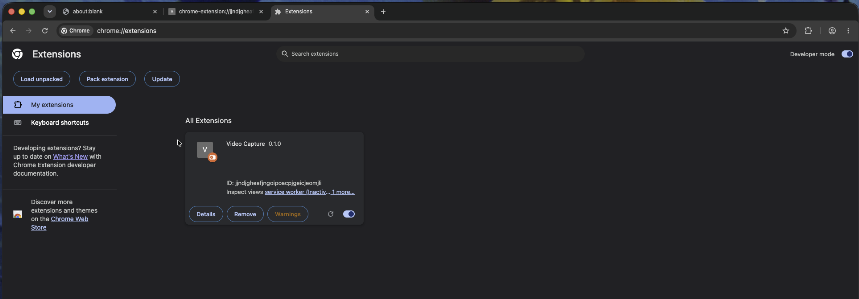
Turned on Developer Mode, closed the Manage Extensions tab and ran prismcast service restart
Developer mode is still enabled. Make sure the extension is there and enabled.
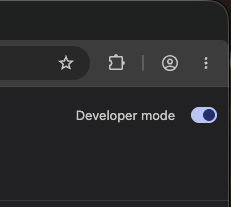
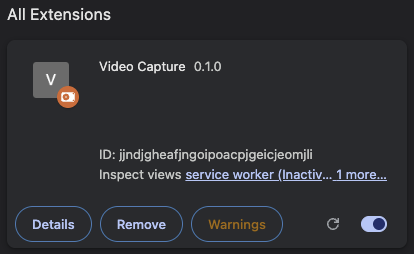
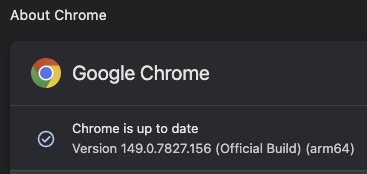
Thanks. That's similar to what I tried, except that Chrome didn't just minimize, it closed. Even when I could catch it open before it shut itself down, and enabled developer mode, the extension either didn't show up (I assume Chrome just deleted it) or maybe it displayed but still wouldn't work (I tried things so many times it's hard to remember all the details). I don't think I used prismcast service restart, though, probably just prismcast. I've had difficulty (in Win11) getting it to start as a service, though it may be doing that now.
I don't want to mess with what's currently working, but it might be worth setting up on a different PC (I have 2 Win10 boxes that could serve) and see if prismcast service restart works differently in the relevant respect for me. If not, it might be a Mac vs Windows thing.
If anyone running the native version of prismcast would like to give it a try, I have a patched version of PuppeteerStream.js that seems to work. It would replace the existing version (I would just rename the original instead of deleting it, just in case) located at C:\Users\XXXX\AppData\Roaming\npm\node_modules\prismcast\node_modules\puppeteer-stream\dist in Windows 11.
I have the file for download at GitHub - daldana2940/Prismcast-Chrome-149-Fix: File to allow Chrome 149 to use video capture extension · GitHub. Let me know if it works for you.
1 Like
Make sure the extension is there and enabled. It won't enable unless Developer mode is on.
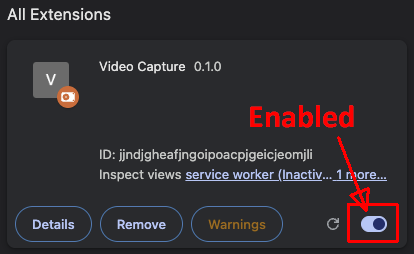
After you turn Developer mode on, you need to enable the extension.
FYI, one of the features in the patched file;
Fix: write extensions.ui.developer_mode = true directly into the profile's
Preferences file BEFORE Chrome ever launches (see ensureDeveloperMode()).
Because the profile comes up already trusted, Chrome never fires the toggle
event that triggers the confirmation dialog in the first place.
Can't you create a PR at his GitHub, or has he abandoned this project?
2 Likes
I was hoping to have some testing done by others before submitting a PR request.