
Let's just say I've seen something that makes me believe this issue could be fully mitigated in the not too distant future... 
Auto reauthenticate like channels does? That would be awesome.
As @GTFan mentioned, I was able to get it to stream from cnn.com by using the login/authenticate button in the interface and my YTTV credentials, similar to Introducing PrismCast: Browser-based Live TV Capture for Channels DVR and Plex - #1573 by jator. I just played with it a little bit and it seemed to work okay on the old M1 Mac Mini that I had lying around. Seemed like it was struggling in the transcoding a bit.
Definitely a slick app that's easy to set up and connect to Channels DVR!
Is it worthwhile setting up PrismCast if I only have one streaming service that may provide live channels (Paramount Premium), I have Disney with Hulu, but don’t believe that plan will provide me the live channels. I already get CBS from my OTA setup.
1 Like
@JCyea I'm relatively new to PrismCast, so maybe others will correct me, but here's my take...
I think all PrismCast by itself is going to get you with your Paramount+ subscription is access to the live Showtime East and West feeds. However, in combination with FruitDeepLinks, you may be able to access live sports on Paramount+ like UFC, Golf, Football, etc. via PrismCast.
EPlusTV is also an option to get some of the Paramount+ sports content delivered to your Channels DVR. I know it has had their UFC events recently, but I don't think it has everything. EPlusTV has the advantage (IMO) of just grabbing a direct stream vs PrismCast navigating and capturing through the browser. But it's possible that more of Paramount+'s live events show up in the guide using FruitDeepLinks+Prismcast vs EPlusTV.
Thanks, didn’t think there was much there with Paramount, didn’t realize I could add Showtime feeds though.
For those running PrismCast on macOS: has anyone been able to get CNN above a 576p stream? Even after increasing my monitor resolution to 4K, I only see "avc-sdr-576p-30fps-2500kbps-******.mp4" files in Chrome's network traffic. Meanwhile, I can get a 720p/60fps stream to load in a Safari window of the same size.

Yes, forgot to specify. CNN.com. I’m aware the OTT sites are more consistent, although Sling maxes out at 720p/30fps for CNN.
Since it was removed from Channels DVR due to DRM, it would have to go through PrismCast Chrome instead of a direct HLS stream, so why not use your Providers site?
I don't think it really matters why I prefer to use the CNN's website, but if you must know it's because Sling is limited to 30fps. CNN.com is higher quality (when working properly), can do 60fps and is more reliable in PrismCast for me than Sling.
Have you tried enabling some /debug logging API's and looked at the log?
I just switched mine from YTTV to CNN.com and am getting 1920x1080p
1 Like
Are you running macOS, and did you verify the stream resolution in PrismCast Chrome instance's web inspector?
Channels DVR stats or PrismCast logs are always going to report whatever resolution you set in the PrismCast settings, so those aren't indicative of the actual stream quality.
Yes
No. Do you mean look at the network traffic?
Yes, you can look at the network traffic in the inspector. It’s also visually apparent when I watch my PrismCast CNN stream that it’s a bit soft and below 720p.
Yep, I see what you mean.
The MPD manifest shows variants for 720p at both 30 and 60fps that weren't chosen.
But when using YTTV, the player auto selects 720p60
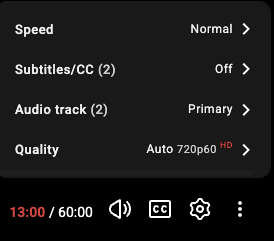
Yes, that's exactly what I'm seeing. Unfortunately, I think something about CNN's player is arbitrarily restricting the stream to 576p when PrismCast interacts with it. I've tried toying around with monitor resolution, window size, etc. and have not gotten a better quality stream with PrismCast's Chrome instance. On Safari, it's always full quality and quick to load.
No idea if a workaround is possible, but I'm glad to know the issue isn't just on my end.
1 Like
Exactly, and there's no settings for that player I could see to change the quality.
1 Like
Probably one of the negatives using Prismcast. Its resource intensive and pretty random like that. Thats why I don't bother with it unless I max out on my HDMI tuners.
IF you have an HDMI encoder, you can use this instead
thats suboptimal though .. cc4c let me do a key stroke that kept it working with no interruptions.
also cc4c allowed more than one stream. prismcast only supports 1?
does it allow streaming full quality of non drm streams like discovery networks?
I dont see all the hbo channels and peacock channels either? I had a script for cc4c that let me watch live events with peacock. I posted the source code. It was like the espn method .