Introducing PrismCast: Browser-based Live TV Capture for Channels DVR and Plex

Looking good! You can create user channels as well...YouTube's pretty well supported. In an ideal world, you're doing this with a YouTube RED (or whatever it's called now) subscription so you don't see ads, but you can create YouTube live channels for Channels DVR using PrismCast.

There's a few things there you can tweak once you're up and running and comfortable with the environment...

2 Likes

Also, if you pull up the PrismCast webUI, it'll show you the current incremental memory consumption of a given tab. Specifically, it's showing you how much memory PrismCast's using to livestream that tab. It's not going to show you what Chrome is consuming, so it's an incomplete picture...but the intent was directional. Shouldn't ever see more than 100MB/tab, at most...and often much less.

1 Like

Hey mate,

Wanting to create a custom profile for my streaming site.

ATM, I get cc4c to:

await page.waitForSelector('.TM21VideoTile img', { timeout: 30000 }).catch(() => {});
await page.evaluate(() => window.scrollBy(0, 300));

then use the following constants to load the appropriate channel:

const CUSTOM_CHANNEL_MAP = {
espn: '5bce8eb9e4b0a8faf3c14a94',
footy: '5bcefacfe4b0a8faf3c14ae2',
cricket: '5bcef5ede4b0a8faf3c14acf',
'505': '5bcefaf5e4b0cb6f1d7f46fc',
'503': '5bcef93ae4b0a8faf3c14ada',
'506': '5bcefc4ae4b0a8faf3c14aed',
league: '5bcef901e4b0cb6f1d7f46f3',
news: '5bcefccee4b0a8faf3c14aef',
racing: '5ccacc4ae4b020d0a4eb3979',
ufc: '66d524f4e4b06b17c2bfdd58',
espn2: '5bcef583e4b0a8faf3c14acb',
'507': '5bcefc6be4b0cb6f1d7f4703',

then I get fullscreen with the following:

const FULLSCREEN_TOGGLE_FUNCTION = () => {
  const uniquePathData =
    'M8.384 22.596L8.384 8.384 35.033 8.384 35.033 0 0 0 0 22.596zM8.384 44.954L0 44.954 0 67.313 35.033 67.313 35.033 58.928 8.384 58.928zM81.049 22.596L89.434 22.596 89.434 0 57.391 0 57.391 8.384 81.049 8.384zM81.049 44.954L81.049 58.928 57.391 58.928 57.391 67.313 89.434 67.313 89.434 44.954z';
  const fullscreenPath = document.querySelector(`path[d="${uniquePathData}"]`);
  if (fullscreenPath) {
    const fullscreenButton = fullscreenPath.closest('.gRgwBu');
    if (fullscreenButton) {
      fullscreenButton.click();
      return true;

This was all vibe coded (chatgpt)

some recent changes to try improve it completely broke it for me but would love to try implement this into your project.

Can't seem to find how to make a custom profile to achieve all this.

  1. Add a new user channel in the channels tab in PrismCast.
  2. Select a profile preset - likely in your case one of the keyboardDynamic or keyboardFullscreen ones.
  3. Test it in Channels by tuning the channel. You may need to try a few different presets to find the one that works, and definitely test each preset a few times to ensure it works (or doesn't).

You don't need to restart PrismCast when you add/remove/edit a user channel. It'll just work...you may need to do a reload of the M3U in Channels DVR so the channel shows up in the Channels DVR Guide.

I created PrismCast in part to address esoteric use cases like these.

So the individual channels don’t have a direct url, I’m essentially loading the front page of the website, scrolling to the live channels bar (so they all load) and then picking a channel by the image name (only differentiating factor between the channel boxes).

So I would’ve assumed it would be too complex for the presets, especially without the extra info.

Ah. Well, USA Networks (https://usanetwork.com/live) works the same way, and it's supported by PrismCast. You want to select the keyboardDynamicMultiVideo preset. You'll also want to select the advanced options selector and type in the text to match for your particular channel. The "text" to match for is the actual image file name for the channel on the live grid...PrismCast uses that to figure out which channel you are trying to tune. PrismCast should then be able to tune that.

That's the best I can do to help in your use case, unless you've got a specific URL for me to look at.

Never used CC4C.

I'll just let the other users answer my questions.
Was thinking of trying it on my Mac Mini M4, that's why I asked what you're running it on.

It'll run fine on an M1 or greater Mac. Good luck.

Okay will give it a go

Thanks

@hjd any plans for GPU support? I got an Intel GPU on hand here that I would love to use

1 Like

Not sure I follow here...there's no GPU support needed by PrismCast itself...Chrome is going to be what needs the GPU. As long as it's configured to do so, it will...and on macOS, Chrome uses the GPU by default.

Tried to run the docker from the command line in the GitHubb:

docker run -d \
  --name prismcast \
  --shm-size=1g \
  -p 5589:5589 \
  -v prismcast-data:/root/.prismcast \
  -e QUALITY_PRESET=1080p \
  -e VIDEO_BITRATE=15000000 \
  -e MAX_CONCURRENT_STREAMS=5 \
  your-prismcast-image

However, I get this error when trying to run:

Unable to find image 'your-prismcast-image:latest' locally
docker: Error response from daemon: pull access denied for your-prismcast-image, repository does not exist or may require 'docker login': denied: requested access to the resource is denied
1 Like

True on MacOS and Windows, not so much on Linux. Chrome, in a container, typically doesn't use the GPU.

A GPU could be used with ffmpeg, but given your project isn't re-encoding, it's not needed there.

So just like with cc4c, the containerized version will not utilize the GPU.

1 Like

Check my post above regarding the Docker version I built for testing.

As mentioned - PrismCast is macOS first...and relies on Chrome. So whatever you have Chrome configured to utilize, is what it is.

And yep...common issue with containerized runs...access to the GPU can be tricky. I've got no plans to chase this, but will review any PRs that folks may want to develop toward that outcome for containerized runs. I'm appreciative that you've taken it on...and curious to see how it develops and getting it incorporated into PrismCast proper. As you've seen...all the plumbing is there to configure it via environment variables / command line...it's mostly about the right recipe and packaging. And dealing with the caveats you've rightly called out with GPU acceleration, which is more a Chrome thing than a me thing, unfortunately.

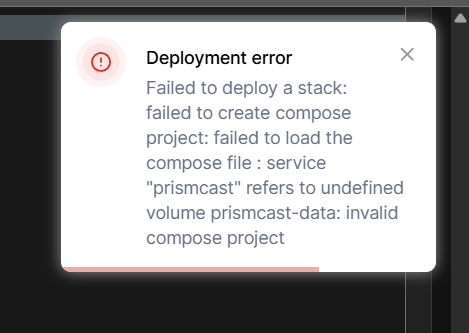
Tried that first and I got this error:
image

Granted, my Linux and Portainer knowledge is limited, so likely user error.

Here's the volume paths I inputed:

    volumes:
      - prismcast-data:/home/jator/.prismcast
      - /home/jator/prismcast/config:/home/prismcast/conf

I get where you're coming from -- and am onboard with it. :slight_smile:

Having the Linux version of Chrome utilize the GPU in a container, is not a matter of the right configuration though. It's a known issue with Linux Chrome.

So far so good with your project though, and for those that have been using cc4c containerized, this project is easier on the CPU in particular.

Thanks for creating it!

2 Likes

Looks like a copy-and-paste fail to me. This error typically indicates you didn't include the last couple of lines in the Docker Compose that define the volume.

Also, get rid of this extra line you added. Stick to the compose as I posted it. No changes should be needed.

Noted. Though I recall seeing it was indeed possible at some point. I'd take your word over mine...I don't follow that world all that much. :smile: Glad you're here to deal with the containerization component...I'll stay in my lane on the software/solution/capability end. :smile:

Was able to successfully install and have gotten several channels to work. I use a Linux Beelink NUC (Intel n5105 based chip). Haven't mapped the channels to a client, but was able to watch via the web interface. looks like there may be some choppiness, but given the NUC isn't intended for this purpose, not too surprised. I'll try and map to a client in the next day or so to see how it performs as a back vs my current ADBTuner setup as the backup to most of the TVE and OTA channels I have now.