Is it possible to schedule a recording by date and time

I have discovered the DVR/Passes and tried to setup an Advanced Pass.

I can see how to setup a pass for a specific program in the guide, but I want to be able to set a recording based soley on the time. In other words, I don't want to have to rely on the title of the program, I just want to set the channel and time.

Is this possible?

2 Likes

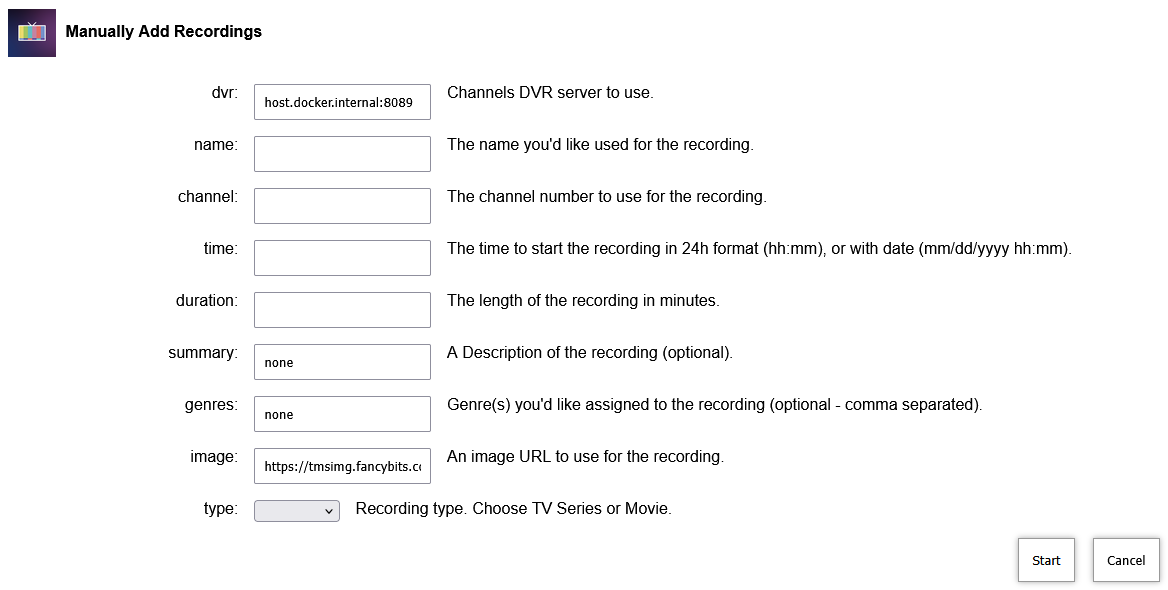
There are many ways to do this, none inherent to the Channels interface. The easiest way is to install OliveTin for Channels and use that:

image

It's one of the great mysteries as to why this has never been a part of channels, given that pretty much every other DVR in existence has a UI for manual recordings (with optional repeats on any given days etc.). There are many possible use cases most of which revolve around bad guide data or last minute programming changes (usually sports).

TiVo in particular nailed this.

If you don't want to fool with OliveTin (I don't) here's the Windows app I use:

1 Like

OliveTin-for-Channels is very easy to install now, especially if you don't already have Portainer. Given all of the add-ons you can install with Project One-Click, and the fact that just about every tool anyone has ever posted about here is available with a nice WebUI frontend -- one will actually spend way more time overall fooling around with individual installations of Docker projects and Python-based utilities.

In fact, for Windows users, if you have WSL enabled already (with a default distro installed like Debian or Ubuntu, and "integration" with that distro enabled in Docker Desktop). Portainer and OliveTin-for-Channels can be installed in under 5 minutes. I've done it, and timed it...

1 Like

With an advanced pass:

You might be right, but a simple UI would be a way better way of handling this. What is y'all's objection to this? I don't understand. It has been asked for over and over again and imo an advanced pass is not the nicest way to handle this. Not to mention that you can only specify a time, not a date.

One of the problems I've seen with advanced passes is that it seems like it's an AND function for multiple conditions and an OR function for others, I can't figure it out. TiVo Wishlists let you specify which conditions to AND/OR.

I'll give you a specific example - sometimes NASCAR races get rained out and they get rescheduled for the next day at some random time in the morning or early afternoon. The only way you can schedule these is with a manual recording or maybe gimmick up something from the incorrect guide, That's not what an advanced pass is for because it's a one-off.

2 Likes

Many reasons to do one off manual recordings that advanced passes and manually picked airings don't work for. And there is still no custom or negative padding available for a manually picked airing.

1 Like

True, you can only specify day/days of the week, not date.
I got spoiled by my TiVo's :grinning:

It's nothing personal, I just have no need for 90+% of what OliveTin does and so I don't want to fool with it or the extra memory hit on my server..

1 Like

i.e. more than one way to skin a cat
OliveTin for Channels is a great collection of utilities and I use it for some.
I still use my original curl based method for manual recordings though.

The best way I've found to do this is to use channels as a tuner for SageTV, and just do the simple manual recording in SageTV as I've been doing for a couple decades. It's not the way it should be, but it's just my workaround I guess.

I even get the advantages of SageTV where it informs me if there is a problem. Crazy concept.

Wow that's sad.

I'm on a Mac, and just wanted to report I experimented with the GUI version (Windows) and it works. I'm running it via Whisky. Whisky was initially created with games in mind, development as stopped on it, but it's still chugging along over here. There are, of course, a few ways to run Windows apps on Mac, but what's nicest about Whisky is that it's very lightweight, very easy, and also, it's free.

I agree it would be best if we could just do this directly, manually in the CDVR web UI. Until then I'm just grateful there are a few other ways to get it done now.

Thanks all.

Not sure I have the time to explore any of these solutions. I am getting the sense is not as plug-n-play as I was hoping.

1 Like

If you happen to have a Windows computer, take a look at this solution:

I created an Automator / AppleScript option for the Mac when this was under discussion a few years ago… easy enough to change and customise to your own needs, if you’re so inclined!

This topic was automatically closed 30 days after the last reply. New replies are no longer allowed.