
Try resetting to factory defaults
I love the ENC1PROs I have, other than the audio. I heard a strong audio clipping myself when I first installed them. The default gain seems to be set too high. I set the gain of the audio to -12dB. This seems to help some, but there still seems to be some clipping effect in the audio on certain shows that I watch. Maybe I should go further on reducing the gain to get it to work better on all shows. I have set the bitrate of the audio to be pretty high hoping this would improve as well (300kbps).
I may try using other audio codecs next, but not holding out hope on that for helping.
Edit: I looked at this again, and tried -18dB and am getting less clipping. There is a -24 dB setting too, but trying this for now.
i would check your source material and device thats feeding the encoder. What is its volume level? What device are you capturing. I have been using 0db gain on my linkPi enc1-v3 audio chain when capturing from firesticks, apple tvs, and ONN devices. Never had any clipping issues.
Maybe try bringing the volume level of your source material down, you might be clipping the input stage?
This is good to hear, I was worried that there was a bad design for the audio portion of these devices.
What I was doing wasn't a great solution, depending on where the gain was being applied for the audio config. Reducing the volume of clipped data just creates a lower volume clipped data.
I am using these devices for ADBTuner, and I suspect that @SF10 was doing that or something similar. So for me, I had a Google TV Streamer attached to the ENC1Pro. I set this streamer up at the get go to work with the ENC1PRO, so I never did anything to change the remote volume settings for the device. Also, the remote volume settings for the streamer were defaulted to CEC, so volume control from the devices remote did nothing.
After hearing about @mnwxman132 experience and thinking about this again, I went into the settings of my streamer, and went to the remote control settings. I went to the control volume section of that and switched if off of Auto (CEC). This set the volume control of the remote to control my streamer device directly.
Once I did this, I noticed the volume was defaulted to on full blast (15/15). I knocked this value down to around 5 with the remote, and the audio is all good now. So thanks to @mnwxman132 for the inspiration, and hopefully this helps @SF10 and others.
2 Likes
Does anyone have a recommendation on a multi usb plug for these onn devices? I got 5 of these things
Can't make a specific recommendation, but I will say Anker products are a solid mix of cheap/good. You'll want up to 2Amp per port. This should work:
https://www.amazon.com/Anker-5-Port-Charger-PowerPort-iPhone/dp/B00VH8ZW02/
2 Likes
Thanks!
I'm finally jumping in and ready to make a LinkPi purchase. I'd rather test the waters with a more basic entry. If I purchase the WayPonDEV Link Pi ENC1-V3 that only has a single input, will it be easy enough to purchase a second single input encoder on a later date to pair with the first one? Any issues running two of these?
I'd rather not drop $350 on the 5 input when I'm really just looking to pull in NBC Sports Boston or NESN.
See this thread about using the USB input to achieve 2 tuners on the device you are considering.
You can absolutely run two, independent LinkPi encoders if you like. Won't matter to ADBTuner or AH4C. You just need to specific the different IP address for each encoder paired to the IP address of each ADB device you add. I ran dual LinkPi ENC1s for a while, no problem. I purchased a five-port ENC5 v2 just about two years ago, and have been running it daily without issue. They are great little boxes.
@TJN is right, you can add a second tuner to the LinkPi with a $20-25 USB to HDMI encoder. Just make sure the encoder users the MS2130 Chipset so you get stereo. Although this does work, the USB 2.0 port on the LinkPi will limit the quality of the USB encoder. It works, and fine for the cheap price, but the quality is much lower than the native LinkPi.
If you have any LinkPi questions, let me know. I was one of the first to get the LinkPi models back in 2023, learned a good deal, always happy to help.
Firmware 20250831 is out
Fixed an issue where the remote control wouldn't trigger on the ENCS1 model.
Fixed an issue with abnormal SDI output at certain resolutions on the ENC4S model.
Optimized the stability of system time synchronization via NTP.
Optimized connection stability for the GB28181 platform.
Optimized the preview of H265 encoded video streams on the [Live Streaming] page.
Added RIST protocol stream output to the [Stream Output] page.
Added a [Video Carousel] page with support for single- and multi-view automatic rotation (this feature is not supported on the MINI model).
System RPC service upgrade
1 Like
After updating my LinkPi ENC5-V2 firmware to 20250831, I found it caused the black levels to be washed out. Downgrading to version 20250630 fixed the washed out black levels immediately, so I would advise skipping the 20250831 firmware. I'm using onn 4K (2023) boxes with the color format set to YCbCr 4:4:4 8-bit.
If you want to downgrade, all the firmware versions can be found at the new LinkPi documentation site:
1 Like
Hi, hopefully someone will be able to help...
I have an Enc1Pro on the 4.1.3 build 20250430 but when I try updating it, its stuck at 1% and doesn't update. I've tried downloading the update (update_enc1pro_20250831.bin) and directly uploading to the encoder but it comes back with "500 internal server error"
Has anyone come across this or know how to fix it. I haver sent an email to LinkPi but on past experience I'll be waiting a month or 2 to reply.
I have also tried loading the update onto a usb and doing the force update by turning power on whilst holding the "RST" button as it doesn't have the DEF button but no success, it just resets it, as you'd imagine.
Thanks
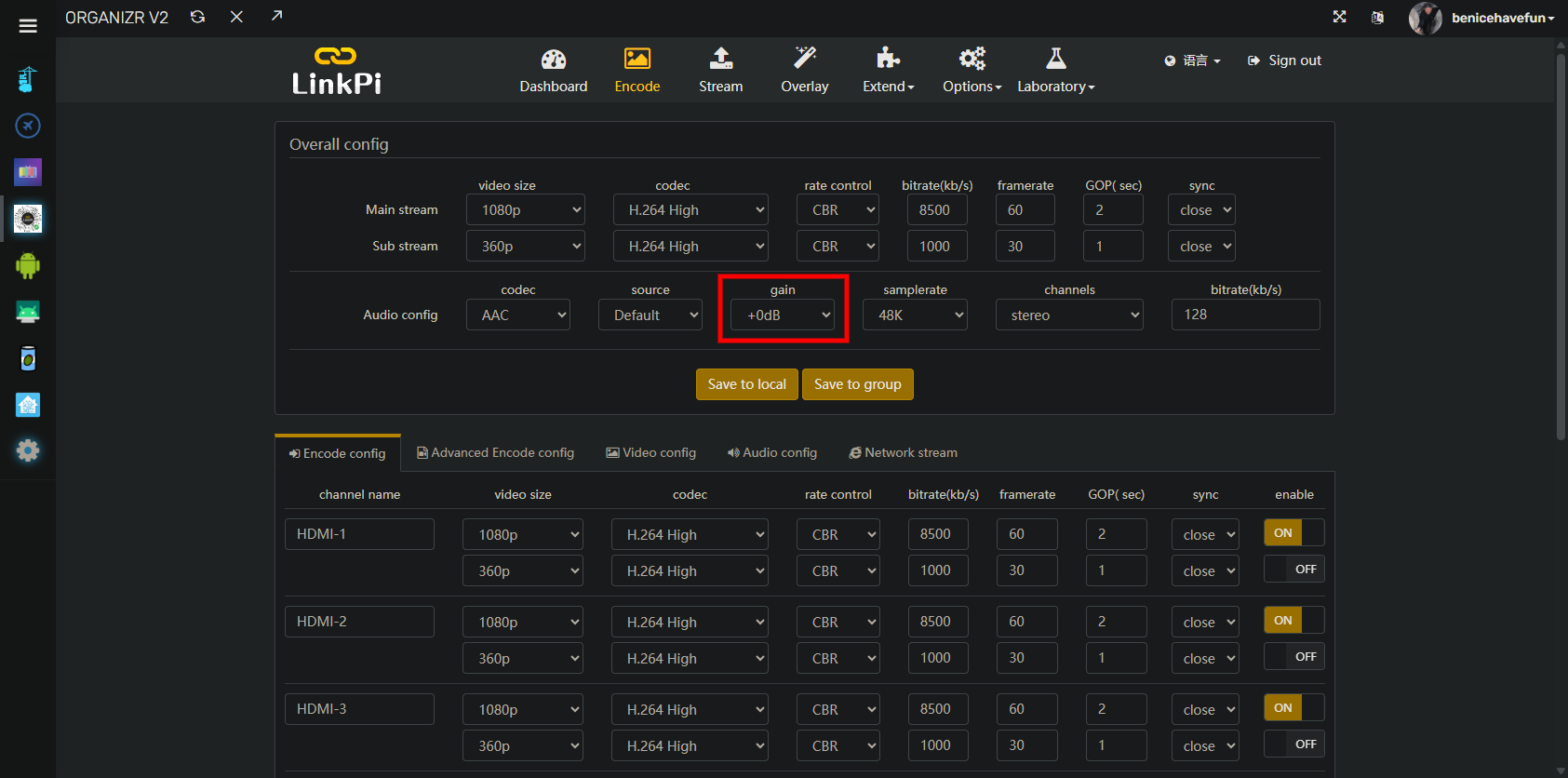
Anybody using gain under Audio config? I'm noticing my remote LinkPi encoder's volume is lower than most of my other sources, so I'm thinking I'll add some gain. Looks like the choices are 6, 12, 18 and 24dB. This is mostly an issue when using Multiview.
1 Like
I haven't tried using audio gain on the LinkPi. However, before adjusting that, make sure that the volume is set correctly on your source devices. I once forgot to adjust one of my ONN boxes after I did a factory reset...
I use gain on my LinkPi ENC5v2. When I started playing with Onn Plus’s boxes I noticed they were lower volume than my Osprey boxes, even though Android said output was max. Setting the LinkPi inputs for Onn boxes to a gain +6dB brought them to nearly parity with Osprey. The Osprey boxes remain at zero.
1 Like
I'm also using gain - mine is set to +12dB to try to match it as close to my other sources as possible.
1 Like
How does your increased audio gain on the onn boxes compare to the volume level for TVE sources?
Also, what volume setting are you using on the onn boxes themselves. I have mine set near max at 23. The boxes have a maximum of 25. I wonder if maxing them out at 25 could cause any type of distortion.
No distortion noticed at 25 set on Onn box. I assume 100% is close to level line output, and I adjust volume on my TV. The gain does not create any distortion. However, I did accidentally find +6 gain on my Osprey boxes did clip the audio, so I do not recommend 
Thanks! I had them at 25 when I first set them up. I don't recall any problems at that volume either. 