
So, how were you able to know if your cards are actually putting out the framerates you are targeting? You have mentioned the difference between 30hz, 50hz and 60hz. You measured or tested it in some way?
Channels DVR tells you in the stats.
I'm still having lockups with my Cam Link 4Ks. I'm hoping that the dummy passthrough plugs will help with that. I'll report back tomorrow when they arrive and see if that's a good solution for those.
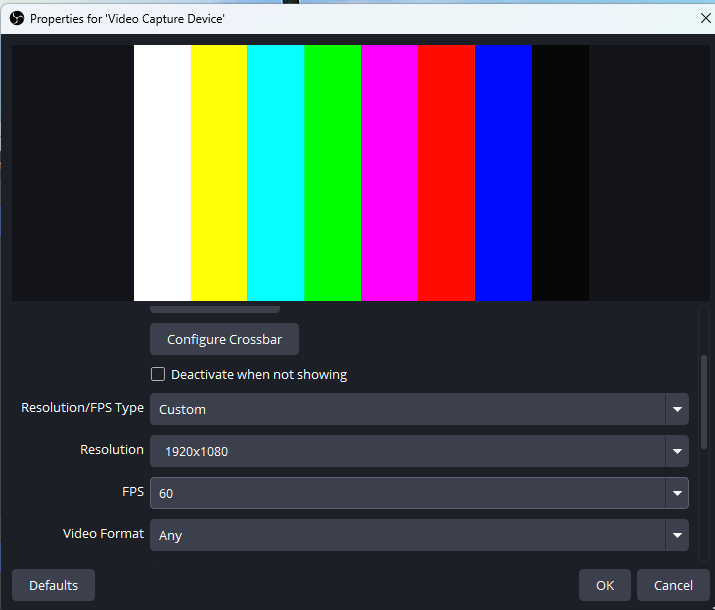
I found that by hooking your capture card up to your PC, you can check the available output resolutions and frame rates using OBS Studio. Connect the card, add the USB device as a source to the OBS interface, open the properties of the device, choose "custom" for your resolution and fps, and you can see all the available outputs from your device.
It turns out that my cheapo Vivitar device does indeed support 1080p @ 60hz.
@jsfullam Have you tried a full reflash of the firmware?
I was having lockups with my Elgato cam links, and I narrowed it down to seemingly happening on just one of my three encoders. It was so random and only affected those cam links that it was very hard to track down.
I followed the procedure translated from Chinese to do a full reflash with a USB stick, and that seems to have fixed it.
Everything is on here in Chinese. Basically, you download the firmware file from LinkPi Then what you do is extract the zip onto a FAT32 formatted USB stick.
You want to format a USB stick that's 4 GB or smaller or just take a large one and only format it to 4 GB.
That way it formats as FAT32. Then essentially what you do is plug the stick in with the files extracted to the root. Unplug your encoder, hold the reset button down with a toothpick or a SIM reset tool or something small, and then as you're holding it down, plug the encoder back in and keep holding. It's also helpful to plug a monitor into the output so you can see the upgrade happening on the screen. You'll just see a bunch of Chinese text.
Once it's done, it'll be completely reset and wiped, and that hopefully will resolve any weird issues. It seemed to fix my weird Cam Link freezing issues from what I can tell so far. My fingers are crossed that it doesn't crop back up, but I know that was supposedly fixed in the latest release and it wasn't fixed for me, so that's why I tried the full reflash and it seemed to have paid off.
Maybe that will fix your issue with the USB port as well.
Edit: EDID passthrough dummy plugs also did nothing to help and maybe caused more harm than good.
Edit 1: I confirmed it that the firmware from the end of January does fix the USB cam freeze issue, but not always it does seem to sometimes require a full flash, at least in my case. After all that, I decided to just keep my boxes awake because the enumeration on the Cam Link 4Ks is about 10 seconds, and to me that's not worth it for the amount of energy that's being used, which I was able to calculate off my UPS is not a lot. Like it's less than an incandescent light bulb. Satisfied that I finally figured out the problem and if I do have a box reboot randomly for some reason, such as for a firmware update, at least I know it'll come back.
I also want to mention I tested these Ugreen capture devices and they only advertise 30 FPS. So the only ones I can recommend really are the Cam Link 4Ks. They genuinely do 1080p 60fps over USB 2.0. I don't know what magic Elgato is doing to achieve that, but it works. The only issue is the slow enumeration, and occasionally on wake it will renegotiate about three seconds into the stream every month and a while, which is a little ugly, but besides that, if you let the boxes never sleep, then it's actually a really good capture card solution.
I was also thinking of getting an ENC5, but I think I might hold off because it's a single point of failure, whereas right now I have three encoders, so if one goes down, I only lose two tuners, but if an ENC5 goes down, I lose five tuners.
I have done auto updates, and manual updates of the firmware through the GUI. So far, I haven't attempted to flash from a USB stick. That is the next step. Thanks for the suggestion and instructions.
Let me know if you need help. Definitely plug it into a monitor because I learned that if you don't release the pin at the right time, it doesn't seem to update properly from what I could tell. I just plugged it into my TV that was nearby.
Even LinkPi's own documentation says that a full flash is better than a firmware upgrade for resolving weird issues. I was really surprised when my capture card started working normally.
1 Like
Couldn't resist, there's a $40.00 off coupon right now on AliExpress to get the ENC5 V2. I just had to buy it. It was just a little over $300.00 for one.
I saw that and was like, screw it, I'm buying it! I'd rather not deal with all the hassle of having the capture cards if I can avoid it. Those can go on eBay now. Just paid $317.00, including sales tax and shipping.
Something told me that I shouldn't try it. It looks like I was right. I followed all the steps, and it was updating. At least I think that was what was displayed on the monitor.
The front display on the device had some corrupted looking image on it. It seemed like it was stuck as nothing had changed over several minutes. Eventually, I unplugged the unit. Now, it won't even power on.
I knew that there was something wrong with this unit. But, it was working as it was. I should have been happy with that and left it alone. Now, I may have to buy a new encoder...
Yeah, I had the corrupted image on the screen too, but it eventually did boot back up. The reason why you can't connect to it is because the IP address changes.
Don't worry, it's most likely fine.
I should have mentioned that to you that the IP address is going to change. If it's not showing up on the screen, take a look in your router. It usually changes to 192.168.1.217.
The reason why the screen probably isn't working is because you have to go to fac.php and change it back to an ENC5.
What should happen is you should see like updating or something in Chinese on the screen that you have it plugged into, a LinkPy logo, and then the screen should just go black.
Then the update was successful and you probably just have to go to that different URL.
1 Like
I have had that happen when I updated the firmware and did a full reset through the GUI. Sadly, this is different. Nothing comes on when I connect the power. No display, no status light, absolutely nothing. I think that I killed it. 
Maybe try unplugging it, holding the reset switch and flashing it one more time just to see if it picks back up.
Maybe it needs a second flash, who knows? I mean, at this point, you don't really risk much by trying another flash.
We plug the display out into a TV set and try the flash process again and see if you get something on the screen. That would tell you it's alive at least.
You've probably unplugged it at the wrong time and it may have just not flashed correctly. Generally when flashing something you don't want to ever unplug it until you confirm that it's working. That's usually like a no-no.
This is what happened. I honestly thought that it was stuck. Nothing had changed for what seemed like too long. Now it's dead. Not even a small flicker of life...sigh.
I am so sorry that happened.
I will at least, if you have to buy a new one, send you what I bought. It was really inexpensive compared to buying it elsewhere. It's on sale right now at least, if you can't get it to recover.
https://www.aliexpress.us/item/3256810457190891.html
USCD40 Here's the coupon code. It's good until 04/08/2026.
Thanks, I may have to go that route. I have never purchased anything from aliexpress. I wonder how they are regarding support and/or returns if you receive a bad unit.
I know that my unit is getting power as there is a tiny white led lit on the left front portion of the main board when I look into the air vents on the left side.
I really think that you just have to hit the right IP address. If your unit's getting power, then it's not dead. And the screen's probably off because like it said in that page I sent you, you have to set the model.
Do you see any blinking lights on the Ethernet port? That would tell you you're getting network. If you're getting network, you probably have an IP address and you probably have to go into your router and figure out what that IP address is.
Most routers will tell you everything that's connected to the network and you just have to kind of poke around in that list and figure out what IP address it grabbed.
So in terms of buying it, there are a few options that I can't say here because of filters on the forum, but they have buyer protection outside of AliExpress, and then you can use cc on top of that for even more buyer protection. The service begins with a P and ends with an L. Elon Musk was involved in inventing it.
They just have it blacklisted here because of scams, but you can buy it using that, and that'll give you buyer protection outside of AliExpress.
Unfortunately, no. It's not getting onto the LAN. I checked my device list through the router GUI. It's not on there.
1 Like
Maybe try resetting again with the reset button. That's the only thing I can think of.
I just wanted to note on my experience to only buy something direct/Amazon from Link Pi / YouYeeToo. These products plain work, right out of the box. Whereas I thought I could be cute and just purchase an older multi-port industrial level encoder on eBay for a great discount, it ended up being a completely wasted effort, especially for everything I had to do to make it partially work. Don't bother trying to get around this to save a few (or a lot) of bucks like I did; pay whatever price is being asked if you want to go down the HDMI capture path!
2 Likes