
No. does not appear. I have been working for over two years and the recent change was unplugging ethernet because I was getting duplicate hostname errors. Maybe I need to reinstall dvr software?
I'm not familiar with a Mac.
Is it maybe sharing the WiFi and Ethernet connections, like bridging them together?
So tonight the even with all these issues. It is recording show! However, still can see guide or sources in the settings. Can’t watch live tv via apps or web client.
What was telling you you had duplicate hostnames?
The Mac, some software?
I'm really wasting both of our time as I don't know a Mac so can't be much help.
Perhaps the developers got your diagnostics and will respond.
I'm changing the Subject to include Mac Mini in hopes someone that owns one can offer assistance.
@tmm1 @maddox @eric Are you able to glean anything from the diagnostics he sent (assuming they went through)?
Pretty weird. Seems like a firewall or some kind of networking kext is installed. Never seen anything like this before.
I have eero mesh network. It macOS was telling me I had duplicate host name and subsequently cause MacOS to renaming my Mac incrementally. Mac1, mac2, Mac3, etc. I was told by eero support is was caused because I had the Mac connected with two network adapters, Ethernet and WiFi. Because there are some features of macOS only available if you have WiFi connected I chose WiFi only.
I don’t have any 3rd party firewalls or networking filters installed and my install have been rock solid until about a month or two ago when I started noticing this intermittently.
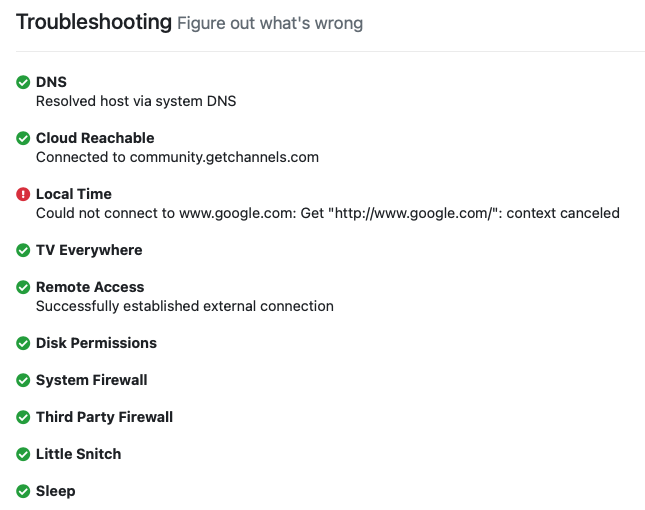
Any idea about this symptom in the troubleshooting command:
Local Time
Could not connect to www.google.com: Get "http://www.google.com/": context canceled
Did the diagnostic logs point to any direction to troubleshoot?
7ebec35f-0a43-46b3-81a5-44f1087bc9e1
Try this, go to network settings on the iMac and delete your Ethernet interface. Then create a new one. For some reason this clears all sorts of odd Mac network issues.
It’s ok to have WiFi and Ethernet on at the same time, I do it all the time on my machines because airdrop and weather won’t work without WiFi. Key thing is that both have their own unique IP address. You didn’t add the same IP as a static address to both interfaces? That won’t work.
Did this. Restarted. Still have the same issue.

2021/12/10 07:51:31.498766 [ERR] Failed to fetch station 19586: Get "http://data.tmsapi.com/v1.1/stations/19586?api_key=x26sg2rpk8qyuyn9ddzwmsuu&lineupId=": dial tcp 50.19.245.151:80: i/o timeout
2021/12/10 07:51:48.599674 [ERR] Failed to fetch station 14771: Get "http://data.tmsapi.com/v1.1/stations/14771?api_key=x26sg2rpk8qyuyn9ddzwmsuu&lineupId=": dial tcp 50.19.245.151:80: i/o timeout
Do you have your time server hard coded? I see that is not working and if it can’t get time then things go nuts.
No. Don’t know where I would set that. Is that a setting in DVR?
As you can see my server does not try to go to google to get time.
2021/12/10 08:08:02.168666 [TRS] DNS: OK: Resolved host via system DNS
2021/12/10 08:08:02.399913 [TRS] Cloud Reachable: OK: Connected to community.getchannels.com
2021/12/10 08:08:02.510189 [TRS] Local Time: OK: Local clock is accurate
2021/12/10 08:08:02.510305 [TRS] TV Everywhere: OK
2021/12/10 08:08:02.794031 [TRS] Remote Access: OK: Successfully established external connection
2021/12/10 08:08:02.796499 [TRS] Disk Permissions: OK
2021/12/10 08:08:02.796773 [TRS] System Firewall: OK
2021/12/10 08:08:02.932439 [TRS] Third Party Firewall: OK
2021/12/10 08:08:03.056640 [TRS] Little Snitch: OK
2021/12/10 08:08:03.056771 [TRS] Sleep: OK
What is in your time server settings on your iMac
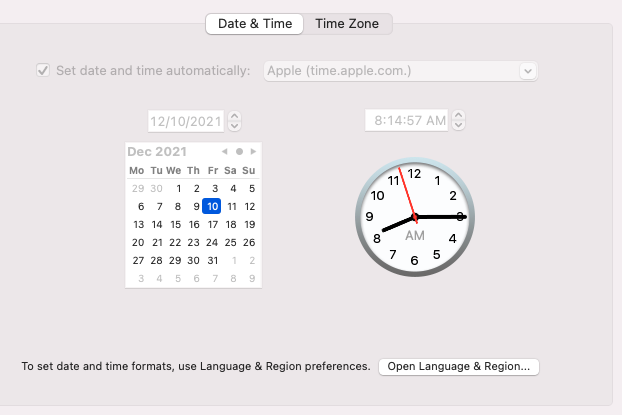
Something is messed up that Channels is trying to go to Google.com to get the time. The time server for google is time.Google.com
Do you have that in your router? Router can be set to intercept time requests and could be misconfigured.
If you can’t find anything then I would go ahead and delete Channels and then reinstall doing a recovery setup. It’s easy. I have done it a few times as I change my server gear out.
Do you have steps involved? I have a lot of configures sources, clients around the house and other settings that I don’t want to lose.
First download the installer again and run it. Uninstall the program. Then run it again and follow these instructions starting from "Run the Restore Wizard"