
Why are you insisting on using wifi? Make the wifi 2nd in the list. The server will then use the ethernet, and wifi will still be available to Mac specific process that must use it such as airdrop and location.
If you insist on wifi, make sure your wifi network settings are correct. DHCP only, DNS servers are showing, port forwarding of 8089 to the IP of the wifi interface. you cant forward to both wifi and ethernet, only one or the other. But you are making things so hard on yourself. All my 5 Macs use ethernet 1st in the list and wifi 2nd. All primary data then goes over the ethernet and the wifi only lets apple process's run. It just works.
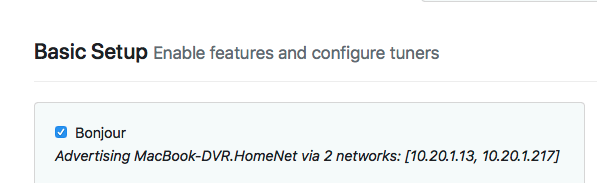
All of those things are in place and correct. But for a, yet to be discovered, reason my installation does not detect the WiFi adapter. It doesn't matter what order. I have tried both ways. I don't think it is unreason to figure out what is going on. Yes it is working now, but if I don't have an ethernet option then it won't work. I don't think the network interface should make a difference to the software. ALL of my other software appears to be functioning fine with JUST WIFI enabled. So, that's why I suggested another thread to see if the community could figure it out.
Thanks for all of the help. It was appreciated.
Dont know. If all your wifi settings are in the default mode and all other programs on the Mac can see and communicate over wifi, then I have no idea why Channels does not see it.
I see that you are running an older version of the server. Maybe try the latest PreRelease and see what it does?
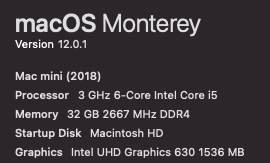
What OS is the Mac running? I have had no issues with Catalina, Big Sur or Monterey.
Open Terminal.app and type ifconfig and copy paste all the output
You can try these too to reset certain parameters in your mini in this order. SMC then PRAM. Only do PRAM if SMC reset does not clear the issue.
Reset SMC
- Shut down your Mac.
- Hold down the power button for 10 seconds.
- Release the power button, wait a few seconds, then restart the computer.
- If the problem hasn't gone away, turn off your Mac again.
- Unplug the power cord.
- Wait 15 seconds.
- Reconnect the power cord and wait five seconds.
- Turn on your Mac.
RESET PRAM
- Shut down your Mac.
- Press the power button.
- Before the grey screen appears, press the Cmd, Option, P, and R keys at the same time.
- Hold the keys until your computer restarts and the Apple logo appears and disappears for the second time.
- Release the keys.
Been using mac's since my first computer, an appleII. My son worked at Apple for awhile too, so Its in the family.
I was running on the latest beta release. But as part of troubleshooting I was ask to uninstall and download the latest version from the website.
ifconfig output
lo0: flags=8049<UP,LOOPBACK,RUNNING,MULTICAST> mtu 16384
	options=1203<RXCSUM,TXCSUM,TXSTATUS,SW_TIMESTAMP>
	inet 127.0.0.1 netmask 0xff000000
	inet6 ::1 prefixlen 128
	inet6 fe80::1%lo0 prefixlen 64 scopeid 0x1
	nd6 options=201<PERFORMNUD,DAD>
gif0: flags=8010<POINTOPOINT,MULTICAST> mtu 1280
stf0: flags=0<> mtu 1280
en0: flags=8863<UP,BROADCAST,SMART,RUNNING,SIMPLEX,MULTICAST> mtu 1500
	options=50b<RXCSUM,TXCSUM,VLAN_HWTAGGING,AV,CHANNEL_IO>
	ether f0:18:98:ea:58:41
	inet6 fe80::1cad:6dfa:9d56:af3%en0 prefixlen 64 secured scopeid 0x4
	inet 192.168.7.231 netmask 0xffffff00 broadcast 192.168.7.255
	inet6 fdef:502c:b3fe:3:cd0:d8f9:b49:761 prefixlen 64 autoconf secured
	nd6 options=201<PERFORMNUD,DAD>
	media: autoselect (1000baseT <full-duplex,flow-control>)
	status: active
en6: flags=8863<UP,BROADCAST,SMART,RUNNING,SIMPLEX,MULTICAST> mtu 1500
	ether ac:de:48:00:11:22
	inet6 fe80::aede:48ff:fe00:1122%en6 prefixlen 64 scopeid 0x5
	nd6 options=201<PERFORMNUD,DAD>
	media: autoselect (100baseTX <full-duplex>)
	status: active
ap1: flags=8802<BROADCAST,SIMPLEX,MULTICAST> mtu 1500
	options=400<CHANNEL_IO>
	ether 3a:f9:d3:1f:4e:7e
	media: autoselect
	status: inactive
en1: flags=8863<UP,BROADCAST,SMART,RUNNING,SIMPLEX,MULTICAST> mtu 1500
	options=6463<RXCSUM,TXCSUM,TSO4,TSO6,CHANNEL_IO,PARTIAL_CSUM,ZEROINVERT_CSUM>
	ether 38:f9:d3:1f:4e:7e
	inet6 fe80::880:df87:a3fb:26d3%en1 prefixlen 64 secured scopeid 0x7
	inet6 fdef:502c:b3fe:3:18ef:83fb:8a5e:3f7f prefixlen 64 autoconf secured
	inet 192.168.7.219 netmask 0xffffff00 broadcast 192.168.7.255
	nd6 options=201<PERFORMNUD,DAD>
	media: autoselect
	status: active
awdl0: flags=8943<UP,BROADCAST,RUNNING,PROMISC,SIMPLEX,MULTICAST> mtu 1500
	options=400<CHANNEL_IO>
	ether 5e:ed:54:a1:00:91
	inet6 fe80::5ced:54ff:fea1:91%awdl0 prefixlen 64 scopeid 0x8
	nd6 options=201<PERFORMNUD,DAD>
	media: autoselect
	status: active
llw0: flags=8863<UP,BROADCAST,SMART,RUNNING,SIMPLEX,MULTICAST> mtu 1500
	options=400<CHANNEL_IO>
	ether 5e:ed:54:a1:00:91
	inet6 fe80::5ced:54ff:fea1:91%llw0 prefixlen 64 scopeid 0x9
	nd6 options=201<PERFORMNUD,DAD>
	media: autoselect
	status: active
en4: flags=8963<UP,BROADCAST,SMART,RUNNING,PROMISC,SIMPLEX,MULTICAST> mtu 1500
	options=460<TSO4,TSO6,CHANNEL_IO>
	ether 82:d0:f7:83:38:05
	media: autoselect <full-duplex>
	status: inactive
en5: flags=8963<UP,BROADCAST,SMART,RUNNING,PROMISC,SIMPLEX,MULTICAST> mtu 1500
	options=460<TSO4,TSO6,CHANNEL_IO>
	ether 82:d0:f7:83:38:04
	media: autoselect <full-duplex>
	status: inactive
en3: flags=8963<UP,BROADCAST,SMART,RUNNING,PROMISC,SIMPLEX,MULTICAST> mtu 1500
	options=460<TSO4,TSO6,CHANNEL_IO>
	ether 82:d0:f7:83:38:00
	media: autoselect <full-duplex>
	status: inactive
en2: flags=8963<UP,BROADCAST,SMART,RUNNING,PROMISC,SIMPLEX,MULTICAST> mtu 1500
	options=460<TSO4,TSO6,CHANNEL_IO>
	ether 82:d0:f7:83:38:01
	media: autoselect <full-duplex>
	status: inactive
bridge0: flags=8863<UP,BROADCAST,SMART,RUNNING,SIMPLEX,MULTICAST> mtu 1500
	options=63<RXCSUM,TXCSUM,TSO4,TSO6>
	ether 82:d0:f7:83:38:01
	Configuration:
		id 0:0:0:0:0:0 priority 0 hellotime 0 fwddelay 0
		maxage 0 holdcnt 0 proto stp maxaddr 100 timeout 1200
		root id 0:0:0:0:0:0 priority 0 ifcost 0 port 0
		ipfilter disabled flags 0x0
	member: en2 flags=3<LEARNING,DISCOVER>
	        ifmaxaddr 0 port 13 priority 0 path cost 0
	member: en3 flags=3<LEARNING,DISCOVER>
	        ifmaxaddr 0 port 12 priority 0 path cost 0
	member: en4 flags=3<LEARNING,DISCOVER>
	        ifmaxaddr 0 port 10 priority 0 path cost 0
	member: en5 flags=3<LEARNING,DISCOVER>
	        ifmaxaddr 0 port 11 priority 0 path cost 0
	nd6 options=201<PERFORMNUD,DAD>
	media: <unknown type>
	status: inactive
utun0: flags=8051<UP,POINTOPOINT,RUNNING,MULTICAST> mtu 1380
	inet6 fe80::e2d2:bb03:a1cd:e529%utun0 prefixlen 64 scopeid 0xf
	nd6 options=201<PERFORMNUD,DAD>
utun1: flags=8051<UP,POINTOPOINT,RUNNING,MULTICAST> mtu 2000
	inet6 fe80::c6c:3b8c:c03e:f386%utun1 prefixlen 64 scopeid 0x10
	nd6 options=201<PERFORMNUD,DAD>
utun2: flags=8051<UP,POINTOPOINT,RUNNING,MULTICAST> mtu 1000
	inet6 fe80::ce81:b1c:bd2c:69e%utun2 prefixlen 64 scopeid 0x11
	nd6 options=201<PERFORMNUD,DAD>
Generated a new Diagnostics Log, a3df917c-ef9c-43e9-bee7-ed10058a67e4
Everything has been working just fine. I have updated to version: 2022.01.13.2139 this morning and not my the only source that will load is PlayOn. I can't even generate diagnostics to send.
Never mind, a reboot solved my issue.
1 Like