
I see what you did there, going to the web interface via Phone.....
However, keep in mind that when viewing the web interface on your phone, you won't have access to this manual feature. You can't install the extension on a mobile device.
manual = PC only
extend way far out = learned i can do this on my phone as well
1 Like
I also made something which you can host yourself: GitHub - giejay/channels-dvr-manager: Channels DVR Manager - Manual scheduling and more
Features:
-
Create manual recordings with custom start/end times, multiple channels, and repeat options -
Search and select channels with logos and filtering -
View, filter, and manage all scheduled recordings in a data table -
Edit or delete individual or multiple scheduled recordings -
Dark/light mode toggle with automatic detection -
Proxy support for secure API access to your Channels DVR server -
Docker-ready for easy deployment
I was able to create an advanced pass using the Time contains "12pm", etc. to record whatever airs in a timeslot. It works fine except for one specific corner case. If there is a program scheduled that you have already recorded, the pass skips that time slot. The only way to catch it is to mark the recorded show as not recorded, something that the advanced pass can't do. Of course you can do it manually, but that's not ideal. I'm working on a script to do this, but I'm wondering if anyone else has already combined those two features; unconditionally recording a time slot (even 24x7), and also proactively marking existing recordings in the same time slots as not recorded?
That's the problem with using a pass. The scheduler is looking at the ProgramID.
Sounds like you want to create recurring "curl based" manual recordings.
That way the scheduler doesn't care what's airing at the time of recording. (As long as you don't use both SeriesID and ProgramID in your json payload. I just use SeriesID for grouping)
In fact, I created a "curl based" manual recording to record the same thing from two different channels and they both ended up recording to the same file. How to create a Manual Time/Channel based recording job - #21 by chDVRuser
Another option (which has been brought up before and gained no traction) is to allow a pass to record "everything" that meets its criteria. TiVo had this (New/New & Repeats/Everything).
Not exactly. I think it will help to explain why I would even want to do it in the first place, because there are multiple reasons that a manual recording may be desired.
The problem is that when an important news event takes place, like the shooting at the White House Correspondent's Dinner, I want to start recording and not stop for a while. The schedule data is incorrect because all scheduled programming is preempted. In this case, I don't want the DVR logic interfering with the directive to record everything. This has been happening enough lately that I have been recording my favorite news channel 24x7, but it has holes because of the rerecord logic embedded in passes.
So, one solution would be to add support for a time-based pass with a "dammit" checkbox (don't skip the time slot because the apparently scheduled program was already recorded).
The ultimate solution would be for Gracenote to notify that something's up (programming data is invalid due to breaking news or whatever), and Channels has a "when somethings up do this" capability.
I've never understood why this simple fix was not implemented. Change the 're-record deleted' pass flag to everything and implement it, problem solved as long as the guide data is correct.
But ultimately, a simple manual recording UI should have been added which allows for repeating days etc. There's an extension out there by @mjitkop that does this for us, but it really should have been in the web admin. As posted above, there are times when events are moved or preempted and you want to schedule a simple manual recording to override the guide.
I wouldn't hold my breath waiting for those last two solutions you mention.
There is a very simple way to do what you want.
The nice thing about this method is it doesn't interfere with existing scheduled recordings.
Create a Custom M3U Source with no guide data (it will use placeholders) that points to your source device channel to record. Then create your pass using that custom channel.
Example using my HDHR Prime tuner source channel 706
I export the M3U for my HDHR Prime source and edit it
#EXTINF:-1 channel-id="706" tvg-id="706" tvg-chno="706" tvg-logo="https://tmsimg.fancybits.co/assets/s32356_h3_aa.png?w=360&h=270" tvc-guide-stationid="34197" tvg-name="KVIEDT" group-title="Favorites",PBS
http://192.168.1.4:8189/devices/1323AADB/channels/706/stream.mpg?format=ts&codec=copy
to use as a new custom M3U source. The existing one is still ch706, the new one is ch10706.
#EXTM3U
#EXTINF:-1 channel-id="10706" tvg-id="10706" tvg-chno="10706" tvg-logo="https://tmsimg.fancybits.co/assets/s32356_h3_aa.png?w=360&h=270" tvg-name="PBS-KVIEDT",PBS-KVIEDT
http://192.168.1.4:8189/devices/1323AADB/channels/706/stream.mpg?format=ts&codec=copy
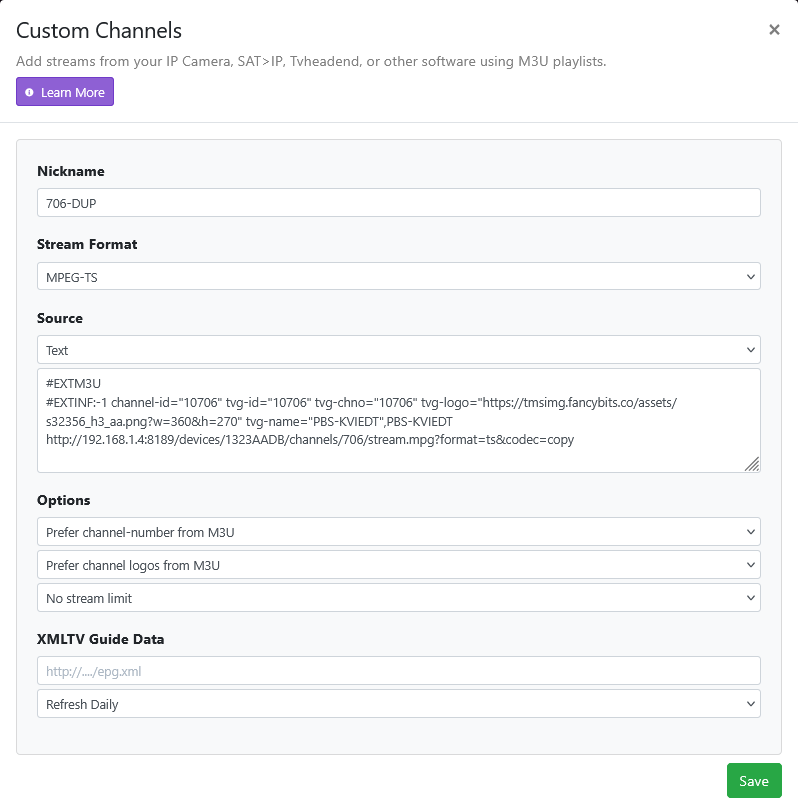

If you want something other than 1 hour placeholders you can set that
https://getchannels.com/docs/channels-dvr-server/how-to/custom-channels/#automatic-placeholders
If you want to duplicate multiple channels, just add those lines to the custom M3U Text.
Great example, I was in a similar boat, twice recently, trying to manage it remotely. Last mimute recordings without reliable guide data is way more difficult than I'd expect them to be on this platform. I've often thought that I'd love to see Manual Recordings added to CDVR's web admin page, maybe an advanced tab somewhere, that we could kick off a recording right away, yes, even without any metadata, just a recording of "this channel, what's on right now, for next 5 hours," or, whatever.
That works, but it has a side effect. Consider the worst case: if I have a 24x7 rule for CNN and another one without guide data, that's 200Gb instead of 100Gb on disk. It seems like the solution for now is to add a watcher service that marks everything qualified by the rule (however it's defined) as not recorded. That way I have recordings with their proper metadata and no gaps.
You could do that, but I wouldn't recommend it because you'll be fighting the DVR scheduler.
Use your web browser dev tool network inspector to inspect the network traffic and click on a pass in the DVR web UI. Look for the POST to the API /dvr/rules/test.
The Request payload is the rule (pass) json.
The Response json is what fills up the Matches tab on the pass.
Gather all the ProgramID values from the response.
Look each one up in the /programs API (GET /programs/ProgramID)
The result for each will tell you if it's marked as imported, recording, recorded, skipped, queued or null if the ProgramID doesn't exist in /programs
ProgramID's for gracenote begin with EP(episode), SH(show), MV(movie)
this thread bump and explanation had me experimenting. I'd like to have a single 'show' for all the news. right now I'm doing 20min placeholders for reasons but may go to a more normal 30min. this way comskip can have little bite size chunks, and I'm hoping to have autoplay next episode. right now with the following the recording get grouped by hour ( MSNow @ #pm )
is the only way to assign the series id via curl?
#EXTINF:-1 channel-id="76530" tvg-id="76530" tvg-chno="76530" tvc-guide-placeholders="1200" tvc-guide-title="MS Now News" tvc-guide-description="MSNow News 20min" tvc-guide-art="https://tmsimg.fancybits.co/assets/GNLZZGG002H5PTL.png?w=360&h=270" tvc-guide-tags="ah4c, MSNow, Live" tvg-logo="https://tmsimg.fancybits.co/assets/GNLZZGG002H5PTL.png?w=360&h=270" tvg-name="MSNOW",MSNow
http://localhost:8089/devices/M3U-ah4c1DtvStream720/channels/356/stream.mpg?format=ts
I'd like to do something similar with local news, but trying it out with a single channel first.
There is no way to assign a SeriesID in an m3u since a SeriesID is associated with a show/series.
Using one hour placeholders on my channel 10706, the SeriesID is placeholder/channel/time
"SeriesID": "placeholder/10706/12AM"
"SeriesID": "placeholder/10706/1AM"
"SeriesID": "placeholder/10706/2AM"
"SeriesID": "placeholder/10706/3AM"
"SeriesID": "placeholder/10706/4AM"
"SeriesID": "placeholder/10706/5AM"
"SeriesID": "placeholder/10706/6AM"
"SeriesID": "placeholder/10706/7AM"
"SeriesID": "placeholder/10706/8AM"
"SeriesID": "placeholder/10706/9AM"
"SeriesID": "placeholder/10706/10AM"
"SeriesID": "placeholder/10706/11AM"
"SeriesID": "placeholder/10706/12PM"
"SeriesID": "placeholder/10706/1PM"
"SeriesID": "placeholder/10706/2PM"
"SeriesID": "placeholder/10706/3PM"
"SeriesID": "placeholder/10706/4PM"
"SeriesID": "placeholder/10706/5PM"
"SeriesID": "placeholder/10706/6PM"
"SeriesID": "placeholder/10706/7PM"
"SeriesID": "placeholder/10706/8PM"
"SeriesID": "placeholder/10706/9PM"
"SeriesID": "placeholder/10706/10PM"
"SeriesID": "placeholder/10706/11PM"
I'm sure the reason for that is so you can create a pass with SeriesID == placeholder/10706/6PM to record channel 10706 everyday from 6PM-7PM.
tvc-guide-placeholders-grouping="channel"
so it did use the channel title for the groups, but still separated them by hour.
I made a tool that does exactly that. It has a grid to specify the time slots to record, the channel number(s) to record, a test button which displays the json, and a list of programs that are affected with their recorded status, and a button to mark all currently recorded programs covered by the rule as recorded. It also has a service that periodically reads the rule and marks any recordings as not recorded.
Question: what is the relationship between the KeepNum and KeepOnly parameters?
The desired behavior for my specific goal is a special type of advanced rule (a "Record All" checkbox?) that guarantees that all shows meeting the criteria are recorded live, regardless of existing recordings. There are probably simpler ways to implement that on the server side than the convoluted process of finding and marking existing recordings as not recorded.
1 Like
Bring up the dev tools network inspector while you change settings in a pass so you can see how it affects the rules json keys and values.
Update; when i got home the server had settled in and everything was grouped properly. 