Maybe moving server from NAS to Mac mini - your input appreciated

I currently run my ChannelsDVR server along with a Plex server on my Synology DS220+. I'm thinking about moving to an old Mac mini as a dedicated server for ChannelsDVR and Plex because the Synology CPU gets hit pretty hard sometimes and also commercial detection can take a long time.

So I was thinking of using the following:

  • Older Mac mini with an attached external drive for my DVR recordings
  • Continue to store my rips on the NAS and map that to ChannelsDVR for playback. The NAS provides more space and is also protected from drive failure - I'd hate to have to re-rip a bunch of media if a drive goes bad.

For anyone with a similar setup and/or who is managing large, multi-TB media libraries, I'd appreciate any suggestions you have on this sort of set up, external drives that have worked well for you, etc. Thank you.

Which model Mac mini, what's the CPU

I’m thinking about using an 8-core M2 (2023 model)

I ran it on the Mac mini M2 for a couple years (upgraded to M4) along with homebridge and a few other server based apps. Worked great and really had no issues. Set up is quick but if you store on an external drive just make sure it’s speed it ok. It doesn’t need to full Thunderbolt 4 speed and I had no issues with an M.2 Nvme ssd in a 10gbps case. As a matter of fact I still use that with the m4.

1 Like

I am assuming "old" Mac mini means "free" Mac mini, but the new smaller form factor for the late 2024 model seems like it'd be ideal for something like this.

As far as running Channels DVR on a Mac-based server in general, I have never had any issues and I have been running it off and on for a few years now. It has been rock solid on an older Intel Mac, and I have seriously been considering getting one of those tiny new Apple Silicon-based Mac minis myself. I run the Mac installer natively, i.e. not in a container, but I also run Docker and a few add-on containers like ah4c and EPlusTV. I don't have any experience with the storage you mention, however.

1 Like

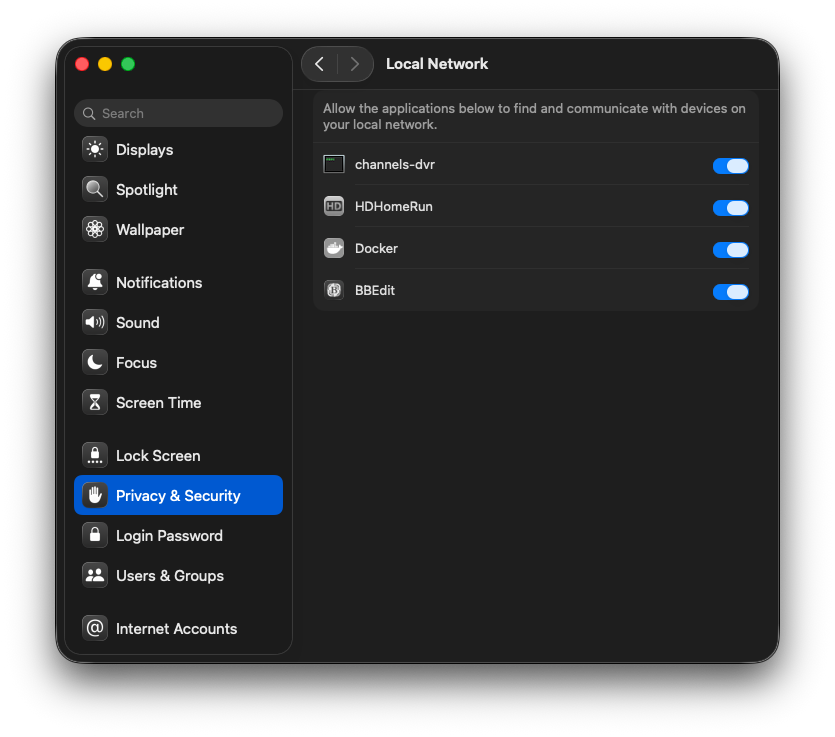
Do you see channels-dvr in the "System Settings->Privacy & Security->Local Network?"

This is not sufficient on Sequoia.

A m1 Mac mini is plenty of cpu power for everything channels needs. I run one of those with an external 4TB spinner in a USB 3.2 enclosure and also small 128gb ssd in a 3.2 enclosure for putting the "transcoding cache" on to reduce wear on the internal SSD. Both are redirected using symbolic links from the default directories. I do a lot of remote H.265 transcoding and the m1 mini is VERY capable of keeping up with transcoding several streams at once. Commercial detection on mpeg-2 captures from HDHomeRun Primes or Duos run at ~1 min+15 sec for an hour of programming using 2 cores using my setup. Also stay with running the mini on MacOS 14. MacOS 15 introduces a bunch of annoying behavior issues for "permissions" after any point upgrades are installed.

Thanks for the replies. The M2 arrived today. I’ll use it to rip a bunch of media before it becomes my DVR server, but it won’t be too long.

I don’t seem to have this issue on Sequoia - updates seem to happen automatically without any intervention on my behalf. As far as I recall, I just enabled the various permissions just the once.

My Channels Server is running on a standard M3 iMac which is my only system. The library resides on a locally-attached SSD.

So, what is causing this different behaviour between different users?

I have not noticed the permissions issue either. I have 2 main CDVR servers on 2 x M4 Mac Minis both running latest Sequoia releases. I manually update when new macos releases are issued to keep current and I do not recall seeing any permission prompts since the original install.

CDVR is installed on the internal nvme drive while the database, recording, etc is done on an external thunderbolt attached nvme drive. I have a cron job that copies everything from the external nvme drive to an external hard drive. The external hard drive is setup as a 2nd storage path for CDVR. I have another job that will delete any recordings on the external nvme drive if they are older than 5 days since it is limited on space. With the external hard drive setup as a 2nd storage path, CDVR still sees the recordings but if older than 5 days it comes from the hard drive. I use Time Machine to protect the Mac mini internal drive and then I have another rsync process that clones my external hard drive to a secondary external hard drive. As you may notice, I don't like it when something fails and I can't recover. Or maybe I should say my wife doesn't like when something fails and I can't recover :wink:

I have been very happy with the performance and stability since I moved to these Mac minis last fall. Prior these were running as docker containers on linux vm's running in Proxmox. Very stable running as linux docker container as well but definitely not as snappy as the Mac minis. The nesting of docker on linux vm's on Proxmox physical servers was just adding too much latency which I was not happy with. The Mac mini setup is killer IMO if you want the best experience. Yeah I go overboard with redundancy and protection but that comes from 40+ years in IT seeing just about every kind of failure :frowning:

Edit: I have no problem paying extra $$$'s to get good stable performance and a happy wife! I am not suggesting anyone needs to go as robust as I do but do make sure you think of failure points in your setup. Think ahead and know what you will do "when" you find yourself with a failed drive because it will happen eventually.

2 posts were merged into an existing topic: Proxmox-for-Channels: Step-by-Step for Virtualizing Everything

Thanks for the replies. M2 mini is up and running, and ChannelsDVR is better-performing. Also the migration from my NAS was really easy. Thanks to the Channels team for the good docs and for making it easy to migrate the DVR to a new host.

1 Like

This topic was automatically closed 30 days after the last reply. New replies are no longer allowed.