Privacy & Security pop-ups, when updating CDVR server on macOS Sequoia+

I'm seeing these pop-ups frequenty now. Seems like, every time I update CDVR?
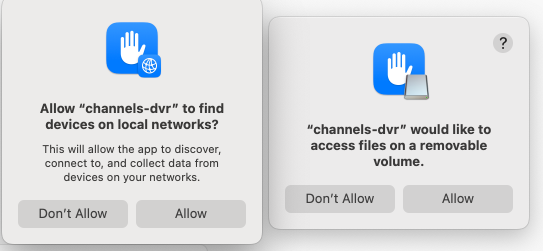
SCR-20250816-bkzq

Of course it's not a big deal to click "Allow" but this also means updates applied remotely via the web admin page, will halt the Channels server from working, until those permissions are re-granted once again.

Is anyone else experiencing this? Is there a way to "whitelist" channels-dvr permanently so I don't have to keep granting it permission to "find devices on local networks" and "access files on my removable volumes" every time I update? Feels like this is new behavior with macOS Sequoia. At least, I've updated CDVR remotely via the web admin for years now, and have never experienced this issue before.

Consider this a heads up, if you're also running CDVR server on macOS Sequoia. I think this might be an issue for more folks moving forward.

This could be a β€œnasty” for remote updating. Thank you for the public service announcement on this.

I have been seeing this more and more as well, but not really after CDVR updates, but whenever apple does point updates to Sequoia - thats when I see em.

Like last week for when I updated from MACOS 15.5 to 15.6 I saw these popups related to channels. There have been two point updates recently 15.6.1 and 15.6.2. I dont use auto updates on my mac, so I haven’t seen the popups yet after updating MACOS again but I just confirmed updating channels to latest prerelease DIDNT cause the pop ups this morning.

When I remote update channels I’m already using Tailscale, so I guess in a weird situation with pop ups happening when I’m not at home I would Remote Desktop into my machine, or I’d figure out a way through SSH to grant permissions if possible.

Good to keep aware of this, especially if the trend continues with MACOS26 and undoubtedly many point updates in the fall!

Just yesterday I saw the one about "accessing files on a removable volume" again, when I updated to the latest prerelease of CDVR, working directly on my server. At this point I won't be doing updates remotely via the web admin page anymore, because I can't trust that the update won't trigger these showstopper dialogs that I can't see in order to dismiss.

I already have a home VPN but Tailscale works too, I guess Remote Desktop is the safest bet for handling this, moving forward. It's a bummer because I used to handle this on my smartphone phone instantly and very regularly via a bookmark. Requiring more than that, means it'll take more time, probably a laptop instead, which means I won't update nearly as frequently.

We don’t have much insight into these and how we can do anything to make things more reliable.

I myself am a macOS user and have been suffering through these new (very badly implemented) privacy settings by an and policies for a few years.

In this year’s OS, I have to approve local network access to almost everything after every single point release software update of macOS, and it’s awful.

Apple’s engineers don’t seem to care very much about what the fallout of these changes have meant for third party software or its users/customers.

The important thing is that you brought this pattern into awareness now. At least you have a backup plan in case something gets hosed using VPN or tailscale and remote desktop.

Im thankful you brought this up, so I (and others)wont just blindly do an update server from my phone while driving - which used to be very fast and convenient.

For now, until apple smooths out these privacy and secirity popups we all should be more aware.

Im using external disks for channels, and a different disk for my portainer stacks and other things.

I can confirm Im getting this popups running other applications, its nuts.

Yesterday I got one just to run terminal, which of course Ive been using for a very long time. Weird and annoying

@Fofer

I wrote a helper script and made it executable on boot up that emails me when channels cant find a file. it parses the channels log. Its kind of a hack, but at least its a strategy to have a soft landing for these kinds of issues.

Happy to share!

@maddox

Do you have any advice for us users regarding MACOS26? Im going to hold off until the dust settles, but Im interested if you have any insight.

In my case, with a separate removable disk volume dedicated to the DVR, it appears that the new executable needs to be authorized to access "Files & Folders" or "Full Disk Access" (System Settings > Privacy & Security). This seems to be the case after an automatic update even though the new executable winds up in the same place the previous one did: ~Library > Application Support > ChannelsDVR > latest. I guess MacOS keeps track of the actual executable file that was allowed access and knows the new one is different though it has the same filename & location.

I get flashbacks

Isn't latest a directory symlink pointing to the new version directory?
i.e. ~Library > Application Support > ChannelsDVR > latest
points to ~Library > Application Support > ChannelsDVR > 2025.08.24.0217
And the directory the symlink points to changes with each update.
It is on Linux.

I'm running the server on MacOS and "latest" appears to be an actual folder. The previous versions all appeared in their own folders with the date/time naming convention you mentioned. I moved all those just to be sure and restarted the server without any issues.

Run this command in Terminal and it will show that latest is a symbolic directory link

ls -l ~Library/Application\ Support/ChannelsDVR/latest

Looks like this in Linux

$ ls -l /volume1/docker/channels-dvr-8089
total 28
drwxrwxrwx+ 2 root  root  4096 Aug 11 18:55 2025.08.09.2304
drwxrwxrwx+ 2 root  root  4096 Aug 14 14:07 2025.08.14.0637
drwxrwxrwx+ 2 root  root  4096 Aug 16 08:54 2025.08.15.1429
drwxrwxrwx+ 2 root  root  4096 Aug 19 11:56 2025.08.19.0525
drwxrwxrwx+ 2 root  root  4096 Aug 20 18:51 2025.08.21.0013
drwxrwxrwx+ 2 root  root  4096 Aug 23 11:19 2025.08.21.1637
drwxrwxrwx+ 9 root  root  4096 Aug 17 09:40 data
lrwxrwxrwx+ 1 root  root    15 Aug 23 11:19 latest -> 2025.08.21.1637

$ ls -l /volume1/docker/channels-dvr-8089/latest
lrwxrwxrwx+ 1 root root 15 Aug 23 11:19 /volume1/docker/channels-dvr-8089/latest -> 2025.08.21.1637

The executables are cryptographically signed and the details can be viewed via

$ sqlite3 "$HOME/Library/Application Support/com.apple.TCC/TCC.db"

after granting full disk access to Terminal

$ sqlite3 --box "$HOME/Library/Application Support/com.apple.TCC/TCC.db" 'select * from access where client like "%iterm2%"'

β”‚                service                 β”‚        client         β”‚ client_type β”‚ auth_value β”‚ auth_reason β”‚ auth_version β”‚ csreq β”‚ policy_id β”‚ indirect_object_identifier_type β”‚ indirect_object_identifier β”‚ indirect_object_code_identity β”‚ flags β”‚ last_modified β”‚ pid β”‚ pid_version β”‚ boot_uuid β”‚ last_reminded β”‚
β”œβ”€β”€β”€β”€β”€β”€β”€β”€β”€β”€β”€β”€β”€β”€β”€β”€β”€β”€β”€β”€β”€β”€β”€β”€β”€β”€β”€β”€β”€β”€β”€β”€β”€β”€β”€β”€β”€β”€β”€β”€β”Όβ”€β”€β”€β”€β”€β”€β”€β”€β”€β”€β”€β”€β”€β”€β”€β”€β”€β”€β”€β”€β”€β”€β”€β”Όβ”€β”€β”€β”€β”€β”€β”€β”€β”€β”€β”€β”€β”€β”Όβ”€β”€β”€β”€β”€β”€β”€β”€β”€β”€β”€β”€β”Όβ”€β”€β”€β”€β”€β”€β”€β”€β”€β”€β”€β”€β”€β”Όβ”€β”€β”€β”€β”€β”€β”€β”€β”€β”€β”€β”€β”€β”€β”Όβ”€β”€β”€β”€β”€β”€β”€β”Όβ”€β”€β”€β”€β”€β”€β”€β”€β”€β”€β”€β”Όβ”€β”€β”€β”€β”€β”€β”€β”€β”€β”€β”€β”€β”€β”€β”€β”€β”€β”€β”€β”€β”€β”€β”€β”€β”€β”€β”€β”€β”€β”€β”€β”€β”€β”Όβ”€β”€β”€β”€β”€β”€β”€β”€β”€β”€β”€β”€β”€β”€β”€β”€β”€β”€β”€β”€β”€β”€β”€β”€β”€β”€β”€β”€β”Όβ”€β”€β”€β”€β”€β”€β”€β”€β”€β”€β”€β”€β”€β”€β”€β”€β”€β”€β”€β”€β”€β”€β”€β”€β”€β”€β”€β”€β”€β”€β”€β”Όβ”€β”€β”€β”€β”€β”€β”€β”Όβ”€β”€β”€β”€β”€β”€β”€β”€β”€β”€β”€β”€β”€β”€β”€β”Όβ”€β”€β”€β”€β”€β”Όβ”€β”€β”€β”€β”€β”€β”€β”€β”€β”€β”€β”€β”€β”Όβ”€β”€β”€β”€β”€β”€β”€β”€β”€β”€β”€β”Όβ”€β”€β”€β”€β”€β”€β”€β”€β”€β”€β”€β”€β”€β”€β”€β”€
β”‚ kTCCServiceSystemPolicyDownloadsFolder β”‚ com.googlecode.iterm2 β”‚ 0           β”‚ 2          β”‚ 2           β”‚ 1            β”‚ οΏ½οΏ½    β”‚           β”‚                                 β”‚ UNUSED                     β”‚                               β”‚ 0     β”‚ 1744937330    β”‚     β”‚             β”‚ UNUSED    β”‚ 0             β”‚
β”‚ kTCCServiceSystemPolicyDocumentsFolder β”‚ com.googlecode.iterm2 β”‚ 0           β”‚ 2          β”‚ 2           β”‚ 1            β”‚ οΏ½οΏ½    β”‚           β”‚                                 β”‚ UNUSED                     β”‚                               β”‚ 0     β”‚ 1754199221    β”‚     β”‚             β”‚ UNUSED    β”‚ 0             β”‚
β””β”€β”€β”€β”€β”€β”€β”€β”€β”€β”€β”€β”€β”€β”€β”€β”€β”€β”€β”€β”€β”€β”€β”€β”€β”€β”€β”€β”€β”€β”€β”€β”€β”€β”€β”€β”€β”€β”€β”€β”€β”΄β”€β”€β”€β”€β”€β”€β”€β”€β”€β”€β”€β”€β”€β”€β”€β”€β”€β”€β”€β”€β”€β”€β”€β”΄β”€β”€β”€β”€β”€β”€β”€β”€β”€β”€β”€β”€β”€β”΄β”€β”€β”€β”€β”€β”€β”€β”€β”€β”€β”€β”€β”΄β”€β”€β”€β”€β”€β”€β”€β”€β”€β”€β”€β”€β”€β”΄β”€β”€β”€β”€β”€β”€β”€β”€β”€β”€β”€β”€β”€β”€β”΄β”€β”€β”€β”€β”€β”€β”€β”΄β”€β”€β”€β”€β”€β”€β”€β”€β”€β”€β”€β”΄β”€β”€β”€β”€β”€β”€β”€β”€β”€β”€β”€β”€β”€β”€β”€β”€β”€β”€β”€β”€β”€β”€β”€β”€β”€β”€β”€β”€β”€β”€β”€β”€β”€β”΄β”€β”€β”€β”€β”€β”€β”€β”€β”€β”€β”€β”€β”€β”€β”€β”€β”€β”€β”€β”€β”€β”€β”€β”€β”€β”€β”€β”€β”΄β”€β”€β”€β”€β”€β”€β”€β”€β”€β”€β”€β”€β”€β”€β”€β”€β”€β”€β”€β”€β”€β”€β”€β”€β”€β”€β”€β”€β”€β”€β”€β”΄β”€β”€β”€β”€β”€β”€β”€β”΄β”€β”€β”€β”€β”€β”€β”€β”€β”€β”€β”€β”€β”€β”€β”€β”΄β”€β”€β”€β”€β”€β”΄β”€β”€β”€β”€β”€β”€β”€β”€β”€β”€β”€β”€β”€β”΄β”€β”€β”€β”€β”€β”€β”€β”€β”€β”€β”€β”΄β”€β”€β”€β”€β”€β”€β”€β”€β”€β”€β”€β”€β”€β”€β”€β”˜```

That’s a good idea, I’d love to take a look.

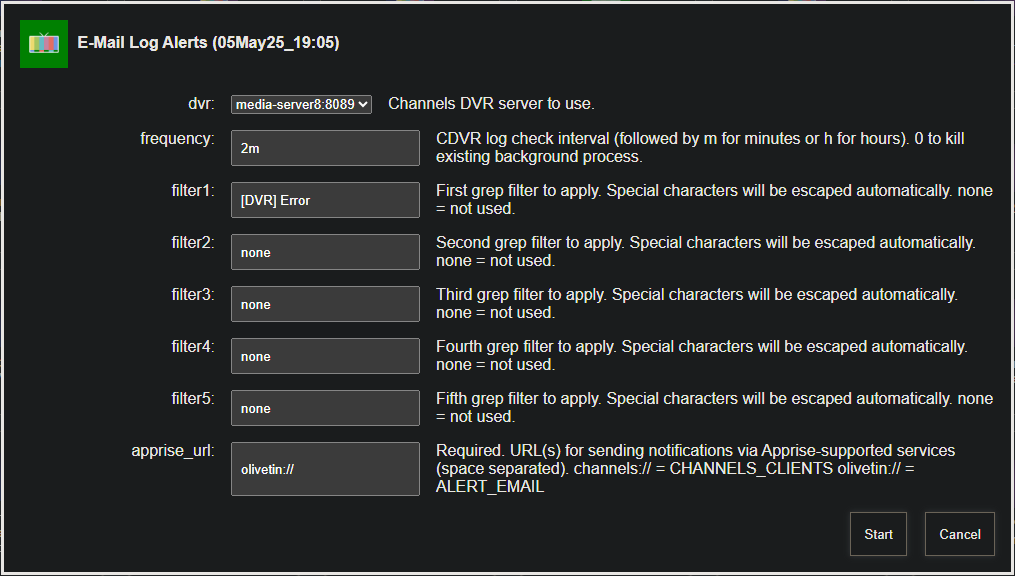
@bnhf, is this something that OliveTin could help with?

I would think so. The E-Mail Log Alerts Action already does this. It's just a question of having the right pattern or patterns to search for:

1 Like

Here is one pattern for people to try if interested. You may find some false positives though, where an email is sent but channels recovered gracefully after a retry

tail -F "$LOGFILE" |
grep --line-buffered "no such file or directory" |

@Fofer So in olive tin, you could try experimenting with the term "no such file or directory" as a search term

I haven't tried the cool email feature in olive tin yet.

Ah, thanks for that. Any idea what the error log would say when channels-dvr can't "find devices on local networks?" I'll keep an eye out on my system, certainly the next time this happens.

I don’t recall parsing the logs and seeing that specific term. The best I could do at the time that I set my email notification script up was to indirectly infer that the drive became unmounted or unavailable by the no such file or directory term.

The drawback is that there can be falls positives if for instance you move some of your personal media around or even rename you personal local media that you had previously imported into channels.

Let’s keep refining these search terms and scripts.
Now that I know that these pop ups are occurring during point updates of macOS I’ll try and take another look at the logs next time I get the pop ups and look for more specific error patterns for my custom scripts and for olivetin.

I’m in the middle of some code development at the moment. Once that is stable I’ll do another MacOs point release and I’m pretty sure I’ll see the pops again

Shouldn't CDVR report its status via some endpoint like /health ? This would make monitoring easy.

I posted a question to the forum some time ago asking if there was any benefit to moving from MacOS 14 to 15 on my M1 Mac mini DVR server. Most of the responses were "scolds" for not mindlessly upgrading with zero reasoning put forth. It appears there IS a benefit to not using MacOS 15 for your server OS at this point.

Nope, apparently not a sym link on MacOS.
Screenshot 2025-08-30 at 10.54.36 AM