
Fair warning, I'm a complete idiot (at least as far as CDVR/docker/life goes). But I did have mlbserver running great last year on my Synology NAS. Now I've moved my Channels DVR server over to a Mac Mini and I'm having trouble setting this up again. I have OliveTin/Project One-Click installed and running. But when I use the "Create an mlbserver Stack in Portainer + CDVR Custom Channels" option, it just immediately errors out. I've tried several different folders for my "HOST_DIR" without success. I've also tried changing the DVR IP to "localhost" or "127.0.0.1". Is the "DATA_DIRECTORY" field something I need to change? Or is there something else I should try?
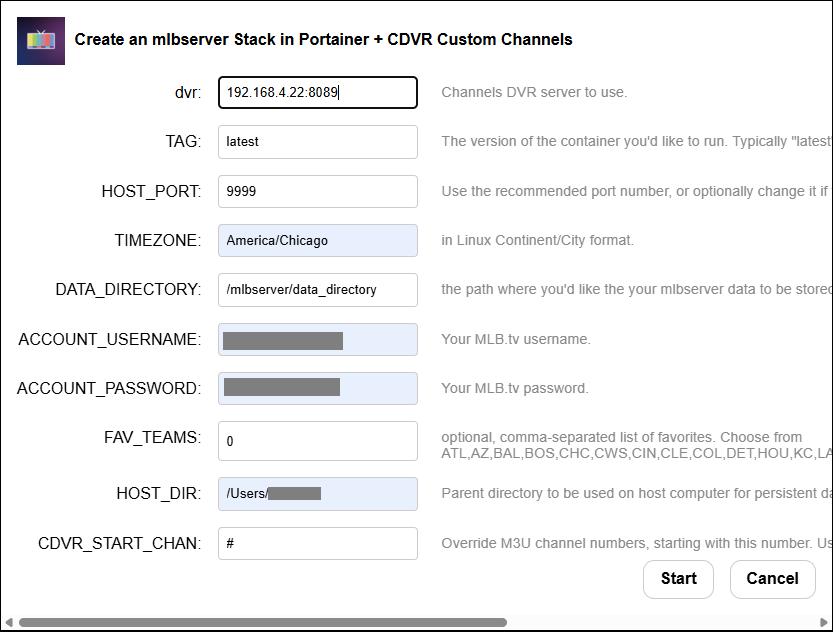
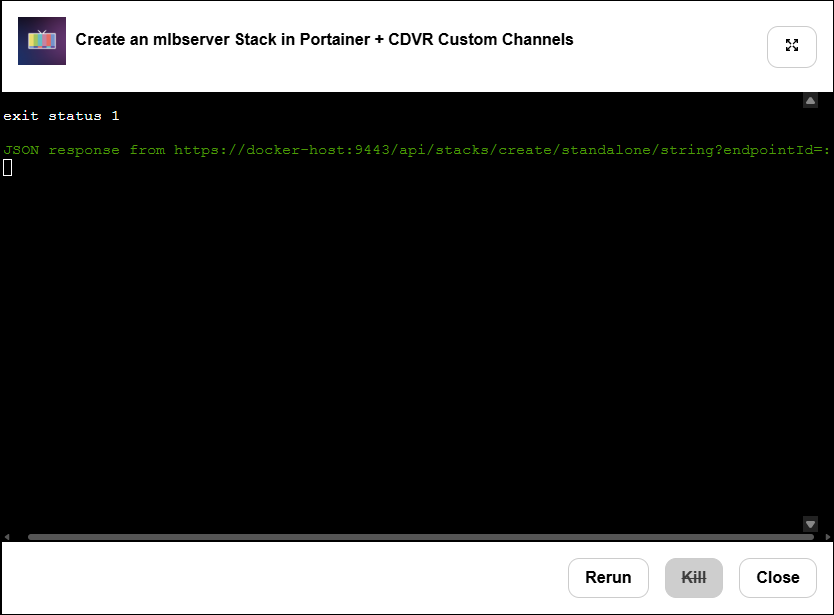
MacOS only allows Docker to write to certain directories (which are defined in Docker Desktop). Make sure the directory you're trying to write to actually exists -- and that you're matching upper and lower case. Most use /User/<your MacOS username>, and that's what I'd recommend. I installed mlbserver moments ago on my own server to test, and it installed (and removed) fine.
Have you installed other projects successfully on this platform with Project One-Click?
Well, I definitely have in the past, but now it seems I can't install anything using Project One-Click. So I guess I have something broken there. My apologies for posting this in the mlb thread.
Run the Post-Install Healthcheck Action and post the results in the Project One-Click thread.
I decided to do a fresh install of olivetin. Now it seems to be working for everything but mlbserver though. So I'm not sure if I should be posting this here or in the project one-click thread. When I try to install mlbserver it seems to hang and I never get the source added to my channels DVR. I'm getting this in the log (those last 4 lines keep repeating):
/config/mlbserver.debug.log 2026-03-23 17:33:48

+ dvr=192.168.4.22:8089
++ basename /config/mlbserver.sh
+ extension=mlbserver.sh
+ extension=mlbserver
+ cp /config/mlbserver.env /tmp
+ envFile=/tmp/mlbserver.env
+ [[ -n 192.168.4.22 ]]
+ extensionURL=192.168.4.22:9995
+ [[ # == \# ]]
+ cdvrStartingChannel=
+ [[ -n '' ]]
+ cdvrIgnoreM3UNumbers=
+ curl -s -o /dev/null http://192.168.4.22:9995
+ dirsFile=/tmp/mlbserver.dirs
+ envVars=("TAG=$2" "HOST_PORT=$3" "TZ=$4" "DATA_DIRECTORY=$5" "ACCOUNT_USERNAME=$6" "ACCOUNT_PASSWORD=$7" "FAV_TEAMS=$8" "ZIP_CODE=0" "HOST_DIR=$9")
+ synologyDirs=("$9/mlbserver")
+ printf '%s\n' TAG=latest HOST_PORT=9995 TZ=America/Chicago DATA_DIRECTORY=/mlbserver/data_directory [email protected] ACCOUNT_PASSWORD=password FAV_TEAMS=DET,MIL ZIP_CODE=0 HOST_DIR=/Users/myname
+ printf '%s\n' /Users/myname/mlbserver
+ sed -i /=#/d /tmp/mlbserver.env
+ /config/portainerstack.sh mlbserver
+ [[ 0 == 1 ]]
+++ customChannels
+++ cat
++ tr -d '\n'
++ echo -n '{
  "name": "mlbserver",
  "type": "HLS",
  "source": "URL",
  "url": "http://192.168.4.22:9995/channels.m3u?mediaType=Video&resolution=best",
  "text": "",
  "refresh": "24",
  "limit": "",
  "satip": "",
  "numbering": "",
  "start_number": "",
  "logos": "",
  "xmltv_url": "http://192.168.4.22:9995/guide.xml?mediaType=Video&includeTeamsInTitles=channels&offAir=channels",
  "xmltv_refresh": "3600"
}'
+ customChannelsJSON='{  "name": "mlbserver",  "type": "HLS",  "source": "URL",  "url": "http://192.168.4.22:9995/channels.m3u?mediaType=Video&resolution=best",  "text": "",  "refresh": "24",  "limit": "",  "satip": "",  "numbering": "",  "start_number": "",  "logos": "",  "xmltv_url": "http://192.168.4.22:9995/guide.xml?mediaType=Video&includeTeamsInTitles=channels&offAir=channels",  "xmltv_refresh": "3600"}'
+ true
+ curl -s -o /dev/null http://192.168.4.22:9995
+ [[ -n '' ]]
+ sleep 5
+ true
+ curl -s -o /dev/null http://192.168.4.22:9995
+ [[ -n '' ]]
+ sleep 5
+ true
+ curl -s -o /dev/null http://192.168.4.22:9995
+ [[ -n '' ]]
+ sleep 5
+ true
+ curl -s -o /dev/null http://192.168.4.22:9995
+ [[ -n '' ]]
+ sleep 5
+ true
Please post the results from a Post-Install Healthcheck Action in the Project One-Click thread, so I can verify your installation is properly configured.
After giving up on installing this using Project One-Click, I tried just using the docker compose and still had the same problem. But I finally realized that the MLB.TV login page is not working at the moment. I'm hoping that's the majority of my issue. And I really apologize for wasting bnhf's time if it is.
It makes sense that whatever is blocking the container's access is also blocking access from a browser. Likely something related to your IP, or maybe the public DNS servers you use.
I installed and deleted mlbserver quite a few times, as I was testing based on your report, and both the container and their website have been accessible for me.
You might try logging in from your phone via cellular, or anything really that uses a different path to the Internet. That might help narrow down whether it's a wider problem, or isolated to your IP.
I had this problem once. Try logging in from your phone over cellular. For some reason my IP was flagged. Once I figured this out I called their support and they were able to fix. I believe that I had to reset my password while on the phone with them as well.
Yup, this is definitely a problem between my ISP and MLB.tv. Strangely enough it was working fine just last week to watch games over my wifi. But now it is blocked entirely. I was able to finally get mlbserver installed and running by connecting my Mac to my cellular hotspot, but I'm not sure if that means I'll be able to see any of the games yet. I should know soon.
Edit: I didn't realize there was a game on already today. Seems to be working fine now. Does anyone have any idea how long before it will try to re-authenticate my MLB.tv account? Because that seems like it will be an issue again.
mlbserver update 2026.3.27 is available. Updated the Big Inning schedule for 2026, which in turn fixed some errors in loading the M3U/XML feeds.
Hey Tony, I just heard about this today. I actually don't use ChannelsDVR, but I installed mlbserver as a docker container, got it all up and working. Within mlbserver UI I can watch the streams, but when exporting the MLB team channels via M3U, I am then not able to get the team channels to load. I am guessing I am just misunderstanding how this works. But for instance I can watch the feed via mlbserver ui for the Giants vs Yankees, but going to either of the team channels it does not show the game. Sometimes I get an ad for "Big Buck Bunny" for whatever reason.
Pull the latest container. It has a fix for missing team feeds in the m3u. The container logs should show -3 version
Version 2026.3.26-3
Go to the mlbserver web interface and find the option for "Scan Mode" and turn it off.
Having scan mode on will return a demo stream (Big Buck Bunny) for every stream request (so software like TVHeadend could scan the M3U and see them all as valid channels, even if no games were active).
Thanks for the response and that did the trick! What is now happening I am bringing them into a container called dispatcharr, which works like a middle man. I can't get the team stream to load (I can in VLC with the same M3U), but I can get MLBTV.GAMECHANGER stream to load via dispatcharr.
I resolved this by have a different FFmpeg profile for these streams btw. I think the multiple audio channels was the issue.
If you add “&audio_track=English” to the team stream URL, mlbserver will filter out the extra audio tracks. (There are also options to force the radio track, etc)
@tonywagner I'm trying to watch a game with the radio audio. This worked fine last year but is failing when I try it now. (Regular video/tv audio feeds work fine)
I'm using the format: http://192.168.12.39:9999/stream.m3u8?team=PHI&mediaType=Video&resolution=best&audio_track=radio&includeBlackouts=true
When I try this in VLC I get radio audio/no video. When I try it in Channels I get no video/no audio. Any ideas?
(you have to scroll right in the code block but there is an error there, I just dont know if it means anything serious)
2026-03-29T17:48:21.448209705Z   configuration: --enable-gpl --enable-version3 --enable-static --disable-debug --disable-ffplay --disable-indev=sndio --disable-outdev=sndio --cc=gcc --enable-fontconfig --enable-frei0r --enable-gnutls --enable-gmp --enable-libgme --enable-gray --enable-libaom --enable-libfribidi --enable-libass --enable-libvmaf --enable-libfreetype --enable-libmp3lame --enable-libopencore-amrnb --enable-libopencore-amrwb --enable-libopenjpeg --enable-librubberband --enable-libsoxr --enable-libspeex --enable-libsrt --enable-libvorbis --enable-libopus --enable-libtheora --enable-libvidstab --enable-libvo-amrwbenc --enable-libvpx --enable-libwebp --enable-libx264 --enable-libx265 --enable-libxml2 --enable-libdav1d --enable-libxvid --enable-libzvbi --enable-libzimg
2026-03-29T17:48:21.448225981Z   libavutil      56. 70.100 / 56. 70.100
2026-03-29T17:48:21.448237752Z   libavcodec     58.134.100 / 58.134.100
2026-03-29T17:48:21.448249460Z   libavformat    58. 76.100 / 58. 76.100
2026-03-29T17:48:21.448261333Z   libavdevice    58. 13.100 / 58. 13.100
2026-03-29T17:48:21.448273012Z   libavfilter     7.110.100 /  7.110.100
2026-03-29T17:48:21.448284549Z   libswscale      5.  9.100 /  5.  9.100
2026-03-29T17:48:21.448296096Z   libswresample   3.  9.100 /  3.  9.100
2026-03-29T17:48:21.448307609Z   libpostproc    55.  9.100 / 55.  9.100
2026-03-29T17:48:21.448319148Z [tcp @ 0x2973f0c0] Port missing in uri
2026-03-29T17:48:21.448331197Z http://127.0.0.1:undefined/segment.ts?url=https%3A%2F%2Ftv-fst.mlb.com%2F20260329%2F823487-HD_7500K%2F00051%2F823487-HD_7500K_00004.ts&streamURLToken=1774892323_MDB1MXVyaXppMHF3ZzdieG4zNTg_YWxsb3dlZE1lZGlhVHlwZXM9VklERU8sQVVESU8_LzIwMjYwMzI5LzgyMzQ4Ny1IRA_d03a348e2cddc9c0e8494455e7dfc52be36456280163d5debf3c55e2fa72f3c2&key=https%3A%2F%2Ftv-fst.mlb.com%2F20260329%2F823487-HD.key&iv=00000000000000000000000000000730: Invalid argument
2026-03-29T17:48:21.448378787Z
That exact URL works as expected for me in VLC (substituting my IP or hostname, of course).
But your error message says the port as "undefined". Are you doing something special with the port number in your setup? Are you going through the multiview etc.?
@tonywagner is there a way to offset the audio with the video in the feed itself in the radio feed? I know it's only opening week and the kinks are being worked on by MLB, but im seeing the audio being a head. probably a long shot I gather.
1 Like