Multichannel view, an alternative approach

Hmmm... This doesn't seem to be a simple thing to install on Synology at all. Is there a "for dummies" method? Or, perhaps, I should abandon the idea of using hardware acceleration.

I can say this... the Mosaic seems to be playing much better since I enabled hardware acceleration. Using libx264 software codec, it would scarcely load or play the channel. With h264_qsv codec, it will play for a few minutes at a time without problem. Then, it begins "buffering" and falls behind on the timeline. It will pause several times, over and over. Then, will play fine for a while. Though, never quite catching up on the timeline.

Right now, it has been playing for an hour or so, and is about 2-3 minutes behind...
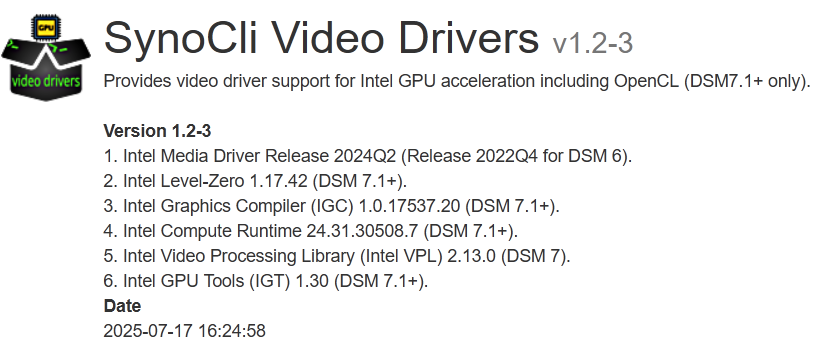
It sounds like it's working, but being able to confirm would be nice. Maybe @chDVRuser knows something about install regular Linux packages from the command line on Synology?

Something tells me these webcam streams might be a tricky test. Have you tried choosing 4x TVE streams? It'd be interesting to know how those appear to work. Also, you can try the h264_vaapi codec to see if that makes any difference.

This won't play at all... Connection Lost. The h264_qsv codec seems to work the best.

I'm happy to try 4x TVE streams. I'll try to set up a new mosaic using your instructions from back a few posts earlier today.

The 4x TVE streams play somewhat better than the 4x YouTube camera feeds do. Less pausing and buffering. But, not completely smooth. They start a bit better, and may play for longer without glitches.

On second glance, the TVE channels are having the same problems as well...

The hardware is probably just too low-end. You could install this directly on a Windows PC or a Mac -- or it's running nicely for me on a Proxmox box (10th gen i7) in an LXC container (with Docker/Portainer running within). Lots of options. It requires a bit more oomph than basic single stream transcoding though.

Nope.
It doesn't have the horsepower to do 4 hardware transcodes (My Synology DS1019+).
I found 3 was the limit (h264_vaapi), and I normally only do one at a time.

Yeah, that sounds about right. It makes sense that my YouTube webcam feeds 4x(Full HD - 1920x1080) bogged down more than the TVE channels 4x(HD - 1280x720).

Have you tried adjusting this:

TARGET_WIDTH = 1280
TARGET_HEIGHT = 720
BW='5120k'

to something like:

TARGET_WIDTH = 960
TARGET_HEIGHT = 540
BW='2048k'

or even:

TARGET_WIDTH = 640
TARGET_HEIGHT = 360
BW='1024k'

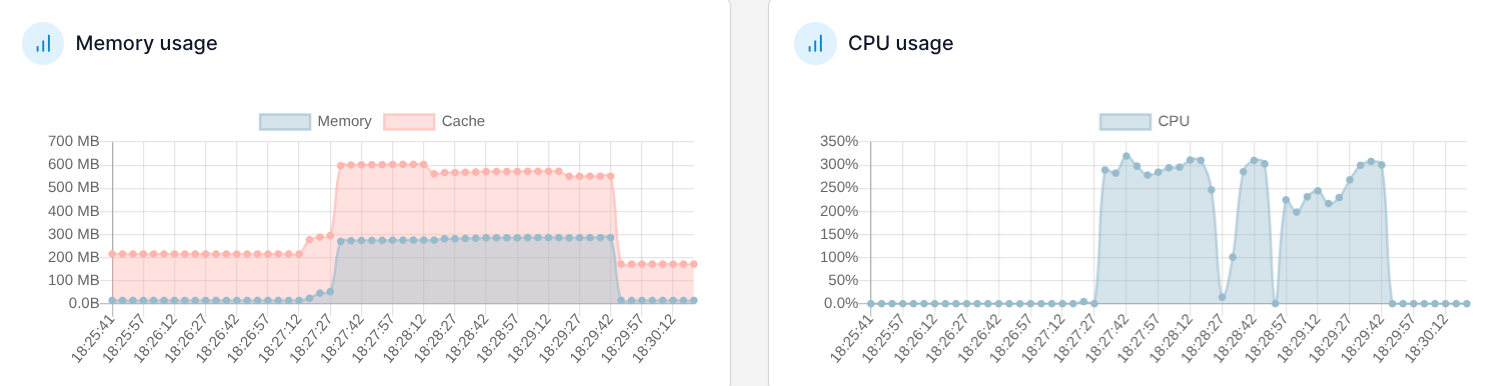
Here's the usage stats from Portainer while I ran the YouTube cams matrix for a while:

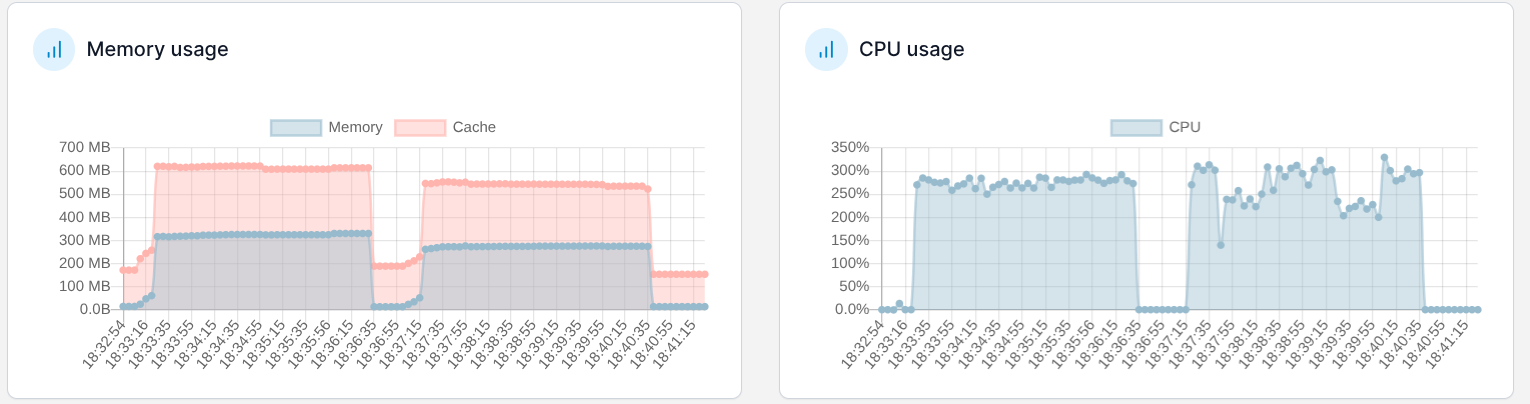
And the same stats when running the TVE matrix:

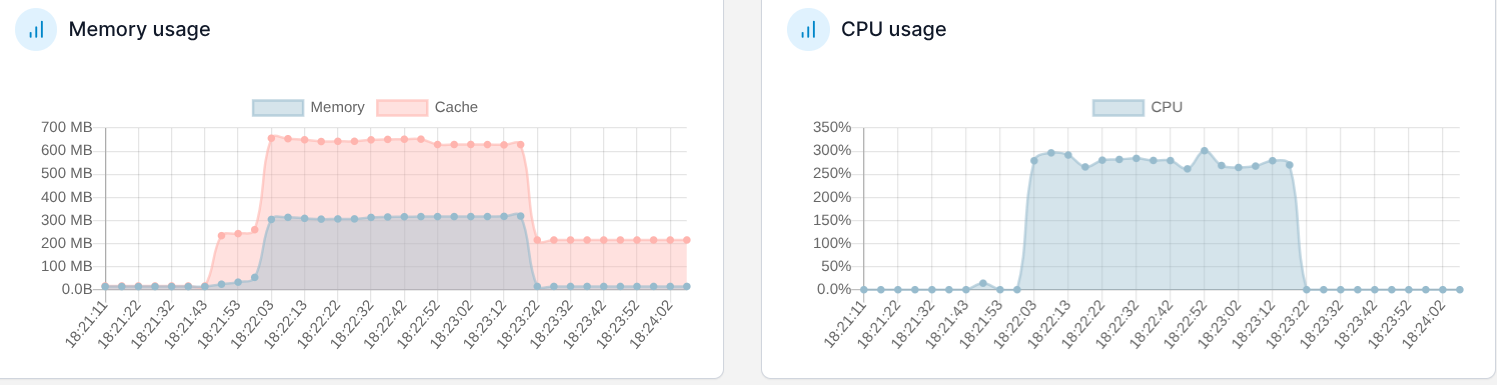
Another test run of first YouTube, then TVE:

I believe it. I quit trying to stress my NAS.
I'm good with using only one or two hardware transcodes at a time.
Doing 2 hardware transcodes while comskip is running and a guide fetch is happening is the limit.
Besides, I'm running 7 CDVR Servers in containers on it already.
If I were using this Multichannel view I would be running it on something more powerful, with more headroom.

That processor only has 4 cores correct? If so, you're using 3 if I'm reading that chart correctly -- which makes me think you're not using the GPU.

@chDVRuser The question I was hoping you would know the answer to before is regarding whether or not there's a way to install a standard Linux package like intel-gpu-tools on Synology?

Not that I'm aware of and I don't go messing around with my Synology's like that.
If there are standard linux utilities installed that can display GPU, I can try to run one.
Even the Synology Performance monitor doesn't display GPU Performance | DSM - Synology Knowledge Center (only supports add-on GPU cards) https://www.reddit.com/r/synology/comments/1934kbn/how_to_check_gpu_usage/ and Portainer only supports Nvidia GPU as far as I know.

I get the concept of not messing with the host OS on a platform like Synology. I take much the same approach with Proxmox -- I think long and hard before installing anything at the host OS level.

It's always possible Synology includes intel-gpu-tools in the base OS. Try running intel_gpu_top to see.

root@DS1019PLUS:~# which intel_gpu_top
root@DS1019PLUS:~# intel_gpu_top
-ash: intel_gpu_top: command not found
1 Like

Yes, it has 4 cores. As I see it, three were being used specifically for the multichannel container when it was playing either of the matrices.

At the moment, according to my Synology resource monitor, without the multiview running, the other 12 containers, CDVR server, and a few other programs, all together are using about 53% CPU.

Add that to the 300% used by multiview, and we're hitting 353% CPU total.

I agree with you. My goal in using multichannel was to monitor several live cameras which were focused on the "Gold" fire near our home in Big Bear, CA. For the most part, I have little interest in viewing several things at once. Notably, the multichannel view did play well enough on the Synology for the rare times I may want to use it. :ok_hand:

You'll probably need the SynoCommunity repo for that:

1 Like

just discovered this after rolling my own solution with vlc. this works great with tve and other custom channels sources. it doesn't seem to work too well with hdhomerun sources in channels. the stream plays in vlc but very poorly.

Yeah, I'm able to get it working well with one OTA channel via HDHomerun, and three other sources, via TVE and other dockers. Once I add a second HDHomerun channel, the multiview doesn't work. At least that's been my experience so far.

This solution makes no effort to deal with interlacing at all, so choosing interlaced sources might be a problem. Does the problem persist with progressive sources on HDHR?