Mute when using the iPad app on a Mac

I am a new Channels user. I use the iPad Channels app on my Mac Mini, and in general, it works well. My Mac Mini is connected to an Onkyo AVR that processes the audio.

The iPad Channels app has a volume slider, but it has no effect on the sound. Sometimes I watch streaming content at the same time as viewing something from the Channels app, and I would like to keep the video from the Channels app and mute the sound, but I have not found a way to do that from within the Channels app. The SoundSource app can mute the Channels app, but it is $45.

Is it possible to mute the sound on the iPad Channels app on a Mac when connected to an AVR? If not, can the developers add a mute button, or have the volume slider explicitly mute the audio when the volume is turned all the way down? I will post a feature request if nobody has any other suggestions.

Also, is it possible to use Multiview on the iPad Channels app on a Mac? With my iPad, I can do it from the Guide using a long press on the program I want to watch, but I have not been able figure out how to use Multiview on a Mac.

Thanks!
BTW, I did just install the iOS beta app on my Mac just in case my issues were addressed in a beta. The behavior is the same in the beta app.

Thanks! I did try BackgroundMusic but it did not work for me. After looking at their troubleshooting section, I found this:

"Only 2-channel (stereo) audio devices are currently supported for output."

I got horrible distorted audio through my AVR. However, it did seem to work fine with my Mini Mac's internal speaker. So I do not think BackgroundMusic is an option for a multi-channel AVR. The SoundSource app did work fine in trial mode, but that only lasts 20 minutes or to and then they start pumping in white noise.

I will test the other two. Right now, I just use Safari to pull up the Channels Server webpage on the Windows PC running Channels Server, and I can playback in a windows and use Safari to mute the audio, but I prefer the iPad Channels app. Also, I do not get anything from the rear speakers using Safari.

Does the iPad Channels app running a Mac even support 5.1 channel sound? I have not tested this yet, but I will.

You'll need to use third party software. The app is just an iPad app running on macOS. There's nothing we can do about it, it's just how Apple has implemented this compatibility on desktop.

Yes, because it's transcoded to stereo audio for a web browser.

Yes, but it's up to the system to do something with it. What macOS does, who knows.

This is not something we even test. Again, the iPad app is offered on desktop macOS as a sort of extra. It's not something we even test or target. Our work and efforts are spent on streaming and mobile devices.

With M series chips, Apple added the ability to run iOS apps, because they could. The effort they put into it is mid at best. They work, but they're not the best experience. We didn't even plan on offering it at first, but fans said it worked well, so we figured, might as well. But it's not something we put effort into, nor can we.

It's just an iPad app. How it works, is up to how Apple makes iPad apps work on macOS.

Thanks. I will test the other 3rd party apps.

Is it possible to use Multiview in the iPad Channels app running on a Mac? I have not figured out to do that yet, but it is very cool on my iPad!

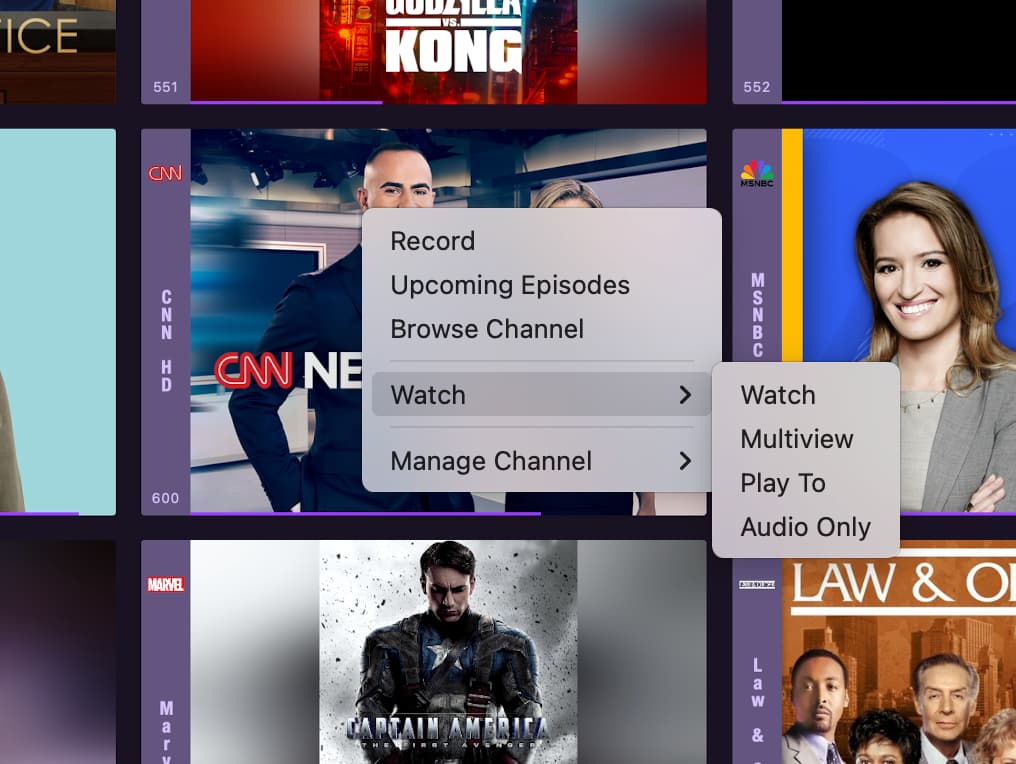
From the grid guide or the On Now panels, right-click or use two finger click on touchpad to bring up context menu, under Watch> there will be a Multi-view option

Thanks for the response. I do not have a touchpad, and right-click does not work for me in the iPad Channels app. Right-click does work fine in other native Mac apps.

On the plus side, I have confirmed that the iPad Channels app does provide 5.1 channel sound on a Mac.

To be honest, I can get similar functionality by using the iPad Channels app along with multiple instances of the native HDHomeRun app, so it's not a big deal. However, it would be cool to see it work on a Mac.

Quick update. Right-click now works on my Mac in the beta of the iPad Channels app, but the MultiView option in not in the context menu. However, it looks like other Apple TV users are having similar issue with the latest beta. I will keep checking the beta versions. If I have more feedback, I'll post in the Beta Community.

It works. The latest beta just accidently dropped the menu item. The new update will be out within minutes.

Try either control-click (one-button mouse) or right-mouse-click (multi-button mouse) to get the menu as shown. Those both work for me on my mac Mini (no touchpad)

Thanks. Right-click to get MultiView is working for me now using the iPad beta app on a Mac. It looks great on a 77" TV!