
@chDVRuser Now I'm thinking it failed for you before because I didn't take the SFS volume into account. 
OK
Removed docker volumes, images and host directories.
Using the following compose/env vars
version: '3.9'
services:
  olivetin: # This docker-compose typically requires no editing. Use the Environment variables section of Portainer to set your values.
    # 2025.03.23
    # GitHub home for this project: https://github.com/bnhf/OliveTin.
    # Docker container home for this project with setup instructions: https://hub.docker.com/repository/docker/bnhf/olivetin.
    image: bnhf/olivetin:${TAG:-latest} # Add the tag like latest or test to the environment variables below.
    container_name: ${OLIVETIN_NAME:-olivetin}${EZ_START}
    hostname: ${OLIVETIN_NAME:-olivetin}${EZ_START}
    dns_search: ${DOMAIN:+${DOMAIN}} # For Tailscale users using Magic DNS, add your Tailnet (tailxxxxx.ts.net) to use hostnames for remote nodes, otherwise use your local domain name.
    ports:
      - ${HOST_PORT:-1337}:1337
    environment:
      - CHANNELS_DVR=${CHANNELS_DVR_HOST}:${CHANNELS_DVR_PORT:-8089} # Add your Channels DVR server in the form CHANNELS_DVR_HOST=<hostname or ip> and CHANNELS_DVR_PORT=<port>.
      - ${CHANNELS_DVR2_HOST:+CHANNELS_DVR_ALTERNATES=${CHANNELS_DVR2_HOST}:${CHANNELS_DVR2_PORT}} ${CHANNELS_DVR3_HOST:+${CHANNELS_DVR3_HOST}:${CHANNELS_DVR3_PORT}} # Space separated list of alternate Channels DVR servers to choose from in the form hostname:port or ip:port.
      - CHANNELS_CLIENTS=${CHANNELS_CLIENTS} # Space separated list of Channels DVR clients you'd like notifications sent to in the form hostname or IP.
      - ALERT_SMTP_SERVER=${ALERT_SMTP_SERVER} # SMTP server to use for sending alert e-mails. smtp.gmail.com:587 for example.
      - ALERT_EMAIL_FROM=${ALERT_EMAIL_FROM} # Sender address for alert e-mails.
      - ALERT_EMAIL_PASS=${ALERT_EMAIL_PASS} # SMTP "app" password established through GMail or Yahoo Mail. Do not use your everyday e-mail address.
      - ALERT_EMAIL_TO=${ALERT_EMAIL_TO} # Recipient address for alert e-mails.
      - UPDATE_YAMLS=${UPDATE_YAMLS:-true} # Set this to true to update config.yaml.
      - UPDATE_SCRIPTS=${UPDATE_SCRIPTS:-true} # Set this to true to update all included scripts.
      - TZ=${TZ} # Add your local timezone in standard linux format. E.G. US/Eastern, US/Central, US/Mountain, US/Pacific, etc.
      - PORTAINER_TOKEN=${PORTAINER_TOKEN} # Generate via <username> dropdown (upper right of WebUI), "My account", API tokens.
      - PORTAINER_HOST=${PORTAINER_HOST:-$CHANNELS_DVR_HOST} # Hostname or IP of the Docker host you're running Portainer on.
      - PORTAINER_PORT=${PORTAINER_PORT:-9443} # https port you're running Portainer on. 9443 is the default.
      - PORTAINER_ENV=${PORTAINER_ENV:-2} # Set this is if you're using an alternate Portainer Environment for some reason. 2 is the default.
      - PERSISTENT_LOGS=${PERSISTENT_LOGS:-false} # For supported Actions, log files are retained on an ongoing basis. false is the default.
    volumes:
      - ${HOST_DIR:-/unused}${HOST_DIR:+/olivetin:/config} # Add the parent directory on your Docker you'd like to use.
      - ${DVR_SHARE:-/unused}${DVR_SHARE:+:/mnt/${CHANNELS_DVR_HOST}-${CHANNELS_DVR_PORT}} # This can either be a Docker volume or a host directory that's connected via Samba or NFS to your Channels DVR network share.
      - ${LOGS_SHARE:-/unused}${LOGS_SHARE:+:/mnt/${CHANNELS_DVR_HOST}-${CHANNELS_DVR_PORT}_logs} # This can either be a Docker volume or a host directory that's connected via Samba or NFS to your Channels DVR logs network share.
      - ${TUBEARCHIVIST_SHARE:-/unused}${TUBEARCHIVIST_SHARE:+:/mnt/${CHANNELS_DVR_HOST}-${CHANNELS_DVR_PORT}_ta} # This can either be a Docker volume or a host directory that's connected via Samba or NFS to your TubeArchivist videos network share.
      - ${DVR2_SHARE:-/unused}${DVR2_SHARE:+:/mnt/${CHANNELS_DVR2_HOST}-${CHANNELS_DVR2_PORT}} # Note that these volume mounts should always be to /mnt/hostname-port or /mnt/ip-port (dash rather than a colon between).
      - ${LOGS2_SHARE:-/unused}${LOGS2_SHARE:+:/mnt/${CHANNELS_DVR2_HOST}-${CHANNELS_DVR2_PORT}_logs} # This can either be a Docker volume or a host directory that's connected via Samba or NFS to your Channels DVR logs network share.
      - ${TUBEARCHIVIST2_SHARE:-/unused}${TUBEARCHIVIST2_SHARE:+:/mnt/${CHANNELS_DVR2_HOST}-${CHANNELS_DVR2_PORT}_ta} # This can either be a Docker volume or a host directory that's connected via Samba or NFS to your TubeArchivist videos network share.
      - ${DVR3_SHARE:-/unused}${DVR3_SHARE:+:/mnt/${CHANNELS_DVR3_HOST}-${CHANNELS_DVR3_PORT}} # Note that these volume mounts should always be to /mnt/hostname-port or /mnt/ip-port (dash rather than a colon between).
      - ${LOGS3_SHARE:-/unused}${LOGS3_SHARE:+:/mnt/${CHANNELS_DVR3_HOST}-${CHANNELS_DVR3_PORT}_logs} # This can either be a Docker volume or a host directory that's connected via Samba or NFS to your Channels DVR logs network share.
      - ${TUBEARCHIVIST3_SHARE:-/unused}${TUBEARCHIVIST3_SHARE:+:/mnt/${CHANNELS_DVR3_HOST}-${CHANNELS_DVR3_PORT}_ta} # This can either be a Docker volume or a host directory that's connected via Samba or NFS to your TubeArchivist videos network share.
      - /var/run/docker.sock:/var/run/docker.sock
    restart: unless-stopped

  static-file-server:
    image: halverneus/static-file-server:latest
    container_name: ${SFS_NAME:-static-file-server}${EZ_START}
    dns_search: ${DOMAIN}
    ports:
      - ${HOST_SFS_PORT:-0}:8080
    environment:
      - FOLDER=${FOLDER:-/web}
    volumes:
      - ${HOST_DIR:-/unused}${HOST_DIR:+/olivetin/data:${FOLDER:-/web}}
    restart: unless-stopped

volumes: # use this section if you've setup a docker volume named channels-dvr, with CIFS or NFS, to bind to /mnt/dvr inside the container. Set ${DVR_SHARE} to channels-dvr (DVR_SHARE=channels_dvr) in that example.
  olivetin-ezstart:
    name: olivetin-ezstart
  olivetin:
    name: olivetin
  #channels-dvr:
    #external: true
  #channels-dvr-logs:
    #external: true
  #tubearchivist:
    #external: true
  #channels-dvr2:
    #external: true
  #channels-dvr2-logs:
    #external: true
  #tubearchivist2:
    #external: true
   #channels-dvr3:
    #external: true
  #channels-dvr3-logs:
    #external: true
  #tubearchivist3:
    #external: true
environment variables
EZ_START=-ezstart
CHANNELS_DVR_HOST=192.168.1.3
It deployed with no errors and created two anonymous docker volumes.
Ran the OliveTin Environment Variables Generator/Tester
What do you want me to override there for this test?
Without doing any overrides, what do you see in Standard Output after clicking Start?
1 Like
Standard Output
TAG=latest
DOMAIN=
HOST_PORT=1337
CHANNELS_DVR_HOST=192.168.1.3
CHANNELS_DVR_PORT=8089
CHANNELS_CLIENTS=
ALERT_EMAIL_SERVER=
ALERT_EMAIL_FROM=
ALERT_EMAIL_PASS=
ALERT_EMAIL_TO=
UPDATE_YAMLS=true
UPDATE_SCRIPTS=true
TZ=
HOST_DIR=/data
DVR_SHARE=/shares/dvr
LOGS_SHARE=/channels-dvr
TUBEARCHIVIST_SHARE=/shares/dvr
DVR2_SHARE=
LOGS2_SHARE=
TUBEARCHIVIST2_SHARE=
DVR3_SHARE=
LOGS3_SHARE=
TUBEARCHIVIST3_SHARE=
HOST_SFS_PORT=8080
FOLDER=/web
PORTAINER_TOKEN=
PORTAINER_HOST=192.168.1.3
PORTAINER_PORT=9443
PORTAINER_ENV=2
PERSISTENT_LOGS=false
These would need overriden
TZ=
HOST_DIR=/data
DVR_SHARE=/shares/dvr
LOGS_SHARE=/channels-dvr
TUBEARCHIVIST_SHARE=/shares/dvr
HOST_SFS_PORT=8080
PORTAINER_TOKEN=
Just noticed this
Standard Error
Error: No such object: olivetin
Are these 4 correct? Are there any other values you think could be determined using CDVR and/or Docker (besides PORTAINER_ENV which I should be able to do)?
Beyond that, the idea is for the Action to get a reasonable description of the value needed right next to a field to input it, and to indicate whether it's required or optional.
Also, this Action can be used anytime someone wants to add values to enable features not supported without those values. Once the "full" OliveTin is spun-up, a new list can be created anytime that will show what's known along with any overrides.
I'm already working on the next version of this which can be spun-up from the command line, which will then allow for installing Portainer itself from OliveTin, and even a CDVR Docker instance.
So, some could start with OliveTin from the command line, and have a full working installation of CDVR, Portainer and multiple extensions in short order.
1 Like
For someone running on a single host system, not using a Docker version of CDVR, those fields with values would be correct.
That error should go away, as there are one or two other things I need to change with this new compose.
EDIT: I think I might be able to get time zone by mounting /etc/timezone into the container...
EDIT2: Yes -- that works!
1 Like
No. Since I'm running Channels DVR in a docker container on Synology.
HOST_DIR should be /volume1/docker (not the default you have), and I would have to first create that directory on my Synology since Synology Docker does NOT create host directories.
DVR_SHARE should be the Host directory I mapped the DVR container to (it picked up the DVR container path)
- /volume1/ChDvrTveTest:/shares/dvr # Channels DVR recording directory
LOGS_SHARE should be the Host directory I mapped the DVR container to (it picked up the DVR container path)
- /volume1/docker/channels-dvr-tve-test:/channels-dvr # Channels DVR executables and log directory
TUBEARCHIVIST_SHARE should be the Host directory I mapped the DVR container to (it picked up the DVR container path), but I don't use tube archivist, so I would comment that out somehow.
- /volume1/ChDvrTveTest:/shares/dvr # Channels DVR recording directory
I can remove the Channels DVR docker container and reinstall it using the Channels DVR Synology package to see if that's true.
I find myself wondering if doing a directory binding shouldn't be considered an advanced skill in the case of the /config directory. Rather than having it error out on /data (as many can't use that), I'm thinking I should assign it to an olivetin volume by default, as that should always work.
Then those, like you and I, that like to be able to easily view the scripts and know how to make it happen, can change it to host directory binding. Generally, I'm trying to reduce or eliminate decisions and knowledge required to get OliveTin going.
That I can understand.
In the context of a Synology install, I'm not sure what you mean.
Where would this olivetin volume be and how would one access it?
Is it a docker volume or a mapped host directory?
Sorry yes, a Docker Volume. Accessing it is what makes Docker Volumes somewhat less desirable in my mind, as Docker Volumes are buried in the file system:
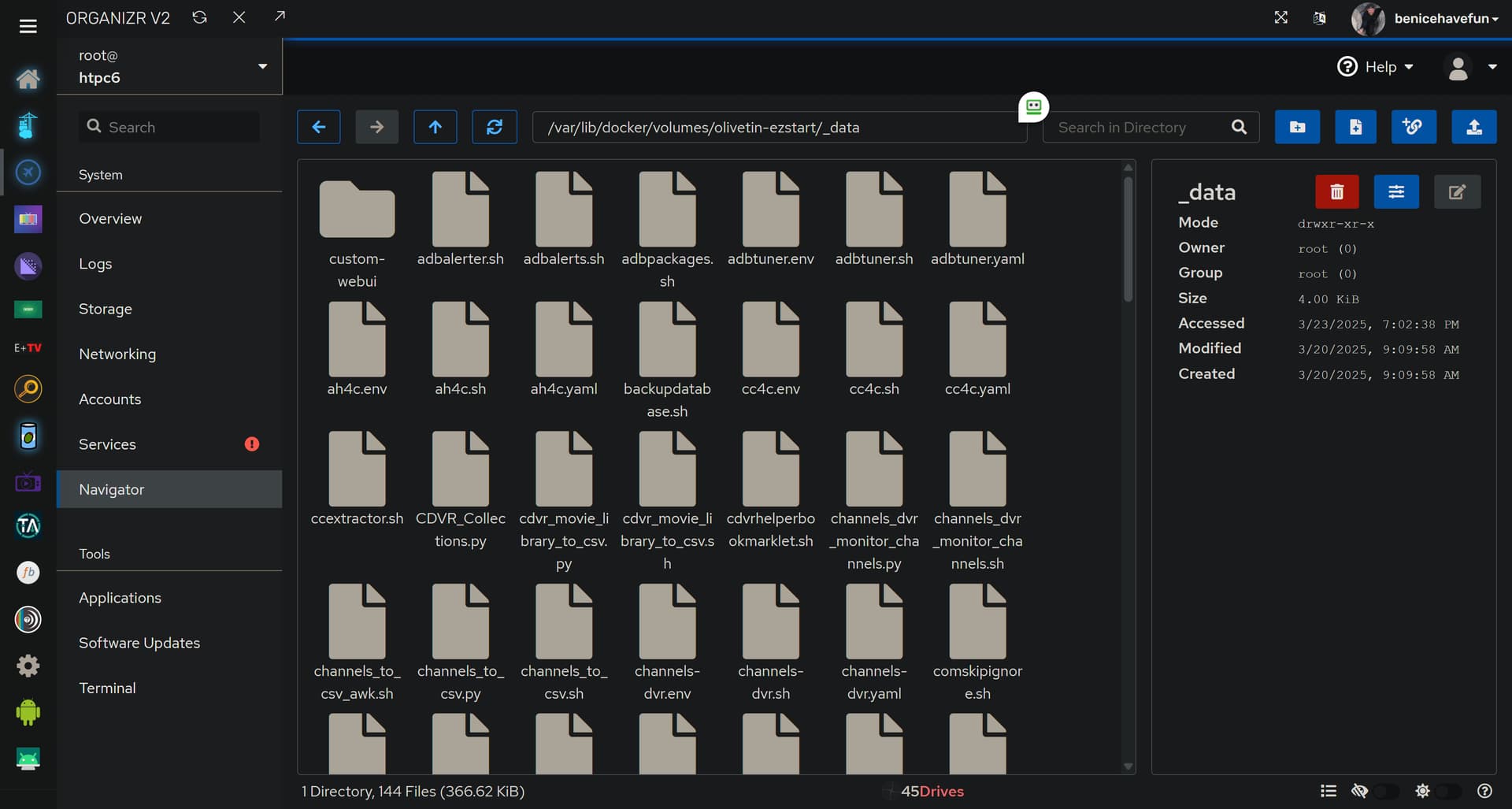
But, the question is, how often does the average user need to find their way there. Given that it works across OS's, without the need to create it first, is a pretty big plus.
I'm really just talking about defaulting to something that will definitely work, instead of defaulting to /data which often doesn't work.
I agree a quick and easy setup is preferable. Up to you since you support it.
Like you said, us more advanced users would avoid docker volumes.
But have you thought of some of your Action buttons and One-Clicks.
Which ones require a user to access those directories (including SFS directories).
Or you ask a user to look at a file there (like a log file).
Worked fine, I just had to override these in the final env vars
TZ=America/Los_Angeles
HOST_DIR=/volume1/docker
HOST_SFS_PORT=8088
PORTAINER_TOKEN=<REDACTED>
P.S. Yes, the healthcheck passed!
Great Work 
1 Like
One suggestion for the healthcheck.
Show the HOST_DIR value and its directory listing?
Here's a list of your current OliveTin-related settings:

HOSTNAME=olivetin
CHANNELS_DVR=192.168.1.3:8089
CHANNELS_DVR_ALTERNATES=
CHANNELS_CLIENTS=
ALERT_SMTP_SERVER=
ALERT_EMAIL_FROM=[Redacted]@
ALERT_EMAIL_PASS=[Redacted]
ALERT_EMAIL_TO=[Redacted]@
UPDATE_YAMLS=true
UPDATE_SCRIPTS=true
PORTAINER_TOKEN=[Redacted]
PORTAINER_HOST=192.168.1.3
PORTAINER_PORT=9443
PORTAINER_ENV=2
Once the container is running I can only find the value as part of the bind mounts for the container.
1 Like
I will, as I know how to get that now. It's not an var that's passed to the container's env, so it's a touch tricky -- but doable.
@chDVRuser If on your Synology you run:
docker info 2>/dev/null | grep Kernel
what do you get? I'm thinking about querying the docker host to get that value, as I believe it would be pretty good for offering suggestions for several OS-specific things.
On Windows, it looks like this:
Kernel Version: 5.15.167.4-microsoft-standard-WSL2
@chDVRuser Also, it appears it's OK to have comments in with your Poratiner env vars. I'll test it more tomorrow, but if it holds true with the testing I've done, I could add OS specific comments to certain values. Like the need to create a directory on Synology first before deploying, or the limited writable paths on Mac Docker hosts.
1 Like
My older Synology NAS
# docker info
 Server:
  Server Version: 20.10.3
  Kernel Version: 3.10.108
Portainer Host Details
 Kernel Version 3.10.108
 Engine Details
  Version 20.10.3 (API: 1.41)

My newer Synology NAS
# docker info
Server:
 Server Version: 24.0.2
 Kernel Version: 4.4.302+
Portainer Host Details
 Kernel Version 4.4.302+
 Engine Details
  Version 24.0.2 (API: 1.43)
1 Like
Much better than reading comments in the compose statement and having to find the env vars below in Portainer!
FYI
Fails to create container on Synology. No host link or file named /etc/timezone
- /etc/timezone:/etc/timezone # fails on Synology
had to modify this for it to work on Synology NAS
- /etc/TZ:/etc/timezone:ro # works on Synology
OR use this
- /etc/localtime:/etc/localtime:ro # works on Synology