OliveTin EZ-Start: A New Way to Deploy OliveTin-for-Channels Using Just Two Environment Variables to Get Started!

First, I'm glad you're trying EZ-Start, as it's exposed some issues that need to be addressed.

Second, EZ-Start isn't really aimed at a user like you, as you already understand what values are needed for the various env vars OliveTin needs. It's designed for the user that needs the additional guidance offered by using the new OliveTin Environment Variables Generator/Tester.

The idea is that user can spin-up OliveTin with the two env vars, use it to figure out a full list of env vars. And then, stop the stack, replace the two variables with the full list and now they're running the full version of OliveTin. It's really only intended to ever be used once -- by a user new to OliveTin, that finds determining the correct env vars needed challenging.

Yes, if you were the user this process is targeted towards, that's what you'd do -- one time, to help you get your env var list together.

This is what it looks like after I stop and redeploy no change. I think I rather do the Variables manually lol.

version: '3.9'
services:
  olivetin: # This docker-compose typically requires no editing. Use the Environment variables section of Portainer to set your values.
    # 2025.03.19
    # GitHub home for this project: https://github.com/bnhf/OliveTin.
    # Docker container home for this project with setup instructions: https://hub.docker.com/repository/docker/bnhf/olivetin.
    image: bnhf/olivetin:${TAG:-latest} # Add the tag like latest or test to the environment variables below.
    container_name: ${OLIVETIN_NAME:-olivetin}${EZ_START}
    hostname: ${OLIVETIN_NAME:-olivetin}${EZ_START}
    dns_search: ${DOMAIN:+${DOMAIN}} # For Tailscale users using Magic DNS, add your Tailnet (tailxxxxx.ts.net) to use hostnames for remote nodes, otherwise use your local domain name.
    ports:
      - ${HOST_PORT:-1337}:1337
    environment:
      - CHANNELS_DVR=${CHANNELS_DVR_HOST}:${CHANNELS_DVR_PORT:-8089} # Add your Channels DVR server in the form CHANNELS_DVR_HOST=<hostname or ip> and CHANNELS_DVR_PORT=<port>.
      - ${CHANNELS_DVR2_HOST:+CHANNELS_DVR_ALTERNATES=${CHANNELS_DVR2_HOST}:${CHANNELS_DVR2_PORT}} ${CHANNELS_DVR3_HOST:+${CHANNELS_DVR3_HOST}:${CHANNELS_DVR3_PORT}} # Space separated list of alternate Channels DVR servers to choose from in the form hostname:port or ip:port.
      - CHANNELS_CLIENTS=${CHANNELS_CLIENTS} # Space separated list of Channels DVR clients you'd like notifications sent to in the form hostname or IP.
      - ALERT_SMTP_SERVER=${ALERT_SMTP_SERVER} # SMTP server to use for sending alert e-mails. smtp.gmail.com:587 for example.
      - ALERT_EMAIL_FROM=${ALERT_EMAIL_FROM} # Sender address for alert e-mails.
      - ALERT_EMAIL_PASS=${ALERT_EMAIL_PASS} # SMTP "app" password established through GMail or Yahoo Mail. Do not use your everyday e-mail address.
      - ALERT_EMAIL_TO=${ALERT_EMAIL_TO} # Recipient address for alert e-mails.
      - UPDATE_YAMLS=${UPDATE_YAMLS:-true} # Set this to true to update config.yaml.
      - UPDATE_SCRIPTS=${UPDATE_SCRIPTS:-true} # Set this to true to update all included scripts.
      - TZ=${TZ} # Add your local timezone in standard linux format. E.G. US/Eastern, US/Central, US/Mountain, US/Pacific, etc.
      - PORTAINER_TOKEN=${PORTAINER_TOKEN} # Generate via <username> dropdown (upper right of WebUI), "My account", API tokens.
      - PORTAINER_HOST=${PORTAINER_HOST:-$CHANNELS_DVR_HOST} # Hostname or IP of the Docker host you're running Portainer on.
      - PORTAINER_PORT=${PORTAINER_PORT:-9443} # https port you're running Portainer on. 9443 is the default.
      - PORTAINER_ENV=${PORTAINER_ENV:-2} # Set this is if you're using an alternate Portainer Environment for some reason. 2 is the default.
      - PERSISTENT_LOGS=${PERSISTENT_LOGS:-false} # For supported Actions, log files are retained on an ongoing basis. false is the default.
    volumes:
      - ${HOST_DIR:-olivetin}${EZ_START:-/olivetin}:/config # Add the parent directory on your Docker you'd like to use.
      - ${DVR_SHARE:-olivetin}${EZ_START}:/mnt/${CHANNELS_DVR_HOST}-${CHANNELS_DVR_PORT} # This can either be a Docker volume or a host directory that's connected via Samba or NFS to your Channels DVR network share.
      - ${LOGS_SHARE:-olivetin}${EZ_START}:/mnt/${CHANNELS_DVR_HOST}-${CHANNELS_DVR_PORT}_logs # This can either be a Docker volume or a host directory that's connected via Samba or NFS to your Channels DVR logs network share.
      - ${TUBEARCHIVIST_SHARE:-olivetin}:/mnt/${CHANNELS_DVR_HOST:-unused}-${CHANNELS_DVR_PORT:-unused}_ta # This can either be a Docker volume or a host directory that's connected via Samba or NFS to your TubeArchivist videos network share.
      - ${DVR2_SHARE:-olivetin}:/mnt/${CHANNELS_DVR2_HOST:-unused}-${CHANNELS_DVR2_PORT:-unused} # Note that these volume mounts should always be to /mnt/hostname-port or /mnt/ip-port (dash rather than a colon between).
      - ${LOGS2_SHARE:-olivetin}:/mnt/${CHANNELS_DVR2_HOST:-unused}-${CHANNELS_DVR2_PORT:-unused}_logs # This can either be a Docker volume or a host directory that's connected via Samba or NFS to your Channels DVR logs network share.
      - ${TUBEARCHIVIST2_SHARE:-olivetin}:/mnt/${CHANNELS_DVR2_HOST:-unused}-${CHANNELS_DVR2_PORT:-unused}_ta # This can either be a Docker volume or a host directory that's connected via Samba or NFS to your TubeArchivist videos network share.
      - ${DVR3_SHARE:-olivetin}:/mnt/${CHANNELS_DVR3_HOST:-unused}-${CHANNELS_DVR3_PORT:-unused} # Note that these volume mounts should always be to /mnt/hostname-port or /mnt/ip-port (dash rather than a colon between).
      - ${LOGS3_SHARE:-olivetin}:/mnt/${CHANNELS_DVR3_HOST:-unused}-${CHANNELS_DVR3_PORT:-unused}_logs # This can either be a Docker volume or a host directory that's connected via Samba or NFS to your Channels DVR logs network share.
      - ${TUBEARCHIVIST3_SHARE:-olivetin}:/mnt/${CHANNELS_DVR3_HOST:-unused}-${CHANNELS_DVR3_PORT:-unused}_ta # This can either be a Docker volume or a host directory that's connected via Samba or NFS to your TubeArchivist videos network share.
      - /var/run/docker.sock:/var/run/docker.sock
    restart: unless-stopped

  static-file-server:
    image: halverneus/static-file-server:latest
    container_name: ${SFS_NAME:-static-file-server}${EZ_START}
    dns_search: ${DOMAIN}
    ports:
      - ${HOST_SFS_PORT:-8080}:8080
    environment:
      - FOLDER=${FOLDER:-/web}
    volumes:
      - ${HOST_DIR}/olivetin/data:${FOLDER:-/web}
    restart: unless-stopped

volumes: # use this section if you've setup a docker volume named channels-dvr, with CIFS or NFS, to bind to /mnt/dvr inside the container. Set ${DVR_SHARE} to channels-dvr (DVR_SHARE=channels_dvr) in that example.
  olivetin-ezstart:
    name: olivetin-ezstart
  olivetin:
    name: olivetin
  #channels-dvr:
    #external: true
  #channels-dvr-logs:
    #external: true
  #tubearchivist:
    #external: true
  #channels-dvr2:
    #external: true
  #channels-dvr2-logs:
    #external: true
  #tubearchivist2:
    #external: true
   #channels-dvr3:
    #external: true
  #channels-dvr3-logs:
    #external: true
  #tubearchivist3:
    #external: true

The compose doesn't change. With the exception of uncommenting volume names (if needed) in the compose, all that ever changes are the env vars in that section of Portainer-Stacks.

I could test it, but would need some guidance on how.
I currently have Portainer and OliveTin for Channels running on my two Synology NAS's.

My new Synology has nine Portainer Stacks, runs six Channels DVR Server containers, and other containers (I won't mess with this NAS).

My old Synology has eight Portainer Stacks, runs seven M3U sources in containers, plus Diun, Portainer and OliveTin for Channels(not using this OT4C currently).

I could test on my old Synology, but don't want to disturb the running containers or lose the Stacks.
I suppose I could make a Portainer backup and restore after testing.

Is it worth trying? (I'm guessing it's not worth the trouble)

Finally not using EZ-STart

Checking your OliveTin-for-Channels installation...
(extended_check=false)

Version 2025.03.22

----------------------------------------

Checking that your selected Channels DVR server (192.168.50.11:8089) is reachable by URL:
HTTP Status: 200 indicates success...

  % Total    % Received % Xferd  Average Speed   Time    Time     Time  Current
                                 Dload  Upload   Total   Spent    Left  Speed

  0     0    0     0    0     0      0      0 --:--:-- --:--:-- --:--:--     0
100  1276  100  1276    0     0  1246k      0 --:--:-- --:--:-- --:--:-- 1246k
HTTP Status: 200
Effective URL: http://192.168.50.11:8089/

----------------------------------------

Checking that your selected Channels DVR server's data files (/mnt/192.168.50.11-8089) are accessible:
Folders with the names Database, Images, Imports, Logs, Movies, Streaming and TV should be visible...

total 4
drwxrwxrwx 1 root root 4096 Mar 22 19:22 .
drwxr-xr-x 1 root root 4096 Mar 23 13:31 ..
drwxrwxrwx 1 root root 4096 Mar 23 09:02 Database
drwxrwxrwx 1 root root 4096 Mar 22 19:22 Images
drwxrwxrwx 1 root root 4096 Mar 22 19:22 Imports
drwxrwxrwx 1 root root 4096 Mar 22 19:22 Streaming

If the listed folders are NOT visible, AND you have your Channels DVR and Docker on the same system:

Channels reports this path as...
X:\DVR

When using a Windows path in Portainer, change the backslashes to slashes like this...
X:/DVR

When using WSL with a Linux distro and Docker Desktop, it's also possible to use...
/mnt/x/DVR

----------------------------------------

Checking that your selected Channels DVR server's log files (/mnt/192.168.50.11-8089_logs) are accessible:
Folders with the names data and latest should be visible...

total 8
drwxrwxrwx 1 root root 4096 Mar 23 07:25 .
drwxr-xr-x 1 root root 4096 Mar 23 13:31 ..
drwxrwxrwx 1 root root 4096 Mar 17 08:45 2025.03.17.1435
drwxrwxrwx 1 root root 4096 Mar 18 18:11 2025.03.19.0001
drwxrwxrwx 1 root root 4096 Mar 18 20:51 2025.03.19.0243
drwxrwxrwx 1 root root 4096 Mar 19 18:41 2025.03.20.0031
drwxrwxrwx 1 root root 4096 Mar 20 15:26 2025.03.20.2117
drwxrwxrwx 1 root root 4096 Mar 21 19:36 2025.03.22.0129
-rwxrwxrwx 1 root root  829 Mar 23 07:25 Channels DVR Server.lnk
drwxrwxrwx 1 root root 4096 Mar 23 13:05 data
drwxrwxrwx 1 root root 4096 Mar 23 07:25 latest

If the listed folders are NOT visible, AND you have your Channels DVR and Docker on the same system:

Channels reports this path as...
C:\ProgramData\ChannelsDVR

When using a Windows path in Portainer, change the backslashes to slashes like this...
C:/ProgramData/ChannelsDVR

When using WSL with a Linux distro and Docker Desktop, it's also possible to use...
/mnt/c/ProgramData/ChannelsDVR

----------------------------------------

Checking if your Portainer token is working on ports 9000 and/or 9443:

Portainer http response on port 9000 reports version 
Portainer Environment ID for local is 
Portainer https response on port 9443 reports version 
Portainer Environment ID for local is 

----------------------------------------

Here's a list of your current OliveTin-related settings:

HOSTNAME=olivetin
CHANNELS_DVR=192.168.50.11:8089
CHANNELS_DVR_ALTERNATES=
CHANNELS_CLIENTS=appletv4k-den firestick-bedroom
ALERT_SMTP_SERVER=smtp.gmail.com:587
ALERT_EMAIL_FROM=[Redacted]@gmail.com
ALERT_EMAIL_PASS=[Redacted]
ALERT_EMAIL_TO=[Redacted]@gmail.com
UPDATE_YAMLS=true
UPDATE_SCRIPTS=true
PORTAINER_TOKEN=[Redacted]
PORTAINER_HOST=docker-host
PORTAINER_PORT=9443
PORTAINER_ENV=3

----------------------------------------

Here's the contents of /etc/resolv.conf from inside the container:

# Generated by Docker Engine.
# This file can be edited; Docker Engine will not make further changes once it
# has been modified.

nameserver 127.0.0.11
search tail[Redacted].ts.net
options ndots:0

# Based on host file: '/etc/resolv.conf' (internal resolver)
# ExtServers: [host(192.168.65.7)]
# Overrides: [search]
# Option ndots from: internal

----------------------------------------

Here's the contents of /etc/hosts from inside the container:

127.0.0.1	localhost
::1	localhost ip6-localhost ip6-loopback
fe00::	ip6-localnet
ff00::	ip6-mcastprefix
ff02::1	ip6-allnodes
ff02::2	ip6-allrouters
172.18.0.3	olivetin

1 Like

I'd be happy to get your input.

It's safe to spin-up an OliveTin EZ-Start container side-by-side with your production OliveTin stack (I'm doing it right now in fact).

Create a new stack called olivetin-ezstart, and add HOST_PORT=1338 to the other two needed:

EZ_START=-ezstart
HOST_PORT=1338
CHANNELS_DVR_HOST=192.168.110.66

If you want to run this stack on a system other than where the CDVR server is located, add:

PORTAINER_HOST=192.168.110.111

Be sure to use the latest compose from post #1 of this thread, as I haven't rolled this compose out elsewhere yet. Also, be sure you pull the most recent version of :latest.

That's it -- OliveTin EZ-Start will be found on port 1338 instead of 1337.

CHANNELS_DVR_HOST= would be the IP of my new NAS running the six Channels DVR Servers in containers (192.168.1.4)?

PORTAINER_HOST= would be the IP of my old NAS I'm testing this on (192.168.1.3)?

You might need to generate a new token, or check you're using the correct one -- as this suggests the one you're using is wrong.

What @chDVRuser said below is more likely...

That or the IP/hostname is incorrect

Yep Generating it now.

You could, but keep in mind EZ-Start is targeted at people running Docker and CDVR on the same host. The main issue is that CDVR will report the path to recordings and the executables relative to itself.

Could you spin-up a test CDVR server on the old system to use with this test OliveTin EZ-Start? Otherwise, you'd need to be sharing your recordings directory and your executables directory, via SMB or NFS. And of course, the best test relative to the target audience for EZ-Start, is when OliveTin and CDVR are running on the same system.

OK, will spinup a CDVR container on my old NAS.
Should I use the default port 8089, or do you want me to test using an alternate port for the CDVR server container?

I'd say 8089, since this would be the most common. It'll be interesting to know how everything works with a Docker-based CDVR.

I just spun up a new instance using just the 2 variables and here is what was Generated.

TAG=latest
DOMAIN=
HOST_PORT=1337
CHANNELS_DVR_HOST=
CHANNELS_DVR_PORT=8089
CHANNELS_CLIENTS=
ALERT_EMAIL_SERVER=
ALERT_EMAIL_FROM=
ALERT_EMAIL_PASS=
ALERT_EMAIL_TO=
UPDATE_YAMLS=true
UPDATE_SCRIPTS=true
TZ=
HOST_DIR=/data
DVR_SHARE=
LOGS_SHARE=
TUBEARCHIVIST_SHARE=
DVR2_SHARE=
LOGS2_SHARE=
TUBEARCHIVIST2_SHARE=
DVR3_SHARE=
LOGS3_SHARE=
TUBEARCHIVIST3_SHARE=
HOST_SFS_PORT=8080
FOLDER=/web
PORTAINER_TOKEN=
PORTAINER_HOST=
PORTAINER_PORT=9443
PORTAINER_ENV=2
PERSISTENT_LOGS=false

Disregard just realized I used the wrong 2

this looks better. Works good when you use the DVR IP instead of the Host Port 1338 :man_facepalming:

TAG=latest
DOMAIN=
HOST_PORT=1337
CHANNELS_DVR_HOST=192.168.50.149
CHANNELS_DVR_PORT=8089
CHANNELS_CLIENTS=
ALERT_EMAIL_SERVER=
ALERT_EMAIL_FROM=
ALERT_EMAIL_PASS=
ALERT_EMAIL_TO=
UPDATE_YAMLS=true
UPDATE_SCRIPTS=true
TZ=
HOST_DIR=/data
DVR_SHARE=F:/DVR-storage/DVR
LOGS_SHARE=C:/ProgramData/ChannelsDVR
TUBEARCHIVIST_SHARE=F:/DVR-storage/DVR
DVR2_SHARE=
LOGS2_SHARE=
TUBEARCHIVIST2_SHARE=
DVR3_SHARE=
LOGS3_SHARE=
TUBEARCHIVIST3_SHARE=
HOST_SFS_PORT=8080
FOLDER=/web
PORTAINER_TOKEN=
PORTAINER_HOST=192.168.50.149
PORTAINER_PORT=9443
PORTAINER_ENV=2
PERSISTENT_LOGS=false

Health check results.

Checking your OliveTin-for-Channels installation...
(extended_check=false)

Version 2025.03.22

----------------------------------------

Checking that your selected Channels DVR server (192.168.50.149:8089) is reachable by URL:
HTTP Status: 200 indicates success...

  % Total    % Received % Xferd  Average Speed   Time    Time     Time  Current
                                 Dload  Upload   Total   Spent    Left  Speed

  0     0    0     0    0     0      0      0 --:--:-- --:--:-- --:--:--     0
100  1276  100  1276    0     0   623k      0 --:--:-- --:--:-- --:--:-- 1246k
HTTP Status: 200
Effective URL: http://192.168.50.149:8089/

----------------------------------------

Checking that your selected Channels DVR server's data files (/mnt/192.168.50.149-8089) are accessible:
Folders with the names Database, Images, Imports, Logs, Movies, Streaming and TV should be visible...

total 4
drwxrwxrwx 1 root root 4096 Mar  9 06:46 .
drwxr-xr-x 1 root root 4096 Mar 23 20:37 ..
drwxrwxrwx 1 root root 4096 Mar 23 00:34 Database
drwxrwxrwx 1 root root 4096 Mar 21 04:00 Images
drwxrwxrwx 1 root root 4096 Jan 23 22:03 Imports
drwxrwxrwx 1 root root 4096 Jan 23 22:03 Logs
drwxrwxrwx 1 root root 4096 Mar 11 06:30 Movies
drwxrwxrwx 1 root root 4096 Jan 23 22:18 PlayOn
lrwxrwxrwx 1 root root   45 Sep 21  2024 Streaming -> /mnt/host/c/ProgramData/ChannelsDVR/Streaming
drwxrwxrwx 1 root root 4096 Mar  9 06:46 TV

If the listed folders are NOT visible, AND you have your Channels DVR and Docker on the same system:

Channels reports this path as...
F:\DVR-storage\DVR

When using a Windows path in Portainer, change the backslashes to slashes like this...
F:/DVR-storage/DVR

When using WSL with a Linux distro and Docker Desktop, it's also possible to use...
/mnt/f/DVR-storage/DVR

----------------------------------------

Checking that your selected Channels DVR server's log files (/mnt/192.168.50.149-8089_logs) are accessible:
Folders with the names data and latest should be visible...

total 8
drwxrwxrwx 1 root root 4096 Mar  9 05:25 .
drwxr-xr-x 1 root root 4096 Mar 23 20:37 ..
drwxrwxrwx 1 root root 4096 Mar  9 05:20 2025.03.01.2019
-rwxrwxrwx 1 root root  835 Mar  9 02:42 Channels DVR Server.lnk
drwxrwxrwx 1 root root 4096 Mar 17 06:00 Streaming
drwxrwxrwx 1 root root 4096 Mar 23 19:39 data
drwxrwxrwx 1 root root 4096 Mar  9 05:16 latest

If the listed folders are NOT visible, AND you have your Channels DVR and Docker on the same system:

Channels reports this path as...
C:\ProgramData\ChannelsDVR

When using a Windows path in Portainer, change the backslashes to slashes like this...
C:/ProgramData/ChannelsDVR

When using WSL with a Linux distro and Docker Desktop, it's also possible to use...
/mnt/c/ProgramData/ChannelsDVR

----------------------------------------

Checking if your Portainer token is working on ports 9000 and/or 9443:

Portainer http response on port 9000 reports version 2.21.1
Portainer Environment ID for local is 
Portainer https response on port 9443 reports version 2.21.1
Portainer Environment ID for local is 

----------------------------------------

Here's a list of your current OliveTin-related settings:

HOSTNAME=olivetin
CHANNELS_DVR=192.168.50.149:8089
CHANNELS_DVR_ALTERNATES=
CHANNELS_CLIENTS=
ALERT_SMTP_SERVER=
ALERT_EMAIL_FROM=[Redacted]@
ALERT_EMAIL_PASS=[Redacted]
ALERT_EMAIL_TO=[Redacted]@
UPDATE_YAMLS=true
UPDATE_SCRIPTS=true
PORTAINER_HOST=192.168.50.149
PORTAINER_PORT=9443
PORTAINER_ENV=2

----------------------------------------

Here's the contents of /etc/resolv.conf from inside the container:

# Generated by Docker Engine.
# This file can be edited; Docker Engine will not make further changes once it
# has been modified.

nameserver 127.0.0.11
search 
options ndots:0

# Based on host file: '/etc/resolv.conf' (internal resolver)
# ExtServers: [host(192.168.65.7)]
# Overrides: [search]
# Option ndots from: internal

----------------------------------------

Here's the contents of /etc/hosts from inside the container:

127.0.0.1	localhost
::1	localhost ip6-localhost ip6-loopback
fe00::	ip6-localnet
ff00::	ip6-mcastprefix
ff02::1	ip6-allnodes
ff02::2	ip6-allrouters
172.20.0.3	olivetin

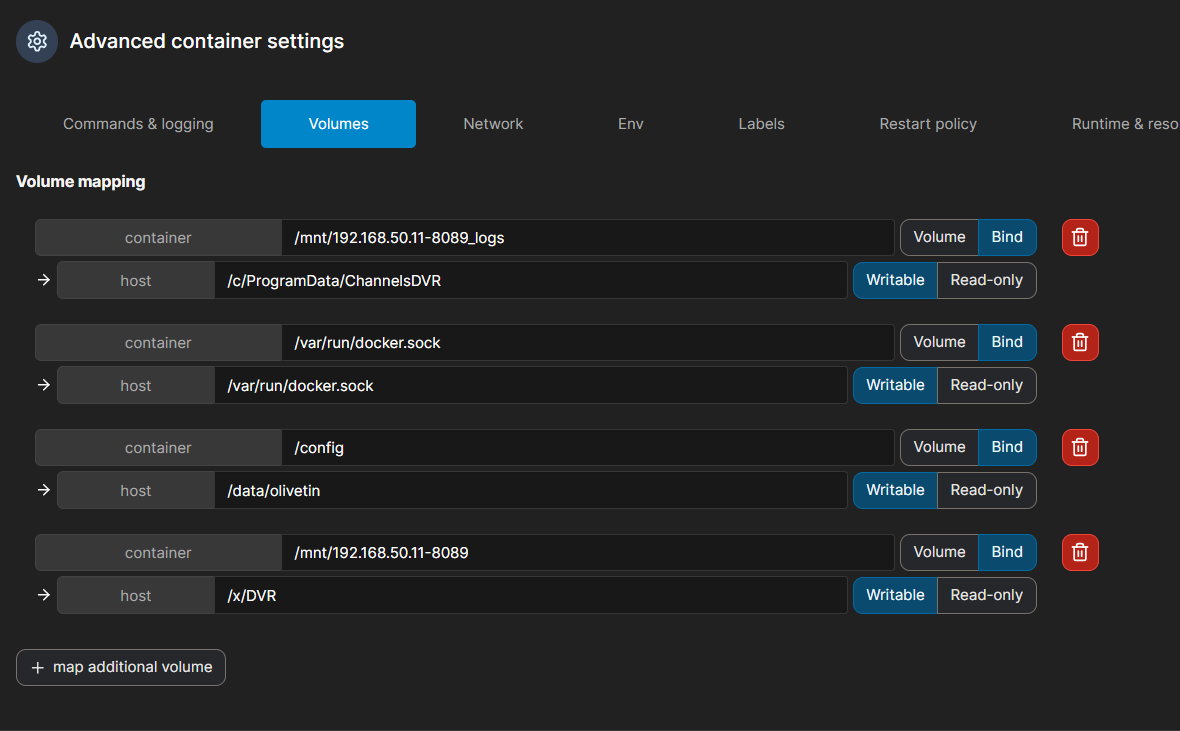
Be aware the current Windows style paths you're using won't work with newer versions of Docker. At some point you'll need to switch to /F/ instead of F:/ and /C/ instead of C:/. I believe those drive letters can be either upper or lower case.

One of the discoveries working with @Edwin_Perez today... :slight_smile:

Thought this would be quick and easy, but no, it's Synology.

Removed and deleted my current OliveTin for Channels Portainer Stack.
Deleted the images.
Deleted my host directories for OT4C and SFS.
Spun up a Channels DVR Server container.

Deploying the EZ-Start, not so EZ.

2025-03-23 14:24:01 Deployment error: Failed to deploy a stack: compose up operation failed: Error response from daemon: driver failed programming external connectivity on endpoint static-file-server-ezstart (47b78c35e9304b9277ee05ef9def9d01b781fc9e4d89e1fd0a2aeceeb2dbad15): Bind for 0.0.0.0:8080 failed: port is already allocated.
 Fixed by adding env var HOST_SFS_PORT=8088
2025-03-23 14:29:26 Deployment error: Failed to deploy a stack: compose up operation failed: Error response from daemon: Bind mount failed: '/olivetin/data' does not exists
 Fixed by adding env var HOST_DIR=/volume1/docker and created Host directory /volume1/docker/olivetin/data
2025-03-23 14:38:14 Deployment error: Failed to deploy a stack: compose up operation failed: Error response from daemon: Bind mount failed: '/volume1/docker-ezstart' does not exists.
 Issue is Compose volumes: - ${HOST_DIR:-olivetin}${EZ_START:-/olivetin}:/config # Add the parent directory on your Docker you'd like to use.

That's where I stopped. I don't want to modify anything in the compose.

Makes sense, and I'll make a change here as static-file-server isn't important to the process, so I'll see what I can do to prevent that from being an issue.

This is more puzzling, as one of the EZ-Start concepts is to not use a directory binding at all, but rather use a Docker Volume. Does Synology require Docker Volumes to be created in advance too, like it does with directory bindings?

Basically the same issue here regarding Docker Volumes.

@chDVRuser Based on some quick research it appears this is the case. However, I may be able to use something called an Anonymous Volume. Which, are not persistent, but that's totally fine for this purpose. I'll check into it further...

1 Like

Synology Docker does create Container directories.
Synology Docker does NOT create Host directories.

What is this used for?

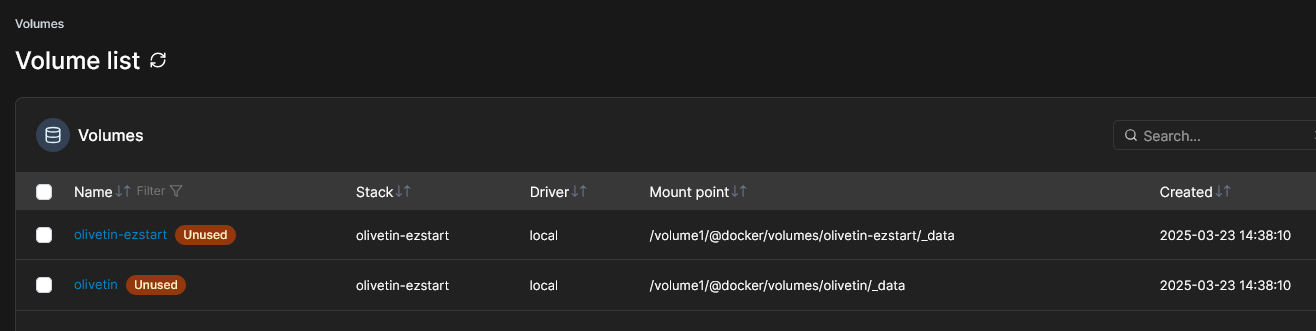
volumes: # use this section if you've setup a docker volume named channels-dvr, with CIFS or NFS, to bind to /mnt/dvr inside the container. Set ${DVR_SHARE} to channels-dvr (DVR_SHARE=channels_dvr) in that example.
  olivetin-ezstart:
    name: olivetin-ezstart
  olivetin:
    name: olivetin

I noticed these two docker volumes were created

I don't use Docker Volumes.
Everything I do is with Host directory bindings.