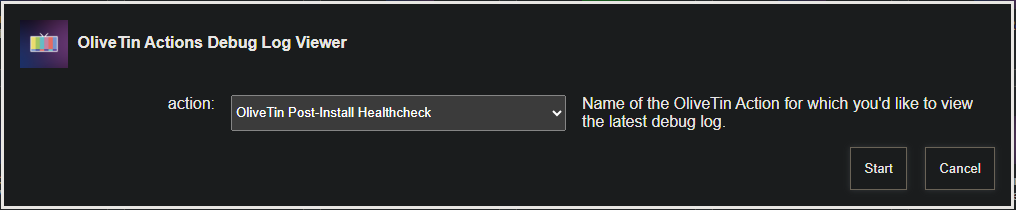
Trying spinning it up with the latest Docker compose, and those env vars.
Stop the stack, and paste the new compose into the editor followed by "Update the stack". Use the "Repull and re-deploy" slider as well

Trying spinning it up with the latest Docker compose, and those env vars.
Stop the stack, and paste the new compose into the editor followed by "Update the stack". Use the "Repull and re-deploy" slider as well
Thanks for the help!
This topic was automatically closed 30 days after the last reply. New replies are no longer allowed.
I'm a newbie trying to run this on an Asustor NAS, with Portainer and the CDVR both running on the same system. I had previously tried to get OliveTin working manually, but never got it going properly, so I removed the containers and stack from Portainer, and tried using this EZ-Start procedure.
After selecting the OliveTin Environment Variables Generator/Tester Action, I get Standard Error:
cat: /config/olivetin.token: No such file or directory
The Standard Output was as follows:
TAG=latest
DOMAIN=
HOST_PORT=1337
CHANNELS_DVR_HOST=192.168.50.40
CHANNELS_DVR_PORT=8089
CHANNELS_CLIENTS=
ALERT_SMTP_SERVER=
ALERT_EMAIL_FROM=
ALERT_EMAIL_PASS=
ALERT_EMAIL_TO=
UPDATE_YAMLS=true
UPDATE_SCRIPTS=true
TZ=
HOST_DIR=/data
DVR_SHARE=/volume1/MediaBank/Channels DVR
LOGS_SHARE=/usr/local/AppCentral/ChannelsDVR/channels-dvr
TUBEARCHIVIST_SHARE=/volume1/MediaBank/Channels DVR
DVR2_SHARE=
LOGS2_SHARE=
TUBEARCHIVIST2_SHARE=
DVR3_SHARE=
LOGS3_SHARE=
TUBEARCHIVIST3_SHARE=
HOST_SFS_PORT=8080
FOLDER=/web
PORTAINER_TOKEN=
PORTAINER_HOST=192.168.50.40
PORTAINER_PORT=9443
PORTAINER_ENV=2
PERSISTENT_LOGS=false
The instructions in this thread are for those that already have Portainer installed. Since you removed Portainer too (hopefully including the portainer_data volume), this is the set of instructions to follow:
Oops, I omitted that I have already reinstalled Portainer CE from the Asustor App Central, and have several stacks and packages running, so I'd prefer not to have to remove everthing again. That's why I'm not using the "Next Generation".
What should I do next?
Your env vars are looking pretty good, with just two that need attention.
First:
HOST_DIR=/data
Using /data as a value here is fine, as long as this is allowed by the OS on your ASUSTOR.
Second:
PORTAINER_TOKEN=
You need a PORTAINER_TOKEN. There's an Action on the Project One-Click page to create one. Be sure to copy-and-paste the value to a safe place, as you'll only see it when it's created.
Then, you can run the OliveTin Environment Variables Generator/Tester again and adjust the value for HOST_DIR (if needed), and PORTAINER_TOKEN. Copy the new set of env vars shown in Standard Output, stop the OliveTin stack, and paste this new set of values in the Environment variables section of the Portainer-Stacks editor in Advanced mode.
Click on Update the stack, and then run the OliveTin Post-Install Healthcheck to make sure everything looks correct. From there, you should be good-to-go.
Getting the error JSON response from https://192.168.0.20:9443/api/stacks/create/standalone/string?endpointId=: {"message":"Invalid query parameter: endpointId","details":"Missing query parameter"} false
I verified the api url and token are valid. Any ideas what could be causing this?
Looks like you're missing a PORTAINER_ENV value. If you're to the point where you're running the full version of OliveTin (not still in the midst of the EZ-Start process), can you post your OliveTin Post-Install Healthcheck? (anything sensitive is automatically redacted)
Thanks here is the Healthcheck: BTW I've tried PORTAINER_ENV 0-3 all return same error.
Checking your OliveTin-for-Channels installation...
(extended_check=true)

OliveTin Container Version 2025.07.21
OliveTin Docker Compose Version 2025.03.26

----------------------------------------

Checking that your selected Channels DVR server (192.168.0.51:8089) is reachable by URL:
HTTP Status: 200 indicates success...

  % Total    % Received % Xferd  Average Speed   Time    Time     Time  Current
                                 Dload  Upload   Total   Spent    Left  Speed

  0     0    0     0    0     0      0      0 --:--:-- --:--:-- --:--:--     0
100  1276  100  1276    0     0   138k      0 --:--:-- --:--:-- --:--:--  138k
HTTP Status: 200
Effective URL: http://192.168.0.51:8089/

----------------------------------------

Checking that your selected Channels DVR server's data files (/mnt/192.168.0.51-8089) are accessible:
Folders with the names Database, Images, Imports, Logs, Movies, Streaming and TV should be visible...

total 8
drwxr-xr-x 2 root root 4096 Jul 24 21:37 .
drwxr-xr-x 1 root root 4096 Jul 27 15:36 ..
drwxr-xr-x 2 root root    0 Jul 26 22:05 Database
drwxr-xr-x 2 root root    0 Jul 20 12:49 Images
drwxr-xr-x 2 root root    0 Jul 24 16:52 Imports
drwxr-xr-x 2 root root    0 Sep  5  2020 Live TV
drwxr-xr-x 2 root root    0 Jun 27  2022 Logs
drwxr-xr-x 2 root root    0 Oct  6  2023 Movies
drwxr-xr-x 2 root root    0 Jul  5 22:10 Streaming
drwxr-xr-x 2 root root    0 Jul  9 10:53 TV

Docker reports your current DVR_SHARE setting as...
/mnt/data/supervisor/media/DVR/Channels

If the listed folders are NOT visible, AND you have your Channels DVR and Docker on the same system:

Channels reports this path as...
Z:\Recorded TV\Channels

When using WSL with a Linux distro and Docker Desktop, it's recommended to use...
/mnt/z/Recorded TV/Channels

----------------------------------------

Checking that your selected Channels DVR server's log files (/mnt/192.168.0.51-8089_logs) are accessible:
Folders with the names data and latest should be visible...

total 4
drwxr-xr-x 2 root root    0 Jun 27  2022 .
drwxr-xr-x 1 root root 4096 Jul 27 15:36 ..
drwxr-xr-x 2 root root    0 May 12 04:24 comskip
drwxr-xr-x 2 root root    0 May 12 04:24 recording

Docker reports your current LOGS_SHARE setting as...
/mnt/data/supervisor/media/DVR/Channels/Logs

If the listed folders are NOT visible, AND you have your Channels DVR and Docker on the same system:

Channels reports this path as...
C:\ProgramData\ChannelsDVR

When using WSL with a Linux distro and Docker Desktop, it's recommended to use...
/mnt/c/ProgramData/ChannelsDVR

----------------------------------------

Checking if your Portainer token is working on ports 9000 and/or 9443:

Portainer http response on port 9000 reports version
Portainer Environment ID for local is
Portainer https response on port 9443 reports version 2.32.0
Portainer Environment ID for local is

----------------------------------------

Here's a list of your current OliveTin-related settings:

HOSTNAME=olivetin
CHANNELS_DVR=192.168.0.51:8089
CHANNELS_DVR_ALTERNATES=another-server:8089 a-third-server:8089
CHANNELS_CLIENTS=appletv4k firestick-master amazon-aftkrt
ALERT_SMTP_SERVER=smtp.gmail.com:587
ALERT_EMAIL_FROM=[Redacted]@gmail.com
ALERT_EMAIL_PASS=[Redacted]
ALERT_EMAIL_TO=[Redacted]@gmail.com
UPDATE_YAMLS=true
UPDATE_SCRIPTS=true
PORTAINER_TOKEN=[Redacted]
PORTAINER_HOST=192.168.0.20
PORTAINER_PORT=9443
PORTAINER_ENV=1

----------------------------------------

Here's the contents of /etc/resolv.conf from inside the container:

# Generated by Docker Engine.
# This file can be edited; Docker Engine will not make further changes once it
# has been modified.

nameserver 127.0.0.11
search lan
options ndots:0

# Based on host file: '/etc/resolv.conf' (internal resolver)
# ExtServers: [host(192.168.0.1) host(2603:7000:b500:15f8::1)]
# Overrides: []
# Option ndots from: internal

----------------------------------------

Here's the contents of /etc/hosts from inside the container:

127.0.0.1	localhost
::1	localhost ip6-localhost ip6-loopback
fe00::	ip6-localnet
ff00::	ip6-mcastprefix
ff02::1	ip6-allnodes
ff02::2	ip6-allrouters
172.19.0.2	olivetin

----------------------------------------

Your WSL Docker-host is running:

 FIFO pipe not found. Is the host helper script running?
Run sudo -E ./fifopipe_hostside.sh "$PATH" from the directory you have bound to /config on your host computer

----------------------------------------

Your WSL Docker-host's /etc/resolv.conf file contains:

FIFO pipe not found. Is the host helper script running?
Run sudo -E ./fifopipe_hostside.sh "$PATH" from the directory you have bound to /config on your host computer

----------------------------------------

Your WSL Docker-host's /etc/hosts file contains:

FIFO pipe not found. Is the host helper script running?
Run sudo -E ./fifopipe_hostside.sh "$PATH" from the directory you have bound to /config on your host computer

----------------------------------------

Your WSL Docker-host's /etc/wsl.conf file contains:

FIFO pipe not found. Is the host helper script running?
Run sudo -E ./fifopipe_hostside.sh "$PATH" from the directory you have bound to /config on your host computer

----------------------------------------

Your Windows PC's %USERPROFILE%\.wslconfig file contains:

FIFO pipe not found. Is the host helper script running?
Run sudo -E ./fifopipe_hostside.sh "$PATH" from the directory you have bound to /config on your host computer


----------------------------------------

Your Windows PC's etc/hosts file contains:

FIFO pipe not found. Is the host helper script running?
Run sudo -E ./fifopipe_hostside.sh "$PATH" from the directory you have bound to /config on your host computer

----------------------------------------

Your Windows PC's DNS server resolution:

FIFO pipe not found. Is the host helper script running?
Run sudo -E ./fifopipe_hostside.sh "$PATH" from the directory you have bound to /config on your host computer

----------------------------------------

Your Windows PC's network interfaces:

FIFO pipe not found. Is the host helper script running?
Run sudo -E ./fifopipe_hostside.sh "$PATH" from the directory you have bound to /config on your host computer

----------------------------------------

Your Tailscale version is:

FIFO pipe not found. Is the host helper script running?
Run sudo -E ./fifopipe_hostside.sh "$PATH" from the directory you have bound to /config on your host computer

----------------------------------------```I'm pretty sure I see the problem in my code. Give me a bit and I'll push a fix...
If you're comfortable editing a Bash script, could you edit lines 15 & 16 in portainerstack.sh that look like this:
portainerEnv=$(curl -s -k -H "X-API-Key: $portainerToken" "http://$portainerHost:9000/api/endpoints" | jq '.[] | select(.Name=="local") | .Id') \
  && [[ -z $portainerEnv ]] && portainerEnv=$(curl -s -k -H "X-API-Key: $portainerToken" "https://$portainerHost:$portainerPort/api/endpoints" | jq '.[] | select(.Name=="local") | .Id')`
And make this small change (get rid of backslash at the end of the first line, and delete the && at the beginning of the second):
portainerEnv=$(curl -s -k -H "X-API-Key: $portainerToken" "http://$portainerHost:9000/api/endpoints" | jq '.[] | select(.Name=="local") | .Id')
  [[ -z $portainerEnv ]] && portainerEnv=$(curl -s -k -H "X-API-Key: $portainerToken" "https://$portainerHost:$portainerPort/api/endpoints" | jq '.[] | select(.Name=="local") | .Id')
This should correct a logic flaw (on my part) that affects people with only https enabled in Portainer. Let me know if that works.
Killed the container, made the change, restarted container. Same error:
Checking your OliveTin-for-Channels installation...
(extended_check=true)

OliveTin Container Version 2025.07.21
OliveTin Docker Compose Version 2025.03.26

----------------------------------------

Checking that your selected Channels DVR server (192.168.0.51:8089) is reachable by URL:
HTTP Status: 200 indicates success...

  % Total    % Received % Xferd  Average Speed   Time    Time     Time  Current
                                 Dload  Upload   Total   Spent    Left  Speed

  0     0    0     0    0     0      0      0 --:--:-- --:--:-- --:--:--     0
100  1276  100  1276    0     0   155k      0 --:--:-- --:--:-- --:--:--  155k
HTTP Status: 200
Effective URL: http://192.168.0.51:8089/

----------------------------------------

Checking that your selected Channels DVR server's data files (/mnt/192.168.0.51-8089) are accessible:
Folders with the names Database, Images, Imports, Logs, Movies, Streaming and TV should be visible...

total 8
drwxr-xr-x 2 root root 4096 Jul 24 21:37 .
drwxr-xr-x 1 root root 4096 Jul 27 16:16 ..
drwxr-xr-x 2 root root    0 Jul 26 22:05 Database
drwxr-xr-x 2 root root    0 Jul 20 12:49 Images
drwxr-xr-x 2 root root    0 Jul 24 16:52 Imports
drwxr-xr-x 2 root root    0 Sep  5  2020 Live TV
drwxr-xr-x 2 root root    0 Jun 27  2022 Logs
drwxr-xr-x 2 root root    0 Oct  6  2023 Movies
drwxr-xr-x 2 root root    0 Jul  5 22:10 Streaming
drwxr-xr-x 2 root root    0 Jul  9 10:53 TV

Docker reports your current DVR_SHARE setting as...
/mnt/data/supervisor/media/DVR/Channels

If the listed folders are NOT visible, AND you have your Channels DVR and Docker on the same system:

Channels reports this path as...
Z:\Recorded TV\Channels

When using WSL with a Linux distro and Docker Desktop, it's recommended to use...
/mnt/z/Recorded TV/Channels

----------------------------------------

Checking that your selected Channels DVR server's log files (/mnt/192.168.0.51-8089_logs) are accessible:
Folders with the names data and latest should be visible...

total 4
drwxr-xr-x 2 root root    0 Jun 27  2022 .
drwxr-xr-x 1 root root 4096 Jul 27 16:16 ..
drwxr-xr-x 2 root root    0 May 12 04:24 comskip
drwxr-xr-x 2 root root    0 May 12 04:24 recording

Docker reports your current LOGS_SHARE setting as...
/mnt/data/supervisor/media/DVR/Channels/Logs

If the listed folders are NOT visible, AND you have your Channels DVR and Docker on the same system:

Channels reports this path as...
C:\ProgramData\ChannelsDVR

When using WSL with a Linux distro and Docker Desktop, it's recommended to use...
/mnt/c/ProgramData/ChannelsDVR

----------------------------------------

Checking if your Portainer token is working on ports 9000 and/or 9443:

Portainer http response on port 9000 reports version
Portainer Environment ID for local is
Portainer https response on port 9443 reports version 2.32.0
Portainer Environment ID for local is

----------------------------------------

Here's a list of your current OliveTin-related settings:

HOSTNAME=olivetin
CHANNELS_DVR=192.168.0.51:8089
CHANNELS_DVR_ALTERNATES=another-server:8089 a-third-server:8089
CHANNELS_CLIENTS=appletv4k firestick-master amazon-aftkrt
ALERT_SMTP_SERVER=smtp.gmail.com:587
ALERT_EMAIL_FROM=[Redacted]@gmail.com
ALERT_EMAIL_PASS=[Redacted]
ALERT_EMAIL_TO=[Redacted]@gmail.com
UPDATE_YAMLS=true
UPDATE_SCRIPTS=true
PORTAINER_TOKEN=[Redacted]
PORTAINER_HOST=192.168.0.20
PORTAINER_PORT=9443
PORTAINER_ENV=2

----------------------------------------

Here's the contents of /etc/resolv.conf from inside the container:

# Generated by Docker Engine.
# This file can be edited; Docker Engine will not make further changes once it
# has been modified.

nameserver 127.0.0.11
search lan
options ndots:0

# Based on host file: '/etc/resolv.conf' (internal resolver)
# ExtServers: [host(192.168.0.1) host(2603:7000:b500:15f8::1)]
# Overrides: []
# Option ndots from: internal

----------------------------------------

Here's the contents of /etc/hosts from inside the container:

127.0.0.1	localhost
::1	localhost ip6-localhost ip6-loopback
fe00::	ip6-localnet
ff00::	ip6-mcastprefix
ff02::1	ip6-allnodes
ff02::2	ip6-allrouters
172.19.0.2	olivetin

----------------------------------------

Your WSL Docker-host is running:

 FIFO pipe not found. Is the host helper script running?
Run sudo -E ./fifopipe_hostside.sh "$PATH" from the directory you have bound to /config on your host computer

----------------------------------------

Your WSL Docker-host's /etc/resolv.conf file contains:

FIFO pipe not found. Is the host helper script running?
Run sudo -E ./fifopipe_hostside.sh "$PATH" from the directory you have bound to /config on your host computer

----------------------------------------

Your WSL Docker-host's /etc/hosts file contains:

FIFO pipe not found. Is the host helper script running?
Run sudo -E ./fifopipe_hostside.sh "$PATH" from the directory you have bound to /config on your host computer

----------------------------------------

Your WSL Docker-host's /etc/wsl.conf file contains:

FIFO pipe not found. Is the host helper script running?
Run sudo -E ./fifopipe_hostside.sh "$PATH" from the directory you have bound to /config on your host computer

----------------------------------------

Your Windows PC's %USERPROFILE%\.wslconfig file contains:

FIFO pipe not found. Is the host helper script running?
Run sudo -E ./fifopipe_hostside.sh "$PATH" from the directory you have bound to /config on your host computer


----------------------------------------

Your Windows PC's etc/hosts file contains:

FIFO pipe not found. Is the host helper script running?
Run sudo -E ./fifopipe_hostside.sh "$PATH" from the directory you have bound to /config on your host computer

----------------------------------------

Your Windows PC's DNS server resolution:

FIFO pipe not found. Is the host helper script running?
Run sudo -E ./fifopipe_hostside.sh "$PATH" from the directory you have bound to /config on your host computer

----------------------------------------

Your Windows PC's network interfaces:

FIFO pipe not found. Is the host helper script running?
Run sudo -E ./fifopipe_hostside.sh "$PATH" from the directory you have bound to /config on your host computer

----------------------------------------

Your Tailscale version is:

FIFO pipe not found. Is the host helper script running?
Run sudo -E ./fifopipe_hostside.sh "$PATH" from the directory you have bound to /config on your host computer

----------------------------------------
Killing and restarting would restore the original script. Keep it running, make the change and try it out. If it works, I'll push an update. My testing says it'll work, but nothing like a real world test. 
@Lunatixz There might be something more going on here, as the Post-Install Healthcheck isn't returning a Portainer Environment ID, and it looks to me like it should.
Could you PM me the Healthcheck debug log using the new Action for that purpose? (Contains some sensitive info, that's why I'm requesting by PM)
Sent, Change didn't work... hanging at waiting for results...
Thanks for the help, if you need further testing pls let me know.
Could you exec into the OliveTin container and run:
curl -k -X GET --max-time 3 -H "X-API-Key: $PORTAINER_TOKEN" https://$PORTAINER_HOST:$PORTAINER_PORT/api/endpoints
You should either get a whole bunch of output, or just an error in JSON form. If it's a bunch of output, I'm only curious about "Id": which is right at the beginning. If it's an error, post it.
DM Sent
For the moment let's not worry about the healthcheck not showing the env id.
Instead, let's see if we can Project One-Click spin-ups working. First, stop the OliveTin stack and change your PORTAINER_ENV value to 1, as we now know that's the correct env id. Start the stack again, and then modify these lines in portainerstack.sh:
Lines 15 & 16 should currently look like this:
portainerEnv=$(curl -s -k -H "X-API-Key: $portainerToken" "http://$portainerHost:9000/api/endpoints" | jq '.[] | select(.Name=="local") | .Id') \
  && [[ -z $portainerEnv ]] && portainerEnv=$(curl -s -k -H "X-API-Key: $portainerToken" "https://$portainerHost:$portainerPort/api/endpoints" | jq '.[] | select(.Name=="local") | .Id')
I'd like you to add a space and a backslash to the end of line 16, and then add the third line below between the current line 16 & line 17:
portainerEnv=$(curl -s -k -H "X-API-Key: $portainerToken" "http://$portainerHost:9000/api/endpoints" | jq '.[] | select(.Name=="local") | .Id') \
  && [[ -z $portainerEnv ]] && portainerEnv=$(curl -s -k -H "X-API-Key: $portainerToken" "https://$portainerHost:$portainerPort/api/endpoints" | jq '.[] | select(.Name=="local") | .Id') \
  && [[ -z $portainerEnv ]] && portainerEnv="$PORTAINER_ENV"
This should allow us a fallback of using the value in PORTAINER_ENV if the curl commands are unsuccessful in getting the env id.
After that, try to add any project via Project One-Click...
EDIT: The above shouldn't be necessary. I'm fairly certain the non-standard name you're using for the local Portainer environment is at the root of this. Check my response to your last PM, but if you rename primary back to local everything should start working.