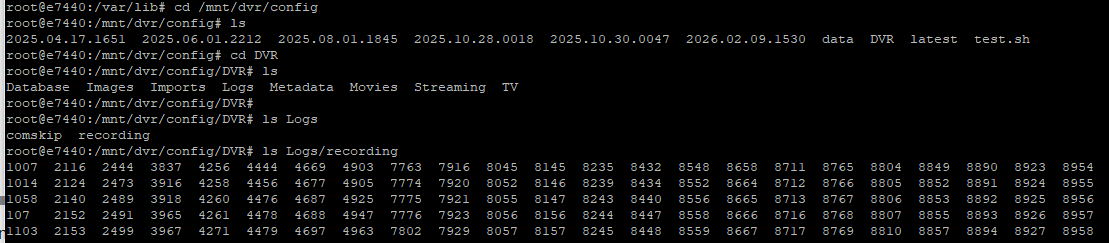
I don't think you'll need to go the EZ-Start route. The standard set of overrides looks like this, with your specifics where possible:
TAG=latest
DOMAIN=localdomain tailxxxxx.ts.net
HOST_PORT=1337
CHANNELS_DVR_HOST=192.168.1.249
CHANNELS_DVR_PORT=8089
CHANNELS_DVR2_HOST=
CHANNELS_DVR2_PORT=
CHANNELS_CLIENTS=
ALERT_SMTP_SERVER=
ALERT_EMAIL_FROM=
ALERT_EMAIL_PASS=
ALERT_EMAIL_TO=
UPDATE_YAMLS=true
UPDATE_SCRIPTS=true
TZ=US/Eastern
HOST_DIR=/var/lib/OliveTin
DVR_SHARE=/mnt/dvr/config/DVR
LOGS_SHARE=/mnt/dvr/config/DVR/Logs
TUBEARCHIVIST_SHARE=
DVR2_SHARE=
LOGS2_SHARE=
TUBEARCHIVIST2_SHARE=
DVR3_SHARE=
LOGS3_SHARE=
TUBEARCHIVIST3_SHARE=
HOST_SFS_PORT=8080
FOLDER=/web
PORTAINER_TOKEN=
PORTAINER_HOST=192.168.1.249
PORTAINER_PORT=9443
PORTAINER_ENV=2
PERSISTENT_LOGS=false
Sub-in your LAN's domain name (if possible. usually localdomain, lan or the like), also add your Tailnet if you use one (you'll thank me later), in the way shown above.
You'll need to generate a Portainer token called OliveTin, and add that in.
Otherwise, the only thing that looks funny is the path to your CDVR recordings (DVR_SHARE) vs the path to your CDVR executables (LOGS_SHARE) -- I don't think you have those correct.
There are other values you may want to add in the future, but these (with the few adjustments I mentioned will get you started).
EDIT: In your case, as a CDVR Docker user, your LOGS_SHARE value will come from the host directory you bound to /channels-dvr for the CDVR container.