
I found a really minor bug that I just thought I'd report it. I recently got a SofaBaton U2 Universal Remote. On Android TV I found the Page Down key scrolls the guide to the right, whereas Page Up properly pages the guide up. It seems to scroll to the right while also paging down at the same time. Again, really minor bug, but I thought I'd mention it since most may not encounter it without a universal remote.
I think this is a SofaBaton issue as the down button on the control wheel of the Google TV remote has no action while in the menus of cards (shows). While viewing a video it brings up options.
No, it's not, because I plugged in a USB keyboard and used the Page Down key and it behaved the same way.
Page Down should move the guide down a page and Page Up should move the guide up a page. But Page Up is working correctly, Page Down is scrolling to the right. It works properly on Apple TV, it just does not work properly on Android TV. And I confirm that it's not the SofaBaton because I actually plugged a keyboard into my Nvidia Shield and observed the same issue.
The SofaBaton appears as a bluetooth keyboard. So plugging in an actual USB keyboard does the same thing. It's sending Page Up and Page Down commands, which Channels should page the guide up and down. And also, while watching a show, channel surf, which it does correctly.
I missed the word guide when I read your post.
1 Like
No worries at all.
It's a minor issue, just hopefully the devs will see this.
I believe I posted about this many months ago. It was never fixed.
1 Like
I received an ONN Google TV remote yesterday. My Chromecast with Google TV remote which failed did not have page up and page down. If you look at the photo:
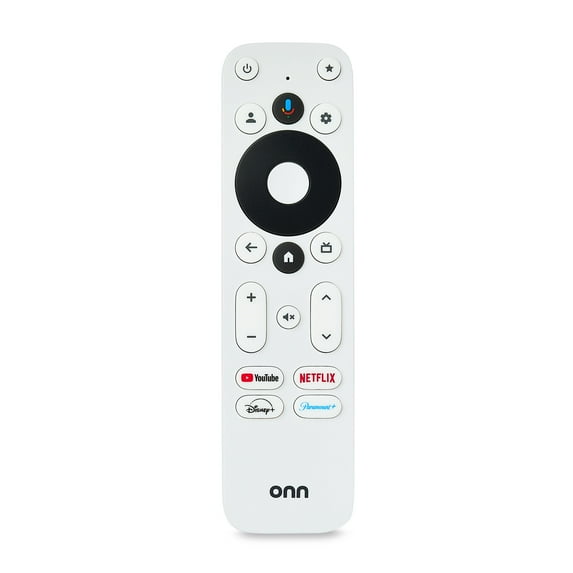
The up arrow and down on the right side of the remote are page up and page down. Each of them function as expected in the Channels DVR guide. I'm using the ONN Google TV remote with my Chromecast with Google TV. As the SofaBaton is configurable, you know know what the page down key must emulate and it sounds like it's not the same as a PC keyboard's page down.
1 Like
This is a supported function.
It's not going to work on a simple remote like that. It's literally keyboard, page up, page down, as in if you plugged in a USB keyboard. This SofaBaton remote acts as a Bluetooth keyboard to the Apple TV or Android TV box in use. Therefore it's sending effectively the same key code as a PC keyboard would.
"This SofaBaton remote acts as a Bluetooth keyboard to the Apple TV or Android TV box in use." Clearly that's not what the devices expect as at least the Google TV works with the page down key on the ONN Google TV Remote. This is what needs to be emulated, not a PC keyboard.
You're not understanding, I'm sorry.
The guide moves down with the key you're using. The guide is supposed to move down significantly. Not just one channel, like eight to ten channels at once.
I don't need to argue this with you. I already reported the bug. You're not understanding what I'm describing, and I'm sorry that that's the case.
1 Like
When I press the down arrow on the ONN remote, it jumps down many channels, I assume a page. The same for the up arrow. Your remote needs to send the same keycode. I suggest you talk to SofaBaton support.
As I've explained to you, I tested with an actual keyboard. It has nothing to do with sofa baton support.
It's a shame that you your desire is to have it work the way you wish as appose to the way it works. "No, it's not, because I plugged in a USB keyboard and used the Page Down key and it behaved the same way."
This is exactly the problem. You configured the SofaBaton to emulate a PC Keyboard and it's doing that. You need to configure the SofaBaton to emulate a Google TV remote.
You are not understanding that PC keyboard commands are supported functionality in Channels DVR.
With all due respect to you, you were simply wrong about this.
Please read the documentation below:
You are arguing with me at this point for no reason. I'm just simply reporting a bug based on functionality that is present in the software. You are not understanding that this is a legitimate issue and another user corroborated my bug. They reported it as well.
Wouldn't it be nice if Channels DVR behaved the way the documentation describes. Till then, you can either live with it or configure your SofaBaton to send a keycode that works.
Possibly the channels developers will see this and implement a fix.
There is no key code that works. That's what I'm trying to say. You don't have to be so argumentative.
I'm not complaining about the bug. I'm simply reporting it. I feel like you're arguing with me though for no reason. With all due respect, I'm going to stop responding to you now because the conversation is not going anywhere and it's simply not helpful.
If there is no key code that works, then how does the ONN remote arrow down cause a page down in the guide? Clearly it sends a key code that is understood. It's just not the key code for Page Down that the PC uses and every other device I know of.
With all due respect, this is a bug report for a very specific issue.As I said, this is not helpful. Page down from a keyboard, which is supported functionality, does not work properly on Android TV. It has nothing to do with the scan code that you're using on your remote. This is simply a bug report for functionality that is actively supported and documented that is not working as intended. Please stop hijacking the thread with mentions of scan codes that are not relevant to the bug report at hand. I'm really asking nicely. It's not helping. It's just cluttering up this thread with comments that are not relevant to the bug report that is at hand.
3 Likes
The app responds to these codes:
- KEYCODE_CHANNEL_DOWN
- KEYCODE_PAGE_DOWN
The behavior should be identical with either key code, so maybe Google added some other built-in page down behavior recently
Just tried on my streamer4k w/ Rii i6. same issue as @mackid1993
based on general quirkiness of the guide (see Shortcut Keys Crash Channels DVR) I checked some other stuff.
the channel column (by arrowing left) and pg down does work properly there.
It almost seems like it's acting more like an End key in excel when in the show fields
1 Like