PlayOn Cloud Integration Issue - Account not Yet Active

I signed into PlayOn Cloud, purchased credits and recorded some shows. I already had an account there from when I purchased the original desktop version back in the day. When linking the source in Channels it logs me in on the PlayOn side just fine. I get this error when I return to Channels:
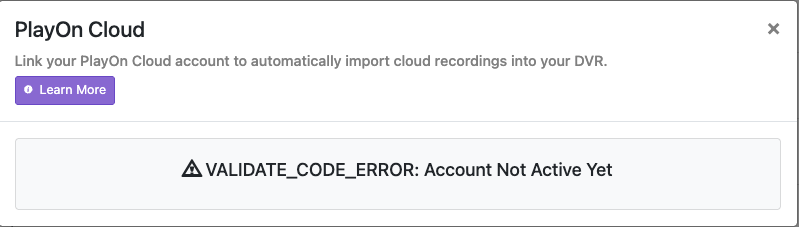
I have tried to login several times and cannot get it to link correctly to my server.

This seems to have been an issue with another user back in 2023 but he deleted his PlayOn account and started from scratch to fix it. I would rather not do that if possible as I just spent money on credits. @tmm1 mentioned at the end of the thread that they worked with PlayOn on the issue and it should be resolved. Hopefully there is an easy fix for this. The link to the original thread is here:

I think this can happen if your email isn't confirmed. Maybe you can reach out to their support, or see if there's a way to confirm your email in their interface.

Thanks for the reply. I will try to find a way to confirm and if not I will reach out to their support.

Hhi there,
Contact the support at Playon cloud.
The support people are responsive in my experience.

I’m having the same issues with my new play on account I set up tonight. As suggested above. I contacted Support and I am waiting on a response. I wonder if it is some type of overall issue they need to fix.

Log in to your PlayOn account from the PlayOn website. That will bring you to their My Account screen. If your email account needs verification, you should find a Verify Email link on that screen. Follow that link to verify your email, and you should be good to go.

I’ve done that and don’t see anywhere to verify my email. Also, when I link it from channels, it goes to a play on site that says it is linked but then when I go back to channels, it shows it’s unable to activate.

Hmmm. Unless there is some kind of clue in the Channels server log, your best bet is to do as was previously suggested and wait for a response from PlayOn support. Please post here when you hear back from them, as I'm curious what they'll tell you.

One more thing - Check the My Profile section of the PlayOn My account page. Is there a Verify Email link on that page?

Nothing in the Channels DVR logs. That was the first thing I checked.

There is no email verification or re-verify in the settings. I did "change" my email to the same email address to see if it would trigger a verification email but that didn't work either. I didn't want to change the email address so I thought I would try that way.

I should mention that this not only causes issues with the Channels DVR integration, but also their own PlayOn Cloud Downloader as it uses the same authentication method.

Their support got back to me with a temporary solution until they could fix the issue. The temporary solution was to download the recordings directly from the web portal at: PlayOn Cloud - Login

I will update the thread so that we have information that can hopefully help others in the future when facing this problem after I hear back from their support with a resolution.

They got back to me with the same solution as well. I need to copy the video files from my downloads folder and manually add them to the Channels. Still no solution for the Playon source to work, though.

In my experience, PlayOn support is very good. While they have provided you a workaround for your problem, I've never seen them call a workaround good enough and just not pursue a real solution. I feel confident that you'll hear back from them with a permanent solution. It might take a little while, but it will happen.

1 Like

In the grand scheme of things if it takes them a while it is not too big of an issue since the workaround is there for the time being.

That being said, I figured that if it was just the Channels integration it might take a while but since it effects their own downloader as well it should be something that they would want to fix quicker.

Support got it working for me now.

Same here! Took a little over a week but there support was super responsive to questions and helpful.

If anyone has this issue in the future please reach out to playOn's support team at [email protected] and they will take care of it for you.