
@bnhf @Rockies It appears Pluto does not like some of the changes I made. I am working on a fix now. Thank you.
I reverted the test and main branches back to 2.21 release which only added the username and password credentials. You can verify if your credentials work by going to
http://<your_server_ip>:<port>/<country_code>/token

e.g. http://127.0.0.1:7777/us_east/token
as before.
I got a little too cute with the changes. I will leave the main branch at 1.21 and only play around on the test branch. Sorry and thanks.
@Bobby_Vaughn @bnhf I reloaded container to v1.21 and everything looks good so far. It is now working in CDVR web guide and using 'us_east,ca,all' gets full 620 channels. I use 'all' in my CDVR definition to get all 620 channels and all the epg data. I noticed the verify url doesn't work but I don't think you had that feature yet in v1.21.
Edit: I am using the 'test' branch
Edit2: the log does show New token for us_east generated
You don't need to add all to the Pluto code on this build. That was one of the changes I made that reverted back to original. It should now work exactly as jgomez177's does with only username and password environment variables added to it. Thanks.
Yes it works without using 'all' in the container definition. Current container settings are 'us_east,ca'. I get all 620 channels with epg data by using 'all' in the CDVR source definition.
New bnhf/olivetin:latest (aka bnhf/olivetin:2025.09.20) pushed today with support for the @Bobby_Vaughn version of this project in Project One-Click. I'm handling it using pluto-for-channels2 as the stack/container name, and Pluto TV 2 as the CDVR Custom Channels Source name -- so you can run this side-by-side with the @joagomez or @maddox versions for testing:
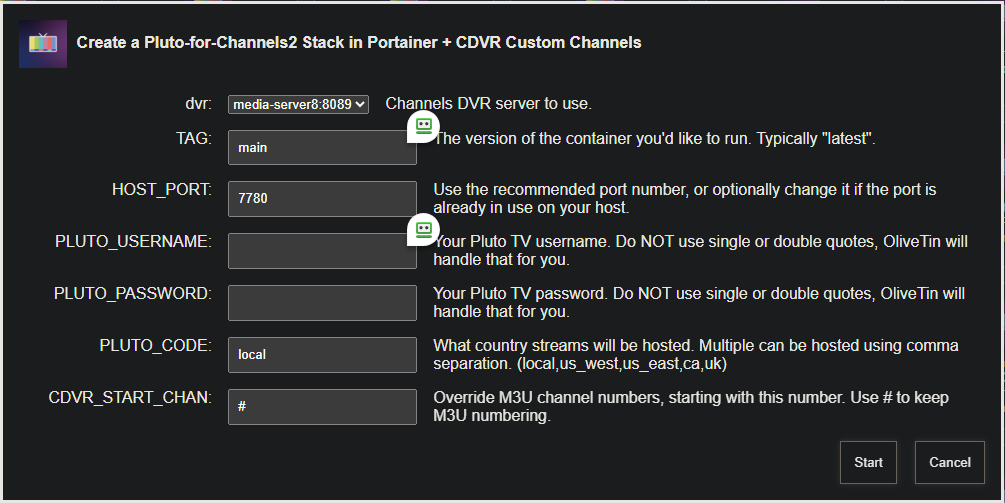
Any of the three versions can be removed using the Project One-Click delete Action. This deletes the CDVR Custom Channels source, the Portainer stack, and the container image -- so it totally clears the decks.
1 Like
I'll be less aggressive on the updates to the main branch. 
I just installed this new Pluto TV container and source yesterday to test things out. I'll go ahead and install by Project One-Click also, just to see how it goes.
1 Like
So, on my original Pluto source, I have many blocked channels. I'd like to block the exact same channels in the new source so that my channel lists and guides will match line by line.
I have selected "prefer channel numbers from M3U" which allocates the same numbers to both sources.
Is there an easy way to copy your blocked channels and/or favorites from one source to another?
I have yet to have any issues with Pluto, still using nocords as source.
Same here, but I have a feeling it's not going to last long. Fortunately all I really want is BBC World News and there's other sources for that.
Using the jgomez version of Pluto For Channels, I'm only seeing about 24 hrs of guide data. Is there a way to get more guide data pulled in? I'm trying to schedule recordings for scary movies to watch this month and the limited duration in the EPG makes this difficult.
1 Like
I think the default is 36 hours. It can be adjusted if you want to edit the pluto.py file. There are two places that need to be adjusted. Around line 225, find:
def update_epg(self, country_code, range_count = 3):
and around line 460 find:
range_count = 3
Those 3's are for how many 12 hour EPG segments you want. E.g. 3 * 12 hours = 36 hours. 4 would give you 48 hours of data.
I think that's all we get from Pluto. If we're pulling in 24 hours for that source, that's not bad. I just checked the Pluto website and app, and they only show the upcoming 12 hours in the guide...
1 Like
Interesting. I didn't know this. Do we know if there's actually more data to be pulled? As I just mentioned in my previous comment, the guide on the Pluto app and/or website only go out 12 hours.
1 Like
The easiest way would probably be trial and error. Change it and look at the container log to see at what duration is fails to retrieve data from pluto.
1 Like
But yeah, if you're not getting 36 hours of guide data, there isn't going to be any more past 36.
If the default is 36, I'm only getting 24 hours in my guide. So, I'll refrain from fiddling with it. Pluto's guide isn't always right on, either. I've had several series recordings be a few minutes off from the guide. Especially back to back recordings. Each one cumulatively got a little farther out of whack.
Any reason why my Pluto EPG data worked great initially when I set this up and not there's no guide data? I assume the Pluto For Channels pulls updated EPG data daily if not hourly.
If you're using the latest container, restart the container.
If you're not using the latest container, update it.
Then refresh the guide data.