
It hasn't?
Running portainer and everything was setup by your script?
@bnhf Any chance of making one change to your EZ-start?
I'd love to easily install everything BUT the channels DVR server on a PC in my house, to account for MacOS vs Windows + a GPU. I'm hoping this could be accomplished via a single parameter that would change whatever localhost item you use (assumed) to a parameter you could enter. Am I off base?
There are two versions of EZ-Start (3 for Windows). They all use a temporary installation of OliveTin to install everything else.
In each case though, you can choose what you want to install after you get the EZ-Start version of OliveTin running.
You can install Portainer, the full version of OliveTin, and anything supported by Project One-Click -- including CDVR Server. Your choice, once you have Portainer and the full version of OliveTin running.
Thanks! Understood. I guess I (badly) assumed that given the purpose, you would default to a localhost address for the DVR. If not, great!
I'm doing this strictly as a CC4C endpoint to test ESPN+
Big update to Project One-Click, via its parent project OliveTin-for-Channels:
@bnhf .
Here's the post install healthcheck you asked for from our discussion in the PrismCast thread. I'm running Channels in Windows with the server in my C drive and all other DVR folders in my E drive.
ls: cannot access '/mnt/192.168.88.240-8089': No such file or directory
ls: cannot access '/mnt/192.168.88.240-8089_logs': No such file or directory
jq: error (at <stdin>:0): Cannot index string with string "Name"
jq: error (at <stdin>:0): Cannot index string with string "Name"
Checking your OliveTin-for-Channels installation...
(extended_check=false)

OliveTin Container Version 2026.01.27
OliveTin Docker Compose Version 2025.08.25

----------------------------------------

Checking that your selected Channels DVR server (192.168.88.240:8089) is reachable by URL:
HTTP Status: 200 indicates success...

  % Total    % Received % Xferd  Average Speed   Time    Time     Time  Current
                                 Dload  Upload   Total   Spent    Left  Speed
100  1276  100  1276    0     0   416k      0 --:--:-- --:--:-- --:--:--  623k
HTTP Status: 200
Effective URL: http://192.168.88.240:8089/

----------------------------------------

Checking that your selected Channels DVR server's data files (/mnt/192.168.88.240-8089) are accessible:
Folders with the names Database, Images, Imports, Logs, Movies, Streaming and TV should be visible...


Docker reports your current DVR_SHARE setting as...


If the listed folders are NOT visible, AND you have your Channels DVR and Docker on the same system:

Channels reports this path as...
E:\DVR

When using WSL with a Linux distro and Docker Desktop, it's recommended to use...
/mnt/e/DVR

----------------------------------------

Checking that your selected Channels DVR server's log files (/mnt/192.168.88.240-8089_logs) are accessible:
Folders with the names data and latest should be visible...


Docker reports your current LOGS_SHARE setting as...


If the listed folders are NOT visible, AND you have your Channels DVR and Docker on the same system:

Channels reports this path as...
C:\ProgramData\ChannelsDVR

When using WSL with a Linux distro and Docker Desktop, it's recommended to use...
/mnt/c/ProgramData/ChannelsDVR

----------------------------------------

Checking if your Portainer token is working on ports 9000 and/or 9443:

Portainer http response on port 9000 reports version 2.33.6
Portainer Environment ID for local is
Portainer https response on port 9443 reports version 2.33.6
Portainer Environment ID for local is

----------------------------------------

Here's a list of your current OliveTin-related settings:

HOSTNAME=olivetin
CHANNELS_DVR=192.168.88.240:8089
CHANNELS_DVR_ALTERNATES=
CHANNELS_CLIENTS=
ALERT_SMTP_SERVER=
ALERT_EMAIL_FROM=[Redacted]@
ALERT_EMAIL_PASS=[Redacted]
ALERT_EMAIL_TO=[Redacted]@
UPDATE_YAMLS=true
UPDATE_SCRIPTS=true
PORTAINER_TOKEN=[Redacted]
PORTAINER_HOST=192.168.88.240
PORTAINER_PORT=9443
PORTAINER_ENV=2

----------------------------------------

Here's the contents of /etc/resolv.conf from inside the container:

# Generated by Docker Engine.
# This file can be edited; Docker Engine will not make further changes once it
# has been modified.

nameserver 127.0.0.11
options ndots:0

# Based on host file: '/etc/resolv.conf' (internal resolver)
# ExtServers: [host(192.168.65.7)]
# Overrides: []
# Option ndots from: internal

----------------------------------------

Here's the contents of /etc/hosts from inside the container:

127.0.0.1       localhost
::1     localhost ip6-localhost ip6-loopback
fe00::  ip6-localnet
ff00::  ip6-mcastprefix
ff02::1 ip6-allnodes
ff02::2 ip6-allrouters
172.21.0.2      olivetin
This is the part we want to get working first, though there's also a problem with the paths you're using.
Typically, when Portainer versions are reported, but not Environment ID numbers, that means there's a problem with your Portainer Token. I'd suggest going into Portainer, and under the dropdown in the upper-right corner for your Username, go into My Account and delete the existing olivetin token and create a new one. Store it in a safe place.
Stop your olivetin stack, and replace the old token with the new and click Update the stack. Rerun the healthcheck and hopefully you'll see ID #'s where there are none now.
Also, while you're at it, you might try replacing your current values for DVR_SHARE and LOGS_SHARE with the values suggested in the healthcheck. So, it'd be:
DVR_SHARE=/mnt/e/DVR
LOGS_SHARE=/mnt/c/ProgramData/ChannelsDVR
and let's see if that fixes the lack of access to those two directories. Windows can be a bit of a pain when it comes to this whole area of Linux vs Windows paths. But those paths should work on recent versions of Windows 11.
EDIT: Also, please confirm your Portainer environment is named local. People have, on rare occasions, changed that default name -- which is another reason this could be failing.
Well, I'm part way there. PrismCast installed and is working, but access to those folders is still not available. I've tried multiple methods to input those values, but the healthcheck still doesn't show them. The container shows the volumes as /mnt/e/DVR/mnt/- for the DVR Share and /mnt/c/ProgramData/ChannelsDVR/mnt/-_logs for the Logs Share.
First, could you just confirm for me that you haven't made any changes directly to the Docker Compose?
And second, could you post your complete list of env vars here (you'll need to make a few manual redactions)? Go into the Environment variables section of the Portainer-Stacks Editor in Advanced mode to grab it.
For example, here's mine:
TAG=latest
DOMAIN=localdomain tailxxxxx.ts.net
HOST_PORT=1337
CHANNELS_DVR_HOST=media-server8
CHANNELS_DVR_PORT=8089
CHANNELS_DVR2_HOST=utheater-pc
CHANNELS_DVR2_PORT=8089
CHANNELS_CLIENTS=appletv4k firestick-master
ALERT_SMTP_SERVER=smtp.gmail.com:587
ALERT_EMAIL_FROM=[Redacted]
ALERT_EMAIL_PASS=[Redacted]
ALERT_EMAIL_TO=[Redacted]
UPDATE_YAMLS=true
UPDATE_SCRIPTS=true
TZ=US/Mountain
HOST_DIR=/data
DVR_SHARE=/mnt/dvr
LOGS_SHARE=/mnt/channelsdvr
TUBEARCHIVIST_SHARE=/mnt/dvr
DVR2_SHARE=
LOGS2_SHARE=
TUBEARCHIVIST2_SHARE=
DVR3_SHARE=
LOGS3_SHARE=
TUBEARCHIVIST3_SHARE=
HOST_SFS_PORT=8081
FOLDER=/web
PORTAINER_TOKEN=[Redacted]
PORTAINER_HOST=htpc6
PORTAINER_PORT=9443
PORTAINER_ENV=2
PERSISTENT_LOGS=false
Confirmed, no changes to the compose. Here's the info;
TAG=latest
DOMAIN=local
HOST_PORT=1337
CHANNELS_DVR_HOST=192.168.88.240
CHANNELS_DVR_PORT=8089
CHANNELS_DVR2_HOST=
CHANNELS_DVR2_PORT=
CHANNELS_CLIENTS=
ALERT_SMTP_SERVER=
ALERT_EMAIL_FROM=
ALERT_EMAIL_PASS=
ALERT_EMAIL_TO=
UPDATE_YAMLS=true
UPDATE_SCRIPTS=true
TZ=America/Los_Angeles
HOST_DIR=/data
DVR_SHARE=/mnt/e/dvr
LOGS_SHARE=/mnt/c/ProgramData/ChannelsDVR
TUBEARCHIVIST_SHARE=
DVR2_SHARE=
LOGS2_SHARE=
TUBEARCHIVIST2_SHARE=
DVR3_SHARE=
LOGS3_SHARE=
TUBEARCHIVIST3_SHARE=
HOST_SFS_PORT=
FOLDER=
PORTAINER_TOKEN=[Redacted]
PORTAINER_HOST=192.168.88.240
PORTAINER_PORT=9443
PORTAINER_ENV=2
PERSISTENT_LOGS=false
@bnhf PrismCast issues hoping you might have suggestion.
2026/02/05 12:01:07.267708 [ERR] Could not start stream for M3U-prismcast ch11992 FX (Pacific): M3U: Could not fetch playlist from win11pc:5589 (Timeout): Get "http://win11pc:5589/hls/fxp/stream.m3u8": net/http: timeout awaiting response headers
2026/02/05 12:01:07.799016 [TNR] Opened connection to 131718F9/0 for ch1409 FXPHD
Any corresponding action in the PrismCast log?
just tried again, channels log.
2026/02/05 12:52:22.735450 [ERR] Could not start stream for M3U-prismcast ch11954 ABC: M3U: Could not fetch playlist from win11pc:5589: GET: http://win11pc:5589/hls/abc/stream.m3u8: 503 Service Unavailable
2026/02/05 12:52:23.265236 [TNR] Opened connection to 131718F9/0 for ch1004 KOMODT
2026/02/05 12:53:22.934785 [SNR] Statistics for ch1004 KOMODT: ss=100% snq=100% seq=100% bps=6519739,209056-6919904 pps=558,18-593
2026/02/05 12:53:22.934785 [SNR] Buffer statistics for 192.168.50.250 (OnePlus 9 Pro 5G) for ch1004 KOMODT: buf=0% drop=0%
2026/02/05 12:53:22.938969 [TNR] Closed connection to 131718F9/0 for ch1004 KOMODT
PrismCast log.
[2026/02/05 20:52:22.735] GET /hls/abc/stream.m3u8 from 172.24.0.1 responded 503 in 0.513 ms.
The site is currently linked to Xfinity perhaps thats why it is opening the HDHR Prime.
Also noticing the timestamps are not matching up.
Try both the PrismCast URL, and the URL it resolves to in VLC. And, you can also try the URL it resolves to in another browser, as a sanity check. 503 is kind of a weird error, indicating a temporary unavailability, as opposed to a 404 error.
Well the link plays in Edge with no problem.
Does not play in VLC.
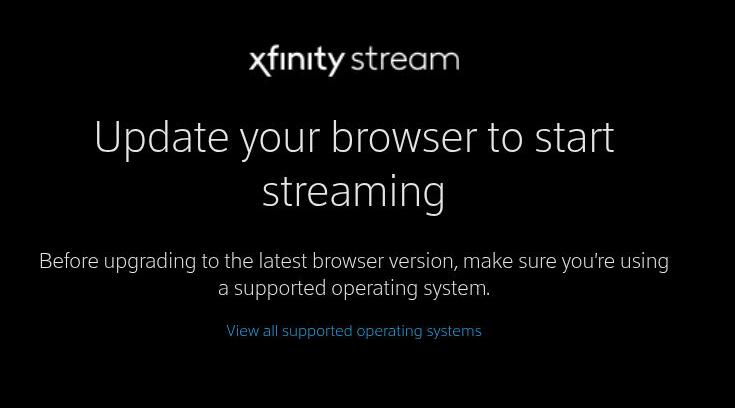
I just now clicked on TV provider Xfinity in the no VNC window and got this on screen.
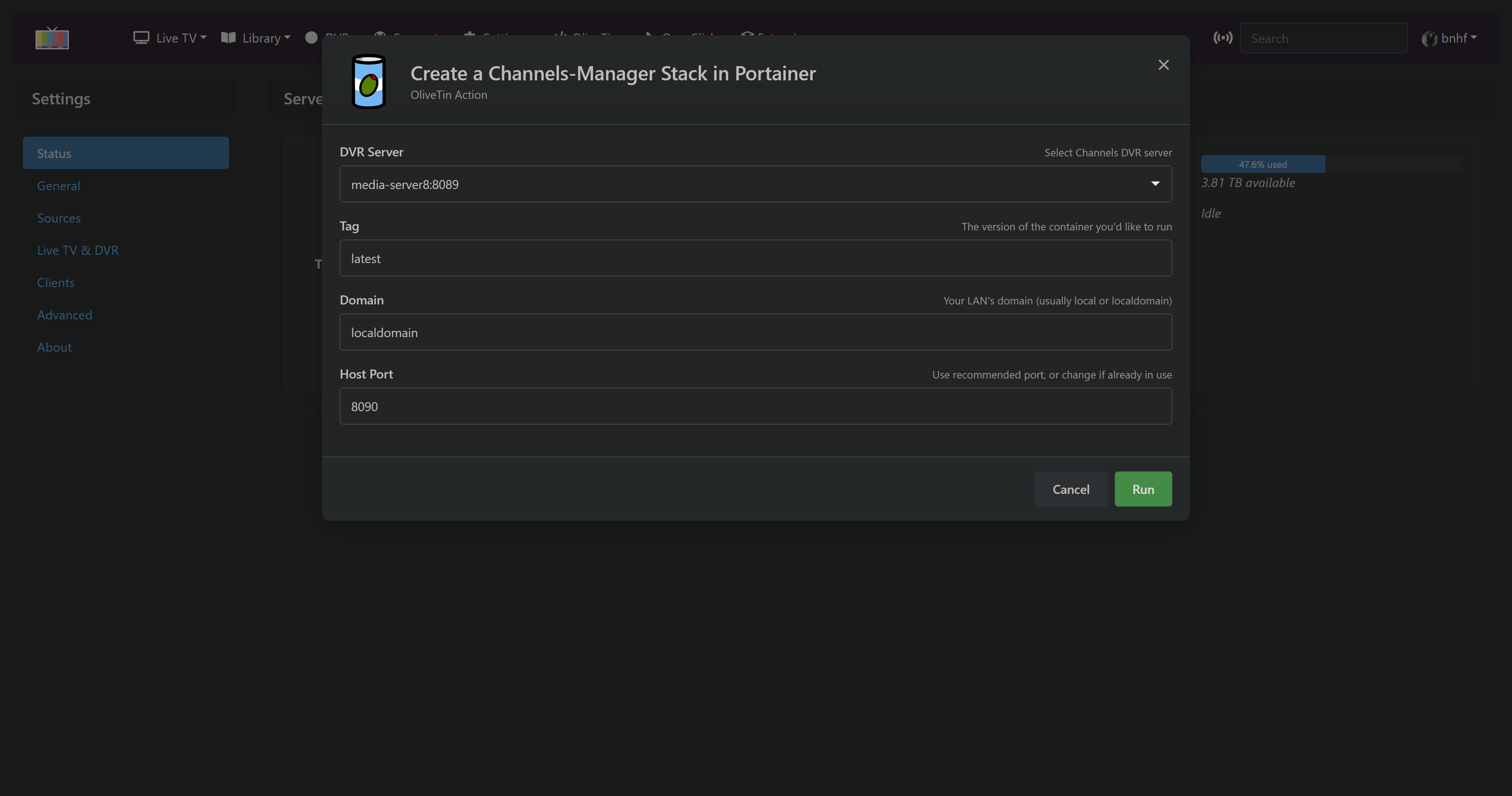
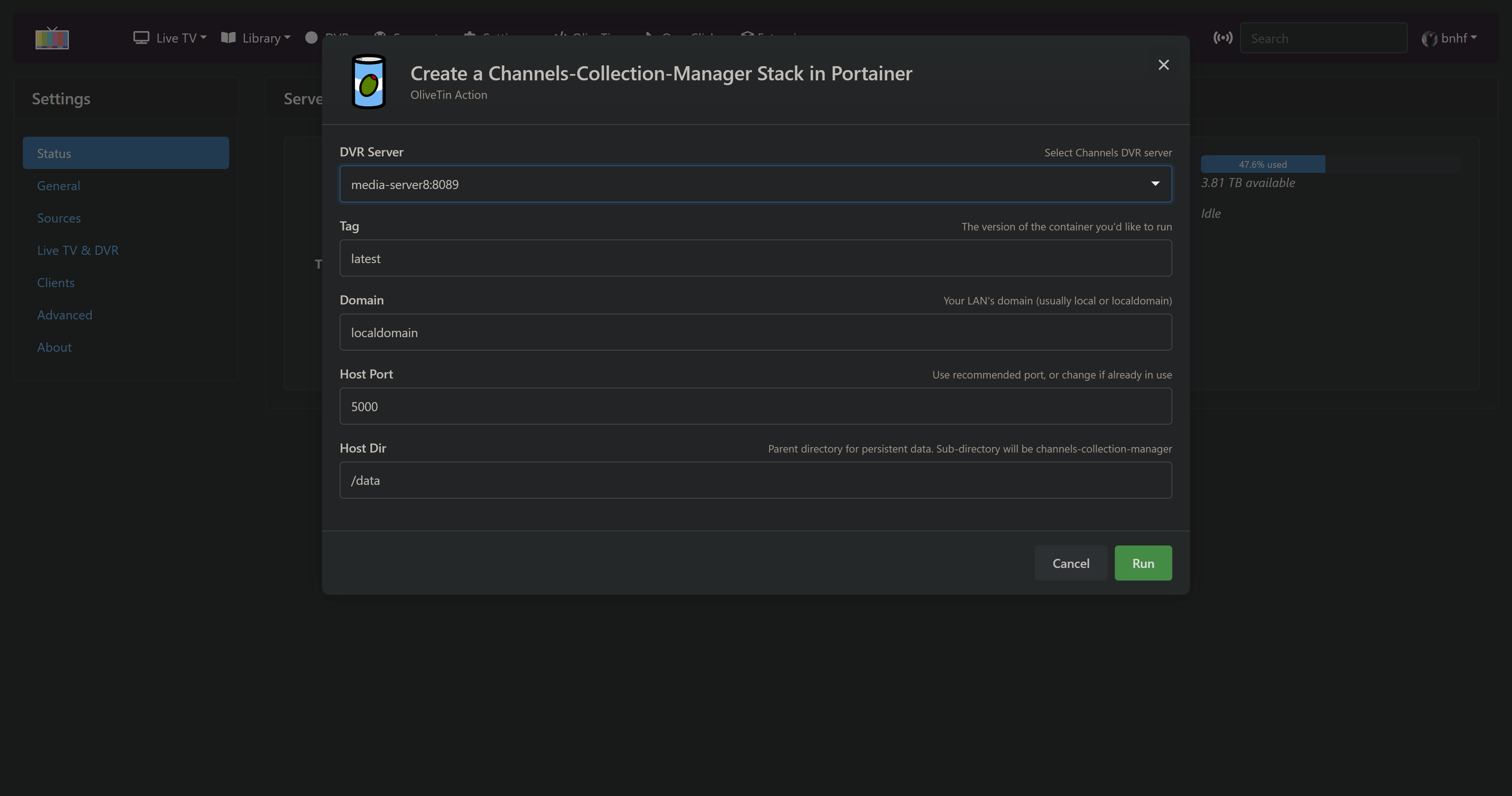
New bnhf/olivetin:latest (aka bnhf/olivetin:2026.03.08 ) pushed this morning with Project One-Click support for two new extensions:
More details here:
And here:
As always with Project One-Click, it's super easy to add and/or delete a project -- which makes it very nice to "kick the tires" on a project with only a few minutes of work.
All with the new integrated feel of running OliveTiin as though it were an integrated part of the CDVR WebUI:
1 Like
I'm currently setting up a from scratch channels with everything based out of project one click - has worked really well so far - i spun up cc4c and it works great for weather
also installed the weatherstar and it doesn't work - not sure if the issue is connected to olivetin or the app itself
trying to setup adbtuner to work with google streamer and Hulu live. In Olivetin I clicked "
Create an ADBTuner Stack in Portainer + CDVR Custom Channels" button and got the following result:
JSON response from http://192.168.10.10:9000/api/stacks/create/standalone/string?endpointId=6:
{
"Id": 13,
"Name": "adbtuner",
"Type": 2,
"EndpointId": 6,
"SwarmId": "",
"EntryPoint": "docker-compose.yml",
"Env": [
{
"name": "TAG",
"value": "latest"
},
{
"name": "DOMAIN",
"value": "localdomain"
},
{
"name": "HOST_PORT",
"value": "5592"
},
{
"name": "HOST_VOLUME",
"value": "adbtuner_config"
}
],
"ResourceControl": {
"Id": 30,
"ResourceId": "6_adbtuner",
"SubResourceIds": [],
"Type": 6,
"UserAccesses": [],
"TeamAccesses": [],
"Public": false,
"AdministratorsOnly": true,
"System": false
},
"Status": 1,
"ProjectPath": "/data/compose/13",
"CreationDate": 1773256412,
"CreatedBy": "admin",
"UpdateDate": 0,
"UpdatedBy": "",
"AdditionalFiles": null,
"AutoUpdate": null,
"Option": null,
"GitConfig": null,
"FromAppTemplate": false,
"Namespace": ""
}
true
JSON response from 192.168.10.10:8089:
{"error":"failed to load m3u: failed to retrieve m3u: GET: http://192.168.10.10:5592/channels.m3u: 502 Bad Gateway"}
Any ideas?
I should add that I'm running channels in a container on a Synology NAS but I didn't use portainer to build the channels dvr container. If I need to redo channels dvr via portainer I can do that if needed.