
Thank you. I'll try all of that and post the results. I likely won't be able to get to it until Wednesday, though.
I followed the steps to the letter and got all of the way to Create an Olivin Stack but got the following:
> JSON response from http://192.168.150.242:9000/api/stacks/create/standalone/string?endpointId=:
> {"message":"Invalid JWT token","details":"Unauthorized"}
false
I confirmed prior to starting the Portainer and Olivetin install process that Portainer was removed following the steps you gave me. I also entered the three envir variables you gave me using my local directory.
1 Like
I believe the issue has to be with the password you're choosing when installing Portainer through EZ-Start. If you're willing to hang with me, this is something I'd really like to get to the bottom of, both for your benefit and potentially future users.
If you try to access Portainer, does it accept the password you used in EZ-Start process, or is it asking you to create a password? If it does accept the password you used, and you look under the admin-My account dropdown, do see an Access token named olivetin?
I use lastpass password manager so it's just logging in under the password I created months ago. There's not an olvetin access token.
If it's a throwaway password (i.e. is a password you don't use elsewhere), would you mind sending it to me via PM? I'm virtually certain the password is at the root of this problem now, as it sounds like you've been consistently using it.
If you send it, I'll do an install here myself with your password, and figure out where things are going wrong...
PM sent. Thank you.
For anyone following along on this issue, the cause appears to have been related to password length. The Portainer default minimum password length is 12 characters, so you want to be sure to conform to that requirement when spinning-up Portainer using OliveTin EZ-Start:
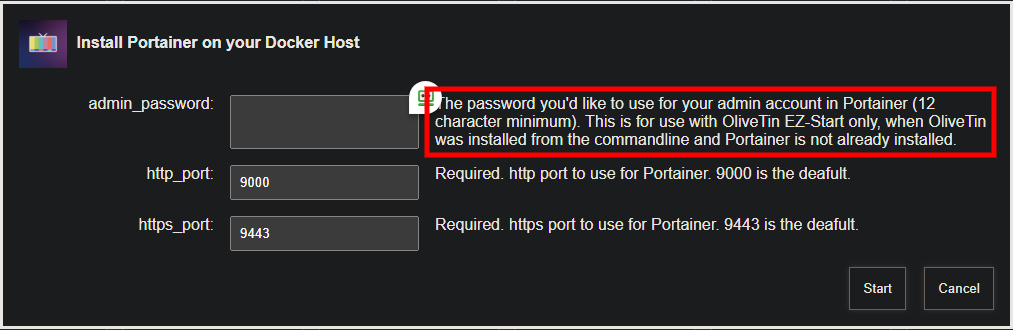
I'll add a check in future versions of OliveTin to confirm a minimum length password is being used.
1 Like
Added in bnhf/olivetin:latest (aka bnhf/olivetin:2025.07.09)
2 Likes
New bnhf/olivetin:latest (aka bnhf/olivetin:2025.09.13) pushed today with support for TV-Logo-Manager. More details here:
This update includes numerous enhancements to ah4c deployments through Project One-Click. Spinning-up an ah4c stack for DirecTV in particular, should be especially quick-and-easy for any of these devices using the STREAMER_APP and M3U_NAME values listed below:
FireTV, ONN or CCwGTV streaming sticks:
STREAMER_APP=scripts/firetv/dtvstreamdeeplinks
CDVR_M3U_NAME=dtvstreamdeeplinks.m3u
Osprey streaming boxes:
STREAMER_APP=scripts/osprey/dtvosprey
CDVR_M3U_NAME=dtvosprey.m3u
Here's what the Action looks like. Data required for each field is described, but in addition to the couple of values above, you'll need the details (IPs or hostnames and URLs) for your streaming devices and encoders:
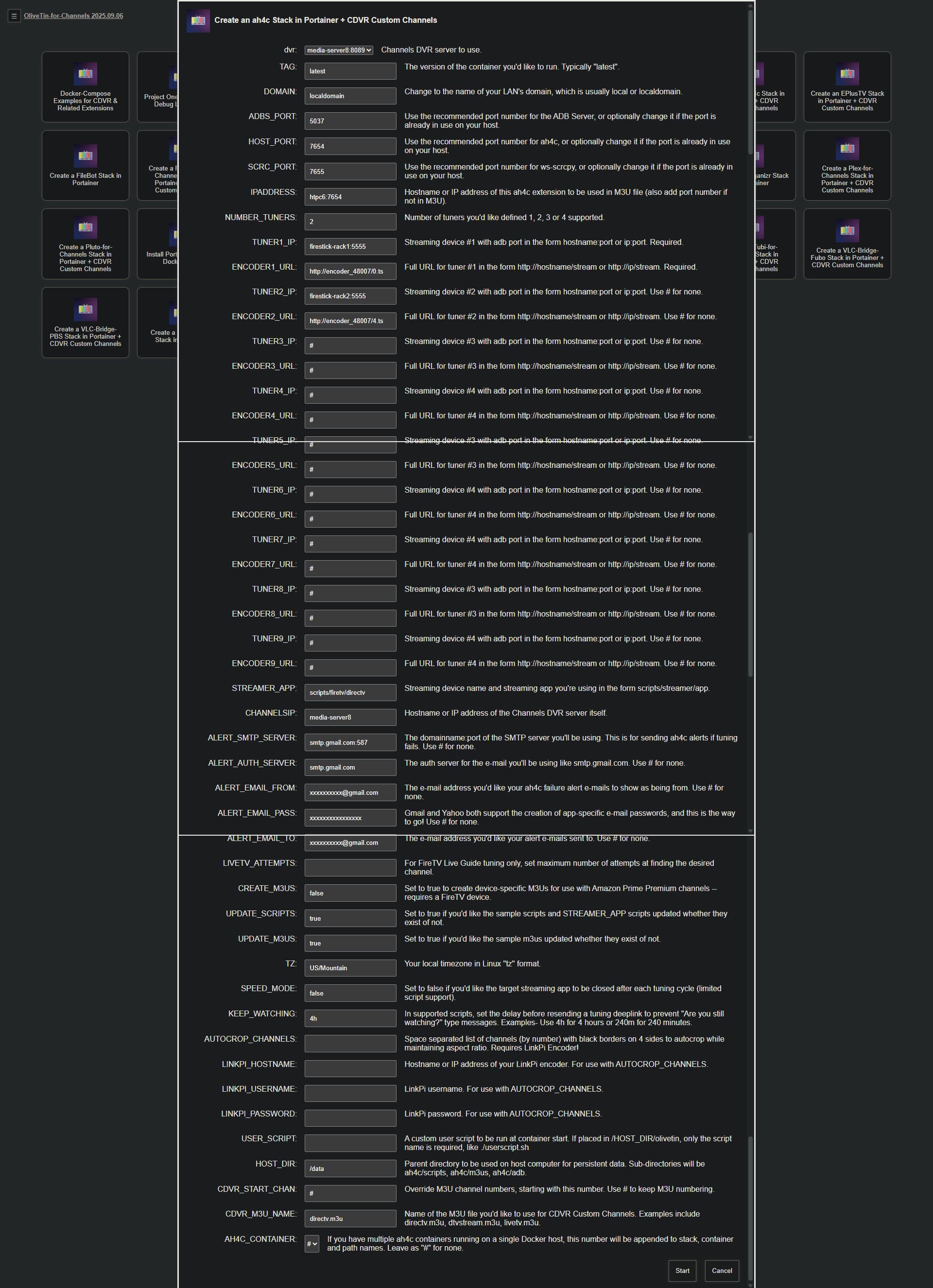
With the proper data entered, this Action will spin-up the stack, and add the Custom Channels Source to your CDVR Server. Assuming you've already activated developer options, and USB debugging on your device, installed the DTV app, and logged in -- approving the ADB connection on each device is about all you should need to do, before you can try to tune to one of the channels in your subscribed package!
19 posts were split to a new topic: Need Help Installing OliveTin on a QNAP NAS with CDVR Running on a Windows PC
failed to load m3u context deadline exceeded? I didn't do anything
I'm not following. What are we talking about here?
All of my custom m3u playlist say that now?
Maybe the LAN IP address of your Docker host has changed?
It hasn't?
Running portainer and everything was setup by your script?
@bnhf Any chance of making one change to your EZ-start?
I'd love to easily install everything BUT the channels DVR server on a PC in my house, to account for MacOS vs Windows + a GPU. I'm hoping this could be accomplished via a single parameter that would change whatever localhost item you use (assumed) to a parameter you could enter. Am I off base?
There are two versions of EZ-Start (3 for Windows). They all use a temporary installation of OliveTin to install everything else.
In each case though, you can choose what you want to install after you get the EZ-Start version of OliveTin running.
You can install Portainer, the full version of OliveTin, and anything supported by Project One-Click -- including CDVR Server. Your choice, once you have Portainer and the full version of OliveTin running.
Thanks! Understood. I guess I (badly) assumed that given the purpose, you would default to a localhost address for the DVR. If not, great!
I'm doing this strictly as a CC4C endpoint to test ESPN+
Big update to Project One-Click, via its parent project OliveTin-for-Channels: