
Use the Pluto History Channel. It is like how History used to me. More history, less big foot and ancient aliens content.
Hulu failing to authenticate on most channels. Latest prerelease.
2025/02/12 06:01:09.312553 [TVE] action=tvejs msg="hulu login not found"
Logs have been submitted as a92cf0a1-0cd4-4415-acbf-b2cd420b6fb8
Here is the error screenshot I’m getting:

1 Like
Just tried to play FS1 and BTN on my phone on the road. Neither work. ESPN works.

Pretty much when the cookie expires that’s it. For me discovery family is the only stuff still working. Hopefully they are working on it. @maddox @tmm1 @eric
1 Like
I've version 2025.02.14.1649 and Channels is getting a Captcha in the login screen to Hulu Live. Any suggestions on how to work around this?
Switch to YTTV. I was on hulu and always had this issue. Bonus is that YTTV looks 1000% better on my hdmi capture device with adb tuner. Didnt realize how much hulu live sucked..
1 Like
Yes, of course. fc4aca77-1f55-403c-8f90-83aad298599a
1 Like
Zero issues with adding YTTV as a TVE source?
Is there a link/page showing the exact channel differences with YTTV and Hulu for TVE channels avail?
@BigMikeSantaCruz your diagnostics are reporting "Wrong password. Please update your password and try again." You'll need to change your password to fix this.
1 Like
Thanks, but I've changed the password a half-dozen times since before and after I posted my call for help. I don't actually believe the password is the problem if it's using the one I enter when I create a new TVE source.
It is timing out after 12 seconds in each failure. It passes Adobe authentication, then times out and returns, "hulu login not found".
2025/02/16 17:56:41.217558 [TVE] action=request type=Document method=GET url=https://auth.hulu.com/oauth2/login redirected_from=https://sp.auth.adobe.com/adobe-services/authenticate/saml
2025/02/16 17:56:41.217576 [TVE] action=auth_domain domain=.hulu.com
2025/02/16 17:56:41.528334 [TVE] action=wait_for_page
2025/02/16 17:56:47.805543 [TVE] action=page_ready
2025/02/16 17:56:47.805600 [TVE] action=wait_for_page done=true reason=page_ready
2025/02/16 17:56:47.805662 [TVE] action=wait_for_auth timeout=12s
2025/02/16 17:56:47.805668 [TVE] action=fill_form [email protected]
2025/02/16 17:56:47.809470 [TVE] action=tvejs msg="hulu login not found"
2025/02/16 17:56:59.806445 [TVE] action=check_result
2025/02/16 17:56:59.808688 [TVE] action=auth_timed_out
260a6fcc-2bfb-4395-9fed-9f1f8680b95e
The logs you just posted do not line up with what I'm seeing in your diagnostics. The only thing I'm seeing from around that time is:
2025/02/16 18:01:27.179579 [TVE] action=script_error err=Wrong password. Please update your password and try again.
but no TVE connections around 2025/02/16 17:56:47.
I apologize. That's probably my fault. I have more than one DVR and I must have mixed up the the two. Although they are both experiencing the same problem.
In an effort to resolve this, I considered that maybe DVR has an old password cached and isn't using the one I enter. I've changed Hulu's password ten times in the last day or so. I keep a record of my old passwords in my password manager, so I changed Hulu's password to some of the old ones that worked back in 08/2023 (this all used to work!) and I retried adding Hulu as a TVE source without success. So I feel I can dismiss this as a possible problem.
I had Hulu on the phone for two hours yesterday, and they've escalated my case and suggest they'll respond within 72 hours. I can surmise that I am alone in this problem, and that this isn't a systemic problem with Channels DVR.
But I can promise that I'm changing the password, verifying it by logging into Hulu with my browser, and using the username/same password when I try to add Hulu as a TVE source.
b06e554c-8a93-479d-a97d-5ff810693b04
I've had YTTV for the last 18 months. I'm trying to switch away from it because I can't stand their interface for watching NBC Sports and some other networks that don't work with TVE.
Posting here for people who may come later...
After having some issues with channels not streaming, I removed Hulu as a source, and went to re-add it. That was a mistake. Try to avoid that, even if it means you wait several days to see if a new beta resolves the issue.
I could not add Hulu as a source. I received the 2FA emails, with no ability to authenticate. After trying several things, several times, none of it working, I will tell you how I got going again.
I started a chat with Hulu support, and had to confirm all my account info. I informed them I had a computer that I was trying to use TVE, but that computer cannot use 2FA, so I needed to authenticate with name and password only. They tried to start troubleshooting, asking about what browser I was using,m but I redirected them saying "This computer cannot use 2FA, no amount of troubleshooting the browser or connection will change that. I need to authenticate this computer with username and password only." They escalated support and came back and said to try again. I went to my Hulu account, to "Manage Devices", and removed my web browser that was trying to authenticate. I then added the source to Channels .... and it worked.
Evidently, by doing this, you can have them temporarily bypass 2FA to get a device added to the account. I wish they still allowed disabling 2FA in your account so this extra headache was no necessary.
Hopefully this helped someone!
2 Likes
Using Hulu with TVE is a nightmare. I wouldn't recommend using this service anyways for TVE. To get it working is just too many steps. I commend you for pushing on tho 
wow, i had this working for a couple of years no issues at all, yesterday i rebooted the NAS - and oops i hit this issue
Given that channels can take a picture of the error message from the embedded web page, is there really no way to make it make a popup for the MFA that can be entered into what i assume is an MFA prompt that is not happening because it is an embedded browser?
2025/07/06 10:03:36.902148 [TVE] Auth starting for Hulu as redacted
2025/07/06 10:03:38.260395 [TVE] action=auth mvpd=Hulu requestor=nbcentertainment
2025/07/06 10:03:40.783059 [TVE] action=version product=Chrome/129.0.6668.59 jsVersion=12.9.202.18 protocol=1.3 revision=@8591405f2525be5aa06c825e3051a243c42a80f1
2025/07/06 10:03:40.794320 [TVE] action=page_ready chromeVersion=129
2025/07/06 10:03:40.795506 [TVE] action=navigate url=https://sp.auth.adobe.com/adobe-services/authenticate/saml?noflash=true&mso_id=Hulu&requestor_id=nbcentertainment&no_iframe=true&domain_name=adobe.com®_code=&redirect_url=https%3A%2F%2Fsp.auth.adobe.com%2Fadobe-services%2FcompletePassiveAuthentication
2025/07/06 10:03:40.798274 [TVE] action=request type=Document method=GET url=https://sp.auth.adobe.com/adobe-services/authenticate/saml
2025/07/06 10:03:46.514611 [TVE] action=request type=Document method=GET url=https://auth.hulu.com/oauth2/login redirected_from=https://sp.auth.adobe.com/adobe-services/authenticate/saml
2025/07/06 10:03:46.514695 [TVE] action=auth_domain domain=.hulu.com
2025/07/06 10:03:46.614517 [TVE] action=wait_for_page
2025/07/06 10:03:54.319947 [TVE] action=page_ready
2025/07/06 10:03:54.320074 [TVE] action=wait_for_page done=true reason=page_ready
2025/07/06 10:03:54.320222 [TVE] action=fill_form u=username-redacted
2025/07/06 10:03:54.320215 [TVE] action=wait_for_auth timeout=12s
2025/07/06 10:03:54.327020 [TVE] action=tvejs msg="huluLogin: found username"
2025/07/06 10:04:00.078347 [TVE] action=page_ready
2025/07/06 10:04:00.078456 [TVE] action=check_result
2025/07/06 10:04:00.083220 [TVE] action=tvejs msg="huluLogin wrong password"
2025/07/06 10:04:00.083568 [TVE] action=screenshot
2025/07/06 10:04:00.244145 [TVE] action=screenshot file=tve_error_screenshot.png size=112923
2025/07/06 10:04:00.440081 [TVE] action=capture_html
2025/07/06 10:04:00.451634 [TVE] action=capture_html file=tve_error_screenshot.html size=180341
2025/07/06 10:04:00.452337 [TVE] action=capture_html
2025/07/06 10:04:00.462603 [TVE] action=capture_html file=tve_error_screenshot.html size=180341
2025/07/06 10:04:00.902961 [TVE] action=script_error err=Wrong password. Please update your password and try again.
2025/07/06 10:04:01.595910 [TVE] Auth failed for Hulu: Wrong password. Please update your password and try again.
either way the log message is wrong, the issue is NOT a wrong password unless the TVE integration is mangling my password for some reason (like it has ! in the password?)
--edit--
hmm, interestingly if i go to that first URL in the log and login with the right username and password, i get this... maybe something more here?
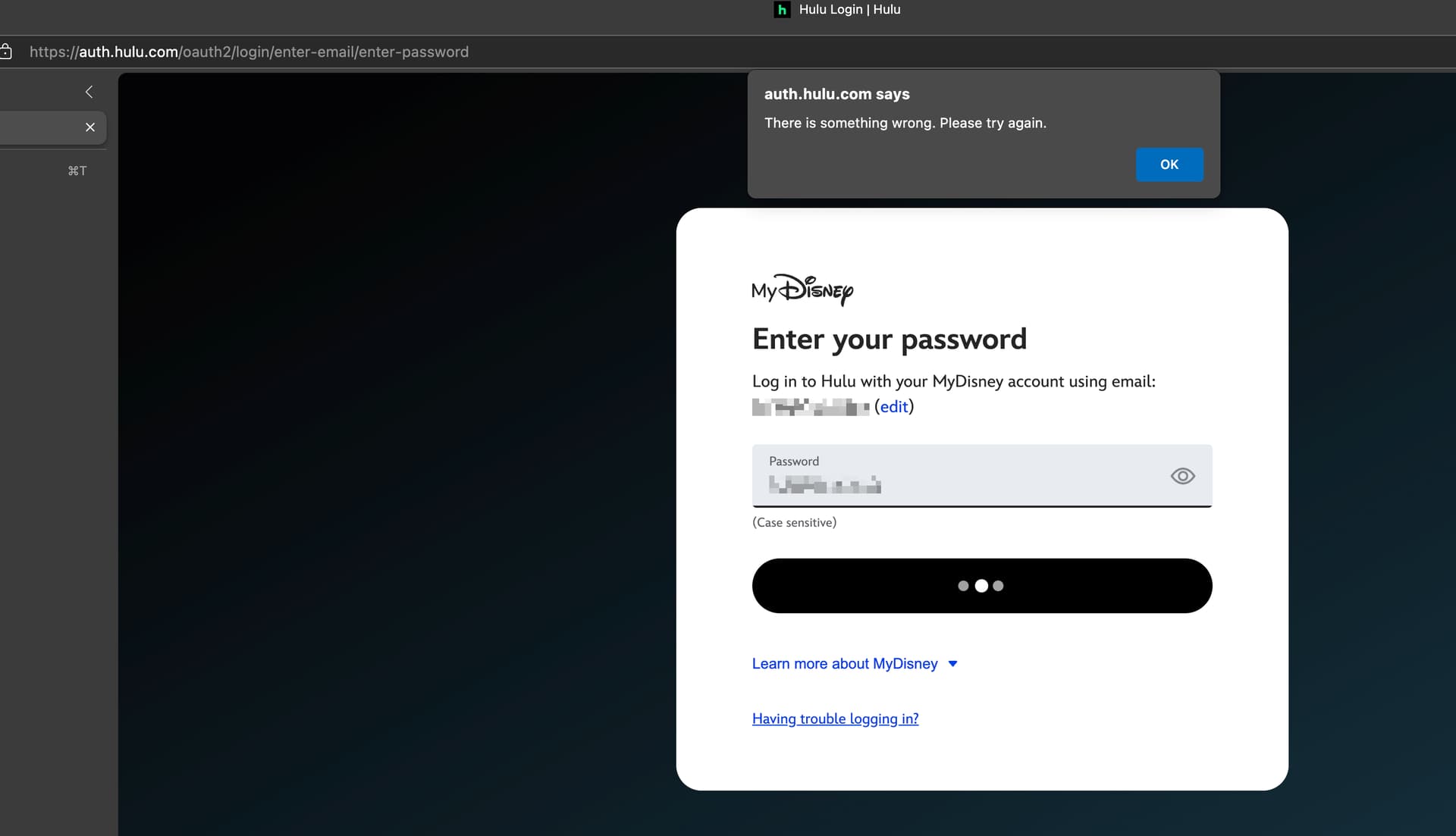
it defintely sends an email one time code along with this attempt at passive login.... which would seem to indicate that MFA is enable on the passive API and that API provides no way to enter MFA interactively..... did disney break their API, lol.
And i tested again, it doesn't send an MFA when channels is using the passive API. So that was a silly idea i posted above.
What's wild is the hulu devices page says that TVE was added today.
Do you have a Disney+ sub?
Did you recently add it or change the password on it?
If so, it changes your Hulu Live password.
I would change the Hulu password, then update password on your CDVR source to match and try again.
Might not hurt to delete all TVE devices appearing on your account first.