
Developers, are you able to get HLN working? Please advise.
Latest pre-release v2026.03.07.2248
I'm seeing this in the DVR log when trying to play the HLN TVE channel.
2026/03/07 19:19:13.323869 [HLS] Couldn't generate stream playlist for ch6031-dANY-ip192.168.1.8: TVE: Stream Not Available
1 Like
Funny - FS1/FS2/BTN just stopped working for me:
not entitled: mvpd: Resource is not supported by MVPD
I checked mine just now and all three of those are working. Probably a temporary authentication issue. I get that quite often with those three channels.
Replying to this as well as I have YouTube TV with TV Everywhere via channels. At some point in the last month or so I lost access from Channels to many networks. Most notably the full ESPN family of channels and FX. I tried to "Rescan All Channels" and that didn't do anything.
I still get quite a few TV Everywhere channels including TBS, TNT, AMC, TMC, FS1, FS2, B1G, CBS Sports and like 80 others. So it isn't a straight authentication issue but for some reason I lost ESPN, FX, and I'm sure many more. Other people having this problem and tips on what I should do to fix? Channels server is running on an N100 mini PC (Win 11). YTTV TVE lineup below still lists ESPN:
It was all over the forum a while back...
Okay, so it's not just me... Figured that was the case but search didn't turn it up for me. Thanks for confirming my fears.
1 Like
Appears to be an issue again authenticating with YouTube TV TVE judging by other topics created.
1 Like
I have a brand new Mac mini runningChannels DVR version 2026.05.18. Storage is configured. Mychannels DVR server running normally. Subscribed to Youtube Base Plan. Can watch TV in Web browser.Fails to add TV Everywhere in Channels. Authentication fails. Frequently redirects to AMC . Is this a known issue? Is there a workaround?
A few others are having the same issue ...
https://community.getchannels.com/t/youtube-tv-login/46617
Read the post above yours. There are already 4 topics created for the issue.
Submit diagnostics from the DVR web UI Support > Troubleshooting
This fixed it, thank you!
1 Like
Thank you for fixing this!!!!!!!!!! I'm getting YTTV and it's got a lot of TVE channels!
Update: I installed the latest pre-release that includes the YouTube TV login fix. This did not fix it for me, My Channels DVR Server is updated and running normally. Storage is configured. I sell selected YouTube tv under tv everywhere. Either dress nothing or redirects to AMC After restarting the Mac mini simply returns to username and password without opening YouTube tv auth. page. Is there another workaround I can try?.ect YouTube TV under TV Everywhere, but clicking Sign In either does nothing or previously redirected me to the AMC login page. The Learn More button opens normally, so the browser can launch external pages. Is there a diagnostic log or another workaround I should try
Run DVR diagnostics.
DVR web UI
Support > Troubleshooting
Look for all green checkmarks
See https://getchannels.com/docs/channels-dvr-server/tv-everywhere/provider-help/#youtube-tv
1 Like
I think this might be the first time I've seen this for YTTV TVE on TCM, happening right now for "Chuck Amuck: The Movie"

So I tried it from a web browser, and apparently this show isn't available for streaming in any fashion with a YTTV sub.
TVE authentication with YTTV is broken again. Can’t get past AMC. Have tried three different logins (family account) and the issue persists. Running CDVR v2026.09.30.1801.
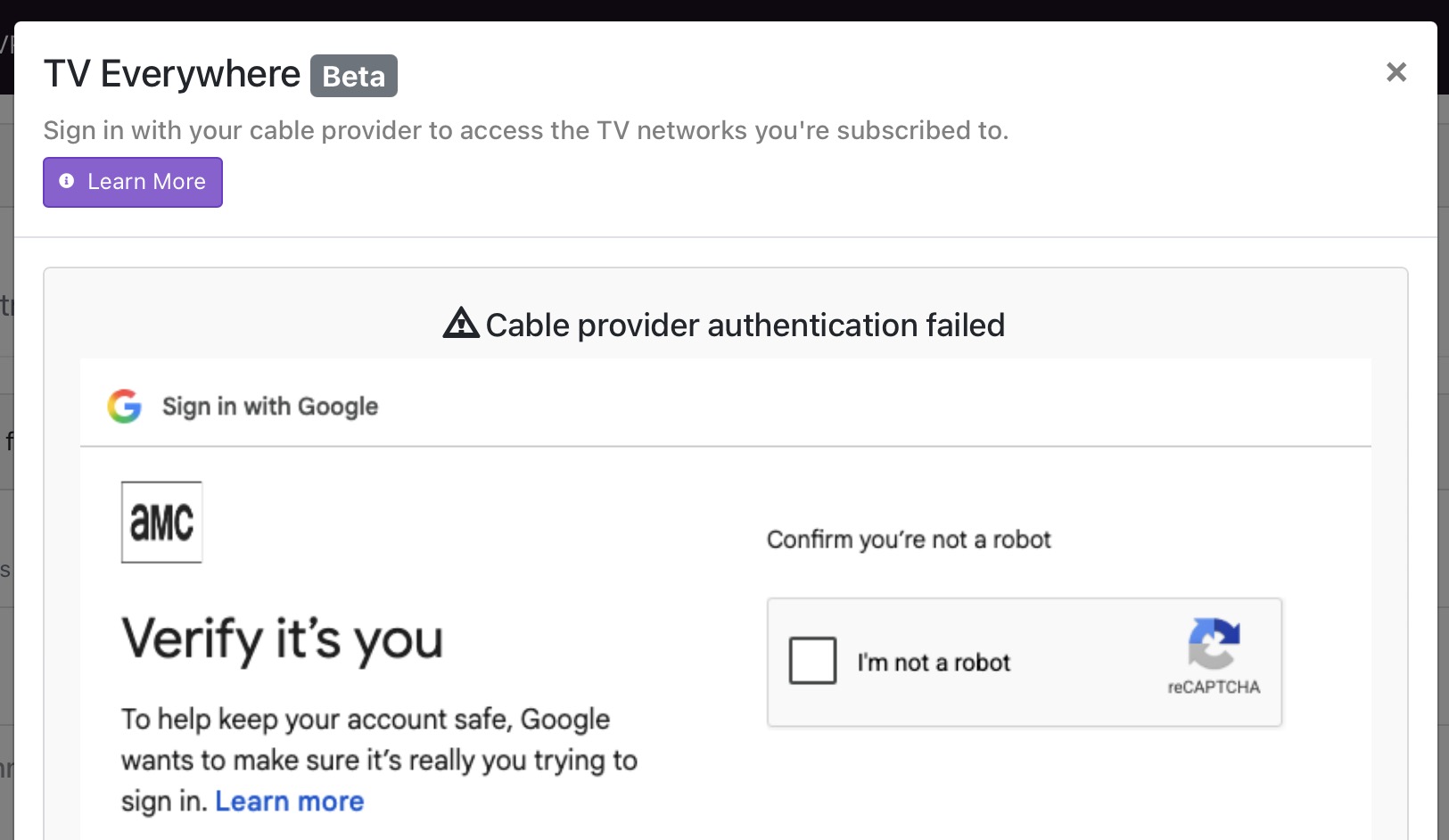
I just went through this. YTTV is constantly excluding users they perceive as bots. My fix was to create “new” family account with new e-mail address. 1st authorize with AMC then NBC. Then do YTTV. FYI, you will have to authorize the new account on TVE web sites before YTTV will authorize them. For example: Authorize Discovery GO. Then you can rescan the channels in the Channels YTTV TVE. This is becoming a real load and motivating me to transition away from TVE. Good luck. FYI: Make sure Chrome has 2FA and Skip password when possible turned off.
1 Like