
I just confirmed that the INTEL Celeron J4125 is NOT an ARM processor
Should work then. I don't have an active YTTV account, so others will have to way in. I used Fubo along with FUBO Project for my primary channels and supplement with Philio and have no issues with TVE validation.
I tried to convert an old ARM based NAS for a friend who uses YTTV, but had issues with embedded Chrome and couldn't get it to work.
Did you click on troubleshooting and make sure chrome is updated to the latest version? I think it should be 114 for the built in chrome version. Prior versions would get blocked by google to login if I remember right.
Please try updating to the latest pre-release and try running:
curl -XPOST http://<dvr-ip>:8089/providers/tve/chrome
and then try to authenticate again and let us know if it is any better.
@eric
Now having issues with authenticating with YouTube where it tries to "Verify it’s you" and asks for verfication either from gmail app or phone. Could really use manner by which at a minimum could see the number google is needing to authincate prior to it timing out. Google 2FA is disabled. See the following logs:
f3911b35-e28c-415c-9d5c-1d05ec533fad
f97bddab-81d4-4177-94d5-efb132abfc51
sheesh!

1 Like
I think the issue is that Google has effectively disabled "less secure app" access previous to the drop dead date of Jan 2025
https://support.google.com/accounts/answer/6010255?fl=1&sjid=7455493635698895343-NA
It would seem that Channels just needs to update the login code/capability to use oAuth via Sign in with Google vs simple username/password
https://support.google.com/accounts/answer/12849458?fl=1&sjid=7455493635698895343-NA
Nothing for YTTV will work for sure after the January date. The Channels app needs to be updated to work with google's sign in capabilities (2FA should work then) since sign in with google is done separately and passes a token back. Zoom, Calendly, etc all use the new mechanism to authenticate.
Seems that Channels needs to update to the Google Login times to work. This is not something a user can fix or work around. The app trying to connect in this case Channels needs to me the google login standards and we'd have TVE back for that provider.
"I think the issue is that Google has effectively disabled "less secure app" access previous to the drop dead date of Jan 2025."
This is big.
Lets hope the devs can enable this, may make YTTV easier in the end??
Less secure app access has been going away for some time (with or without 2FA) you used to be able to use app passwords to get around 2FA with less secure apps. This is a change that's been known and yes any apps wanting to access google must now just use the "Sign in with Google" capability vs username and password.
Basically it opens a browser window to use oAuth and then passes a token back to the requesting app once the permissions are allowed. I've seen this with many apps that want to integrate with google services including custom apps I've used for wordpress/woocommerce. It's all the same and the only way now to allow apps to authenticate.
I am sure if Channels updates the TVE option for YTTV to use the proper oAuth mechanism we will have it back. I really used that connection a lot since I actually got my locals via TVE but only from the YTTV connection. I have 4-5 other M3U custom lists which are fine but missing YTTV.
Since many of us pay for the DVR that is an update that should be prioritized as even using any other account without MFA on the family group still won't work. The error message you get is specifically about it being a less secure app which is why google is blocking it.
This is pretty straight forward an issue.
Thanks for making this post.
Lets see what develops.
I guess it explains why I seem to be seeing more requests to "Sign in with Google" as i browse the web
try to use certain apps etc
unless Google is going to require 2fa for family accounts YTTV should keep working...
Google has stopped supporting less secure apps. That’s the issue. Even disabling 2FA still presents the blocked for for being a less secure app. I’ve already tested it without 2FA and it’s the same block screen. 2FA isn’t the issue it’s the fact they no longer support username/password only and less secure apps connecting to any of their services. Channels needs to get updated to support Google’s latest requirements it has nothing to do with family accounts if you examine the block screen. I’ll disable 2FA again and post the error here but it’s specifically related to “less secure apps” being blocked and channels using username and password only is now considered a less secure app in Google’s world. You’ve got to play by Google’s rules to access their services
Maybe existing connections might keep working...but adding a new one is dead and gone end of story based on the test below. You can no longer add a new YTTV connection until channels updates the process to use oAuth per google's requirements.
Also.....nothing should work in 2024/2025 without 2FA it's practically a requirement now which is why google has disabled less secure app access for security reasons. I have been in IT for 25 years and dealing with google serivices for 12....this is to be expected.
While it's a PITA app developers like channels simply need to update their mechanisms to support google's services for new connections....period end of story.

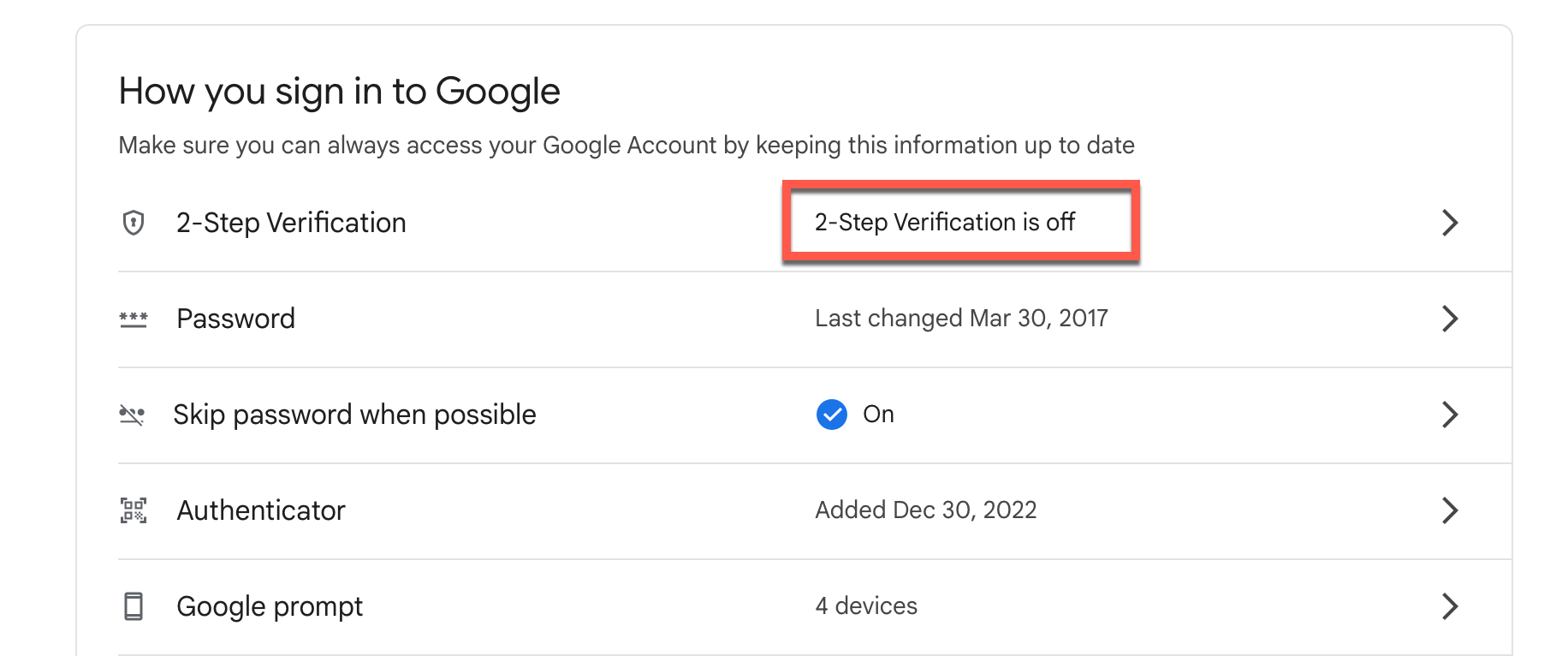
More info...and it can also be account specific as it is in my case...but it is going away 100% Jan 2025 and Channels needs to update their code please for new connections to be fully supported.
https://support.google.com/accounts/answer/6010255?fl=1&sjid=7455493635698895343-NA
also, Once you ever enabled 2FA the option to ALLOW less secure apps gets removed so even if you disable it now it will never connect as the option is gone. Y
How to enable "Less secure app access" on Gmail.
You can check your own account's capability here:
https://www.google.com/settings/security/lesssecureapps
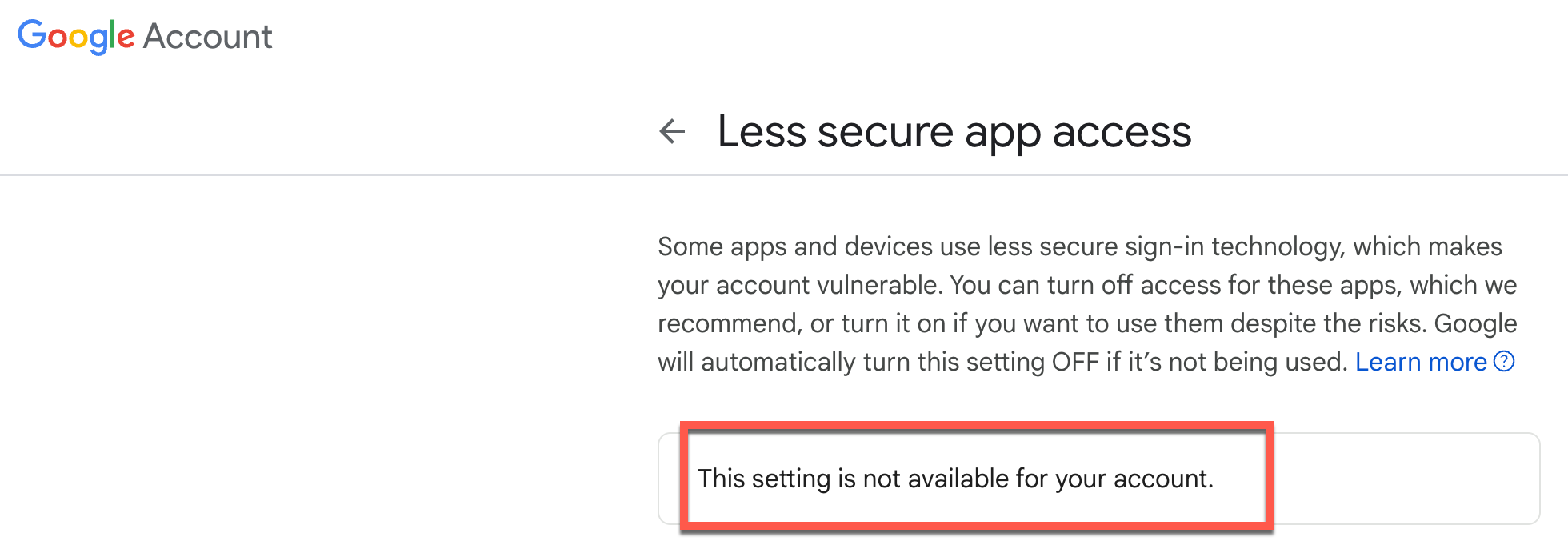
I have many other apps connected that do follow Google's new oAuth process and cvhannels will show here once they support the proper authentication capabilities of google.

This is 99% a channels problem to fix at this stage and especially after Jan 2025 which is around the corner. for the next couple weeks creating a new account with nothing enabled might work, but I suspect only for a short time.
EDIT:
I can also confirm....creating a BRAND NEW google account "today" the ability to enable less secure apps is not available even on a brand account with just a username and password. I can't prove this will no longer work any further and that the authentication simply needs to be updated by Channels to work even on a net new google account with nothing added after creating it. This link still shows the option is not available...you can test it yourself just create a brand new google account and check the link below.
https://www.google.com/settings/security/lesssecureapps
Edit:
The link above may be specific to Google WOrkspace accounts where admins can allow it to be enabled. It does appear that any personal accounts are going to get blocked as google does not see channels app as a secure application per their security standards.
" If an app or site doesn’t meet our security standards, Google might block anyone who’s trying to sign in to your account from it. Less secure apps can make it easier for hackers to get in to your account, so blocking sign-ins from these apps helps keep your account safe."
It still is coming down not to 2FA but to google seeing the connection as a less secure app as one of my screen captures indicates. On admin controlled accounts until Jan 2025 workspace admins can control LSA's but on personal/free accounts google is controlling it for sure
Bottom line.....@Channels please update YTTV option to use the proper secure mechanisms so it can be added as a new source and meet the google security standards. Thanks in advance.
I think maybe existing logons will work but NEW ones will have this new problem.
I'm sure the devs will come up with a fix, and it might work more smoothly and reliably.
So per your additional testing do you still think that 2FA will be required?
I'd rather not go thru the 2FA unless required...
"Google Cloud will require 2FA for all users starting in 2025"
I simply meant that in today's world one should never expect that 2FA is not enabled.
Google is not "requiring" 2FA unless a Google Workspace admin enables that but on personal accounts it is not a requirement yet I am merely saying you should not be using apps today without 2FA it's more secure.
From what I can tell the issue with Channels is "not" 2FA it's the simple fact Google is seeing the channels app connection as an LSA (Less Secure Application) and blocking it in most cases on new connections.
I had an existing connection and it stopped working hence why I tried to make a new connection. I do think existing connections will eventually just stop working, but from what I can tell most certainly any new connections google is blocking it as a LSA (2FA enabled or not) that seems to be irrelevant to the blocking.
It's a bummer as I had over 120 channels on YTTV showing and working including the local streams all of which are gone now since they stopped working and I removed it to try and re-add it and now discovering it's most certainly blocked by google.
At the end of the day you are not going to work around google's security apps just need to work within their requirements and as of now......channels is being considered a less secure app until they move to meet the google security standards for connecting a 3rd party apps to google services. 
If current connections are mostly working I would not remove them for sure or you won't get it reconnected.
1 Like
YouTube TV keeps raising prices ....

Thanks again for a very informative post.
A question:
How did you get all the YTTV "local streams" to work within CDVR... you don't have to answer, LOL!
I will say I am runing the QNAP package but the version is current to what's published ( Version
2024.12.10.0055) and there could be some relationshop to the QNAP OS and Chrome but I Can revert to the docker image and check but I lose the HW transcoding that works so well natively.
generalyl speaking however if a 3rd party app launches a "local" browser to handle the oAuth you never run into the issue of a chrome version built in being stuck at an old version, but I can't tell what/how the chrome version is being determined within the channels app package/version.
I have connected other QNAP apps like Hybrid Mount to google drive without issue as that app uses the proper oauth mechanism with a local browser to connect. See the short videop example below of how it opens a local browser window.
This is how most apps do it (open a local browser) for sure to comply with google security and if your browser is already logged in you just get the permission options presented etc. This is how channels should/needs to connect to the new google.