
Yep...and each file has their header rows so yeah 
1 Like
Okay, I got it now (for real this time!):
1 Like
Finally. It works!! 
I can start generating streamlinks for my dad and his love affair with western movies
SLM deleting episodes it should not. The issue started with v2025.05.16.1232
The first delete in the log is correct. It then goes on to delete episode 11 for other shows even though they exist. See this log info:
2025-05-19 06:15:00.723152: Beginning SLM New & Recent Releases process...
2025-05-19 06:11:03.022976: SLM End-to-end update process complete.
2025-05-19 06:11:03.022976: Total Elapsed Time: 0 hours | 1 minutes | 2 seconds
2025-05-19 06:11:01.022277: Connecting SLM and Channels DVR metadata complete.
2025-05-19 06:11:00.864003: Scan complete.
Deleted: \BEE\dvr\DVR\Imports\TV\slm\Kim's Convenience (2016)\Season 05\S05E11.strmlnk
Deleted: \BEE\dvr\DVR\Imports\TV\slm\Kim's Convenience (2016)\Season 04\S04E11.strmlnk
Deleted: \BEE\dvr\DVR\Imports\TV\slm\Kim's Convenience (2016)\Season 03\S03E11.strmlnk
Deleted: \BEE\dvr\DVR\Imports\TV\slm\Kim's Convenience (2016)\Season 02\S02E11.strmlnk
Deleted: \BEE\dvr\DVR\Imports\TV\slm\Kim's Convenience (2016)\Season 01\S01E11.strmlnk
Deleted: \BEE\dvr\DVR\Imports\TV\slm\The Good Place (2016)\Season 04\S04E11.strmlnk
Deleted: \BEE\dvr\DVR\Imports\TV\slm\The Good Place (2016)\Season 03\S03E11.strmlnk
Deleted: \BEE\dvr\DVR\Imports\TV\slm\The Good Place (2016)\Season 02\S02E11.strmlnk
Deleted: \BEE\dvr\DVR\Imports\TV\slm\Brooklyn Nine-Nine (2013)\Season 06\S06E11.strmlnk
Deleted: \BEE\dvr\DVR\Imports\TV\slm\Brooklyn Nine-Nine (2013)\Season 05\S05E11.strmlnk
Deleted: \BEE\dvr\DVR\Imports\TV\slm\Brooklyn Nine-Nine (2013)\Season 04\S04E11.strmlnk
Deleted: \BEE\dvr\DVR\Imports\TV\slm\Brooklyn Nine-Nine (2013)\Season 03\S03E11.strmlnk
2025-05-19 06:10:00.153985: Beginning SLM end-to-end update process...
Thank you for looking into this
This is not an SLM issue; SLM is working exactly as expected. The problem lies with the metadata on JustWatch, on which SLM is dependent. If you follow the Troubleshooting / FAQ directions, you would see that those episodes are missing links to your streaming services. For instance:
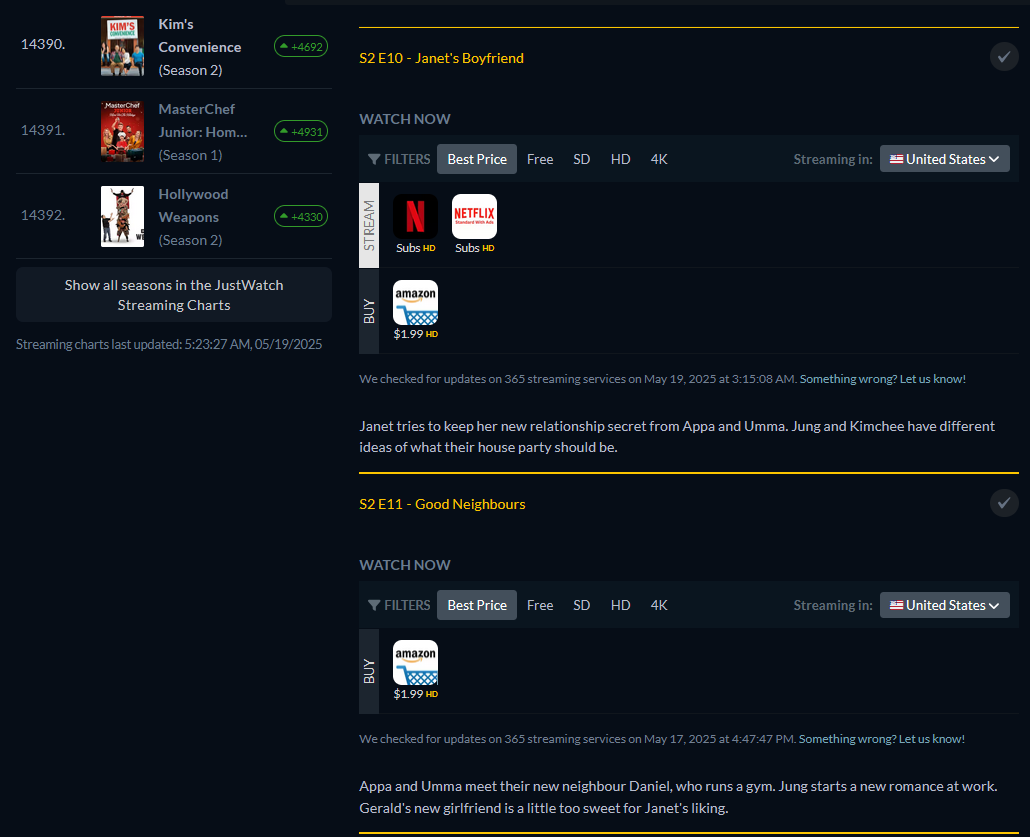
Given the very specific pattern of episode 11 on Netflix, I'm fairly confident this is a temporary issue and they'll have it fixed by tomorrow. But if not, follow the directions from the link above to let them know.
1 Like
Thank you,
I checked a number of them on JustWatch and they are all there. We will see what happens tomorrow.
Look again at the screen shot I provided. The episodes are "there", but they don't have a link to Netflix (episode 10 does, episode 11 does not, episode 12 does). Merely existing on JustWatch is not enough; it must have a link to your streaming service in order to generate a Stream Link. This was the case for every single one I checked.
1 Like
I see the issue, they use they use icons to indicate if there is a stream link and for all the episodes that are missing the Netflix icon does not appear. That display method does not work well for me. I reported all omissions to JustWatch.
I'm a total newbie to Channels and Stream Link Manager so I'm sure I must be making a dumb error, but I cannot get shows to appear in Channels. I can generate the links, I run the Run Updates In Channels command, but nothing appears.
I think I installed it correctly. I have Channels DVR running on a new Windows 11 Mini PC with the server on the root of an external USB drive with the drive letter D: I can record live TV etc without issue.
I downloaded the slm.bat file to the root of the my USB drive and ran the installation from there. This added the slm.exe application and _internal folder.
I added my streaming sources and I can search for shows and generate the links. When I do this, the links appear in _internal>Imports>TV>slm>Name of Show
I have channels DVR set to scan every 5 minutes with the storage path set to D:\
After running the Run Updates in Channels, if I go to Library>TV Shows, all I see are the shows I have recorded from Live TV.
Clearly I'm doing or have done something wrong but I can't work out what.
Are you using the same storage location for Channels DVR and SLM? On the Channels Settings General page at the very bottom is Storage Path. That's the location you should be using. If you have more than one Storage Path, you should use the first.
Solved it, the Channels Directory in the library manager had been set to the _internal folder. Changing it to the root of my USB drive fixed it.
1 Like
Is the root of your USB drive your Channels DVR installation location?
With the most current release, I get a 500 error EVERY time I press the "Update Station List" button on the "Final Playlists" page. Not much to go on in the logs, but this is the last portion:
2025-07-07 10:54:40.574383: INFO: Removed duplicate rows from PlaylistManager_Combinedm3us.csv.
2025-07-07 10:54:41.013983: Finished combination of playlists.
2025-07-07 10:54:41.014066: Starting child station mapping...
2025-07-07 10:54:41.051510: INFO: No station mappings found. Skipping child station mapping.
2025-07-07 10:54:41.051573: Finished child station mapping.
2025-07-07 10:54:41.053651: Starting check of child stations...
2025-07-07 10:54:41.100546: Finished check of child stations.
2025-07-07 10:54:41.103649: ERROR: Webpage responded... 500 INTERNAL SERVER ERROR
I can replicate and see the issue. It's related to it trying to do something with Check Station Status when that function is disabled. Finishing testing the patch right now, so should have an update out shortly.
EDIT:
This is now fixed in v2025.07.07.1207.
I verified the change! All good now! Thanks for the quick fix!
Just a PSA:
If you use or track the provider once again called "HBO Max", you'll need to update your Streaming Services to make sure it is in there...

Details in the FAQs:
1 Like
Thank you
Synology 220+
Portainer Community Edition 2.27.6 LTS
So I finally got around to installing and using Stream Link Manager— Wow!!!
Installation instructions and video were excellent. Portainer really makes it easy to delete and recreate a stack to fix my user errors. Had to create the required folders with the hardest part determining the best place to put them. Took me about 3 stabs before getting them in a good place. Forgot to hit save when I changed to Channels URL on the final spin up (fixed that this am when I saw the error in the log).
Just a couple of questions:
After watching a stream link, I can either Mark as Watched or Trash the link. Is one better than the other?
When I go to Library and view details on an episode, I see the below error below. Is that something I need to be worried about?
Error retrieving file #19176details: exit status 1
I do both. Marking as watched in Channels makes it show up in the "Recently Watched" area, so helpful for continuing a show. Trashing the item will make it marked as "watched" in SLM (once it fully deletes from Trash), which means it will no longer generate a Stream Link/File. Thus, it depends upon if you want to keep everything in Channels even after watching, or you want it to be gone from there unless you set them backed to "unwatched" status.
No, that is just Channels trying to read metadata from a video file. Since there is none, it just returns that error. Devs should do something about that, but it's not hurting anything.
I don't mean to pollute the threads but thought I would ask here as well.
Could SLM work with firefox? I installed/sideloaded the apk on my android device to remove ads. Could SLM route links to hulu or tubi so I can watch directly on my firefox apk? I have uBlockorigin
Also, is there no way to automate a pull request getting all the content on providers, or does each link have to be made?