[RELEASE] Stream Link/File Manager for Channels [Streaming Library Manager Extension]

I'm a software developer, so I appreciate all the effort that the developers put in (for no money) making tools for everyone to use to get the most out of Channels.

I'm new to this plugin and had trouble figuring out how to do anything within the "Manage Programs" screen. I'm running an M1 MacBook Air, so it has a high resolution screen, but is running on the macOS default/recommended resolution of 1440x900. I'm also running this on my couch, with no mouse, which makes navigating any screen (in any program or website) more difficult. :slight_smile:

There are so many columns packed into the grids. This is great for extreme power users, but for people that just want to click a button and have it generate a bunch of stream links that show up on their big screen TV, it's difficult to orientate yourself. The "Global Episodes Controls" panel is even worse, with the labels cutoff after just 3 or 4 characters, and the inputs only having enough space for like 2 characters.

I bumped my resolution up to 1650 pixels, which helped a bit, but not much. Gemini says only about 40% of US desktop-class computers report a logical resolution of at least that width.

I understand how software grows in complexity to respond to new use cases. Any discrete feature that is critical to one small group of users often has no value for most other users. It seems like this screen could be built to accommodate new users and extreme power users, while also factoring in how the screen resolution impacts usability.

The entire "Program Details" panel seems like it could be hidden for non-power users. Having it on the screen by default implies it's important something be done at that level. The default layout for non-power users could just be a big button that says "Generate Stream Links", with possibly a couple high-level options that accommodate the most-used customization features (which I'm guessing might be the name, description, preferred streaming vendor, and cover art). If they want more control, offer a toggle to open up all the powerful features that have built into the software for episode-level granularity, bulk updates, etc.

"Global Episode Controls" can't live in what is effectively a right-hand sidebar. It needs more room.
I agree, the screen for managing videos has become way too cluttered and there are too many options on the dropdowns. At the very least, pleace the things that are most commonly done at the top of the dropdown. There are options that I see no reason for yet you do and they could go. Also better than the long line of options would be a numbered list or single dropdown that leads to a wizard where we chose the rest of the options.

This would greatly simplify the interface and also make it work on phones which are much more friendly in the living room than a laptop or tablet.

Anybody getting 500 errors when searching for shows?

Not too sure whats causing that. Just happened today when searching for "Love Through A Prism"

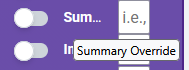
Everything has floating tool tips so you can see them when they are cut off:

image

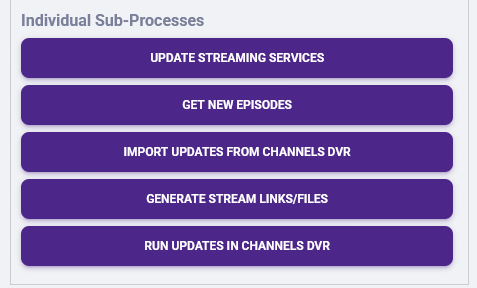
Exactly, editing is for special use cases, not everyday activity. This last major update was made so you wouldn't have to use the edit area 99% of time, and then just quickly one-time when you do. Stick to the big buttons in Automation to avoid the need to work in that screen if it's an issue for you:

image

These are the problems and the solutions. I can't keep adding buttons every time there is a new feature, and I can't keep giving some buttons prominence over others. It became impossible to maintain. This is the tradeoff. Now I can add, remove, and modify all actions at any time with very minor modifications. I did put them in what I found the most useful order, but if you have suggestions to change the order, it's simple enough to implement. Or I might be able to do something where you control the order so I don't have to worry about upsetting a different group of users. In the long run, I'd like to be more modular and user-controlled, and this is the first step.

SLM is not designed for either of these use cases and cannot be supported at this time. A full-sized screen with a mouse interface are expected. Maybe in the future there are changes or simplified vs. complete interfaces can be added, but not anytime soon.

Not having any Movie/TV Show search issues. There are some hiccups in the video search, I believe related to a change Google rolled out. Fixing that one is is going to be a bigger challenge:

I got another new issue too. I can't even use slm. It suddenly stopped working. I can't connect to the webui. I removed the image and redownloaded it and still the same thing. Also, looks like justwatch is producing 403 errors

It might mean JustWatch has soft banned your IP. It happened to me before during some testing when I tried to make things more efficient and hit them too hard. The only solution I had was releasing my IP address at the router and getting a new one. Once I had another one, everything could connect again.

1 Like

Oof...gonna have to go home later on and do that.

I greatly appreciate all you have done by creating SLM and It's made my family's TV viewing much nicer. It's so nice to have everything in one place. Please take all my comments/suggestions as a desire to help. I used to be a systems engineer and get the challenges you are facing.

Then why is it first?

You are correct, the overcomplicated feature set is complicating support. There is beauty in simplicity.

Modular code is great. User configurable, well watch out for where that goes.

This is unfortunate and I can see it being a major effort to rewrite the interface. Possibly a wrapper app that takes care of the most common tasks could be produced as a phone app.

The "New and Updated" box might be better named "What's new to watch on each service?"

It's not how we find things yet an interesting feature. For me the most important feature is "Search" as It's what I use when I want to add a show. When I get a hit on a show I want to add, there are so many choices? Why would I want anything other than add it? That drop down is busy and confusing.

I'm not a heavy user of as I add a show or movie at most a few times a month and then I may add nothing for a month or so. The lack of use exposes me to the complexity of the interface as the next time I come back to use SLM I don't remember the sequence I used the previous time. I'm reading the long list of options and scratching my head. Add to this that the interface keeps changing. I put the effort in to get my shows in as once I do the payback is huge. My wife who is an ex IT trainer will no use SLM. The inconvenience of going to a computer or even opening her laptop does not match the way somone interacts with at TV and the interface set her off even more.

You have the basics of a killer app that you could sell a huge number of copies of. The story is a lot like how Channels DVR started. Right now SLM is a hobby for you and possibly you want to keep it that way. I'd certainly pay for having all my viewing in one place. I love what you have created and appreciate all the effort and that you share this with us.

Morris

Please check out this Wiki article; it's all explained there:

My philosophy is there, too:

Aren't we all (among many other titles, my preference was always "Solutions Architect")! :stuck_out_tongue_closed_eyes:

I understand work can be done and SLM can be a lot more, but I just don't have the bandwidth. I've got it working for me, who is my most important customer! I was planning to take a few months away from all of this stuff (Channels board included), but the YouTube playback issues pulled me back in temporarily. Once I release a patch for that and a couple of other small backend things, I'll be disapearing for a while again.

I do read your documentation and have watched the videos that apply. I get the level of effort and you have done great things for our community. Enjoy your time off!

Thank you,

Morris

Getting a new IP worked. Hope I don't have to do that again. I guess SLM went haywire and tripped up justwatch's anti-bot detection. Wild but ok

I just added Paramount Plus Premium as a streaming service in SLM. I then added shows and movies that I wish to stream. Stream links were generated. In the Channels DVR app on my Google TV, when I click the watch button I get the following:
You don't have an app that can do this

The Paramount Plus app is installed and works fine. I get this for any of the shows or movies.

Do any of you have a fix for this?

Thank you

Can you post the link it is generating? I don't do software development in these areas, but I think these work by generating URLs that the streaming box "intercepts" to then open up the correct application on the device.

From a quick Google search, the URL prefix/intent for that app is: paramountplus://

I use an Apple TV and am in the middle of re-working my Docker containers, so I don't have this up locally at the moment, but Paramount Plus was working correctly for me a couple of weeks ago.

Try going to Google, then to "AI Mode", and having a conversation with Gemini about this. It will likely understand and solve your issue. Trying to resolve it may require manually manipulating the files that SLM generates, which, if I remember correctly, are just those URLs.

1 Like

Yes the stream files contain a url and this is a sample from one:
https://www.paramountplus.com/shows/star-trek-picard/video/p_F16OmokbFpnKJC64lcdoP9_MdR1I7D/star-trek-picard-remembrance

Googling I found this format:
intent://paramountplus/…

And it doesn't launch the app. I also tried the format you suggested and the app did not launch.

Plex is unable to launch the Paramount Plus app as well.

Thank you for the suggestions,

Morris

See above:

TL;DR, Skydance wrote their Android app wrong and you'll have to try to adjust to get to a basic app launch at all with a Stream Link Map.

On the other hand, they wrote the Apple app correctly, which is why it works fine there and in the web. Again, the problem is the Android Manifest and the have to fix it. That is also why other things like Plex, JustWatch, Reelgood, etc... can't do it, either.

As of this version...

... this should hopefully not be an issue ever again. Additionally, non-SLM users are no longer required to be able to connect to JustWatch at all!

1 Like

Thank you for having a look. I went through all your documentation before posting and tried all the suggestions. All streamlinks works fine except ParamountPlus and no matter what I place in the streamlink file the app doesn't launch. HTTPS:// launches a web browser (if one is installed) yet then I run into web issues with ParramontPlus. Without a web browser installed I get no application found to launch the app. I like their content yet there website and app need a lot of work.

Right now instead of clicking watch, I press a button on my remote to launch Paramount Plus, and then deal with launching inside the app. Then return to Channels DVR to delete the movie or show. At least I can track my content.

Is the mapping of the stream link to the application done by Channels or Android? The example in the Channels Documentation makes me think they do it and what is in the Channels DVR documentation does not work.

Possibly I need to report this to them.

Per above:

Thank you,

I wonder what the odds of reaching somone that would understand this. I'll find out.

Morris

1 Like
