
Any fix for the channels in the 2000+ area? They moved Letterman to 2615 and I can't find a way to get it anymore.
Letterman TV was dropped in mid June due to being DRM
Samsung TV Plus channels marked as DRM
Chan Name                         [SLUG]
---- ---------------------------- ---------------
3025 Alfred Hitchcock Presents    [US1800014CG]
1505 ALL ACTION                   [USBB2300001QP]
2718 American Ninja Warrior       [US19000017A]
1940 Bad Girls Club               [US1800008PZ]
1921 Bravo Vault                  [US1800003BG]
3860 Caso Cerrado                 [US1800004S5]
1240 CINEVAULT                    [USAJ30000148W]
1245 CINEVAULT: Classics          [USBB3200015M8]
1405 CINEVAULT: Westerns          [USAK3508709A]
1805 Crime Zone                   [USBB36000040M]
3220 D&D Adventures               [US3400005I4]
1567 Dawson's Creek               [US4100005NW]
2437 DP World Tour                [US4600010KE]
1917 E! Keeping Up                [US18000133I]
1618 Family Hour TV               [US4100024YU]
3005 Fear Zone                    [USBC1300012VK]
2510 Formula 1 Channel            [US600011Q2]
2640 GET Comedy                   [US350000563]
1455 get TV                       [USBD1200002PM]
1430 Lassie                       [US1800010NE]
2615 Letterman TV                 [US4000004N1]
1435 Little House on the Prairie  [US18000078A]
2035 Million Dollar Listing Vault [USBB3200024V5]
1000 Movie Hub                    [USBA3000041ZP]
1204 Movie Hub Action             [USBD3500032H0]
1206 Movie Hub Romance            [USBD3500033U0]
1201 Movie Hub West               [USBD3500036HP]
1813 Murder, She Wrote            [US1800001D1]
3653 My Little Pony               [US2900011CJ]
2352 One Championship TV          [US2600006VY]
1850 Oxygen True Crimes Archive   [US1900005VB]
3615 PBS Kids                     [USBC3600013PC]
2105 Plated                       [USBC1300008AZ]
3684 Power Rangers                [US2900012T8]
1919 Real Housewives Vault        [US18000059V]
1004 Samsung Television Network   [US300068X7]
2678 Saved by the Bell            [US18000096O]
4443 SMTOWN                       [US10000135V]
2627 SNL Vault                    [US1800012MT]
3892 Sony One Cinema              [USAJ22000057N]
1515 Stories by AMC               [USBD2500018X6]
3855 Telemundo Accion             [US1800002UQ]
2710 Top Chef Vault               [US180001143]
3685 Transformers                 [US29000168D]
3020 Universal Monsters           [US1900002QK]
1255 Universal Movies             [USBB3200030CG]
2673 Who's The Boss?              [US4100003MA]
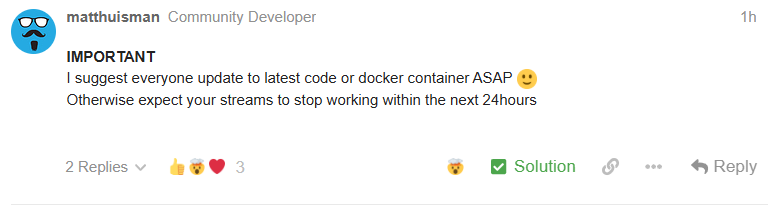
IMPORTANT
I suggest everyone update to latest code or docker container ASAP 
Otherwise expect your streams to stop working within the next 24hours
1 Like
Since I don't run docker and I put into Channels the source url and xmltv guide data manually can you please point me to my options. I'm running Channels under linux if that helps.
Who marked your post as a Solution?
You could just edit your original post to include that.
The new container image is working for me.
Depends. What did you put in your custom m3u settings. What is your source.
AFAIK there's only the docker image source and the python source https://www.matthuisman.nz/2024/08/samsung-tv-plus-for-channels.html
i marked as solution to try get visible - ive unmarked now (im not that familiar with this forum software)
This should help (for those that frequent the forum)
Thank you. I have been using https://www.apsattv.com/ssungusa.m3u as the source and The Daily Report as the guide all this time. If it stops working tomorrow I'll follow the No Docker instructions and run the code using python3 in a process on my server.
1 Like
IMPORTANT
Switch has now occurred.
You will need to be on latest code or docker container for the streams to work
If your already on latest code or docker - you may need to force your software to refresh the latest playlist it generates so you get the new urls
4 Likes
I updated the ssungusa.m3u playlist with the new urls..
2 Likes
Disregard all of this - I went back to Docker and Matt's blog instructions and it worked.
I only barely understand Docker and how this works... It has been working for many months.
How do I know if I have the latest Docker container?
I think all I did in Docker was click on "pull" on this image - matthuisman/samsung-tvplus-for-channels:latest
But my Channels does not appear to work anymore. Samsung channels are listed in the Guide but I can't view them now.
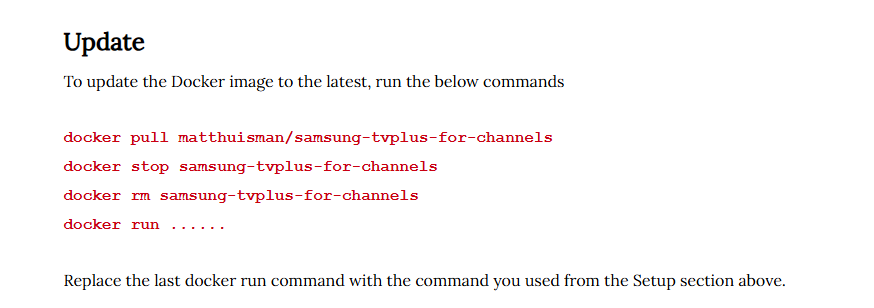
I tried the instructions here but Docker's terminal says 'docker: not found'.
https://huisman47.rssing.com/chan-63724415/latest-article23.php
Update to the above - I may have been using the wrong terminal?? I ran the commands again and it responded correctly.
Samsung channels now working. 
Help?
Mike
Thank you! I didn't have to make any source or guide changes. All I needed to do was remove the old channel urls and then re-add the channels back to my favorites channel list since the urls were different which was easy.
Thanks again!
Using Synology to host ChannelsDVR and AppleTV as playback device, I feel like I've tried everything more than a few times, including:
- just completely deleting the docker entry for this and then reinstalling it as if adding it for the first time,
- deleting it as a source from Channels DVR and then "add"ing it anew,
- deleting some of the channels from collections lists and re-adding them again,
- rebooting the Synology itself to be sure Channels restarts,
- etc...
...and still getting error when trying to watch these channels. As others have offered, they show in the guide (including the detailed description of each show), but will not play. Error message is...
Streaming to the tuner failed. Press play to try again. GET:-IP entry here-/devices/M3U-SamsungTV/Channels/11734/stream.mpg: 503 Service Unavailable.
-IP entry here- in the error is the IP address of Channels on my Synology... and 11734 is the dynamically assigned channel I was trying to tune.
Could someone write the step-by-step for complete dummies? Lack of success has me thinking perhaps I am one and would like to try going step-by-step through a list of how to get this properly updated in Synology so that these channels work again. If someone takes this on, assume I know NOTHING. Thanks for any help.
You probably still have the old container image
Stop and Delete the Samsung TV Plus for Channels container
Delete the Samsung TV Plus for Channels image
Reinstall the Samsung TV Plus for Channels container, pulling the latest image
OR
If you deployed it using a Portainer Stack, just Update the stack using Re-pull image and redeploy
I'm using a Synology myself.
Updating the SAMSUNG tv plus docker was a little bit challenging.
I had to restart the container and make Stream Link manager update the m3us and of course, i tested the streams using the option in SLM.
I'm only using command line and container manager.
- Went back into Synology, Docker, Container, selected it, and turned it off with the slider switch.
- Action (button), Delete, and it deleted.
- Image (tab) still showed it, so selected it there, "delete" button and it deleted.
- Registry (tab), Search for Matthuis, selected it, "download button"
- Image (tab) then had a little blue circle with a 1 appear in it. Clicked Image, then double clicked Samsung-Tvplus-for-channels:latest.
- Window titled Network appeared, clicked Next button, next page- clicked Next again, next page- clicked Next again and one more Next. (this is an install wizard and I just went with defaults).
I didn't know if it was necessary or not, but in Channels via browser, I deleted Samsung in Sources and then re-added it as if adding it for the first time, setting the guide to update every hour. I renamed this channel group something different than what I previously had them named and "save" (button).
And that worked! I had previously deleted the container in Synology but did not then check Image (or maybe that was vice-versa) and Registry to be sure it showed in NONE of the tabs. I was also choosing "create" in the Container tab to attempt to add the new version (which was probably just putting the old version back in place) but this time I added it through the Registry tab. That's what I did different and that worked. Thanks chDVRuser. And thanks for the update Matthuisman!
Bonus: my Channels Collections didn't need any repair. Channels (app) seemed to dynamically match up with the Samsung channels again in the collections even though they had moved from the 9000 range to the 11000 range. I thought I might have to re-add all of them into my personal collections again but Channels "just worked" well.
Glad to hear you fixed it.
Yah, you still had the old, outdated Image.
When you delete a container, it doesn't also delete its image.
1 Like
I've had no XML guide data since the morning (about 6 hours). Channels are playing fine. Anyone else seeing this problem or am I alone?