TV Series jumping to wrong episode after exiting a completed episode

This previously reported glitch persists through the last several beta versions.

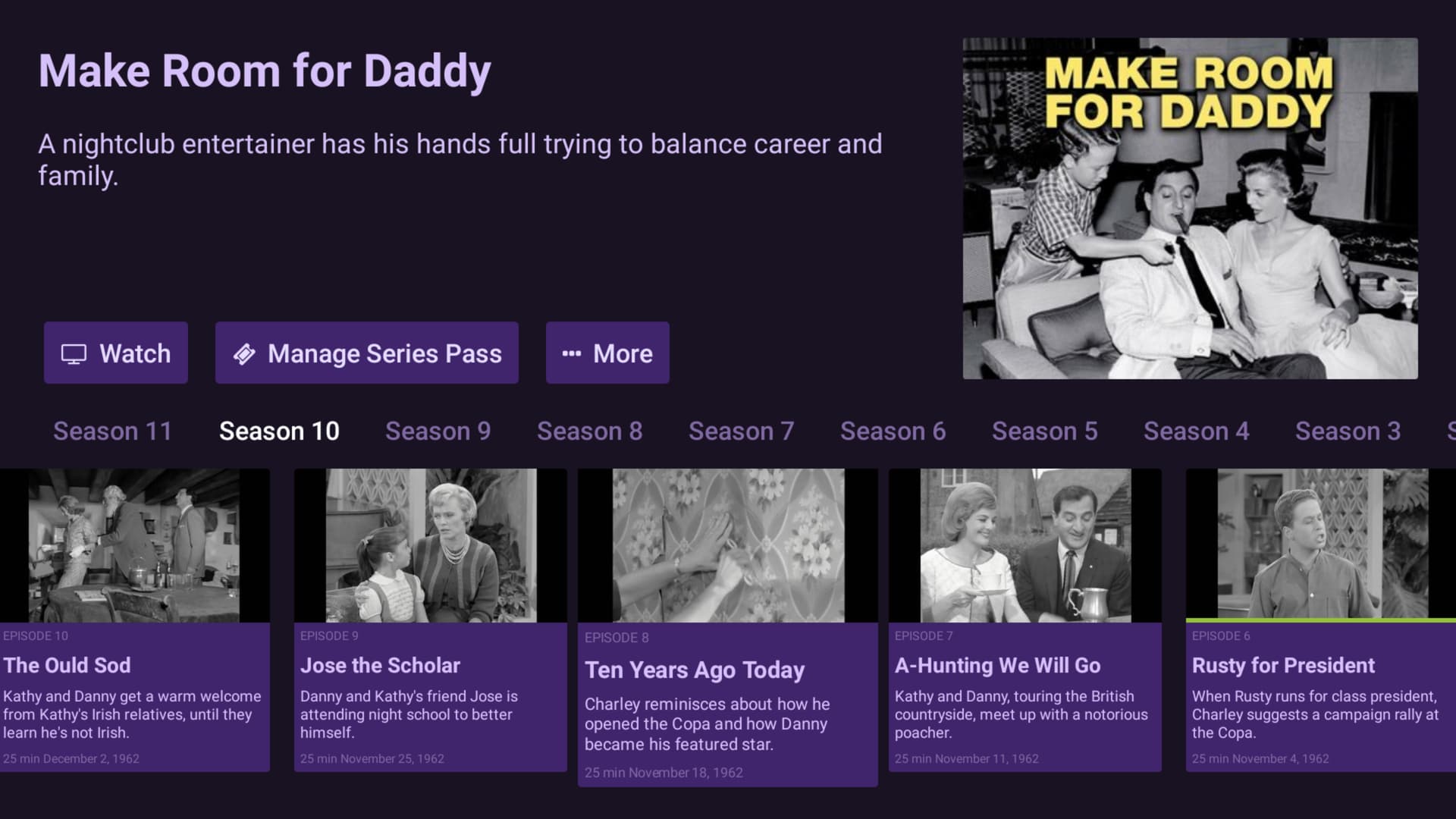
When watching a TV series through the TV shows menu, after completing viewing an episode, exiting the episode does not jump directly to the next episode on the TV shows timeline. The highlight (center screen) jumps one episode too far in advance, forcing me to press the right direction to move to the proper episode so that I can continue viewing in the correct order.

In the following example, I have just completed watching the "Rusty for President" episode. Backing out from the episode using the "back" key on the remote, brings me to this screen as it appears. You can see that the highlighted episode in the bottom center of the screen is "Ten Years Ago Today", which is not the next episode in the viewing order. The next highlighted episode should be "A Hunting We Will Go".

This behavior does not occur in the stable version 4.9.4.
your post caught my attention at just the right time earlier today and and I did verify the behavior you describe. but later I updated to the v2026.02.12.2240 release that fixes other stuff.
now it leaves the episode you just watched highlighted.. so it's different now and at least intuitive, but doesn't save you any button clicks.

I'm personally more annoyed by the watch card (or show card what ever it's called) not disappearing. it prevents the use of the remote shortcuts (F1-F4).

Hmmm Perhaps this will be more tolerable for me. Jumping back on the timeline was driving me nuts. I reported this issue back in August 2024. I'm troubled that it has not been addressed yet. I was hoping that by opening a new topic for it, perhaps it might be acknowledged by the development team.

I haven't been following new beta issues, so, I'm not quite sure what you refer to here. I'll have a look if I decide to join the beta program again.

You don't need to join the Android beta program. You can manually download and install the beta version and keep the released version available at the same time. Of course you need enough storage for both. See the manual sideload:
Pre-Release access for DVR subscribers - Knowledge Base - Channels Community

1 Like

Brilliant! I didn't know this was possible... Thanks so much, @Michael_Birk !

To install you need to make sure your device is in developer mode and there will be a security setting to allow the apps to install from other sources. But once you get it setup, it is very easy to update the beta at any time.

Fortunately, I was already set up for side loading apps to my Nvidia Shield. So, that made this installation go smoothly. What a relief to not have to uninstall and reinstall every time I want to help out with beta testing. Thanks again!