Unraid with Channels DVR - simple question

I have an Unraid docker installation of Channels DVR, it works like a champ in bridge mode.

No problems.

I would like to change the IP address of the instance and I have tested it, but whenever I change it Channels DVR no longer works.

This seems like a very simple thing I'm overlooking. Any ideas?

Thanks beforehand....
Please be more specific what does not work mean.

Can you web into it?

Can you ping it?

I am able to get to the WebUI but menus are only partially loading and it is extremely slow with any function (scheduling, deleting etc). Adding sources is also slow as well, it takes upwards of 20 minutes to complete adding the source.

It doesn't seem like an 'error' exactly but like something that would not have happened if I had started with this IP instead of my standard bridge IP.

Whenever I move back to standard bridge mode it goes back to working normally and at normal speed.

Weird.

Have you asked your question on the Unraid forums?

Can you explain a little more how you're doing this?

Your docker run command would also be helpful.

1 Like

Unraid/Official Channels DVR app

This is my working default config without changing the IP.

docker run
  -d
  --name='channelsdvr_intel'
  --net='Bridge'
  -e 'TCP_PORT_8089'='8089'
  -e 'PUID'='99'
  -e 'PGID'='100'
  -l net.unraid.docker.managed=dockerman
  -l net.unraid.docker.webui='http://[IP]:[PORT:8089]'
  -v '/mnt/user/data/Media/ChannelsDVR':'/shares/DVR':'rw'
  -v '/mnt/user/appdata/channels-dvr':'/channels-dvr':'rw'
  --device='/dev/dri/'
  --restart always

Can you show the full docker run for when it's not working?

It's literally the same config with a different IP address on the same subnet.

docker run
-d
--name='channelsdvr_intel'
--net='Bridge'
--ip='xxx.xxx.xxx.xxx' --------------------------- This is the only change.
-e 'TCP_PORT_8089'='8089'
-e 'PUID'='99'
-e 'PGID'='100'
-l net.unraid.docker.managed=dockerman
-l net.unraid.docker.webui='http://[IP]:[PORT:8089]'
-v '/mnt/user/data/Media/ChannelsDVR':'/shares/DVR':'rw'
-v '/mnt/user/appdata/channels-dvr':'/channels-dvr':'rw'
--device='/dev/dri/'
--restart always

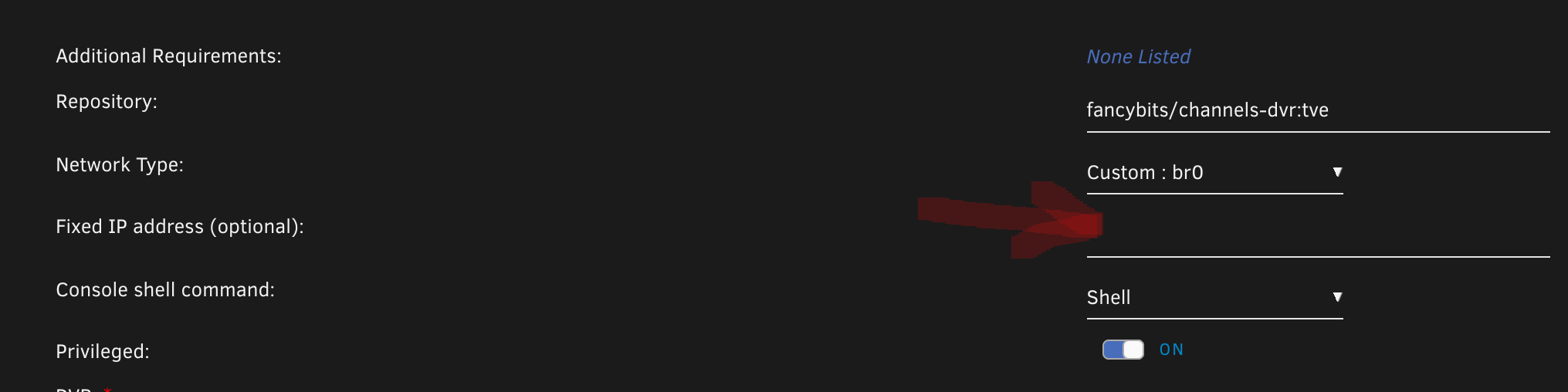
That's not valid with --net='Bridge'. Can you please do the run with the network type that you have in the screenshot and then post it, including the IP address?

I'm trying to recreate it but I can't recreate your issue, it's working in my custom network properly when I give it an IP address. I'm trying 172.18.0.100.

This is the working one without the IP change.

docker run
-d
--name='channelsdvr_intel'
--net='bridge'
--pids-limit 2048
--privileged=true
-e HOST_OS="Unraid"
-e HOST_HOSTNAME="Tower"
-e HOST_CONTAINERNAME="channelsdvr_intel"
-e 'PUID'='99'
-e 'PGID'='100'
-l net.unraid.docker.managed=dockerman
-l net.unraid.docker.webui='http://[IP]:[PORT:8089]'
-l net.unraid.docker.icon='https://github.com/timstephens24/docker-templates/raw/master/img/channels-logo.png'
-p '8089:8089/tcp'
-v '/mnt/user/data/Media/ChannelsDVR':'/shares/DVR':'rw'
-v '/mnt/user/appdata/channels-dvr':'/channels-dvr':'rw'
--device='/dev/dri/'
--restart always

This is the one that has problems:

docker run
-d
--name='channelsdvr_intel'
--net='br0'
--ip='192.136.2.15'
--pids-limit 2048
--privileged=true
-e HOST_OS="Unraid"
-e HOST_HOSTNAME="Tower"
-e HOST_CONTAINERNAME="channelsdvr_intel"
-e 'TCP_PORT_8089'='8089'
-e 'PUID'='99'
-e 'PGID'='100'
-l net.unraid.docker.managed=dockerman
-l net.unraid.docker.webui='http://[IP]:[PORT:8089]'
-l net.unraid.docker.icon='https://github.com/timstephens24/docker-templates/raw/master/img/channels-logo.png'
-v '/mnt/user/data/Media/ChannelsDVR':'/shares/DVR':'rw'
-v '/mnt/user/appdata/channels-dvr':'/channels-dvr':'rw'
--device='/dev/dri/'
--restart always

That's not a valid IP address to give a docker contain in that bridged network. It would most likely be a 172.18.0.x number. Run it with your 'br0' network without specifying the IP address, and then get a console window to that docker and run:
ip a s

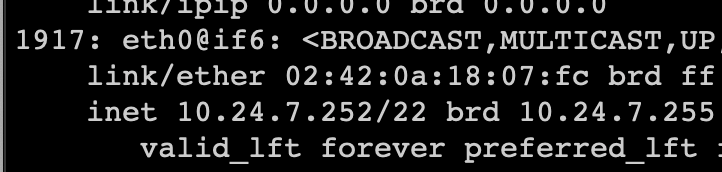
That will show you the IP range that's valid. Mine shows me:

1915: eth0@if1916: <BROADCAST,MULTICAST,UP,LOWER_UP,M-DOWN> mtu 1500 qdisc noqueue state UP link/ether 02:42:ac:12:00:1b brd ff:ff:ff:ff:ff:ff inet 172.18.0.27/16 brd 172.18.255.255 scope global eth0 valid_lft forever preferred_lft forever

Apologies, I used a test network configuration to see if I could get different results. I hadn't changed it back.

The real network is simply a 192.168.1.X/24 - of which the container is 192.168.1.15.

Is that your home internet range? If so you'd need to use the eth0 bond interface.

It's working in bridge mode on the same subnet perfectly. What do you think would account for the issues in simply changing the IP? I will surely take your advice, I'm just confused about why it has no problems as it is now....

Bridge mode isn't in the same subnet. The channels docker container is going to be a 172.17.0.0/16 network. That's why I said see what the IP address in the network is. See here:

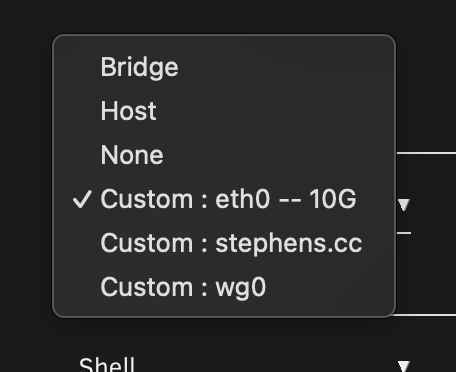
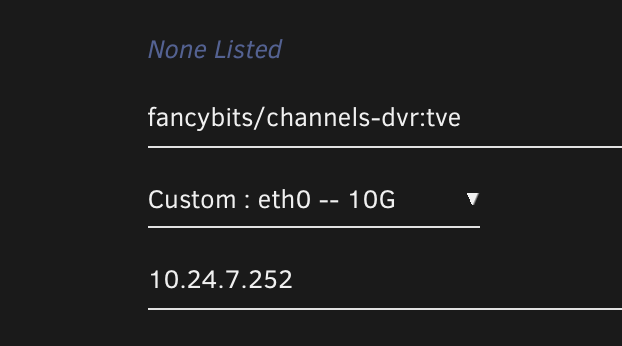
What you're trying to do is give it an IP address in your own private network, which you can do using the eth0 interface (if you're running default without changing it). Mine's named 10G so I choose that one in the list, give it an IP address in my network,

Screen Shot 2024-12-26 at 16.31.35 PM

Screen Shot 2024-12-26 at 16.36.13 PM

Now I can ping it from any device in my private network. You can't get in the same subnet without using the interface network or a bondX network

My setup is Unraid as a Proxmox VM - it bridges from the Proxmox host which is connected to my primary network (192.168.1.X).

This is output from Unraid....

br0: <BROADCAST,MULTICAST,UP,LOWER_UP> mtu 1500 qdisc noqueue state UP group default qlen 1000
link/ether bc:24:11:bc:xx.xx brd ff:ff:ff:ff:ff:ff
inet 192.168.1.14/24 brd 192.168.2.255 scope global dynamic noprefixroute br0

I did look at my Unraid settings and in my network settings I have Bonding and Bridging off, and then in my docker settings I'm using macvlan. There's been a lot of issues with ipvlan so those were the recommended settings (at least a few years ago).