Update Docker Image

I cannot use YouTube TV since it won't login due to (possibly) the chrome version on the docker container being at 87.0.4280.66.

If I manually update the dependencies on the running container it only updates Chrome to 90.0.4430.72.

I'm getting the error ** Blocked by Google: This browser or app may not be secure **

Could the docker image use a newer version of Ubuntu so we can get the latest release of Chrome?

Thank you!
The Docker image is built from Alpine, not Ubuntu.

Depends on what Host OS you're running the container on.
In a Synology NAS Channels DVR TVE docker container, the chrome version is 120.
Screenshot 2024-12-12 at 13-15-07 Channels Settings

Currently, the devs have to update the container image in order to utilize newer chrome versions.

2 Likes

Derp, I was using the nvidia tag so my fault.

I apologize!

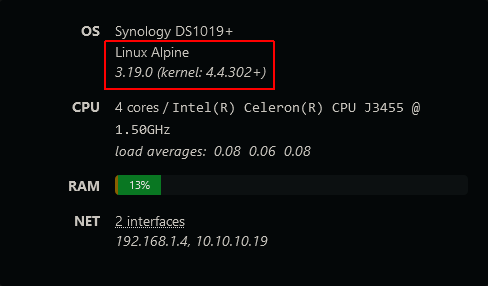
On my Synology DS920+ Alpine is 3.18.4. I'm puzzled why Alpine is different, but Image Update is not being triggered. My image is dated 11/4/2023.

So I assume I would need to stop, clean the container, and remove the current image to pull the 3.19.0 version. Without a good reason, I will let things stay as-is.

The CDVR :tve container image I'm using is the latest :tve tagged one dated 2024-01-05
https://hub.docker.com/r/fancybits/channels-dvr/tags?page=1

Container images don't update by themself.

Agreed; Container images don't update by themself. It's rare I will update as soon as an update is available.

I research the update when the Synology shows image updates are available. It's not clear to me why the Synology shows some images as "update available" and not others.

This discussion is soon becoming moot since a new image was released in the last 30 minutes. Once we find out what the changes are and how it works for others, I will likely update the image.

1 Like

I keep my docker images up to date by using Watchtower.

1 Like

I hope the Nvidia container gets updated too since that is what I use and the tve tag doesn’t have the kernel modules for hardware encoding.

The image hasn’t been updated for 6 months though, can’t it be updated like the other tags?

Not trying be difficult but I’d like that container tag updated to utilize the latest CUDA image. Just so all tags are updated.

Working for me. Chrome v131
[TVE] action=version product=Chrome/131.0.6778.139 jsVersion=13.1.201.16 protocol=1.3 revision=@c35bbcbd7c2775a12a3f320e05ac0022939b1a8a
[TVE] action=page_ready chromeVersion=120

I’d really appreciate either the files for building the image be put into a git repo so the community can help, or for the nvidia tag to be updated.

It has been updated.

3 Likes

Thank you, you're the absolute best!

I have pulled the most recent image, but the system is still telling me " linux alpine
3.14.0_alpha20210212 (kernel: 6.12.9-200.fc41.x86_64)" Is this the most recent image?

I need to get the Chrome-deely updated so I can log into YTTV.

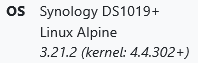
Looks like the latest :tve image from Jan 24, 2025 is using alpine 3.21.2
https://hub.docker.com/layers/fancybits/channels-dvr/tve/images/sha256-ea000df519cc1b25a6b1d80a3b80364060e58a4c44035687fdcc8d4036c75638

Reminded me that I meant to update my 6 CDVR containers.
Just did. Alpine 3.21.2, chromeVersion=132
Screenshot 2025-04-19 at 14-48-40 Channels Settings

You may need to delete the old image and container, before creating the container again

Easier using Portainer
Stack editor
[Update the stack] ( o) Re-pull image and redeploy

Otherwise use docker commands to stop container, remove container, remove image, then run
docker stop <container name>
docker rm <container name>
docker image rm <imageid>
docker run command ...