Using Channels DVR with Iphone external Monitor

Hello,
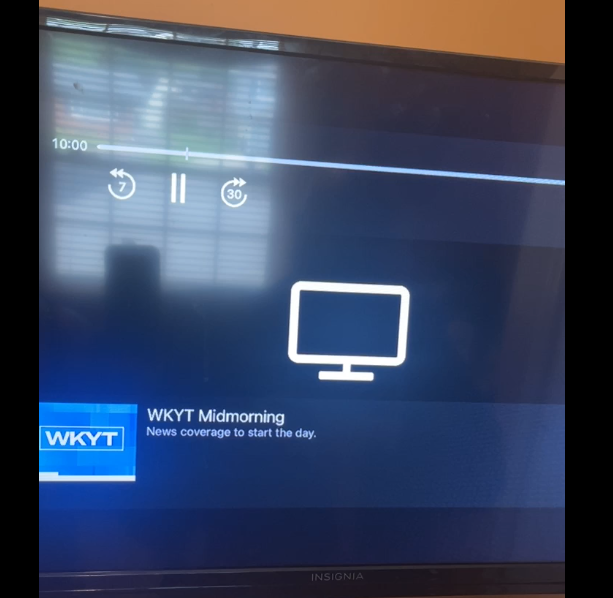
I was wondering if anyone gotten this to work or is what is happening by design? I was trying to see if I could connect a TV to my Iphone as an external monitor. I have an Iphone 16 pro, ios 26.3.1, Channels DVR Beta 5.15.1948. Hooking the TV up to the phone worked fine but Channels only plays audio through to the TV. There is a Monitor Icon that shows for the video. The same thing happens whether I try to use TVE, play recorded media or personal media.

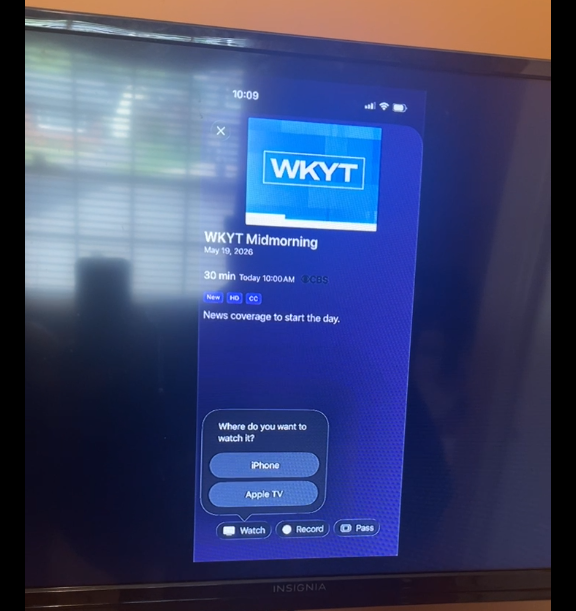
The HDhomerun app works fine and plays audio and video to the tv. Also, channels now asks "where do you want to watch it? Iphone or apple tv" for everything I try to play (there was not apple tv in the mix, just usb c to hdmi. It asks this question whether I have the cable connected or not and it continues after restarting the app and the phone. When the cable is connected, If I choose Iphone I get no video on either the phone or the tv, only audio. If I choose appletv, nothing happens. When the cable is disconnected choosing iphone, channels works normally, choose apple tv, nothing happens.

I thought this would be pretty straight forward. Wanted it for a trip I'm taking and the only internet access I'll have is on my phone, thought maybe I could stream my recordings. I sent diagnostics 696b6249-8d03-46b0-8959-9c17b4b451d8

Thanks.
Can you explain this in simpler terms without mentioning what other things do.

When you plug in a device over hdmi, playback should happen there. Video and audio. There’s no choice on where video or audio will play, it all happens on the external screen.

What happens when you plug in hdmi and play something?

Sorry, I mentioned HD Homerun because I tested the other streaming apps it to see if maybe it could be a DRM issue. Here are snips of what happens in channels. The audio plays but I get no video. Not sure why it is asking about Apple TV, the USB C to HDMI cable is plugged directly into the TV and if you choose Apple TV, nothing happens.

Just checked again and it now isn't asking the question. I would think I was crazy if I didn't have the videos I took this morning. Still doing the same thing though, audio, no video.

Thanks


...and what happens if you choose iPhone?

If you choose iPhone, you get what is on the second picture. Audio plays but only an icon for the video

Iphones do not support a second video output when connected to a tv via hdmi. Its more of a screen mirroring deal. Thats why it looks like a portrait image on your screenshot. Try an ipad, it will do exactly what you are looking for. The tv becomes the display and the ipad becomes the controller

It works on my phone for Netflix, Prime Video, Tubi, HD Homerun and my local news apps. That’s why I thought it was odd it doesn’t on channels.

Try an ipad, its like having an appletv experience while travelling

I'll give it a try. Really don't use my iPad much but this cruise I only have wifi on one device.

Where you able to recreate the issue I was having?