WinUtil-for-Channels: A Community Windows Installer for Channels DVR and Related Projects (focusing on those not Docker-based) Plus OliveTin EZ-Start

@babsonnexus I believe I have it now, complete with a much faster install process. It does take 15-20 seconds before the SLM WebUI responds after installation -- but I don't think that's due to anything I'm doing.

You can test on CDVR WinUtil v2026.08.15.1411 or newer if you like, which you'll be on automatically.

1 Like

Correct, SLM first time build activities may take a little bit.

Most issues look resolved, here are a few things I found:

  • The environment variable for the SLM_PORT remains behind during uninstall.

  • The menu for "Open Web Interface" is hardcoded to port 5000. Perhaps have this read SLM_PORT and use that, otherwise use 5000 if missing.

  • Similarly, perhaps the default port should also be changed to match SLM_PORT, otherwise use 5000 if missing?

  • After install/upgrade, the task remained "Queued" until I manually forced it to run:

    image

  • If you change ports during an upgrade, the old port remains behind in Windows Firewall. Although maybe I should change the .bat file to deal with this situation?

I believe I've addressed these additional issues. Here's the latest installation log:

[2026-08-16 09:38:21.153] [INFO] [Install] Install requested for 1 selected package(s) using preference: Winget
[2026-08-16 09:38:21.160] [INFO] [Install] Install selected package(s): Streaming Library Manager (no package id)
[2026-08-16 09:38:21.435] [INFO] [Install] Install package manager split: winget=0, choco=0, direct=0, github=0, npm=0, wslFeature=0, wslDistro=0, wslCommand=0, streamLinkManager=1
[2026-08-16 09:38:22.231] [INFO] [Package] Installing Streaming Library Manager to C:\Users\slayer\AppData\Local\StreamingLibraryManager
[2026-08-16 09:38:22.497] [INFO] [Package] Downloading slm.bat
[2026-08-16 09:38:22.563] [INFO] [Package] Patched slm.bat: faster download/extract, and waits that work with a non-interactive stdin.
[2026-08-16 09:38:22.568] [INFO] [Package] Running slm.bat upgrade
Beginning upgrade...
Checking to see if Streaming Library Manager is running...
slm.exe is not running.
Downloading Streaming Library Manager files...
Extracting Streaming Library Manager files...
Cleaning up files...
Moving files to final destination...
2944 File(s) copied
Upgrade completed
[2026-08-16 09:38:55.084] [INFO] [Package] Setting Streaming Library Manager's port to 5010
Please enter a port number between 1000 and 9999 (or enter the default 5000): You entered: [5010]
Saving port number to environment variables...

SUCCESS: Specified value was saved.
Streaming Library Manager port set to [5010].
Opening port in Windows firewall...
Please wait...
Port 5010 has been opened in Windows Firewall.
Checking if port 5010 is open...
Port 5010 is open and the server is listening.
Please completely exit out of this command prompt and restart Streaming Library Manager in a new window for the port to take effect.
[2026-08-16 09:39:01.994] [INFO] [Package] Registering Streaming Library Manager to start at logon
Setting Streaming Library Manager to run on startup...
Creating task, please wait...
Startup task complete. To start now, just run 'slm.bat' with no handles.
[2026-08-16 09:39:09.035] [INFO] [Package] Starting Streaming Library Manager
[2026-08-16 09:39:09.308] [INFO] [Package] Streaming Library Manager installed - web interface at http://localhost:5010
===========================================
--      Installs have finished          ---
===========================================
[2026-08-16 09:39:09.838] [INFO] [Install] Install workflow completed.

Mostly looks good, but now I'm getting a new problem.

During initial installation and upgrade, it ended up starting on port 5000 instead of the set one. I believe this is because the launching of the startup task is happening in the same terminal as setting the port, which Windows doesn't like. You'll probably want it to launch a separate terminal just to do the startup after port setting.

Also, FYI, I've updated the SLM Wiki pages for Windows installation, startup, and upgrade, as well as prerelaease, to include and recommend this utility as the first approach.

I didn't actually see this issue myself, but I've applied a fix that hopefully will cover what you experienced. Confirm you're using CDVR WinUtil v2026.08.16.1108 or newer to test.

Confirmed working in that version, nice! I think I'm out of debugging complaints :stuck_out_tongue_closed_eyes:

1 Like

I am new to all this advanced stuff with Channels DVR (server running on windows). OliveTin Ez-Start sure looks cool, and using this project to install it seems like a great way to get it installed. I ran through the install, rebooted when told to, but I am not sure what to do next. I already had Docker desktop installed. I did run the Debian and WSL installs and rebooted as well, but still get this these warnings and errors:

[2026-08-16 13:46:42.065] [WARN] [Package] WSL2: WSL2 does not appear usable yet - if this is the first time it's been enabled on this machine, a restart is likely required.
[2026-08-16 13:46:43.693] [ERROR] [Package] Skipping Olivetin EZ-Start install - The 'docker' command is available inside Debian, but can't reach the Docker daemon. Make sure Docker Desktop is running and has finished starting, then try again.

What am I missing?

Make sure Docker Desktop is set to run at user logon, and that the Docker Desktop icon is showing in your system tray.

Thanks, I will confirm that

Docker desktop is set to run at startup, and the Icon is showing in the system tray but I still get the same errors

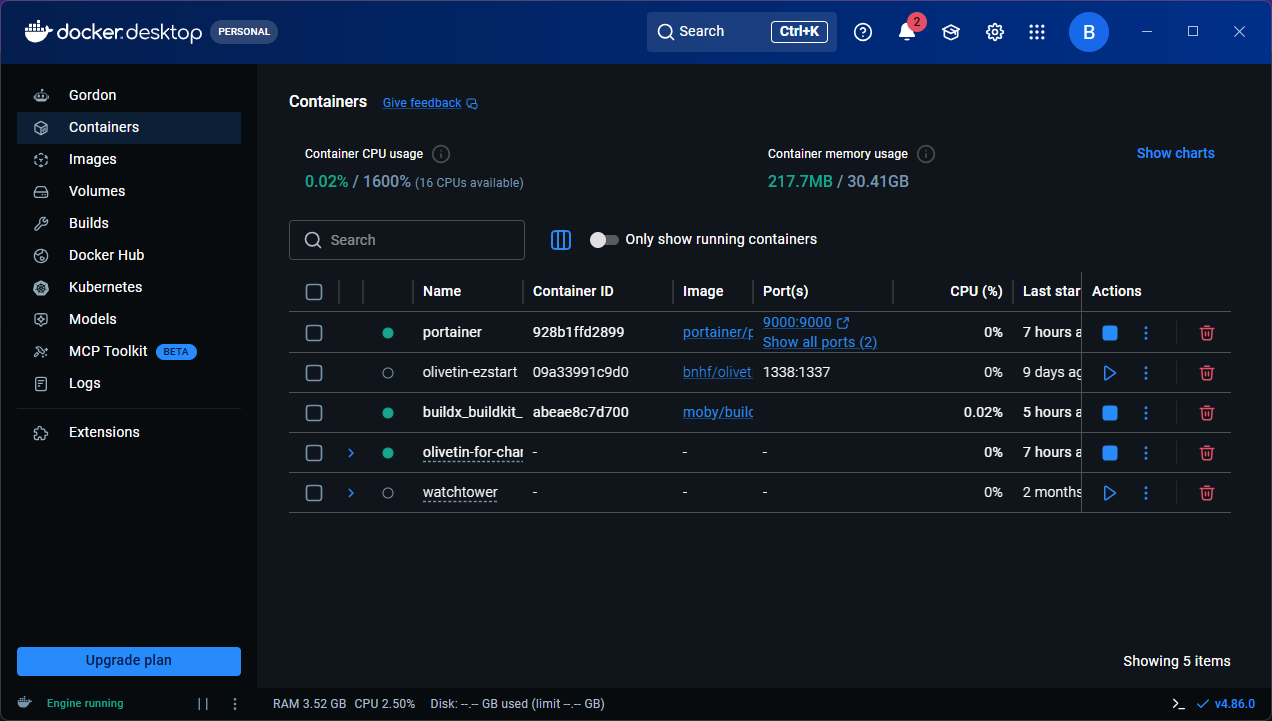
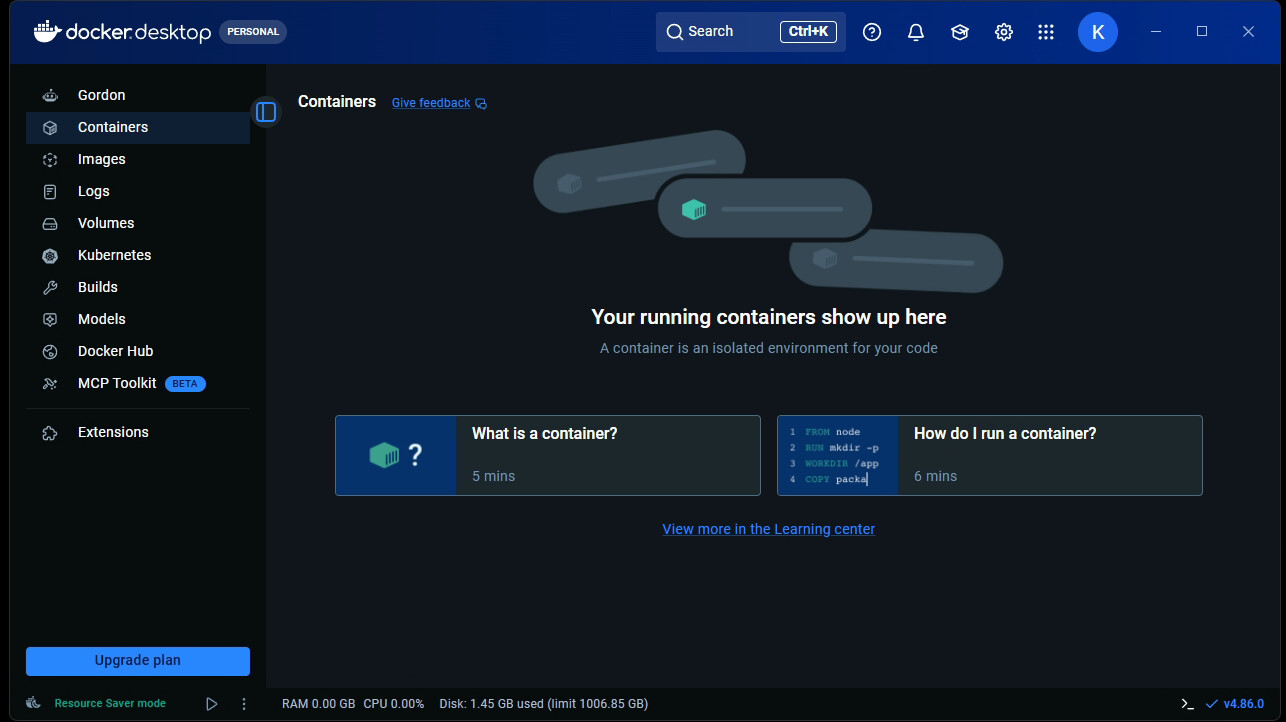
Can you take a screenshot of the Docker Desktop Dashboard? It should look something like this:

Here it is, clearly in the default state...

Indeed. Can you run the following from a PowerShell prompt?:

PS C:\Users\slayer> wsl --status
Default Distribution: Debian
Default Version: 2

image

Somehow Debian did not end up as your default WSL distro.

To fix, confirm Debian is installed with:

wsl --list

And then set it as the default distro with:

wsl -s Debian

After that, you should be able to proceed with the OliveTin installation in WinUtil-for-Channels...

1 Like

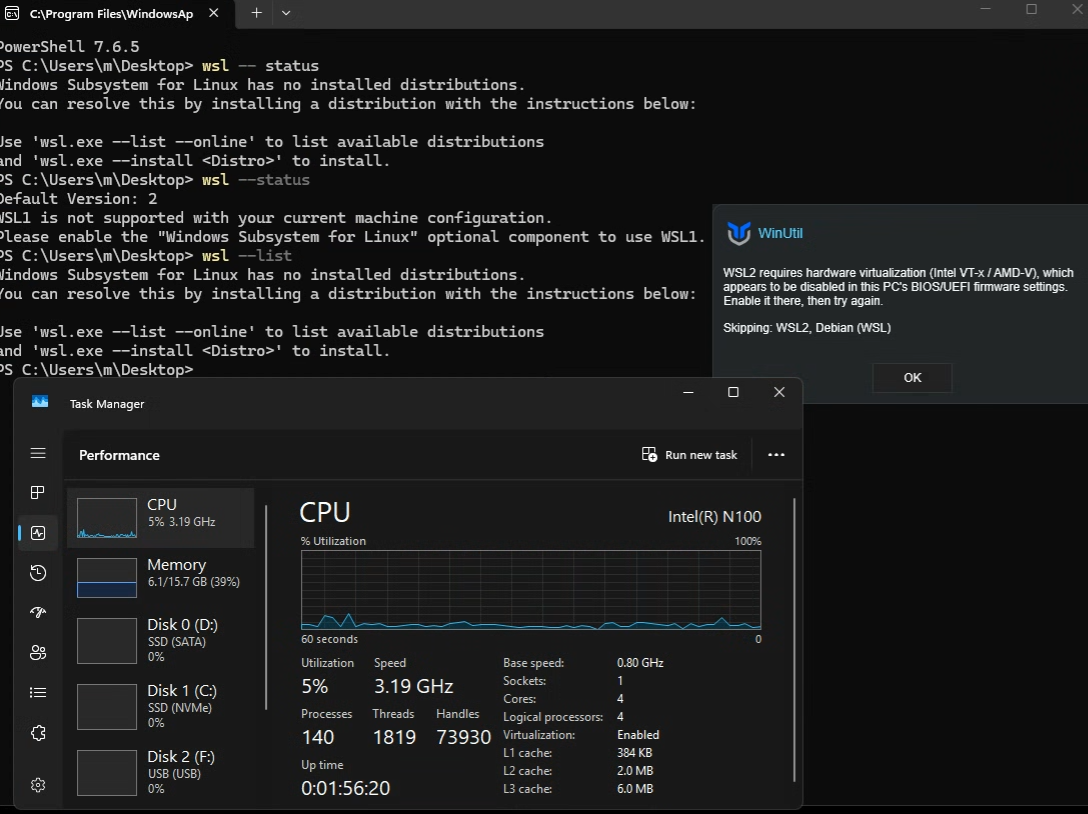
I decided to rebuild my minipc. getting this.

After those commands Debian is set up as the default:
Windows Subsystem for Linux Distributions:
Debian (Default)
docker-desktop

But I still get the same errror

It looks like you don't have virtualization enabled in the BIOS on that PC...

In Docker Desktop, can you confirm you have "WSL Integration with your default distro" enabled in Settings?

task manager says it is. i'll check bios again, but this machines bios is a mess, all settings are available, so I try to be careful in there.