
The other place to check would be in "Turn Windows Features on/off", to confirm you have virtualization enabled.
1 Like
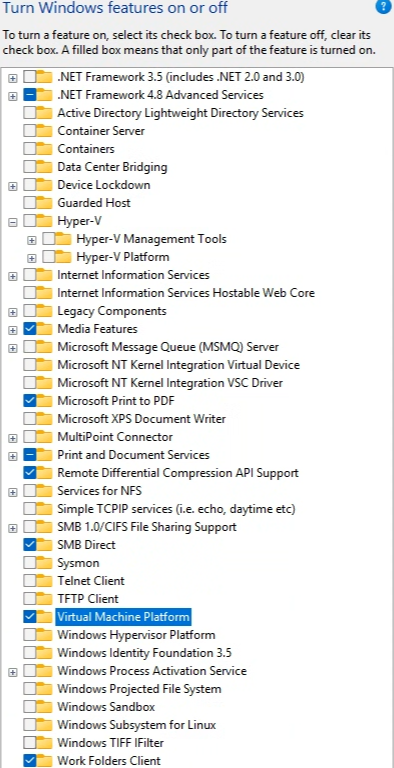
I assume the highlighted option is what's needed (already installed)
do i need to enable the old subsystem for linux, hyper-v or hypervisor?
That did the trick, I am and running, thanks so much!
1 Like
I believe that's the only one you need, although I have Hyper-V and Windows Subsystem for Linux enabled too -- and I don't know of any downside to enabling those as well, just to be sure. 
Sorry if this is a silly question, but does this Windows non-docker utility require docker?
so there must be something with the prerequisite checking. the wsl2 install was done by the CTT WinUtil (I did first) I don't remember telling it to install that, but one of the other apps it installed must have it as a requirement.
i manually installed debian wsl --install -d Debian and docker desktop. your check still prevents olivetin easy start, so I'll manually do that as well.
fyi, clicker install works now on my laptop 
No. Docker is only required for OliveTin EZ-Start -- which then, via its Project One-Click, gives you access to installing other Docker-based projects.
This utility's first mission though, is to create a centralized dashboard for installing the various "native" Windows projects that are available.
OK, so you used the parent CTT WinUtil, instead of this utility, to install WSL2? If so, I'll have to try that path. I'm guessing some people will already have Docker Desktop installed too, but without the correct settings -- so I'll have to solve for that scenario as well.
Which ones are those?
Everything under:
Channels DVR
Channels DVR Windows Clients
Channels DVR Sources (non-Docker)
in the first screenshot in post #1, other than OliveTin EZ-Start.
As an aside, OliveTin EZ-Start has never been simpler to install using this tool, as it only requires a password to use for Portainer -- and with that you'd have a really good WebUI for Docker, and access to all of the other Docker-based projects.
good thing I exported the json.
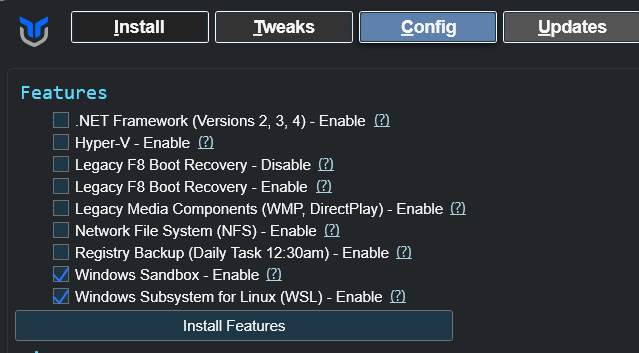
interestingly it did not install the sandbox, but I don't need it on that machine anyway
that's why I was going to do a fresh machine with your settings.. lol, too bad I didn't do your tool first, but there are several tweaks I wanted in place before installing cdvr & docker (ie disable ip6, set time to utc, ect..)
update; I decided that since I know I did a full clean w11 install from usb this morning I'd go ahead and just do a w11 reset and use your winutil first. (i was wary of the still factory install on the CyberGeek Nano A1)
My server is running Windows 10 LTSC 2019. Is the software still supporting Windows 10?
same problem, fresh install, just installed all the drivers/intel software first.
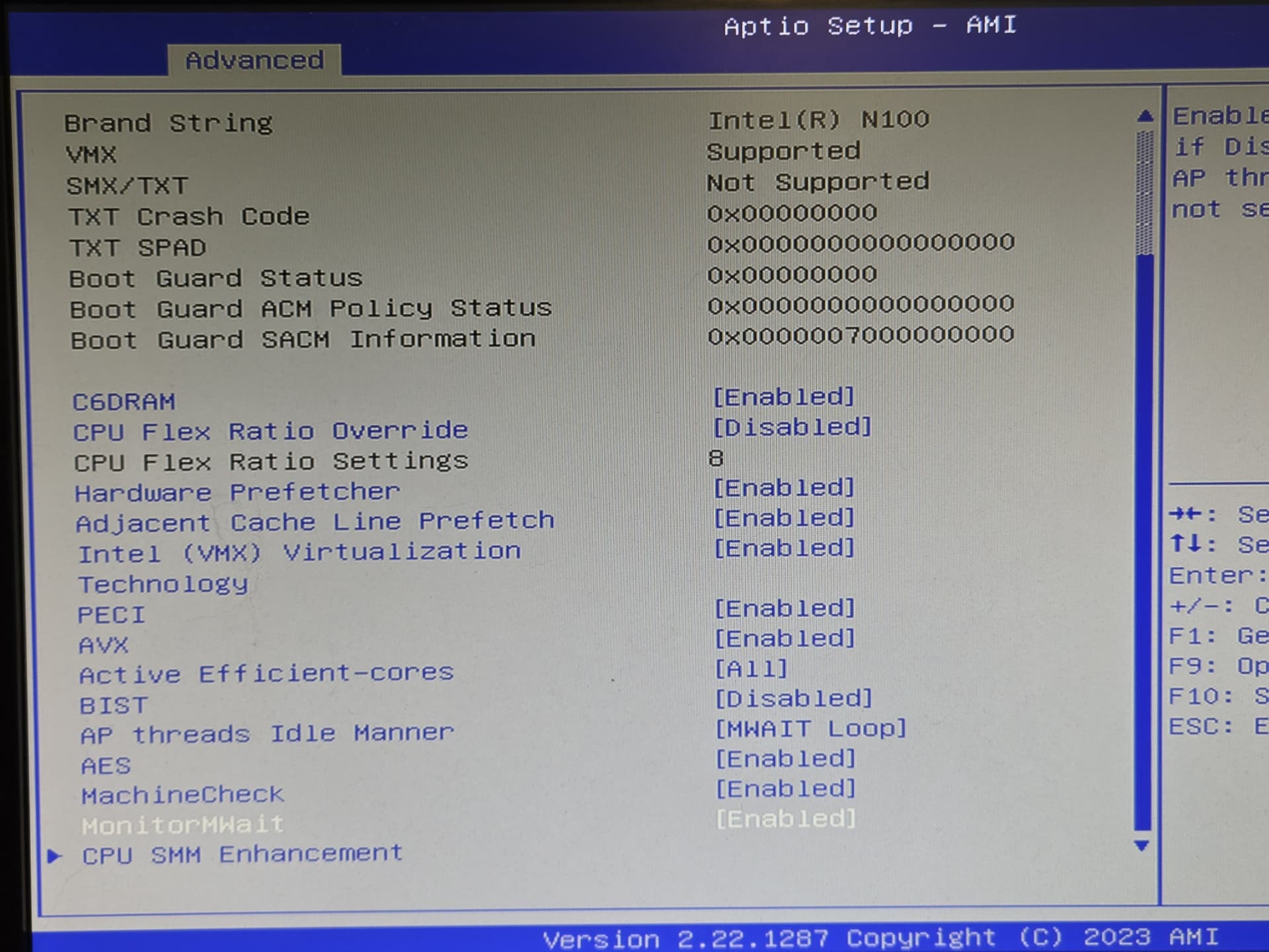
I thought it might have to do with my bios showing VMX instead of VT-x but wiki reports
The CPU flag for VT-x capability is "vmx"
Possible fixing coming shortly...
EDIT: Switched to a hopefully better method for confirming hardware virtualization. Everything still works for me, including WSL2, Debian and Docker Desktop installations.
Make sure you're using CDVR WinUtil v2026.08.16.1913 or newer, before you try it.
EDIT2: Got all the way through install CDVR and OliveTin EZ-Start as well, so this new detection seems at least as good, but hopefully better (for the next guy). Thanks for reporting, as always!
already fixed, beat ya to it coding wizard.  lol (took to long to get photo, I did get wsl2 installed with previous version.)
i guess I had to go back to my roots with hardware level diagnostic and learn modern bios.
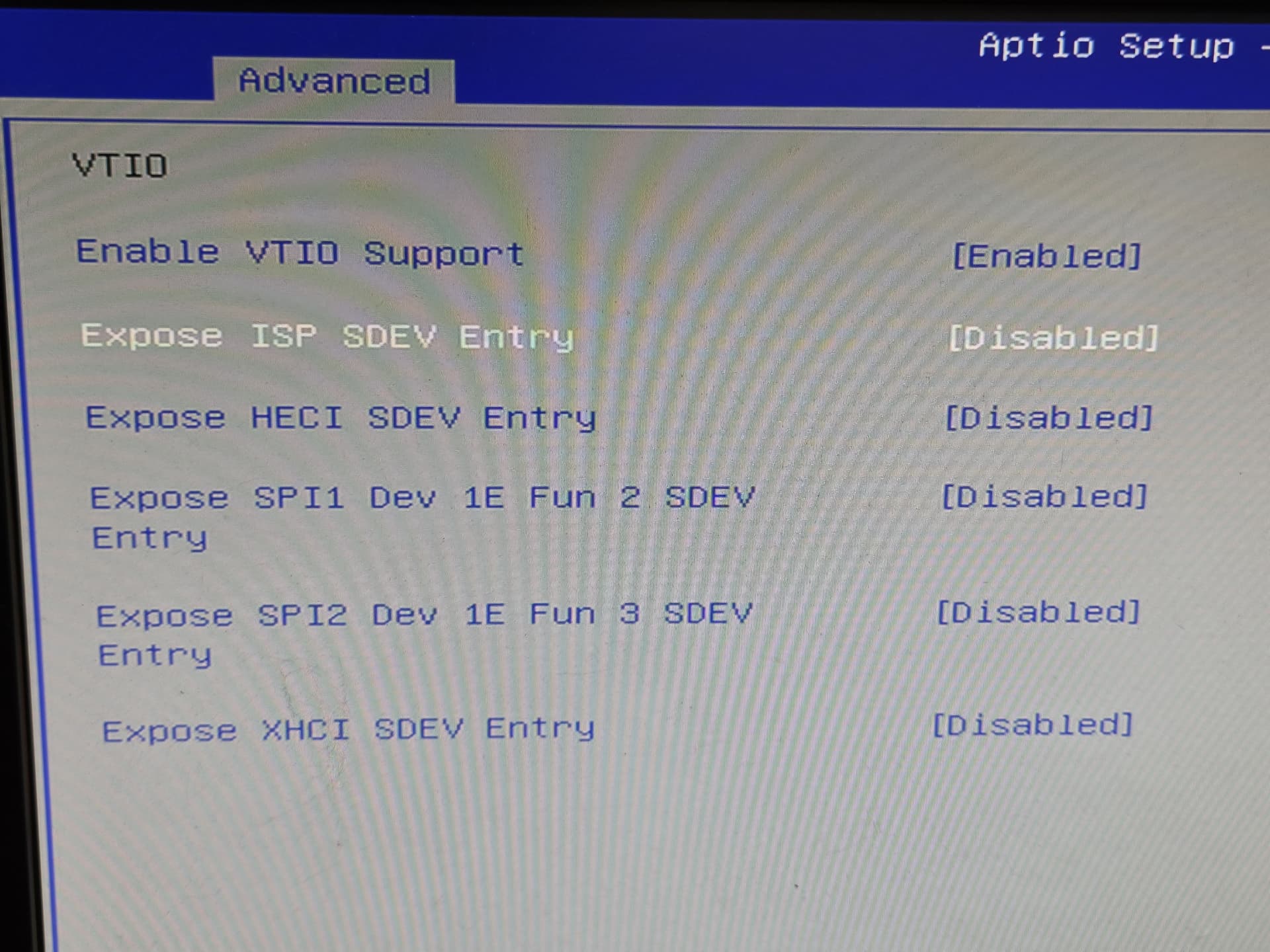
Enabling just VTIO didn't work, but did after I exposed all the I/O's.
these settings were buried deep in the bios not with the VMX setting or VT-d setting.

1 Like
Maybe? If you've added the Microsoft Store, and have at least PowerShell 5+ -- it'd be worth a shot.
thought I'd provide more details as there's bound to be other NUCs out there with similar bios configs, and windows users will likely need these for proper virtualization.
gemini reports the following
Expose ISP SDEV Entry =
- ACPI SDEV Table: Publishes hardware resource constraints and topology for secure peripherals (such as MIPI or integrated camera subsystems) so that isolated virtualization layers like Windows Virtualization-Based Security (VBS) can claim them.
Expose HECI SDEV Entry =
ACPI SDEV Table: The Secure Device (SDEV) table is an ACPI specification used to inform the operating system and hypervisor about hardware security devices, DMAR (DMA Remapping) endpoints, and restricted PCI device namespaces. [1, 2, 3]
HECI Controller Scope: The HECI (Host Embedded Controller Interface) device—acting as the communication channel to the Intel Management Engine (ME)—must be defined with an explicit ACPI Name Scope or _HID/_CID in the DSDT/SSDT. [1]
SDEV Sub-structures: To expose HECI in the SDEV, the BIOS firmware builder must insert a Secure Device Sub-structure (Type 0: Namespace Device or Type 1: PCIe Endpoint Device) specific to the HECI PCI B/D/F (Bus/Device/Function) or ACPI object path.
VT-d Integration: VT-d relies on these entries matching the Root Port and remapping hardware units so that memory spaces assigned to secure microcontrollers are properly locked down against unauthorized DMA attacks, especially when Virtualization-based Security (VBS) or Kernel DMA Protection is active.
Expose SPI1 Dev 1E Fun 2 SDEV Entry =
Exposing this entry allows an operating system or hypervisor with VT-d enabled to properly recognize, isolate, or assign the SPI1 controller context safely. [1]
Expose SPI2 Dev 1E Fun 3 SDEV =
SPI2 Exposure: Enabling this option adds an entry for the SPI2 controller (Device 1E, Function 3) into the SDEV structure.
Expose XHCI SDEV Entry =
Controls whether secure hardware descriptors (specifically for DMA-capable peripherals like the USB xHCI controller) are injected into the ACPI
SDEVtable presented to the operating system. [1, 2]
1 Like
must not have gotten wsl2 installed completely or something. getting this multiple times after reboot
[2026-08-16 21:23:05.140] [INFO] [Install] Install requested for 1 selected package(s) using preference: Winget
[2026-08-16 21:23:05.219] [INFO] [Install] Install selected package(s): WSL2 (no package id)
[2026-08-16 21:23:05.975] [INFO] [Install] Install package manager split: winget=0, choco=0, direct=0, github=0, npm=0, wslFeature=1, wslDistro=0, wslCommand=0, streamLinkManager=0
[2026-08-16 21:23:07.079] [INFO] [Package] Enabling WSL2 (WSL2)
[2026-08-16 21:23:27.643] [INFO] [Package] Still enabling WSL2 (20s elapsed) - this can take a while.
[2026-08-16 21:23:47.910] [INFO] [Package] Still enabling WSL2 (40s elapsed) - this can take a while.
[2026-08-16 21:24:08.175] [INFO] [Package] Still enabling WSL2 (60s elapsed) - this can take a while.
[2026-08-16 21:24:28.440] [INFO] [Package] Still enabling WSL2 (80s elapsed) - this can take a while.
[2026-08-16 21:24:48.700] [INFO] [Package] Still enabling WSL2 (100s elapsed) - this can take a while.
[2026-08-16 21:25:08.894] [INFO] [Package] wsl: WSL installation appears to be corrupted (Error code: Wsl/CallMsi/Install/REGDB_E_CLASSNOTREG).

Press any key to repair WSL, or CTRL-C to cancel.

This prompt will time out in 60 seconds.

Class not registered

Error code: Wsl/CallMsi/Install/REGDB_E_CLASSNOTREG


[2026-08-16 21:25:16.929] [WARN] [Package] WSL2: WSL2 does not appear usable yet - if this is the first time it's been enabled on this machine, a restart is likely required.
but that install was on the older version. I'll have to try uninstalling it
Two requests for Foundational:
-
Allow a version choice for Node.js, with a default of v24.13.0. In all my testing across platforms, and especially Windows, this is the most stable and works across various tools that take advantage of it.
-
Add Playwright as an option, where installation can happen through one of the following ways:
If Python is installed (recommended)...
python -m playwright install --with-deps chromiumIf Python is not installed but Node.js is...
npx playwright install --with-deps chromium
Both of these will be very helpful in current and future SLM functionality, and if other apps are ported to Windows. Thanks!
1 Like