
I should be receiving my Osprey boxes tomorrow. When I get them setup and have a couple days of usage I’ll be sure to report back here.
2 Likes
Over on the Roku Tuner Bridge discussion, we have successfully gone beyond the 4 hour "are you still watching prompt" by periodically sending an "Enter" command by ECP to the DTV app on Roku devices. I expect that this has been tried with ADBTuner before. On the surface, the Roku and Android apps appear to be the same. I'm wondering if this Idea can be revisited to see if the DTV app may accept a similar ADB command in its current version.
As I have had success with the Roku setup, I have swapped out some of my ONN 4k boxes for Roku Streaming Stick 4k's.
My LinkPi now has the three Roku 4k streaming sticks, and three onn 4k Android boxes. The third onn 4k box is feeding through an inexpensive USB HDMI capture card attached to the LinkPi's USB 3.0 port.
I also have two DTV Osprey boxes being delivered tomorrow. As the Roku's seem to be working out well, I may return the Ospreys. If I can get the onn 4k boxes to play well with the DTV app, I may be able to return the 2 new Roku sticks also. (I'm still staying very budget conscious)
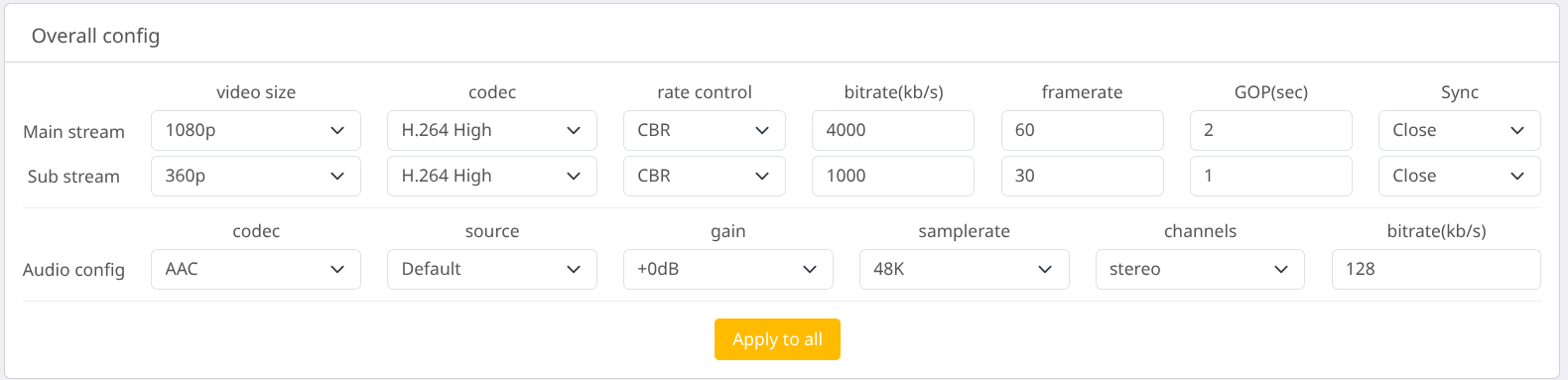
I do have a problem with video stuttering on all the HDMI inputs on the LinkPi. The onn 4k box connected to the USB capture device does not seem to have the same issue. I have switched input devices around and the stutter appears to be independent of device type, and related to the HDMI inputs. I'm wondering if anyone has experienced this stutter, and if it can be resolved by changing the default HDMI encoding settings on the LinkPi.
These are the settings I am currently using. They are the defaults after a hard system restore on the LinkPi.
How does one determine the deep link for each application? I'd love to pull in NESN from their NESN 360 app, but I have no idea how to grab that deep link.
I think I figured out why my stuttering video issue began. For YTTV, I was running 5 Android boxes at 1080p, 60 fps and 8000 bitrate. When I switched from YTTV to DTV, I started playing around with different tuner configurations. I added the Rokus into the mix.
Not wanting to abandon all of the onn boxes and ABDT, I ended up with 6 tuners...three Roku, and three Android. Leaving the settings at the previous resolution, frame rate, and bitrate was more than the poor little LinkPi box could handle.
So, today I experimented with backing down the number of tuners, frame rate, and/or bitrate. It turns out that I can run all six tuners at 1080p, 12000 kbps, and 45fps without stuttering.
The video processing will keep you going. Sounds like you have a good handle on things.
EPlus TV has NESN integrated. I'm not sure if it has the same content as the 360 app, but here is the link
1 Like
NESN is currently broken in EPlusTV and may or may not be fixable. They changed the authentication method and possibly also added DRM.
3 Likes
That stinks.
If you have an m3u8 detector in Chrome, Log inito the site and play the stream and see what is detected.
2 Likes
I’m gonna need more Ospreys.
Lot's of reading today, but I have ADBTuner up and running. So far I have NBC Sports Boston which is great.
The question now is NESN. There's a NESN 360 app that streams both NESN and NESN+ stations. It's not as straight forward as YoutubeTV. How might I go about bringing NESN into ADBTuner? Where do I start to determine links and all that?
Sorry, one more question. Should the quality of the streams being pulled in from YouTubeTV be the same quality as if I'm watching on YouTubeTV? They look more pixelated when watching through Channels DVR. Definitely not a clean 1080p stream.
You will need to adjust your encoder settings and make sure you are using the main stream from your encoder.
I am preparing to spin up a second instance of ADBTuner and would like a confirmation of my thinking.
A little background. I recently switched from Hulu Live to DirecTV stream. Before I made the switch I decided to start with a clean slate thanks to @bnhf and his wonderful OliveTin project. I deleted everything including Portainer. I reinstalled Portainer and OliveTin via the OliveTin EZ-Start. I then reinstalled ADBTuner. After reading about @spammedeeper use of DirecTV Osprey devices I purchased 3 of them to replace the Onn 4k Pros I was using with Hulu. The Ospreys are working well with DTV. I want to spin up a second instance of ADBTuner to use the Onn devices I replaced with Ospreys. The Osprey deep link URL format is different from the Onn format so I can't use them in the same ADBTuner instance.
Q. Can I use the Project One-Click Action to create a ADBTuner instance using the following Env Vars -
HOST_PORT: 5593
HOST_VOLUME: adbtuner_config2
Sorry for the length of this post and thank you to the users of this resource who are so willing to help.
You actually can use the Ospreys in the same ADBT instance. One of the recent dev builds allows you to have an M3U per app.
You'd also need to change the container name to adbtuner2, which I haven't allowed for in Project One-Click. Do you feel comfortable spinning up a stack in Portainer? You could copy and paste from the existing stack or use the sample Docker Compose for ADBTuner in Projerct One-Click.
EDIT: Or, do what @spammedeeper is suggesting. 
EDIT2: If you decide to spin-up a second container, I believe these are the changes you'd need to make to the Docker Compose:
services:
  adbtuner:
    image: turtletank99/adbtuner:${TAG}
    container_name: adbtuner2
    dns_search: ${DOMAIN} # Change to the name of your LAN's domain, which is usually local or localdomain
    init: true
    ports:
      - ${HOST_PORT}:5592 # Use the same port number the container is using, or optionally change it if the port is already in use on your host
    volumes:
      - adbtuner2:/app/.config
    restart: unless-stopped
volumes:
  adbtuner2:
    name: ${HOST_VOLUME}
And then, you were on the right track with the env var changes you were proposing...
I must have missed that post. Thanks
In my main docker I have a mix of Ospreys and Onn boxes. I use the unique package/App M3U to add individual sources to Channels. This is great as it lets me set priority for certain apps, all while using one docker.
In practice this has allowed me to have separated DirecTV Onn source and DirecTV Osprey Source. As the Osprey is faster to tune, I set the Osprey as primary source on my Apple TV for faster channel flips (and recently multi view tuning). To keep the ospreys available for live TV watching, I set the sever to use Onns for recording. Don’t care if the tuning is slower for recoding as I don’t see it.
This setup has worked really well last few weeks.
My Mac-Mini-M2 updated the OS to the latest version Tahoe 26.0 yesterday.
Docker Desktop also had a waiting update to version 4.46.0 (204649) that I installed. After that I noticed that the ADBTuner tuners were displaying the Endpoint/Android Connection Failed error on all three of my Osprey tuners. After messing with it for several hours I decided to delete everything except Docker Desktop and start over. I reinstalled OliveTin and from there I deployed Portainer, Watchtower and ADBTuner. I set up my three Osprey devices and also one of the Onn 4k Pros I had available. All four devices are showing the Connection Failed error for Endpoint and Android. I can ping all of the devices and I can open a stream in VLC using the Endpoint URL for all devices. I stopped and started the adbtuner container and I see this in Portainer - adbtuner log:
INFO:     Application startup complete.
INFO:     Uvicorn running on http://0.0.0.0:5593 (Press CTRL+C to quit)
2025-09-16 20:59:09.639 - lib.adb - [Errno 111] Connection refused
2025-09-16 20:59:09.639 - lib.adb - ADB: Connection failed.
2025-09-16 20:59:09.639 - lib.adb - ADB: Error while running command. Check for approval popup on device.
2025-09-16 20:59:09.639 - lib.adb - Failed to retrieve current configuration. Will not update Android device configuration.
2025-09-16 20:59:09.639 - lib.adb - ADB: Error while running command. Check for approval popup on device.
2025-09-16 20:59:09.639 - lib.adb - ADB: Error while running command. Check for approval popup on device.
2025-09-16 20:59:09.667 - lib.adb - [Errno 111] Connection refused
2025-09-16 20:59:09.667 - lib.adb - ADB: Connection failed.
2025-09-16 20:59:09.667 - lib.adb - ADB: Error while running command. Check for approval popup on device.
2025-09-16 20:59:09.667 - lib.adb - Failed to retrieve current configuration. Will not update Android device configuration.
2025-09-16 20:59:09.667 - lib.adb - ADB: Error while running command. Check for approval popup on device.
2025-09-16 20:59:09.667 - lib.adb - ADB: Error while running command. Check for approval popup on device.
2025-09-16 20:59:09.689 - lib.adb - [Errno 111] Connection refused
2025-09-16 20:59:09.689 - lib.adb - ADB: Connection failed.
2025-09-16 20:59:09.689 - lib.adb - ADB: Error while running command. Check for approval popup on device.
2025-09-16 20:59:09.689 - lib.adb - Failed to retrieve current configuration. Will not update Android device configuration.
2025-09-16 20:59:09.689 - lib.adb - ADB: Error while running command. Check for approval popup on device.
2025-09-16 20:59:09.689 - lib.adb - ADB: Error while running command. Check for approval popup on device.
2025-09-16 20:59:09.707 - lib.adb - [Errno 111] Connection refused
2025-09-16 20:59:09.707 - lib.adb - ADB: Connection failed.
2025-09-16 20:59:09.707 - lib.adb - ADB: Error while running command. Check for approval popup on device.
2025-09-16 20:59:09.707 - lib.adb - Failed to retrieve current configuration. Will not update Android device configuration.
2025-09-16 20:59:09.707 - lib.adb - ADB: Error while running command. Check for approval popup on device.
2025-09-16 20:59:09.707 - lib.adb - ADB: Error while running command. Check for approval popup on device.
None of the devices are displaying an ADB approval popup. I then went into a couple of the Osprey's Settings and revoked ADB permissions. I still don't get an ADB approval popup when I do a Refresh Status from ADBTuner.
What should I try next?
Maybe MacOS network permissions? These apparently get reset now on every update: