
Dood to hear you found the issue and got it all working on new macos. I've got too much going on right now to be the brave one to test this out.
When I try to play any channel on the nbc app through adb tuner using my firestick on my hdmi encoder the channels stream with the lights dimmed, there was previously a post that had a solution which was to download version 9.9.1 of the nbc app and it would work, but that version no longer works because it wont let you login with your provider much less stream anything, is there any way to fix this? THANK YOU!
You will need a development build of ADBTuner and a custom config, but this should help.
thank you so much for yout post on installing NBC App Channels, working around the Dim Video Challenge, I currently am trying to do the same but beczuse I am new at this I only know how to install adbtuner by first installignn portainer and docker desktop and then running the following command on cmd prompt:"docker run -d --init -p 5592:5592 --name adbtuner -v adbtuner_config:/app/.config turtletank99/adbtuner" I have never installed it the way you said, is there any guide that you can give me or send me to that will show me how to do so? THANK YOU!
Just want to report that Iptv simple addon for Kodi and adbtuner now works great after i enter "mime type" video/mp2t in iptv Simple settings and enable ffmpeg reconnect and inputstream.adaptive
video/mp2t
Channel start is 3-4s and channel change with up/down 5s.
Without mime type setting channel change takes along time as Kodi uses MIME types to understand the format of files and streams to correctly display or play them.
You have to find the apk, open it with apktool, and look inside the AndroidManifest.xml to see which links are supported.
I see:
        <activity android:configChanges="keyboardHidden|screenSize" android:exported="false" android:launchMode="singleTask" android:name="com.nesn.nesnplayer.ui.main.MainActivity" android:screenOrientation="behind" android:theme="@style/AppTheme.NoActionBar">
            <intent-filter>
                <action android:name="android.intent.action.SEND"/>
                <category android:name="android.intent.category.DEFAULT"/>
                <data android:mimeType="text/plain"/>
            </intent-filter>
            <intent-filter>
                <action android:name="android.intent.action.VIEW"/>
                <category android:name="android.intent.category.DEFAULT"/>
                <category android:name="android.intent.category.BROWSABLE"/>
                <data android:scheme="com.nesn.nesnplayer"/>
            </intent-filter>
        </activity>
which means com.nesn.nesnplayer:// would launch com.nesn.nesnplayer.ui.main.MainActivity.
But its not clear what more you use to go directly to a live channel. It requires experimentation and luck. Sometimes the same link from the webbrowser will work if the app is configured for it.
There is another section that does seem to support urls that start with nesn.com/watch:
        <activity android:configChanges="orientation|screenSize" android:exported="true" android:name="com.nesn.nesnplayer.ui.splash.SplashActivity" android:screenOrientation="behind" android:theme="@style/AppTheme.NoActionBar">
            <intent-filter>
                <action android:name="android.intent.action.MAIN"/>
                <category android:name="android.intent.category.LAUNCHER"/>
            </intent-filter>
            <intent-filter android:autoVerify="true">
                <action android:name="android.intent.action.VIEW"/>
                <category android:name="android.intent.category.DEFAULT"/>
                <category android:name="android.intent.category.BROWSABLE"/>
                <data android:scheme="http"/>
                <data android:scheme="https"/>
                <data android:host="nesn.com"/>
                <data android:host="*.nesn.com"/>
                <data android:pathPrefix="/watch"/>
            </intent-filter>
1 Like
I can give you some advice to get started, but you will need to experiment.
1. You can pull the experimental development builds by using this for repository.
turtletank99/adbtuner:development
This will pull an experimental, developer version.
2. After you load the dev build, go to your adbtuner web interface, with /configurations
http://[your IP address]:5592/configurations
3. Create a new Config (button at top), leave the top section by giving it a name and leaving your UUID, then copy in and replace just the info I provided in last post.
4. Go back to your channel with NBC, change the config to use the custom one you built. You may need to refresh docker or webpage to see it.
From there you will just need to play with settings. Every config is different, but what I provided will get you started.
One last thing, I'm happy to assist where I can, but there is no reason to ping me so many times for the same topic. If you need simple tuning, use standard channels tuning for YouTube TV.
Thank you so much, I'm sorry about the pinging so many times, its just that I had some spelling and punctuation errors in the previous messages I sent you, but I completely understand, once again thank you!
I was able to install it and I pasted the configurations like you told me and everything seemed to be going well but when I try to run the channel the app just doesnt launch at all, as a matter of fact nothing happens, I guess I may be doing something wrong but I have tried to do it with different devices (both an Onn and a Firestick) and I have uninstalled and reinstalled it several times but its still the same way. And as soon as I revert back to the default configurations the app opens successfully but of course with the dim lights, maybe you may know of a fix or if you have any suggestions it would be much appreciated. THANK YOU!
I have been using this for a while, and overall it is working great, but I have a feature request. Not sure if it has been asked before.
Would it be possible to add a button on each 'Tuner' to send an ADB reboot command for the google devices (or FireTV)? My devices sometimes just get stuck, and they are remote (across town in my office). If I could reboot them from the web interface, it would save me a trip!
That would be good for most situations, however powering your devices with a managed PoE switch is really the ultimate, as it provides a power-cycle reboot if ever needed. I'm an ocean away from my devices a fair bit, and this gives me a lot of confidence that I can deal with whatever. My encoders are powered the same way.
2 Likes
That's a great idea! Another possibility is to plug your tuners into smart switches, a smart power strip, or a basic power strip connected to a smart switch.
These are wireless devices (Chromecast and FireTV). I know of no way to use PoE to power them.
I could use a smart plug I suppose.
I like your idea of ADB reboot buttons on the GUI. I offered the smart switch idea just in case your suggestion can't be incorporated.
Even wireless devices can be powered by PoE, you just need a PoE splitter and use the power side only. However, there are PoE Ethernet adapters for most streaming sticks, which eliminate any issues with having too much Wi-Fi in close proximity.
It's easy for these encoder setups to end up as a jumble of devices and wires. Using PoE-capable Ethernet adapters can help with both reducing the wires and the wireless, along with facilitating some great organizational options -- particularly for rackmount setups:
@hiperwall I use VLC to remotely attach to the video stream of the tuner and then use an android remote app to control the device as I watch on VLC. As @bnnf mentioned, I also have all my streaming devices and my encoder using POE so I can physically cycle the power in worst case scenarios. This has worked well for me to reset a device, install new software, change settings, etc.
Edit; It would be nice to also have a button in ADBTuner to do a reboot. Anything that makes it easier to manage remotely is a welcome addition.
I do the same when I am on-site, but I don't work from the office anymore, so I only go in rarely. I am looking at other options like AnyDesk, but last time I tried to set that up it didn't work. But I didn't have a ton of time to figure it out.
@hiperwall I have also used tailscale to allow me to RDP to a remote desktop then operate from that site. Maybe that would work for you.
1 Like
I already use Tailscale, so my plan was next time I am in the office to maybe explore setting up wireless ADB from either one of my Linux boxes or from my Windows workstation. I am just not super ADB knowledgable, so not sure how hard that will be.
1 Like
You can do this with a custom config, and fake channel. I just tested this:
{
    "name": "Reboot",
    "author": "",
    "version": "0",
    "description": "Forced reboot via ADB Command",
    "uuid": "e46314f0-cv73-21ab-c2b7-e1235d0f1433",
    "global_options": {
        "wait_for_video_playback_detection": false,
        "use_fixed_delay": true,
        "fixed_delay_seconds": 1,
        "check_for_and_clear_whos_watching_prompts": false,
        "wait_after_post_playback_start_commands_seconds": 3
    },
    "pre_tune_commands": [
        "input keyevent 3"
    ],
    "tune_commands": [
        "am start -c android.intent.category.HOME -a android.intent.action.MAIN"
    ],
    "post_playback_start_commands": [
        "sleep 5",
        "reboot"
    ],
    "post_tune_commands": [
        "input keyevent 26"
    ]
}
This wakes a tuner, sends the command to start the home screen button via AM Start, then pushes reboot command via ADB. You can watch the reboot process come back to home screen in the ADBT Preview Window. When tuning is finished, ending the preview puts the tuner to sleep.
To use the custom config, you have to make a fake channel, and but in anything for the URL, and select any application that is installed.
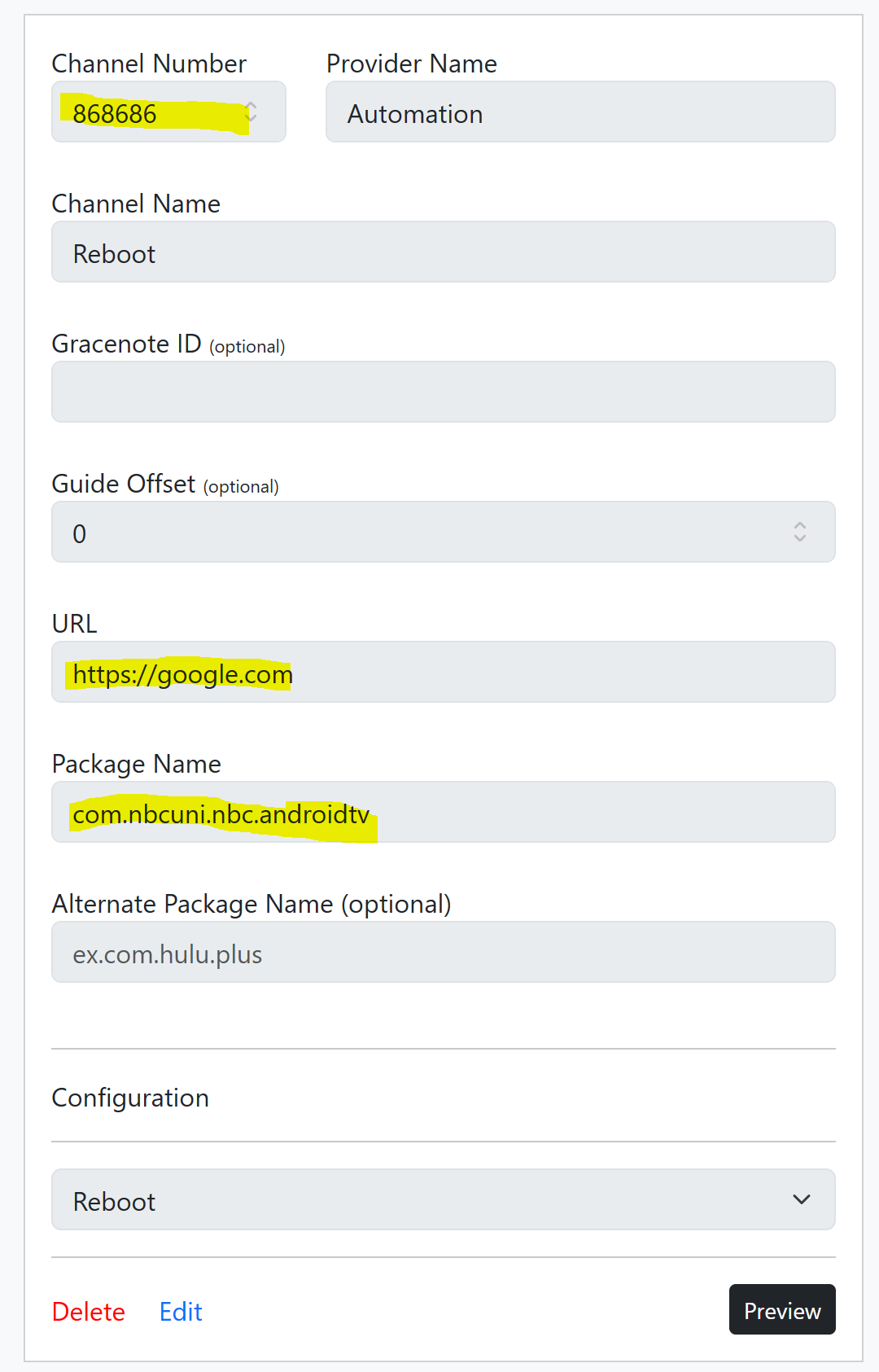
If you really wanted to, you could import this "channel" into Channels DVR, schedule short recording, and it should trigger reboot, say overnight. I guess you would then have a video log of the reboot completing, maybe. Didn't test this.
Of course this is a weird work around, but is much in the same style I use to get ADBTuner to work (rather well) with DirecTV Osprey boxes. If you have multiple turners, it would not target specific tuners. This was just a proof of concept, one that could be used if you were in dire need. As TurtleTank has mentioned before, ADBTuner should not become a scripting platform.
But this is the playground, it's something, best I could come up with before dinner. 
Have fun!