
Ah I see again... I prefer ADBTuner too. Checked out prismcast myself. Prefer the video quality of ADBT.
Bwa ha ha ha, I've figured it out! 


Thus far, got all the NBCs, ESPNs, NFLs, and PBSs working in their native apps through a new method built on top of your original idea, but more generic with some variable controls. Details to come later when I finish with some more of these and put something more formal together. Stay tuned!
2 Likes
Cool. I look forward to seeing what you figured out. I discovered today that if you do scroll down enough times to the bottom of the ESPN app you do eventually find your way to some links to the ESPN linear channels… Suspect that is how you came through those.
Not looking to steal your thunder by any means, but wanted to try this for fun again, once I discovered the links to the ESPN app. Whatever you are doing that makes it generic with variable controls is beyond my capability. So were you thinking of doing something like this to get to the ESPN channel from app?
{
    "name": "ESPN Channel ESPN App",
    "author": "nateg",
    "version": "1.0",
    "description": "Select ESPN channel from ESPN app.",
    "uuid": "28957561-c5e1-417d-bf9f-4a0da4e885fb",
    "global_options": {
        "wait_for_video_playback_detection": true,
        "use_fixed_delay": false,
        "fixed_delay_seconds": 0,
        "wait_after_post_playback_start_commands_seconds": 0
    },
    "pre_tune_commands": [
        "input keyevent KEYCODE_MEDIA_STOP",
        "am force-stop '||TARGET_PACKAGE_NAME||'",
        "sleep 1"
    ],
    "tune_commands": [
        "monkey -p '||TARGET_PACKAGE_NAME||' -c android.intent.category.LEANBACK_LAUNCHER 1 || monkey -p '||TARGET_PACKAGE_NAME||' -c android.intent.category.LAUNCHER 1",
        "sleep 10",
        "input keyevent KEYCODE_DPAD_DOWN",
        "input keyevent KEYCODE_DPAD_DOWN",
        "input keyevent KEYCODE_DPAD_DOWN",
        "input keyevent KEYCODE_DPAD_DOWN",
        "input keyevent KEYCODE_DPAD_DOWN",
        "input keyevent KEYCODE_DPAD_DOWN",
        "input keyevent KEYCODE_DPAD_DOWN",
        "input keyevent KEYCODE_DPAD_DOWN",
        "input keyevent KEYCODE_DPAD_DOWN",
        "input keyevent KEYCODE_DPAD_DOWN",
        "input keyevent KEYCODE_DPAD_DOWN",
        "input keyevent KEYCODE_DPAD_DOWN",
        "input keyevent KEYCODE_DPAD_DOWN",
        "input keyevent KEYCODE_DPAD_DOWN",
        "input keyevent KEYCODE_DPAD_DOWN",
        "input keyevent KEYCODE_DPAD_DOWN",
        "input keyevent KEYCODE_DPAD_DOWN",
        "input keyevent KEYCODE_DPAD_DOWN",
        "input keyevent KEYCODE_DPAD_DOWN",
        "input keyevent KEYCODE_DPAD_DOWN",
        "input keyevent KEYCODE_DPAD_DOWN",
        "input keyevent KEYCODE_DPAD_DOWN",
        "input keyevent KEYCODE_DPAD_CENTER",
        "sleep 2",
        "input keyevent KEYCODE_DPAD_CENTER",
        "sleep 2",
        "input keyevent KEYCODE_DPAD_CENTER"
    ],
    "post_playback_start_commands": [],
    "post_tune_commands": [
        "am force-stop '||TARGET_PACKAGE_NAME||'"
    ],
    "timed_keep_active_commands": []
}
Several times I have had YTTV media pause in the middle of a show for no reason and wonder if anyone else has had the same experience. In this case the media was being played on an ethernet connected ONN 4K Pro via a LinkPi and ADBTuner. I honestly don't think this is an ADBTuner issue but want to know if others have seen it and figured it out. This happened last night during the UConn/Michigan game while I had people over to watch the game, it was on multiple TVs throughout the house. When it pauses the only way to get it to resume is either run to the room where the ONN box is and grab the remote and hit play or exit the channel on all the TVs that had it up so ADBTunner would release it then start playing again. In this case I just opened YTTV till I could get it going on channels again.
I believe this is the 3rd time it has happened with no explanation why; each time while watching basketball during March madness on TBS/TNT/TRU. I do have the unlimited streams package with YTTV, the ONN boxes are on an isolated VLAN so no one on Wi-Fi could be using the phone remote to mess with it and the remotes were in an unoccupied room. Each time it has occured I have not had time to look at the ADBTuner logs, if it happens again I plan to.
Well, I suppose a little preview is in order! Let's look at ESPNews, for instance...
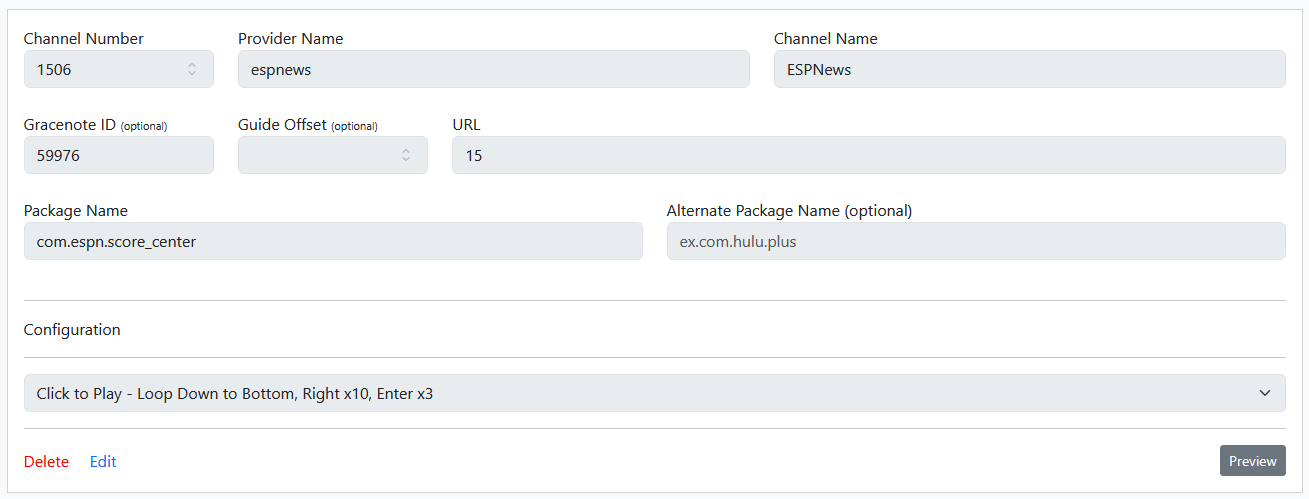
The Configuration tells you the steps that are going to be run, but we'll get back to the rest. First, the global options are set so that it starts streaming after 1 second.
    "global_options": {
        "wait_for_video_playback_detection": false,
        "use_fixed_delay": true,
        "fixed_delay_seconds": 1,
        "check_for_and_clear_whos_watching_prompts": false,
        "wait_after_post_playback_start_commands_seconds": 0
This is because these steps can take quite some time and we don't want Channels or anything else retrying a bunch of times. It's best to have it streaming and you can watch the automation happen, like a ghost moving things! This, too, allows users to see something is happening and not think it's just spinning its wheels.
Next we use the pre-tuning commands to get us a clean slate.
    "pre_tune_commands": [
        "input keyevent KEYCODE_MEDIA_STOP",
        "am force-stop '||TARGET_PACKAGE_NAME||'"
    ],
We definitely want to intentionally force stop the app because we want to make sure we are always opening in the exact same spot before making movements. This, in turn leads to starting the tuning commands.
    "tune_commands": [
        "monkey -p '||TARGET_PACKAGE_NAME||' -c android.intent.category.LAUNCHER -c android.intent.category.LEANBACK_LAUNCHER 1",
        "sleep ||TARGET_URL_OR_IDENTIFIER||",
Here, it's pretty similar to what you found where Monkey acts like an app is being clicked to open. It's very important to do this as then you don't need to know the default page. Note the ||TARGET_PACKAGE_NAME||, which is the variable for the app name. This way, if another app has a similar setup of action steps, you can just reuse this one. Hasn't come up a ton yet, but there have been a few.
Similarly, the sleep to cause a wait is using the variable ||TARGET_URL_OR_IDENTIFIER||, which is derived from the URL field above since we are not using that for anything else. When you save a station for the first time, it seems like you have to put a textual link, so I just keep entering http://thing.com. Then I've just edited it immediately afterwards and put in the number, and it seems quite happy. Anyway, since an app may take a different amount of time to open based on the individual device or other factors, I wanted to make sure the user could easily adjust this to limit the tuning time as much as possible. The shortest I've set any to is 10 seconds, but I could probably go down to 8 on some. However, I'd rather be conservative in these instances, hence the 15 seconds for ESPN.
After this, we are ready to start doing actions in the app.
        "i=1; while [ $i -le 50 ]; do input keyevent KEYCODE_DPAD_DOWN; i=$((i+1)); done",
        "sleep 10",
What you are seeing here is a loop where it hits down 50 times and waits 10 seconds for those actions to complete. The sleep is necessary because ADB will just move on to the next command while this is running, so this makes sure there is enough time to complete. The reason I went with looping 50 times instead of hard coding is because apps like ESPN may have a completely variable number of rows. So I figured, just go overboard and make sure the automation is going to reach the bottom no matter what!
With that in place, we can move on to the regular actions. In this case:
        "input keyevent KEYCODE_DPAD_RIGHT",
        "sleep 1",
        "input keyevent KEYCODE_DPAD_RIGHT",
        "sleep 1",
        "input keyevent KEYCODE_DPAD_RIGHT",
        "sleep 1",
        "input keyevent KEYCODE_DPAD_RIGHT",
        "sleep 1",
        "input keyevent KEYCODE_DPAD_RIGHT",
        "sleep 1",
        "input keyevent KEYCODE_DPAD_RIGHT",
        "sleep 1",
        "input keyevent KEYCODE_DPAD_RIGHT",
        "sleep 1",
        "input keyevent KEYCODE_DPAD_RIGHT",
        "sleep 1",
        "input keyevent KEYCODE_DPAD_RIGHT",
        "sleep 1",
        "input keyevent KEYCODE_DPAD_RIGHT",
        "sleep 1",
        "input keyevent KEYCODE_DPAD_CENTER",
        "sleep 5",
        "input keyevent KEYCODE_DPAD_CENTER",
        "sleep 1",
        "input keyevent KEYCODE_DPAD_CENTER"
    ],
Notice it's 1 second between button presses, not 2. In some apps like NBC 2 seconds may be warranted, but many other are more zippy. More so, I've found that it is critical to get all the tuning steps done in under 60 seconds, otherwise ADBTuner will release the tuner, and we can't have that. So, some quick math says we've got 15 seconds to start the app + 10 seconds to loop to the bottom + 16 seconds to get to actually starting the stream = at least 41 seconds (probably a a few more for general processing, so let's just call it 45 seconds). If we did 2 seconds between button presses, we wouldn't make it.
However, since this keeps it under 60 seconds, the tuner lock is successful, and we can watch until we close out.
    "post_tune_commands": [
        "input keyevent KEYCODE_MEDIA_STOP",
        "input keyevent KEYCODE_MEDIA_PAUSE",
        "input keyevent KEYCODE_HOME",
        "am force-stop '||TARGET_PACKAGE_NAME||'"
    ]
Here all the regular stops are done, plus another kill. Some apps like TBS attempt picture-in-picture and can actually cause an on-device freeze and crash, so killing them on the way out is equally important.
As I said, I want to get this cleaned up, organized, and made easily importable before getting into the rest. Nevertheless, for status, I currently have:
-
81 unique configurations (not all in use)
-
83 stations over 13 apps
-
NBC/Comcast: 11+
Including en Español and West Coast Feeds. There are more stations available depending upon your GeoLocation and TVE providers, so leaving those open as discussed below with PBS. -
Versant: 0
These apps are hot garbage! CNBC and MS NOW will break after being left alone for a few minutes, and USA won't even start. This is the #1 most disappointing issue. -
CBS/Paramount/Skydance: 12
No notes. -
FOX: 12+
Including en Español. There are a couple more that could be added if you are a Fox One subscriber, so leaving that open as discussed below with PBS. -
ABC/Disney: 0
No TVE apps available. There are a few live streams in Disney+ that I considered adding, but they are rather variable and have no guide data, so didn't think it was worthwhile to pursue. -
PBS: 3+
Including PBS Kids. The PBS stations are variable. In one market I have access to only one sub-stream, in another two. This will probably be the example I show for users to set up their own configurations later. -
ESPN: 7
Including en Español. -
NFL: 2
ESPN now owns the NFL Network, so I'm not sure the longterm future of this one. I suspect it will move into the ESPN app like MLB did. If it does, it should be an easy addition. -
Discovery: 15
There are no west coast feeds, but I'm not sure if it give you something different based on geo-location. I set it up for east coast, though. -
Turner/Time Warner: 9
Including west coast feeds. Seems limited to CNNs, TBS, TNT, and TruTv, so nothing like TCM. -
A&E: 11
No notes.
-
-
Gracenote IDs assigned to almost 95% of stations
-
Only tested that things launch as expected and go a few minutes. Haven't checked long-form usage.
1 Like
Can Project One-Click be of any assistance here?  Perhaps along the lines of what I've done for integration with FruitDeepLinks?
Yes, I was going to PM you later when I get my ducks in a row and have you take a look. I was thinking about a deployment like you set up for DirectTV or Sling. I'm not up to speed on the latest FruitDeepLinks stuff, so I'll take a look.
Nice work! A few notes, and a few questions as I have made some custom configs in the fruitdeeplinks world to overcome some consistently going to live behaviors post deep links for some of those apps, so I definitely have some experience with this dpad navigation stuff.
First off, clever use of the TARGET_URL, yeah it needs to be filled with something, good idea to be able to feed a delay timer into your config.
Question: You have 83 stations, did that require you to create 83 custom configs? How much overlap did you have with your approach?
Note: I never tried doing for or while loops with any of this stuff, cool to see that it can be done.
Note: Tuning delays of close to 60 seconds sounds rough. Would be curious if you could take out some of those sleep delays. I have found they are only necessary on most apps when a new window is displayed. If you are just navigating around a same screen, most apps can process them just fine while firing them off as quick as you can. Related, I noticed the ESPN app could have a variable amount of vertical categories, so I added a few extra myself. Not 50 however.
Question: Have you tried out the adb swipe command? I have seen it but not personally tried it yet. This may be useful for apps like ESPN above where you are just trying to get to bottom of screen as quick as you can. Might be faster timing wise than at least 20 dpad downs.
Note: I agree with force-stop for apps pre and post tune for sure. We are definitely dropping things into manual with this approach. Best to go in and come out clean.
Note: My personal preference is to not watch any of this manual interaction as much as I can, so I like to leverage the not show tuning process whenever I can, but I get that that may not be everyones cup of tea, and also may not be feasible if tuning times are stretching way out there with this approach for some apps.
Overall, very nice work. Glad I always able to plant the smallest of seeds to get you started down this path.
1 Like
Will there be support for ADBtuner for the Disney+ app when Hulu is phased out and it's functionality merged into the Disney+ app?
It has very little to do with ADB Tuner and more to do with whether Disney+ supports Deep Links.
Someone would have to take the time to dump the APK and figure out what the scheme is.
Also from what I heard Hulu Live TV will be merged into Fubo rather than Disney+, but the regular on-demand content will be merged into Disney+.
I am currently using ADBTuner successfully with Hulu Live TV and have not investigated Fubo. Does ADBTuner work well with Fubo too?
I have no idea, it depends on if Fubo supports deep linking.
I would either look through the thread and see if someone has figured out the scheme or dump the APK with JADX and figure out what it is. I was able to do that for Frndly.tv a while back for example.
1 Like
they do. Although I had better success using ah4c for fubo
Well, here the latest about the affordable line of onn streaming boxes:
3 Likes
Very little, not even a handful. Remember, even within the ESPN app, each station is unique. All the beginning steps are the same, but the third to last is different because of how many times I need to click right. With the way ADBTuner is built, I'm not sure if there is a way I can modularize this to avoid the repetition, but I'm thinking about it.
Probably could, but I'm afraid of a missed press and want to be extremely conservative. We have to remember these things are designed for expecting human input, so if we move too fast they might not keep up. I prefer to be extremely conservative due to that, but can stress test some possibilities.
Also, most are more like 20-40 seconds. Only when we're talking about something like the 14th listed station does it come up close to 60.
Yes, as well as trying to move to end and page down. It didn't like any of them. Decided to stick with what I know works and not try it on other apps.
It can easily be switched off and I'll document how!
Just want to highlight that what I'm putting together here could be applied to any app to get stations, so deep linking is not a requirement.
I understand ah4c is supposed to be good at doing the automation stepping, but I find ADBTuner's interface and method much more intuitive.
1 Like
That's pretty cool.
1 Like
ADBTuner is definitely cleaner but ah4c is a little bit nicer from a scripting perspective because it's all bash.
1 Like
I'm just curious if there's any consideration of possibly making ADBTuner open source at some point?
I recently moved to ah4c just because I can open PRs and contribute back to it. I would love to be able to contribute to this project because I think it's a fantastic tool. I would just be curious to see if an open source release is planned because the website does say it is pending at some point.
Depends on the feeling of the OP @turtletank
I don't think there should be an issue on that front. We know what happens when the original developer abandons ship or have bad health issues, that the tool is dead unless its open sourced.
SageTV is still a thing since they open sourced the thing so...eh...