
Mine are working fine, although I have had an issue with Multiview where certain channels won’t play if they are not the first channel loaded in Multiview. I know that happened with one ADBTuner channel, but haven’t troubleshooted beyond that to see if it happens with more, or troubleshooted enough yet to see if it is only ADBTuner channels that this happens with. It could be coincidental that it was an ADBTuner channel.
ADB tuner was working fine a few days ago but now every time I try to connect I get the error from the picture below, there is no signal being sent to the tuner even though I enabled adb debug, I have tried to uninstall it and reintsll it several times but I get the same problem, if anyone can help me I would appreciate it. When I use the command "adb connect 192.168.1.64:5555" it connects fine but on adb debug neither my tuner nor my encoder wants to connect.
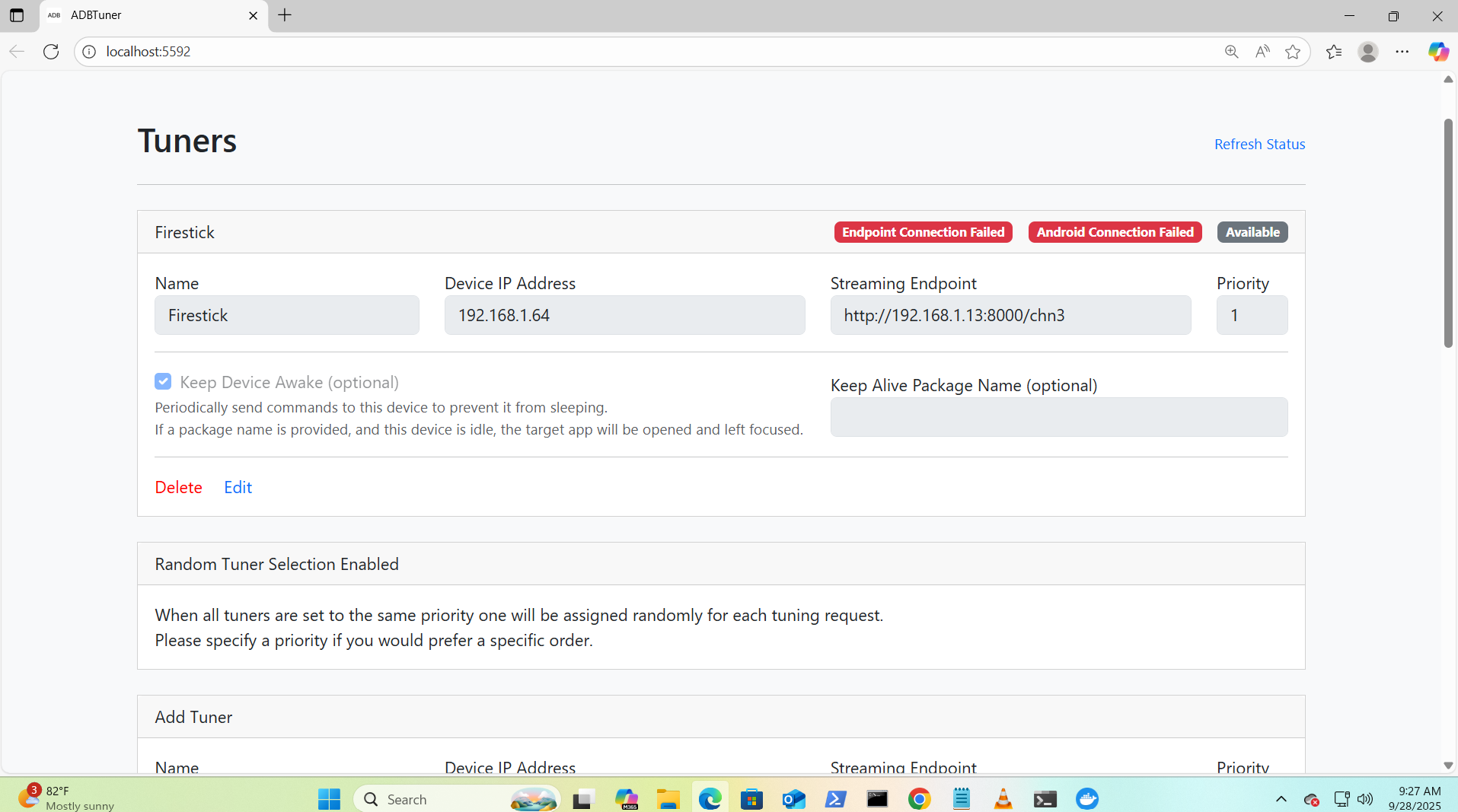
It looks like a networking issue since you can't connect to either device. I don't know what type of host you are running adbtuner on but I would try to validate from the host that you can reach both devices on their respective ports. My encoder defaults to port 80 so I don't use a port number on my link. netcat can be handy tool to test host:port connectivity.
Edit: you could also use vlc to validate you can see the stream using your endpoint link
1 Like
I am running adbtuner on docker and I am able to see the stream on vlc but it wont connect on adbtuner I understand its a networking problem lol but what can I do about it?
What do you mean by host?
1 Like
I meant to test the connections from the server that is running docker adbtuner. If the server can make both connections to tuner and streaming endpoint then that means it is something to do with docker or adbtuner. Also what version of adbtuner are you using?
Well like I said when i try to connect to the tuner, through a command on cmd prompt it connects and also i am able to stream the feed from the encoder through vlc player so yes the server is definitely able to connect to both the tuner and the encoder without a problem, so I guess like you said it has to be a problem with docker and as for the version, I am running the latest version of docker but I have also tried the developer version and its the same thing, could it have something to go with the way portainer is installed?
Did you use olivetin to install adbtuner? Also, what OS and version is your server running? Are you running any other docker containers on this same server? All of these may help drill down on where the issue is. I do not think it is portainer since all it really does is give you an easy management interface to the underlying docker. I'm leaning to this being something between the OS and docker. Did any maintenance patches, updates or reboots happen when this occurred? It could have also been something that happened earlier but never took affect until a reboot or docker was restarted. The more details you can give about the server, OS, and docker the better it is to help you.
I did not install adb tuner with olivetin I just installed it with a cmd command, I am runnind a server with windows 11 pro. I did not have any changes that I can think of im trying to think but cant think of anything, I have many other docker containers running on docker and none of them have any problems. Do you think I should try to install it with olivetin?
As a test you could try adding "network_mode: host" like I'm showing in the below default olivetin stack used when deploying adbtuner. It is not good to keep this but it may help in the short run. You do this in the portainer stack editor for adbtuner. I really do not know how much experience you have with all this stuff so my apologies if you feel I'm offending you in any way. Details really matter when you are trying to trouble shoot issues.
version: '3.9'
services:
  # GitHub home for this project with setup instructions: Caution! This project is not open source, and is not available on GitHub
  # Docker Hub home for this project: https://hub.docker.com/u/turtletank99
  adbtuner:
    image: turtletank99/adbtuner:${TAG}
    container_name: adbtuner
    dns_search: ${DOMAIN} # Change to the name of your LAN's domain, which is usually local or localdomain
    init: true
    network_mode: host
    ports:
      - ${HOST_PORT}:5592 # Use the same port number the container is using, or optionally change it if the port is already in use on your host
    volumes:
      - adbtuner:/app/.config
    restart: unless-stopped
volumes:
  adbtuner:
    name: ${HOST_VOLUME}
well I pasted the code that you gave me and added the information that needed to be added but it doesnt load at all when I go to the adbtuner website, this is what i put:
version: '3.9'
services:
  # GitHub home for this project with setup instructions: Caution! This project is not open source, and is not available on GitHub
  # Docker Hub home for this project: https://hub.docker.com/u/turtletank99
  adbtuner:
    image: turtletank99/adbtuner:latest
    container_name: adbtuner
    dns_search: attlocal.net # Change to the name of your LAN's domain, which is usually local or localdomain
    init: true
    network_mode: host
    ports:
      - 5592:5592 # Use the same port number the container is using, or optionally change it if the port is already in use on your host
    volumes:
      - adbtuner:/app/.config
    restart: unless-stopped
volumes:
  adbtuner:
name: adbtunerDid you use olivetin to install adbtuner or did you do it yourself? The above adbtuner stack is the one used in olivetin. It also has an environment variable section which is needed but I did not post that. I was assuming you used olivetin to deploy adbtuner. It's never good to assume...
This is the environment variable section used by olivetin deployment of adbtuner;
TAG=latest
DOMAIN=localdomain
HOST_PORT=5592
HOST_VOLUME=adbtuner_config
no I did not use olivetin
Remove the "network_mode: host" and try that. Also when you select to update in portainer also select to re-pull the image just to make sure you are running the latest build.
What server OS are you running?
Windows 11
I removed network_mode: host and the adb tuner GUI loaded successfully but when I try to connect to my tuner and encoder it still cant connect
I know there are some unique things when running docker desktop on windows 11 but I really can't help with that. Windows is not an OS I use. My preference has always been using *nix based systems. There are lots of people on here that do prefer Windows and use it for this. My suspicion is there is something happening between windows 11 and docker that are causing this to fail.
One last thing. If you have a firewall running on Windows 11 you could try turning it off to see if that makes a difference.
Edit: Also I have seen people have issues if they are using a VPN on Windows 11. If you are using a VPN again you could try turning that off.
No I dont have a firewall, but thank you brother.
@TaliandTony You may want to look at the work @bnhf has done to simplify the whole windows 11, docker, cdvr, olivetin etc.