ADBTuner: A "channel tuning" application for networked Google TV / Android TV devices

Even if ADBTuner didn't go open source, but at least provided the ability to call external scripts or nest native ADB commands within the config files would be super powerful.

Within ADBTuner there's already a concept for publicly hosted config files... though I've not found any repository. I like that idea immensely where given a piece of hardware (i.e. Firestick) and provider (i.e. Spectrum) a library of scripts for tuning would be shared. With the expansion of direct ADB commands and/or scripting, the flexibility and capability of what the user community could post would be immense.

I find the utility of AH4C and the polished front end of ADBTuner to be a great combination for managing external apps and tuners. I appreciate both and would love to see the best of each merged...thus the suggestion.

Ouch! :face_with_head_bandage:

1 Like

I pushed a new :development build today (20260903-1). It adds a new tuner feature that attempts to automatically enable ADB on connected devices by using remote commands and OCR. The purpose of this feature is to add back some support for the ~3 Google branded devices that reset ADB settings on every reboot.

This is a pretty slow process, it sometimes fails a couple of times because the device might be sluggish after booting up, but it will retry until it gets it right. Expect the device to be back online 2-3 minutes after a reboot. I still recommend using devices that don't have this issue and not rebooting unless necessary, but at least it can recover now.

On a side note, I went through all of the steps to make it possible to just use Wireless Debugging instead of switching the device back to adb over tcpip thinking it would help hedge against future restrictions, but bailed on the idea because the entire wireless debugging stack resets on every Wifi disconnect (such as those caused by routers doing band steering and such). It's just going to be too fragile.

As for additional power user features and an open source release, I have some things in progress, I just need some more time to cook!

5 Likes

Have you tried this project?

Thank you for considering an open source release.

Using the latest build with this feature and my Google Chromecast HD (Android 14) is back online with ADBTuner. I was guilty of trying to intervene with remote keypresses until I realized the recovery was still ongoing. Once I stopped trying to "fix it" and just observed the process, things worked as designed.
Thanks for your continued work on this project!!

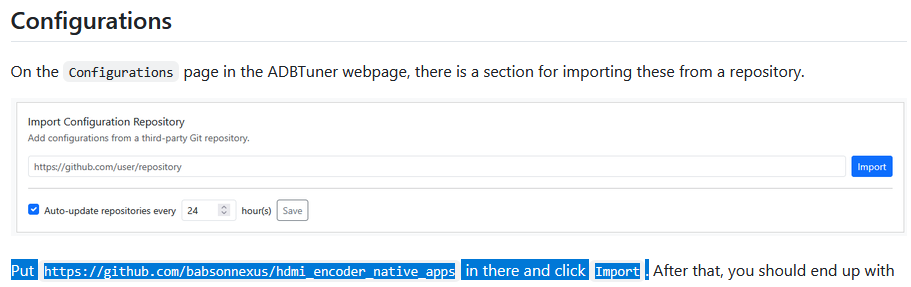
@babsonnexus, Okay, I'm a dork...sorry for missing that and thanks for pointing it out. I've read through the HDMI Encoder apps wiki, but it never specifically indicated the library path to use for the import... so it didn't register that it was the same GIT repository. I put in the repository path //github.com/babsonnexus/hdmi-encoder-native-apps and it worked/imported.

Aren't the various configurations dependent upon the specific app (i.e. Spectrum) and the platform on which they run (i.e. Firestick)? If so, don't the configuration need to be specific for each environment. I guess I'm trying to get my head around how these station specific apps actually work with varying apps and hardware... how does that work?

Also, after a little more attention I noticed the looping function, which is helpful, but is there also a function that could step character by character through a field value (channel number) and send the ADB mapped keypad digits. For example on my ADBTuner config file, I send 3 values that create the channel selection for Spectrum. Can that be made generic so that the identifier field or other could be used and the same config file could apply to all Spectrum channels? This was actually the root of my request for ADB commands and/or scripting.

Thanks for the response and guidance.

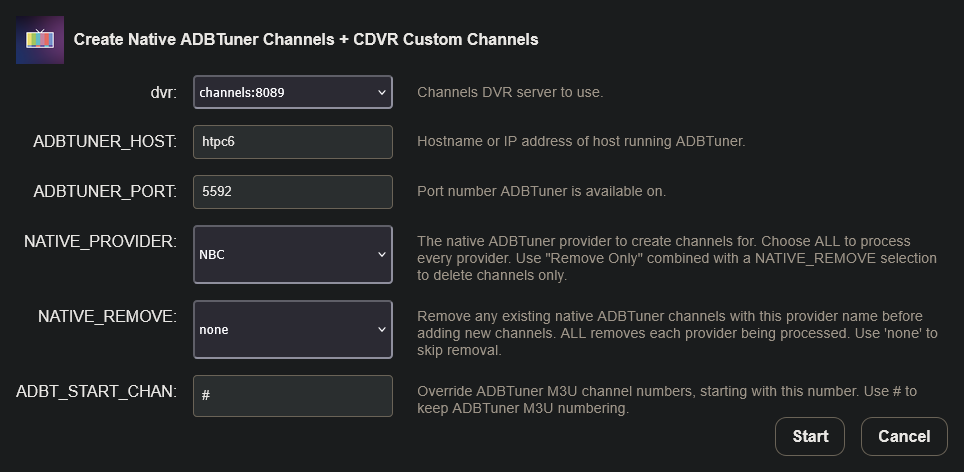
If you don't already have OliveTin-for-Channels installed, you may want to install it, as there's a Project One-Click Action that takes care of everything for you related to setting up HDMI Encoder Native Apps virtual channels for a given streaming stick app. There's also an option to add ALL supported channels in one shot.

The Action adds the virtual channels to ADBTuner, configured to support both generic Android and FireOS devices. It also adds the appropriate Custom Channels Source to your Channels DVR. In addition, it supports a remove function, that can be used as a straight remove -- or if updating, it'll remove previous virtual channels for a given app before adding the updated set of channels.

The above is actually pretty trivial in ah4c, and has been done for several providers. For example here's the core tuning script (bmitune.sh) for scripts/allente/livetv:

#!/bin/bash
#bmitune.sh for allente/livetv
#2024.03.22

#Debug on if uncommented
set -x

#Global
channelID="$1"
streamerIP="$2"
adbTarget="adb -s $streamerIP"

#Trap end of script run
finish() {
  echo "bmitune.sh is exiting for $streamerIP with exit code $?"
}

trap finish EXIT

#Tuning is based on channel number values from allente.m3u
tuneChannel() {
  for (( digit=0; digit<${#channelID}; digit++ )); do
    keypress=${channelID:$digit:1}
    $adbTarget shell input keyevent KEYCODE_$keypress
  done
}

main() {
  tuneChannel
}

main

And the companion m3u, that provides the tuning values (which in this case are channel numbers):

#EXTM3U

#EXTINF:-1 channel-id="1" tvc-guide-stationid="",SVT1
http://{{ .IPADDRESS }}/play/tuner/1

#EXTINF:-1 channel-id="10" tvc-guide-stationid="",Tv10
http://{{ .IPADDRESS }}/play/tuner/10

While ADBTuner has a great WebUI to interact with, ah4c is simple and powerful -- using a couple of dozen env vars to configure it, and three scripts per provider to drive tuning.

At least at this point in time, ah4c is the correct tool for what you're trying to do. That may change in the future, but if you're looking for the best current solution for what you're describing, it's readily available.

1 Like

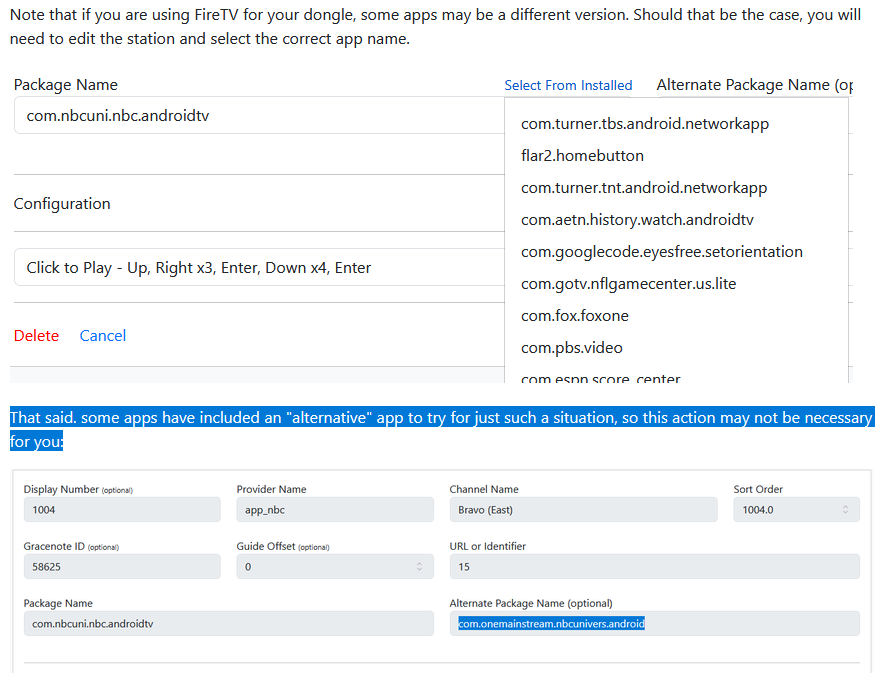
To be very clear, there isn't a Spectrum or any other Cable/Satellite/OTT provider setup in this solution; they would require their own repositories, or at the very least station list. Assuming it would just be one configuration with that special station list, something like with DirecTV and Sling.

image

I'm not adverse to building one, but there's not a good way (yet) to use the field in that way. I could do it in Roku Bridge right now since that uses basic Python for Plugins, but not in ADBTuner. @turtletank, I guess, then, the request is for the ability to use the URL or Identifier field with a function that would parse it into individual keypresses and pass them on. Just something to keep in mind as you're cooking!

I always try to make it so you don't have to repeat this info again and again!

1 Like

@bnhf, All great tips... appreciate the guidance. The AH4C scripting is definitely a strong advantage/benefit to using that application. Thanks.

@babsonnexus, Appreciate pointing out the sections you'd already posted, sorry for missing those, it just wasn't clicking when I read through it. The request to add @turtletank is accurate... adding scripting or external script calls would allow external ADB commands to be designed, but including basic functions into the config files could handle most of the need too. Hopefully @turtletank will consider these ideas with the future builds. Thanks for the tips on using OliveTin and trying to make Channels setups smooth.

I pushed a new :development build this morning (20260808-1).

It adds two new features to custom channel configurations, conditional operations, and number input sequences. They are both represented in this example:

{
    "ADB_NUMBER_INPUT_SEQUENCE": {
        "number": "||TARGET_URL_OR_IDENTIFIER||",
        "input_delay_seconds": 0.25
    },
    "condition": {
        "check": "||TARGET_URL_OR_IDENTIFIER||",
        "cast": "number",
        "greater_than": "100"
    }
}

ADB_NUMBER_INPUT_SEQUENCE would generally be used with a channel number. This command will input each digit, in sequence, with the specified delay between each input.

Conditional operations, the condition block above, provide the ability to execute, or skip, a specific command based on the specified conditions.

Conditions can be applied to any command:

{
    "ADB": {"command": "input keyevent KEYCODE_DPAD_CENTER"},
    "condition": {
        "check": "||TARGET_URL_OR_IDENTIFIER||",
        "cast": "string",
        "equals": "banana",
        "not_equals": "cookie"
    }
}

The available operators are: equals, not_equals, greater_than, less_than, at_least, and at_most.

There is a small amount of documentation for this at /ui/configurations/documentation in the web interface.

I'm still working on some bigger things, but I took some time to add these features to address some limitations that configuration authors were running into. Please let me know if you run into any issues.

2 Likes

So there's some buggy native apps out there that will occasionally crap out video early on for whatever reason (I'm looking at you, NBC).

Am I right to assume that this is not the right project to have something that monitors video playback when running and restarts the app if it dies? I have my own custom monitor script that runs every so often when a recording is going on, but I'm looking to simplify.

@turtletank I sent you a PM with a bug I’m running into when using ADBTuner with channels dvr built in USB HDMI Capture method. Hopefully if you have time you can take a look at it. Thanks.

Thanks for this Xfinity custom configuration! Worked perfectly for me in my Xfinity on FireStick setup.

Would it be possible to add commands[] to this like with ADB_LOOP? After much trial and error, I was forced to do this to get two actions to run:

        {
            "ADB": {
                "command": "input keyevent KEYCODE_DPAD_DOWN"
            },
            "condition": {
                "check": "||TARGET_URL_OR_IDENTIFIER||",
                "cast": "string",
                "equals": "3"
            }
        },
        {
            "ADB": {
                "command": "sleep 1"
            },
            "condition": {
                "check": "||TARGET_URL_OR_IDENTIFIER||",
                "cast": "string",
                "equals": "3"
            }
        },

Lol, trying to recreate script actions instead of just launching a script. I get it, but it's way past time to consider doing that.

ADBTuner loads configurations via a web interface, rest API, and from remote git repositories. Allowing shell scripts as configurations turns all three of these into easy avenues for remote code execution.

Maybe we are all generally ok with the risk of someone sneaking code onto a locked down Android TV device, but I'm not willing to let any network connected device run shell code in ADBTuner's container. Even if I enforced authentication it would still be too risky IMO.

It's not unusual for applications to have a small configuration language like this. I'd rather it not exist at all, but I added a few things to help people out who needed to make some simple customizations to what ADBTuner was already doing internally. Maybe I've gone too far with it, that's fair, but I don't intend to add anything after these new conditional statements are done.

I would argue, I mean, if it's happening in the user's own network and not being exposed to the internet, there's minimal risk. If a user is exposing ADBTuner to the internet, they're a freaking moron. And if there's risk to ADBTuner on their home network, they have bigger problems than ADBTuner. For example, I have my home network accessible over Tailscale, but I'm the only one with access to every asset. The only other two people are my wife and my mother, and they have both very strict ACLs on their accounts to prevent them from accessing anything but a few assets that they need just to protect everything else on my network in case they were compromised. I mean, granted, I also control the authentication endpoint because I run my own OIDC provider, but that's beside the point.

More to the point, Channels DVR itself is accessible on one's home network and allows direct file system access if you were to import a media library. So one could access Channels DVR on one's home network via IP address and start deleting things out of the library.

I feel like this is something that can be hidden behind a configuration flag with a warning and allow the user to choose if they want to execute scripts make them aware of the risks and that's it. I personally think user choice is kind of important. Allowing for some sort of scripting beyond static JSON would be really game changing.

This limitation is the reason why I've been focusing my contributions on adding new features to ah4c, to be honest. Besides the open source question, which I totally understand, because I work on FOSS and have gotten absurd user requests and abusive user requests to the point where I don't want to work on it anymore so I can totally empathize with not wanting to open source, but in terms of running scripts, I don't see why you can't hide that behind a flag/switch with a stern warning.

I mean, I think you've been amazing at adding features and adding new ways of doing things, but as someone highly technical, I want to be able to do that myself. And allowing the ability to script, whether it be Bash or Python, you're just letting me write tuning scripts in BASIC, jk is kind of a big deal for someone like me. I think quite a few of us feel that way.

Edit: Also, users should not be loading scripts from remote Git repositories that they're unaware of. That's just stupid. This should function like ah4c, where you just have a shell script you run to do something. I think you also kind of have to trust your users. Like, if people do stupid things, people are going to do stupid things. Problem exists between keyboard and chair. You can't prevent it. You can warn and mitigate, but you can't prevent. And you also don't want to limit functionality.

1 Like

Channels DVR does not provide a path for an attacker to upload an arbitrary script file and execute it on the host. Arbitrary code execution represents a more significant risk than someone deleting some media files or changing DVR settings.

The Channels Team also had to put out a fire a couple of years ago because it's very easy for a simple misconfiguration to accidentally expose a web service in an unintended way.

I don't feel that it's ok to knowingly build insecure software and then expect that the end user knows they have to secure it and that they know how to do so.

ADBTuner was never meant to be a platform for development and exploration in this space.

When Channels DVR was released it was a huge breath of fresh air compared to other self-hosted DVR options (MythTV, etc.). Yeah it didn't do "all the things" but you could plug in a HDHomerun device, install the Channels DVR software and be up and running in a couple of hours instead of wasting a weekend just trying to figure out how to load some guide data. Somehow they made it easier than setting up a new TiVo.

I haven't been entirely successful, partly because everything is a battle these days, but I've been trying to do the same thing and make this whole process easier for people who just want to watch some TV and don't have the desire, or free time, to spend a month learning new topics trying to figure all of this out.

A few people here have been a huge help with this goal in sharing their knowledge of specific apps and platforms in the form of "channel configurations."

Sharing JSON configuration files that have limited capabilities will always be safer than sharing shell scripts. Even if the script author is trusted, a bad copy/paste could have disastrous results.

Every new option, every new feature, adds complexity. I'm just trying to thread the needle here and find a good balance.

ah4c is a great piece of software and, as you've noticed, is the shell script runner you are looking for.
I'm ok with ADBTuner being the "n00b" option, the gateway drug that eventually leads hobbyists to ah4c.

4 Likes