Roku Tuner Bridge Official Release

Hey everyone,

I'm excited to share a project I've been working on: Roku Tuner Bridge.

This is a Dockerized application that lets you integrate your Roku devices as tuners within the Channels DVR software. It allows you to use streaming service channels from apps like YouTube TV, Philo, and others, just like traditional cable channels inside the Channels app.

Key Features:

  • Seamless Integration: Adds Roku-based channels directly into your Channels DVR guide.

  • Dual M3U Support: Generates two M3U playlists, one optimized for Gracenote guide data and another for custom XMLTV/EPG data.

  • Web-Based Management: Includes a built-in Status Page to monitor your devices and a web-based Remote Control for any of your configured Rokus.

  • Flexible Streaming Modes: Choose between proxy, remux, or an efficient audio-only reencode mode to ensure stream stability with minimal CPU usage.

  • Hardware Acceleration: Automatically detects and uses NVIDIA (NVENC) or Intel (QSV) GPUs if available.

  • Persistent Configuration: Uses a Docker volume to safely store your configuration so it persists through container updates.

The application runs in a multi-architecture Docker container, making installation straightforward.

This post is just a brief announcement. For complete installation and usage instructions, please check out the project's GitHub page. For a detailed walkthrough on creating the roku_channels.json configuration file, please refer to the guide linked below.

I tested this project with several different HDMI Encoders. The LinkPi Encoders work the best. The cheaper ones may require re-encoding to maintain a clean stream. I have not tested the ARM 64 build.

5 Likes

Does this require having a roku

The project requires that you have a roku on the same home network.
I hope he eventually adds boxes for setting up your configuration rather than editing a json file. Great start so far.

Yes @dubx99, it does require a Roku. This does for Roku what ADBTuner does for Google TV and Fire TV streamers using an HDMI Encoder.

@rpaulmerrell, I’ll put web based editing on my list of things to add to it. I personally like the control and speed of editing a JSON file for things like this. There are free JSON editors and validators available that can make it easier. I prefer to just use a text editor and have at it.

https://jsoneditoronline.org/

1 Like

I just got the docker up and running. i'm hoping at some point to get a roku or find one i'm not using and get it hooked up. I may want to get an hdmi encoder with multiple inputs.
I don't want to get rid of my ADBTUNER setup.
I just need to get the hardware going.
I like the remote control. looking forward to seeing how it plays out.

2 Likes

It's not as refined as ADBTuner, but it is another option which is always good to have. The Roku devices perform differently than Android ones do. The most noticeable difference is that Roku Deeplinks always reload the app so that extra few seconds of delay will be there. Most apps load under 6 seconds, but it does depend on the model. The Ultra LT from Walmart is fast while the older Express are a few seconds slower to tune. The new 4K sticks are in the middle, but have nice picture quality.

I have been looking at the LinkPi Enc5. That seems to be the best bang for the buck. After testing some cheaper encoders, I will never buy another one. The LinkPi devices provide a much better stream than the knockoffs do.

2 Likes

I have a LinkPi enc5 with 5 ONN 4k boxes hooked up. That setup works very well with ADBTuner.
Hmmm.
I do happen to have a Roku 4k streaming stick to play with. There's an open USB port on the LinkPi. I wonder if the Roku stick would work with the USB HDMI capture device I have sitting around. :thinking: That could be a sixth tuner on the same encoder...
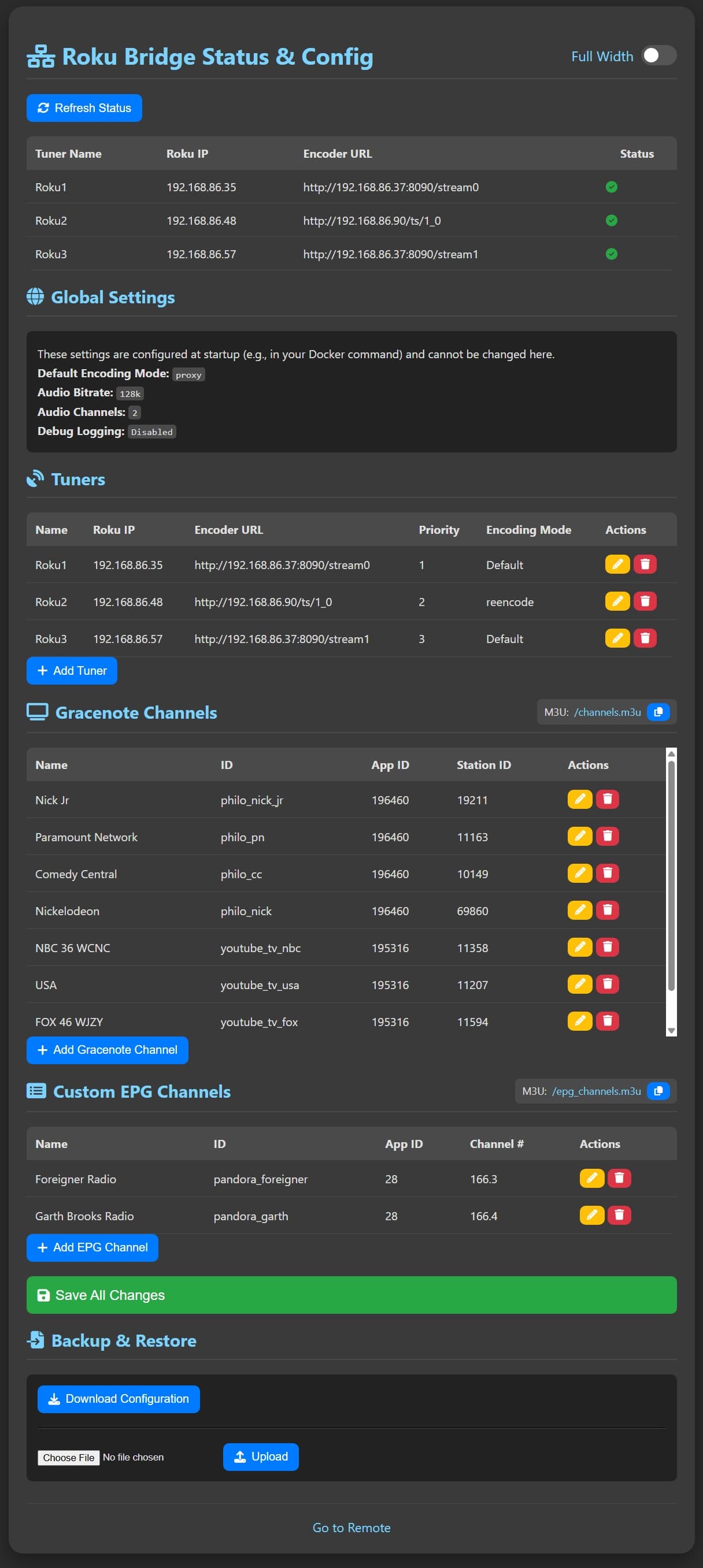
I have not tested them with the HDMI capture devices. It should work, but I do not know. If I have time, I will try it out. I should have the revamped Status page with web based editing and uploading finished by this weekend. It should offer a similar experience to ADBTuner config page. I'll post some screenshots during testing.

Edit: It does work with the capture device connected to the LinkPi.

Cool! Thanks for checking!

Ok, the update did not take as long as I thought it would. @rpaulmerrell, it now has the ability to manage the config values through a web based control panel.

@jsfullam No problem, I was at a point where I needed to test the tuner configuration code and that worked out the be a perfect test.

1 Like

Thanks so much for adding the feature in the latest update.
I think teh addition of the interface stuff will get more folks to use the product.
I will grab a roku and see what i can do.
I need an encoder as well and want to avoid pulling stuff off my ADB Tuner.

Looks like you have given me something to play with this weekend. :smiley: :+1:

2 Likes

So, I'm rather docker/container manager stupid. Is there a way to install this using Portainer?

Are you referring to a yaml file instead of using terminal?

1 Like

This is probably a dumb question, but before I invest in a LinkPi, I need to ask it.
The only Roku device I have is a Streambar with a single hdmi output, so can I use it for this project? Thanks.

1 Like

It should, but I do not have a Streambar to test. External Control Protocol (ECP) should work on any Roku device that is running the latest Roku software. Since this is relatively new, waiting on some feedback from other users might be a good idea. LinkPi's can get expensive, but they are worth it. ADBTuner works great on them with Android TV and Firesticks.

# Docker Compose file for Roku Channels Bridge

# --- Command-Line Instructions ---
# 1. Save this file as 'docker-compose.yml' in a new directory on your Docker host.
# 2. Open a terminal or command prompt in that same directory.
# 3. Run the command: docker-compose up -d
# 4. The container will start in the background. To stop it, run: docker-compose down

# --- Portainer Instructions ---
# 1. In Portainer, go to "Stacks" and click "Add stack".
# 2. Give the stack a name (e.g., "roku-bridge").
# 3. Select "Web editor" and paste the entire content of this file into the editor.
# 4. Click the "Deploy the stack" button.

version: '3.8'

services:
  roku-bridge:
    # The official Docker image for the project.
    image: rcvaughn2/roku-ecp-tuner:latest
    
    # Sets a consistent name for the container.
    container_name: roku-channels-bridge
    
    # Maps port 5006 on your host machine to port 5000 inside the container.
    # You will access the web interface at http://<your-docker-ip>:5006
    ports:
      - "5006:5000"
      
    # Mounts a persistent, named volume to store your configuration.
    # This ensures your roku_channels.json file is safe across container updates.
    volumes:
      - roku-bridge-config:/app/config
      
    # Ensures the container restarts automatically unless you manually stop it.
    restart: unless-stopped
    
    # --- Optional Advanced Settings ---
    # Uncomment the following sections to enable advanced features.
    
    # environment:
      # Sets the default stream handling mode. Options: proxy, remux, reencode
      # - ENCODING_MODE=remux
      
      # Sets the audio bitrate for 'reencode' mode.
      # - AUDIO_BITRATE=192k
      
      # Sets the number of audio channels for 'reencode' mode (e.g., 2, 5.1, 7.1).
      # - AUDIO_CHANNELS=5.1
      
      # Enables more detailed logging for troubleshooting.
      # - ENABLE_DEBUG_LOGGING=true
      
    # devices:
      # (Linux Only) Pass through the GPU for hardware acceleration (e.g., Intel QSV).
      # - /dev/dri:/dev/dri

# Defines the named volume used for persistent configuration storage.
volumes:
  roku-bridge-config:

2 Likes

Thanks again for the reply!

BOOM! Roku Tuner Bridge container is up and running! Thank you so much! :+1:

Let us know how it works
just wondering where to get the app ids and links for launching the app.