
Space all the way around the Multiview. If you turn it off in the settings then you will get the entire screen filled with Multiview.
thank you, ill have to delve deeper into the settings
For us, this decision is contextual, based on what specific channel combination is being multi-viewed at the time, and why. In some scenarios it works great, and others the layout is better off with no obstruction. It depends on what the “main event” is, and who's there watching, I suppose. For us, at least.
The two side-by-side views require an awful lot of black space though, and on a big screen that can look a bit silly, to be "wasting" so much of it. And the “picture in picture” layout seems more in line with Apple's native tvOS interface guidelines as well.
Regardless my request for this was not to replace any of the available layouts, but to be offered as an additional option so everyone can choose what works best for them in any scenario. And I’m grateful this request is being considered for future release.
2 Likes
I need to come back to the forum more often. This is awesome! Nice work devs!
4 Likes
Yep, exactly. It could be something as simple as toggling PIP on or off in the multiview settings. But I'm guessing that you wouldn't want more than a couple of channels on screen that way.
1 Like
Correct. Realistically and practically speaking, such a layout would only be useful to us with TWO channel Multiview, nothing more. And it would be most welcome there on our biggest TV screens. Watching one primary show or event while “just keeping tabs” on another…waiting until the next event starts...
Golly. If we could only pause and buffer the “active” channel on multiview. It would be sports watching Nirvana.
To me this is the only missing piece that on any given Sunday would keep me having to leave multiview mode the whole day.
I tried feeding an hdmi captured stream into multiview from a second Apple TV and then using a different remote to control the source stream.
It’s too bad the buffering latency is so long or one would be able to pause and buffer on one Apple TV or firestick and then use multiview on the main Apple TV to watch games in semi real time, which a ton of people do.
@maddox when a stream in multiview goes down and the triangle appears, can you make it to restart the stream by pressing play again? Only way I see to play it again is to replace the e channel with another and then go back to the original channel. Unless I’m missing something? Thanks.
1 Like
When I get the triangle, cliicking and holding on
that grid shows a menu with “Reload Channel” as an option:
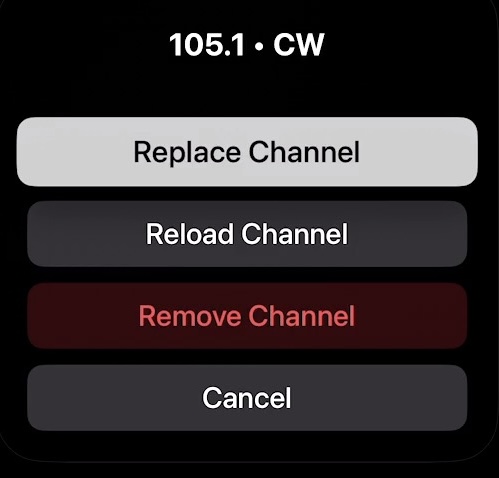
Hmmm. Must be new. Haven’t seen that before. I’ll check it out. Thanks.
Pressing play again would make sense since that’s the way to do it outside of multiview.
The channel needs to automatically be restarted, it's silly to have to toggle over and restart it manually.
4 Likes
I'm seeing the same loading animation even though the video is playing fine.
2 Likes
Can the bright "active" border be replaced with a different indicator that is less likely to cause OLED burn in over time?
2 Likes
Option to time out the border on the main large screen after a period of time would be appreciated. If you're listening to one of the smaller screens, then maybe you don't want the border to time out, but the big screen makes it obvious where the sound is coming from which makes the border redundant.
2 Likes
Not sure if this is by design but thought to report it
AppleTV
Multiview on with at least 2 sources. Full screen looks fine when one source selected with no borders. Then, remove the other source(s) and the remaining single source keeps a border.
Yes this is by design.
1 Like
Oh you mean the actual border. Thought you meant the padding.
Good catch.
2 Likes
A border time-out option would be gratefully appreciated for the main screen.
3 Likes
Maybe the option to make it a small animated speaker icon instead? I quite like the border myself but don’t have OLED burn-in to be concerned about. A fade-out interval sounds like a good idea too.