Comcast Xfinity is also advertising multiview


Comcast Xfinity is also advertising multiview
Just a suggestion…. Let’s say your in single view and your browsing Quick Guide. Would be nice to click another channel and had a way to add selected channel into multi view
Just remove the channel you are trying to replace first
I thought he meant starting from regular live TV watching.
4K 60fps content is likely to utilize all the resources an Apple TV has and isn’t suggested for Multiview.
You should use the lower resolution channel when using Multiview.
If you view Home Kit cameras and go back to Multiview. It doesn't restart the streams. They will sit there frozen until you close them and start them back over. Not sure if there is really anything you can do about that or not.
long press of the select button
Not sure what you mean by that. It just brings up the menu and I have to pick another channel for it to start playing. I would think since it knows to stop the streams from playing that it should be able to tell when you are no longer looking at the home kit and auto restart the current streams.
I cannot begin to describe how happy I am that this is here! I just found out about it yesterday from Lon Seidman’s video and it has been absolutely clutch during football today. I’ve tried many different apps to try and achieve this but could never get it working right. So far, absolutely flawless. Much appreciated!!
I noticed I wasn't having the same issue with quality loss tuning two channels (out of four) using ah4c via a LinkPi, as I was tuning two channels (out of four) using ADBTuner via a URayCoder. I made the following adjustments to the encoding profile on the URayCoder, and so far, this seems to have addressed the quality reduction I was seeing:
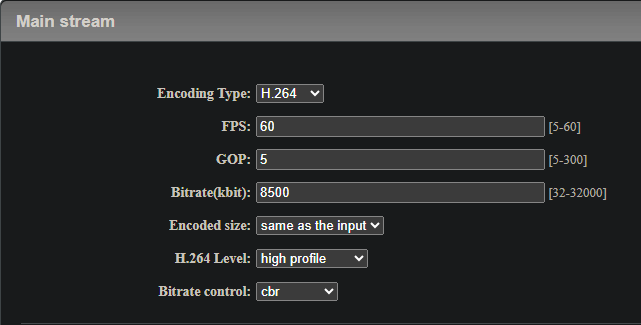
The biggest change was to the GOP, going from 60 to 5. In addition, I dropped the bitrate slightly to match the LinkPi from 9500K to 8500K. Lastly, I changed from Variable Bit Rate to Constant Bit Rate.
Interestingly, my understanding of the total result of these changes would be more data sent to my 1st gen AppleTV 4K -- but the result seems to be positive.
@maddox Was there anything noteworthy in the client diagnostics I submitted?
They haven’t been checked yet. But if turning down the GOP helped, I suspect you’re decreasing the cpu needed to decode the video streams, which would align with just generally reaching the maximum resources of the Apple TV.
As Channels is an open system, you guys have the ability to send anything you want. There’s only so much we can do to ensure a positive experience.
Multiview seems to handle the out of box supported content that Channels provides for everyone. It’s going to be up to the user to figure out if the streams they bring to Channels work or not in an environment where up to 4 streams are playing at once.
All that being said, there probably is not much more we can do to optimize on the Channels side, and at some point, some streams are just not going to be suitable for Multiview.
This goes for a single stream as well. You can hand Channels an 8k 120fps video, but it’s up to the hardware on if it’s going to work or not.
On a positive note, we may have all found a reason to upgrade Apple TVs as they are released 
Obviously not something someone would normally do, but when clicking right/left very fast many time (multi view on, but one stream in full screen) will crash app.
Thanks. We've experienced that. Memory usage hits the Apple TV max memory limit and tvOS dumps the app. Slowly cycling back and forth (like a human) does not actually retain memory in the same manner and works correctly.
It's very odd. There seems to be a bit of delay happening on releasing the memory used, that you can out pace by switching back and forth very fast.
We're still not done looking into it, but we did not find anything obvious in initial investigations.
Well of course it does.
This was resolved in the latest TestFlight beta:
This happens also after connecting via QuickTime.
The HomeKit cameras from Control Center is working better. However there is still an odd issue with it. When going from Homekit single camera view to the Multiview HomeKit camera view, it starts playing the Multiview channels streams in the background. Then if you hit back on the remote to the single camera the Multiview steams stop again until you exist the HomeKit cameras. This shouldn't start playing until you exit the HomeKit cameras from the Control Center regardless if your viewing a single camera or multiple cameras.
This happens in the Multiview and in the regular streaming from the guide.
This is just the nature of how tvOS works. The video players will only be interrupted when audio is playing from another source, and they will resume when that interruption is complete.
I tested this same scenario on 9 different apps. Youtube, Netflix, Disney, tubi, frndly, Paramount+, hulu, plex, prime video. Only one other app has the issue where multiview on the cameras start playing sound in the background. The others do not start playing anything until you exit the control panel. frndly was the only other app to behave like ChannelsDVR.