
@Maddox here is a data point that can help improve, multi view does not like a 4k HDR stream like the current one playing on fox via EPlusTV. diagnostics submitted. thx
This is working great for me today watching college football, I've been using the one large screen and three small screen setup. The only minor issue that I've seen is that sometimes the large screen gets cut off at the left, in other words you don't see the purple border on the left side. It seems to be totally random, sometimes selecting a replacement channel or switching between screens can trigger it. Doesn't affect anything, just an aesthetic.
Here's a pic:
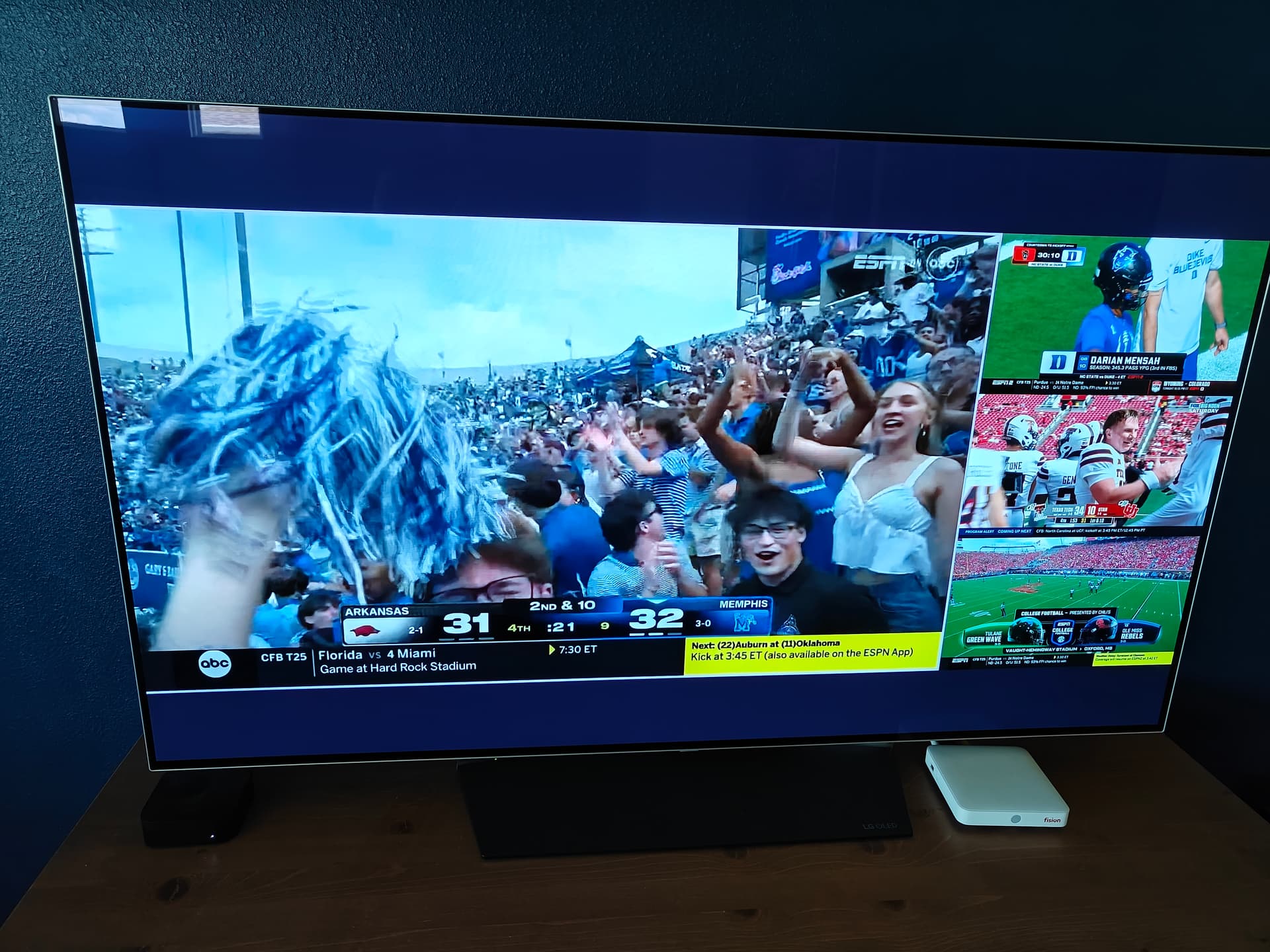
Playback of all four streams has been flawless for me on my 2nd gen Apple TV 4K.
That's not a multiview issue, that's because Fox is switching between 4K and 720p when commercials come on.
Weird, I've got three streams running from three different HDMI encoders right now and I don't see any frame drops or quality issues. They're all 1080p and vary from 4K to 8K bps.
no, it happens at the start of the stream during game time, no commercials where even shown. it looks like its the 4k HDR stream being down converted to sdr to accommodate the multi view ui and normal live tv streams that are sdr.
its behaving like the player can't keep up in converting the stream down which lags the ui until you kill the 4k stream
I'm great with three as well. It's four total (where 2 or 3 are from encoders) where the quality issues come in. This does not happen for me with TVE feeds.
I have four total, three of which are encoders right now. No issues. What's your playback device? Have you checked your server to see if there's any bottlenecks?
1 Like
I would just disable 4k, channels is not going to handle it well as it is with the res change. I've had fox running all day without 4K in multiview and it's fine.
I mean yeah it's something they should fix for multiview but it's not going to work well no matter what. At least if you're recording, that is. I haven't tried watching an entire Fox game live in 4k because I can't deal with all their commercials. But given that it's pointless for multiview it's not much of an issue to me anyway.
Diagnostics submitted from the ATV client: d392bacc-4e6e-47ab-8516-0cdf9e5deed0
1 Like
Honestly I would try backing down your bitrate on the encoders, I see very little difference once you go past 6k especially giving how crappy a lot of the source feeds are anyway.
I don't think this is a multiview issue, it's either client or server bottleneck imo.
1 Like
I think that 1+3 view is begging for 4 more channels at the top or bottom. Seems like a wasted space.
Also how do I get stats or captions?
1 Like
At the streaming stick (source for the encoder) I'm seeing 1080p60 at up to 10Mbps from YTTV. I have no doubt that dropping the bitrate and/or framerate and/or resolution would eventually address what I'm seeing. But is that a requirement for this feature?
If so, it'd be good to figure out what those limitations are. The CDVR client to server speedtest reports about 900Mbps up/down, and as much of my network as possible runs at 10Gbps. If I run 4 streams, I'm seeing the issue consistently. Dropping any one stream (TVE or otherwise), and I'm back in business.
Three streams is probably going to be fine for me most of time, I'm just trying to report what I'm seeing to the devs...
1 Like
People are talking about this feature!
3 Likes
I hear you, but I'm running three encoder streams and one TVE stream and see no issues at all. Granted I'm not running as high a bitrate as you are but I just don't feel the need to.
Just for grins I started up a couple of Android clients streaming on the network at the same time, again no problems.
You didn't say what your client device is by the way, if it's anything older than a 2nd gen ATV 4K it's probably not going to work well..
2 Likes
That's interesting, I don't recall seeing anything in this thread referencing that -- but it is a 1st gen ATV 4K. I believe @Fofer is reporting better results with his 1st gen 4K vs his 2nd gen, and the original post by @maddox just calls for a 4K -- nothing about generation.
I do have a 3rd gen in the guest house, so I could swap them -- but ideally I'd like to be able to use Multivew in both locations with 4 streams if possible. It's all part of this early testing process, figuring out what works and what doesn't.
And, of course everybody's feeds are different. It sounds like they're not too great in your area, which could be working in your favor in this case. 
Perfect. Love it!
1 Like
I would definitely consider swapping the boxes just to see if that fixes it, the first gen 4K is 8 years old now.
I think the problem here is that there are too many variables to consider with client horsepower, if you're feeding three or four 1080p streams at 8k or higher bitrates I can see how some clients would choke. Not sure if the devs can pin down what's acceptable for which clients.
1 Like
For reference I’m getting pretty good results on my 2nd and 3rd gen ATV 4Ks. If they release a new model next month I’ll grab one of those too.
2 Likes
Have you tried swapping the position of the two 4K boxes to see if it's location or box dependent? I have a 2nd gen box it works flawlessly with multiview, I don't know why yours wouldn't. Also don't see why audio config would have anything to do with it.
I would swap the boxes and feed the exact same four channels to each, separately. Then see what happens.