ChannelWatch: The Complete Monitoring Dashboard for Channels DVR

@Free, I’m happy to help make sure this works on your machine, but I’ll need your help with the details from your setup.

The tool is currently working for other users, with reports coming in privately and through GitHub. I’m also running the same image on my home server without issues. Your problem is likely connected to the Core Engine failure on your system.

If you want to bypass the one-click project setup, you can run the image directly. Replace /opt/channelwatch/config with your existing config path:

docker pull coderluii/channelwatch:latest

docker stop OLD_CONTAINER_NAME
docker rm OLD_CONTAINER_NAME

docker run -d
--name channelwatch
--init
--network host
--restart unless-stopped
-v /opt/channelwatch/config:/config
-e TZ=America/New_York
coderluii/channelwatch:latest

Then check the logs:

docker logs -f channelwatch

Open http://SERVER_IP:8501 afterward. Just let me know whenever you want to proceed.

Cheers,
CoderLuii
CoderLuii

I'm trying to give this a whirl. Not getting off to a great start.

  1. I tried to do a diagnostics upload from the app, but it failed (I think it said it took too long to make the report). That was the second try; the first try disappeared mid-process (though it did keep part of the information; just lost the screen shots, etc.) So... I'm going to try again here:

  2. On container startup, I see some errors in the log. Will paste at end:

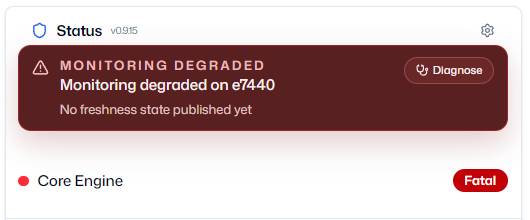
  3. Once up, and I visit the page, let it find my DVR install and give it a user/password, the home screen displays this under status:
    image

  4. I clicked on Diagnose and don't really see anything wrong. I clicked on the self-tests and the alerts fail. I set up Discord as a notification target and now they all pass. Though nothing ever shows up in Discord... actually, I retract that. Two warnings have arrived: ":warning: [TEST] Low Disk Space Warning" which is not nothing, but I did a lot more tests than disk space.

  5. I currently have live TV watching set up to alert. I watched live TV through Channels for 3-4 inutes and nothing arrived at Discord.

  6. I did a restart to see if that would fix it. It counted over 35 seconds and then said restart failed. F5 did work to bring it back.

I'll stop here and see if it's something simple and holistic. Container and app logs follow:

 File "/app/core/main.py", line 527, in main
    bootstrap_encryption_key()
    ~~~~~~~~~~~~~~~~~~~~~~~~^^
  File "/app/core/helpers/encryption.py", line 59, in bootstrap_encryption_key
    _atomic_write_secret_bytes(key_file, key)
    ~~~~~~~~~~~~~~~~~~~~~~~~~~^^^^^^^^^^^^^^^
  File "/app/core/helpers/atomic_io.py", line 129, in _atomic_write_secret_bytes
    encrypted = _encrypt_secret_bytes(data)
  File "/app/core/helpers/atomic_io.py", line 102, in _encrypt_secret_bytes
    token = _make_secret_storage_fernet().encrypt(data)
            ~~~~~~~~~~~~~~~~~~~~~~~~~~~^^
  File "/app/core/helpers/atomic_io.py", line 97, in _make_secret_storage_fernet
    digest = hashlib.sha256(_load_secret_storage_key_material()).digest()
                            ~~~~~~~~~~~~~~~~~~~~~~~~~~~~~~~~~^^
  File "/app/core/helpers/atomic_io.py", line 87, in _load_secret_storage_key_material
    raise SecretStorageKeyUnavailableError(
    ...<2 lines>...
    )
core.helpers.atomic_io.SecretStorageKeyUnavailableError: CHANNELWATCH_SECRET_STORAGE_KEY must be set to at least 32 characters before writing local secrets.
2026-08-21 15:42:36,338 WARN exited: core (exit status 1; not expected)
[Core Config] Info: Overriding timezone from TZ env var to America/New_York.
[2026-08-21 15:51:39] [CORE] 🔧 ── Connectivity Test ──
[2026-08-21 15:51:39] [CORE] Connecting to 172.21.0.1:8089...
[2026-08-21 15:51:39] [CORE] Server version: 2026.08.07.0346
[2026-08-21 15:51:39] [CORE] Testing event stream...
[2026-08-21 15:51:39] [CORE] ✅ [PASS]  Server and event stream reachable
[Core Config] Info: Overriding timezone from TZ env var to America/New_York.
[2026-08-21 15:51:39] [CORE] 🔧 ── API Endpoints Test ──
[2026-08-21 15:51:39] [CORE]   ▸ Core System
[2026-08-21 15:51:39] [CORE]   /status                             PASS  (HTTP 200)
[2026-08-21 15:51:39] [CORE]   /dvr/events/subscribe               PASS  (HTTP 200)
[2026-08-21 15:51:39] [CORE]   /dvr                                PASS  (HTTP 200)
[2026-08-21 15:51:39] [CORE]   ▸ Channel & Program Data
[2026-08-21 15:51:39] [CORE]   /api/v1/channels                    PASS  (HTTP 200)
[2026-08-21 15:51:39] [CORE]   /devices/ANY/guide/xmltv            PASS  (HTTP 200)
[2026-08-21 15:51:39] [CORE]   ▸ Recording & VOD Data
[2026-08-21 15:51:39] [CORE]   /api/v1/all                         PASS  (HTTP 200)
[2026-08-21 15:51:39] [CORE] Results: 6 passed, 0 failed
[2026-08-21 15:51:39] [CORE] ✅ [PASS]  All endpoints reachable
[Core Config] Info: Overriding timezone from TZ env var to America/New_York.
[2026-08-21 15:51:40] [CORE] 🔧 ── Channel-Watching Test ──
[2026-08-21 15:51:40] [CORE] Target: 172.21.0.1:8089
[2026-08-21 15:51:40] [CORE] Setting up mock event data...
[2026-08-21 15:51:40] [CORE] Processing event...
[2026-08-21 15:51:40] [CORE] ✅ [PASS]  Event processed, notification dispatched
/app/core/diagnostics/__init__.py:67: RuntimeWarning: coroutine 'AlertManager.process_event' was never awaited
  return ALERT_TESTS[test_name](host, port, alert_manager)
RuntimeWarning: Enable tracemalloc to get the object allocation traceback
[Core Config] Info: Overriding timezone from TZ env var to America/New_York.
[2026-08-21 15:51:40] [CORE] 🔧 ── VOD-Watching Test ──
[2026-08-21 15:51:40] [CORE] Target: 172.21.0.1:8089
[2026-08-21 15:51:40] [CORE] Setting up mock event data...
[2026-08-21 15:51:41] [CORE] Processing event...
[2026-08-21 15:51:41] [CORE] ✅ [PASS]  Event processed, notification dispatched
[Core Config] Info: Overriding timezone from TZ env var to America/New_York.
[2026-08-21 15:51:41] [CORE] 🔧 ── Disk-Space Test ──
[2026-08-21 15:51:41] [CORE] Target: 172.21.0.1:8089
[2026-08-21 15:51:41] [CORE] Fetching disk space info...
[2026-08-21 15:51:41] [CORE] Disk: 3.31 TB free of 5.44 TB (60.8%)
[2026-08-21 15:51:41] [CORE] Processing alert...
[2026-08-21 15:51:42] [CORE] Notification sent via Apprise: ⚠️ [TEST] Low Disk Space Warning
[2026-08-21 15:51:42] [CORE] ✅ [PASS]  Test event processed, notification dispatched
[Core Config] Info: Overriding timezone from TZ env var to America/New_York.
[2026-08-21 15:51:42] [CORE] 🔧 ── Recording Scheduled Test ──
[2026-08-21 15:51:42] [CORE] Target: 172.21.0.1:8089
[2026-08-21 15:51:42] [CORE] Processing scheduled event...
/app/core/diagnostics/alerts/recording_events.py:53: RuntimeWarning: coroutine 'RecordingEventsAlert._handle_recording_created' was never awaited
  test_fn(test_alert)
RuntimeWarning: Enable tracemalloc to get the object allocation traceback
[2026-08-21 15:51:42] [CORE] ✅ [PASS]  Scheduled event processed, notification dispatched
[Core Config] Info: Overriding timezone from TZ env var to America/New_York.
[2026-08-21 15:51:42] [CORE] 🔧 ── Recording Started Test ──
[2026-08-21 15:51:42] [CORE] Target: 172.21.0.1:8089
[2026-08-21 15:51:42] [CORE] Processing started event...
/app/core/diagnostics/alerts/recording_events.py:53: RuntimeWarning: coroutine 'RecordingEventsAlert._handle_recording_started' was never awaited
  test_fn(test_alert)
RuntimeWarning: Enable tracemalloc to get the object allocation traceback
[2026-08-21 15:51:42] [CORE] ✅ [PASS]  Started event processed, notification dispatched
[Core Config] Info: Overriding timezone from TZ env var to America/New_York.
[2026-08-21 15:51:42] [CORE] 🔧 ── Recording Completed Test ──
[2026-08-21 15:51:42] [CORE] Target: 172.21.0.1:8089
[2026-08-21 15:51:42] [CORE] Processing completed event...
/app/core/diagnostics/alerts/recording_events.py:53: RuntimeWarning: coroutine 'RecordingEventsAlert._handle_recording_completed' was never awaited
  test_fn(test_alert)
RuntimeWarning: Enable tracemalloc to get the object allocation traceback
[2026-08-21 15:51:42] [CORE] ✅ [PASS]  Completed event processed, notification dispatched
[Core Config] Info: Overriding timezone from TZ env var to America/New_York.
[2026-08-21 15:51:42] [CORE] 🔧 ── Recording Stopped Test ──
[2026-08-21 15:51:42] [CORE] Target: 172.21.0.1:8089
[2026-08-21 15:51:42] [CORE] Processing stopped event...
[2026-08-21 15:51:42] [CORE] ✅ [PASS]  Stopped event processed, notification dispatched
[Core Config] Info: Overriding timezone from TZ env var to America/New_York.
[2026-08-21 15:51:42] [CORE] 🔧 ── Recording Cancelled Test ──
[2026-08-21 15:51:42] [CORE] Target: 172.21.0.1:8089
[2026-08-21 15:51:42] [CORE] Processing cancelled event...
/app/core/diagnostics/alerts/recording_events.py:53: RuntimeWarning: coroutine 'RecordingEventsAlert._handle_recording_deleted' was never awaited
  test_fn(test_alert)
RuntimeWarning: Enable tracemalloc to get the object allocation traceback
[2026-08-21 15:51:42] [CORE] ✅ [PASS]  Cancelled event processed, notification dispatched

===

[2026-08-21 15:58:14] [CORE] Processing scheduled event...
[2026-08-21 15:58:14] [CORE] ✅ [PASS] Scheduled event processed, notification dispatched
[2026-08-21 15:58:14] [CORE] 🔧 ── Recording Started Test ──
[2026-08-21 15:58:14] HTTP Request: GET http://172.21.0.1:8089/api/v1/jobs "HTTP/1.1 200 OK"
[2026-08-21 15:58:14] [CORE] Target: 172.21.0.1:8089
[2026-08-21 15:58:14] [CORE] Processing started event...
[2026-08-21 15:58:14] [CORE] ✅ [PASS] Started event processed, notification dispatched
[2026-08-21 15:58:14] [CORE] 🔧 ── Recording Completed Test ──
[2026-08-21 15:58:14] HTTP Request: GET http://172.21.0.1:8089/api/v1/jobs "HTTP/1.1 200 OK"
[2026-08-21 15:58:14] [CORE] Target: 172.21.0.1:8089
[2026-08-21 15:58:14] [CORE] Processing completed event...
[2026-08-21 15:58:14] [CORE] ✅ [PASS] Completed event processed, notification dispatched
[2026-08-21 15:58:14] [CORE] 🔧 ── Recording Stopped Test ──
[2026-08-21 15:58:14] HTTP Request: GET http://172.21.0.1:8089/api/v1/jobs "HTTP/1.1 200 OK"
[2026-08-21 15:58:14] [CORE] Target: 172.21.0.1:8089
[2026-08-21 15:58:14] [CORE] Processing stopped event...
[2026-08-21 15:58:14] [CORE] ✅ [PASS] Stopped event processed, notification dispatched
[2026-08-21 15:58:14] [CORE] 🔧 ── Recording Cancelled Test ──
[2026-08-21 15:58:14] HTTP Request: GET http://172.21.0.1:8089/api/v1/jobs "HTTP/1.1 200 OK"
[2026-08-21 15:58:14] [CORE] Target: 172.21.0.1:8089
[2026-08-21 15:58:14] [CORE] Processing cancelled event...
[2026-08-21 15:58:14] [CORE] ✅ [PASS] Cancelled event processed, notification dispatched
[2026-08-21 16:02:06] HTTP Request: GET http://172.21.0.1:8089/dvr "HTTP/1.1 200 OK"
[2026-08-21 16:02:06] HTTP Request: GET http://172.21.0.1:8089/status "HTTP/1.1 200 OK"
[2026-08-21 16:02:06] HTTP Request: GET http://172.21.0.1:8089/api/v1/channels "HTTP/1.1 200 OK"
[2026-08-21 16:02:06] HTTP Request: GET http://172.21.0.1:8089/dvr/jobs "HTTP/1.1 200 OK"
[2026-08-21 16:02:06] HTTP Request: GET http://172.21.0.1:8089/api/v1/shows "HTTP/1.1 200 OK"
[2026-08-21 16:02:06] HTTP Request: GET http://172.21.0.1:8089/dvr "HTTP/1.1 200 OK"
[2026-08-21 16:02:06] HTTP Request: GET http://172.21.0.1:8089/api/v1/movies "HTTP/1.1 200 OK"
[2026-08-21 16:02:07] HTTP Request: GET http://172.21.0.1:8089/api/v1/episodes "HTTP/1.1 200 OK"
[2026-08-21 16:02:36] HTTP Request: GET http://172.21.0.1:8089/api/v1/channels "HTTP/1.1 200 OK"
[2026-08-21 16:02:36] HTTP Request: GET http://172.21.0.1:8089/dvr "HTTP/1.1 200 OK"
[2026-08-21 16:02:36] HTTP Request: GET http://172.21.0.1:8089/status "HTTP/1.1 200 OK"
[2026-08-21 16:02:36] HTTP Request: GET http://172.21.0.1:8089/dvr/jobs "HTTP/1.1 200 OK"
[2026-08-21 16:02:36] HTTP Request: GET http://172.21.0.1:8089/dvr "HTTP/1.1 200 OK"
[2026-08-21 16:03:06] HTTP Request: GET http://172.21.0.1:8089/api/v1/channels "HTTP/1.1 200 OK"
[2026-08-21 16:03:06] HTTP Request: GET http://172.21.0.1:8089/dvr "HTTP/1.1 200 OK"
[2026-08-21 16:03:06] HTTP Request: GET http://172.21.0.1:8089/status "HTTP/1.1 200 OK"
[2026-08-21 16:03:06] HTTP Request: GET http://172.21.0.1:8089/dvr/jobs "HTTP/1.1 200 OK"
[2026-08-21 16:03:06] HTTP Request: GET http://172.21.0.1:8089/dvr "HTTP/1.1 200 OK"
[2026-08-21 16:03:36] HTTP Request: GET http://172.21.0.1:8089/dvr "HTTP/1.1 200 OK"
[2026-08-21 16:03:36] HTTP Request: GET http://172.21.0.1:8089/status "HTTP/1.1 200 OK"
[2026-08-21 16:03:36] HTTP Request: GET http://172.21.0.1:8089/api/v1/channels "HTTP/1.1 200 OK"
[2026-08-21 16:03:36] HTTP Request: GET http://172.21.0.1:8089/dvr/jobs "HTTP/1.1 200 OK"
[2026-08-21 16:03:36] HTTP Request: GET http://172.21.0.1:8089/dvr "HTTP/1.1 200 OK"
[2026-08-21 16:04:06] HTTP Request: GET http://172.21.0.1:8089/dvr "HTTP/1.1 200 OK"
[2026-08-21 16:04:06] HTTP Request: GET http://172.21.0.1:8089/status "HTTP/1.1 200 OK"
[2026-08-21 16:04:06] HTTP Request: GET http://172.21.0.1:8089/api/v1/channels "HTTP/1.1 200 OK"
[2026-08-21 16:04:06] HTTP Request: GET http://172.21.0.1:8089/dvr/jobs "HTTP/1.1 200 OK"
[2026-08-21 16:04:06] HTTP Request: GET http://172.21.0.1:8089/dvr "HTTP/1.1 200 OK"
[2026-08-21 16:04:36] HTTP Request: GET http://172.21.0.1:8089/api/v1/channels "HTTP/1.1 200 OK"
[2026-08-21 16:04:36] HTTP Request: GET http://172.21.0.1:8089/dvr "HTTP/1.1 200 OK"
[2026-08-21 16:04:36] HTTP Request: GET http://172.21.0.1:8089/status "HTTP/1.1 200 OK"
[2026-08-21 16:04:36] HTTP Request: GET http://172.21.0.1:8089/dvr/jobs "HTTP/1.1 200 OK"
[2026-08-21 16:04:36] HTTP Request: GET http://172.21.0.1:8089/dvr "HTTP/1.1 200 OK"
[2026-08-21 16:05:06] HTTP Request: GET http://172.21.0.1:8089/api/v1/channels "HTTP/1.1 200 OK"
[2026-08-21 16:05:06] HTTP Request: GET http://172.21.0.1:8089/status "HTTP/1.1 200 OK"
[2026-08-21 16:05:06] HTTP Request: GET http://172.21.0.1:8089/dvr "HTTP/1.1 200 OK"
[2026-08-21 16:05:06] HTTP Request: GET http://172.21.0.1:8089/dvr/jobs "HTTP/1.1 200 OK"
[2026-08-21 16:05:06] HTTP Request: GET http://172.21.0.1:8089/dvr "HTTP/1.1 200 OK"
[2026-08-21 16:05:36] HTTP Request: GET http://172.21.0.1:8089/api/v1/channels "HTTP/1.1 200 OK"
[2026-08-21 16:05:36] HTTP Request: GET http://172.21.0.1:8089/status "HTTP/1.1 200 OK"
[2026-08-21 16:05:36] HTTP Request: GET http://172.21.0.1:8089/dvr "HTTP/1.1 200 OK"
[2026-08-21 16:05:36] HTTP Request: GET http://172.21.0.1:8089/dvr/jobs "HTTP/1.1 200 OK"
[2026-08-21 16:05:36] HTTP Request: GET http://172.21.0.1:8089/dvr "HTTP/1.1 200 OK"
[2026-08-21 16:06:06] HTTP Request: GET http://172.21.0.1:8089/dvr "HTTP/1.1 200 OK"
[2026-08-21 16:06:06] HTTP Request: GET http://172.21.0.1:8089/status "HTTP/1.1 200 OK"
[2026-08-21 16:06:06] HTTP Request: GET http://172.21.0.1:8089/api/v1/channels "HTTP/1.1 200 OK"
[2026-08-21 16:06:06] HTTP Request: GET http://172.21.0.1:8089/dvr/jobs "HTTP/1.1 200 OK"
[2026-08-21 16:06:06] HTTP Request: GET http://172.21.0.1:8089/dvr "HTTP/1.1 200 OK"
[2026-08-21 16:06:36] HTTP Request: GET http://172.21.0.1:8089/api/v1/channels "HTTP/1.1 200 OK"
[2026-08-21 16:06:36] HTTP Request: GET http://172.21.0.1:8089/dvr "HTTP/1.1 200 OK"
[2026-08-21 16:06:36] HTTP Request: GET http://172.21.0.1:8089/status "HTTP/1.1 200 OK"
[2026-08-21 16:06:36] HTTP Request: GET http://172.21.0.1:8089/dvr/jobs "HTTP/1.1 200 OK"
[2026-08-21 16:06:36] HTTP Request: GET http://172.21.0.1:8089/dvr "HTTP/1.1 200 OK"
[2026-08-21 16:07:06] HTTP Request: GET http://172.21.0.1:8089/api/v1/channels "HTTP/1.1 200 OK"
[2026-08-21 16:07:06] HTTP Request: GET http://172.21.0.1:8089/dvr "HTTP/1.1 200 OK"
[2026-08-21 16:07:06] HTTP Request: GET http://172.21.0.1:8089/status "HTTP/1.1 200 OK"
[2026-08-21 16:07:06] HTTP Request: GET http://172.21.0.1:8089/dvr/jobs "HTTP/1.1 200 OK"
[2026-08-21 16:07:06] HTTP Request: GET http://172.21.0.1:8089/dvr "HTTP/1.1 200 OK"
[2026-08-21 16:07:36] HTTP Request: GET http://172.21.0.1:8089/api/v1/channels "HTTP/1.1 200 OK"
[2026-08-21 16:07:36] HTTP Request: GET http://172.21.0.1:8089/dvr "HTTP/1.1 200 OK"
[2026-08-21 16:07:36] HTTP Request: GET http://172.21.0.1:8089/status "HTTP/1.1 200 OK"
[2026-08-21 16:07:36] HTTP Request: GET http://172.21.0.1:8089/dvr/jobs "HTTP/1.1 200 OK"
[2026-08-21 16:07:36] HTTP Request: GET http://172.21.0.1:8089/dvr "HTTP/1.1 200 OK"
[2026-08-21 16:08:06] HTTP Request: GET http://172.21.0.1:8089/api/v1/channels "HTTP/1.1 200 OK"
[2026-08-21 16:08:06] HTTP Request: GET http://172.21.0.1:8089/status "HTTP/1.1 200 OK"
[2026-08-21 16:08:06] HTTP Request: GET http://172.21.0.1:8089/dvr "HTTP/1.1 200 OK"
[2026-08-21 16:08:06] HTTP Request: GET http://172.21.0.1:8089/dvr/jobs "HTTP/1.1 200 OK"
[2026-08-21 16:08:06] HTTP Request: GET http://172.21.0.1:8089/dvr "HTTP/1.1 200 OK"
[2026-08-21 16:08:36] HTTP Request: GET http://172.21.0.1:8089/api/v1/channels "HTTP/1.1 200 OK"
[2026-08-21 16:08:36] HTTP Request: GET http://172.21.0.1:8089/status "HTTP/1.1 200 OK"
[2026-08-21 16:08:36] HTTP Request: GET http://172.21.0.1:8089/dvr "HTTP/1.1 200 OK"
[2026-08-21 16:08:36] HTTP Request: GET http://172.21.0.1:8089/dvr/jobs "HTTP/1.1 200 OK"
[2026-08-21 16:08:37] HTTP Request: GET http://172.21.0.1:8089/dvr "HTTP/1.1 200 OK"
[2026-08-21 16:09:06] HTTP Request: GET http://172.21.0.1:8089/dvr "HTTP/1.1 200 OK"
[2026-08-21 16:09:06] HTTP Request: GET http://172.21.0.1:8089/status "HTTP/1.1 200 OK"
[2026-08-21 16:09:06] HTTP Request: GET http://172.21.0.1:8089/api/v1/channels "HTTP/1.1 200 OK"
[2026-08-21 16:09:06] HTTP Request: GET http://172.21.0.1:8089/dvr/jobs "HTTP/1.1 200 OK"
[2026-08-21 16:09:07] HTTP Request: GET http://172.21.0.1:8089/dvr "HTTP/1.1 200 OK"

@CoderLuii Given the report just above that may require some tweaking of the code, may I request that you allow LAN hostnames again in addition to IP addresses?

I use Tailscale and MagicDNS, so by having hostnames configured the same for both, it doesn't matter whether I'm running Tailscale or not, it resolves an IP either on the local LAN or on the Tailnet.

Not to mention that hostnames are just generally easier to remember, and use, with several hundred devices -- many with multiple IP addresses (LAN and Tailnet). :slight_smile: ChannelWatch is currently the only project I know of in Channels DVR orbit that doesn't allow the use of either.

@JefferMC this is great feedback, let me review it and see if i can replicate this on my end and get patch fix tonight.

@bnhf i'm pretty sure this is functioning as part of previous release i did. It should work with Tailscale and MagicDNS since you previously mentioned this, i remember implementing this in the past. let me take another look at this and get back to you on this.

Cheers,
CoderLuii
CoderLuii

@JefferMC I reproduced the problems in your report. Your DVR connection was working. The API checks against 172.21.0.1 passed. The main failure was that ChannelWatch’s background monitoring process stopped because the One-Click installation did not include the storage key ChannelWatch required. The interface stayed online, which made the installation look healthier than it was.

The notification tests were also incorrectly reporting PASS without delivering, report preparation could time out and lose attachments, and the restart screen could report failure after a successful restart. Those issues are fixed in v0.9.17.

@bnhf you were also right about hostnames. My earlier response was incorrect. LAN, .local, single-label, and Tailscale MagicDNS names were being rejected by the wrong security check. v0.9.17 now supports them through a DVR-specific validation path.

For v0.9.18, I’m removing the external storage-key requirement from normal installations. ChannelWatch will create and manage its own internal key automatically under /config, so new One-Click installations will not need another variable or key to preserve. Existing installations will migrate safely without replacing their DVR credentials. That change is planned for the next release and has not shipped yet.

Thanks to both of you for the detailed reports. They helped separate the startup failure from the hostname and diagnostic problems.

Cheers,
CoderLuii
CoderLuii

Quick release catch-up: ChannelWatch v0.9.16 and v0.9.17 are available now.

v0.9.16 improves the monitoring core. ChannelWatch now keeps reconciling DVRs when none are configured or one is offline, retries unavailable DVRs automatically, applies notification rate limits across the whole installation, and handles monitor reloads and Update Center recovery more safely.

v0.9.17 addresses the problems reported above:

  • LAN, .local, single-label, and Tailscale MagicDNS DVR hostnames now work.
  • Notification tests no longer report PASS unless a destination accepts the alert.
  • Failed report preparation keeps your text, screenshots, and debug bundle.
  • A successful restart is no longer reported as failed just because DVR monitoring is degraded.
  • Missing storage-key deployments now show a clear setup-required state instead of repeatedly crashing the monitoring process.

Both releases require a normal container image update while preserving /config.

With Docker Compose:

docker compose pull
docker compose up -d

LAN hostnames are confirmed working.

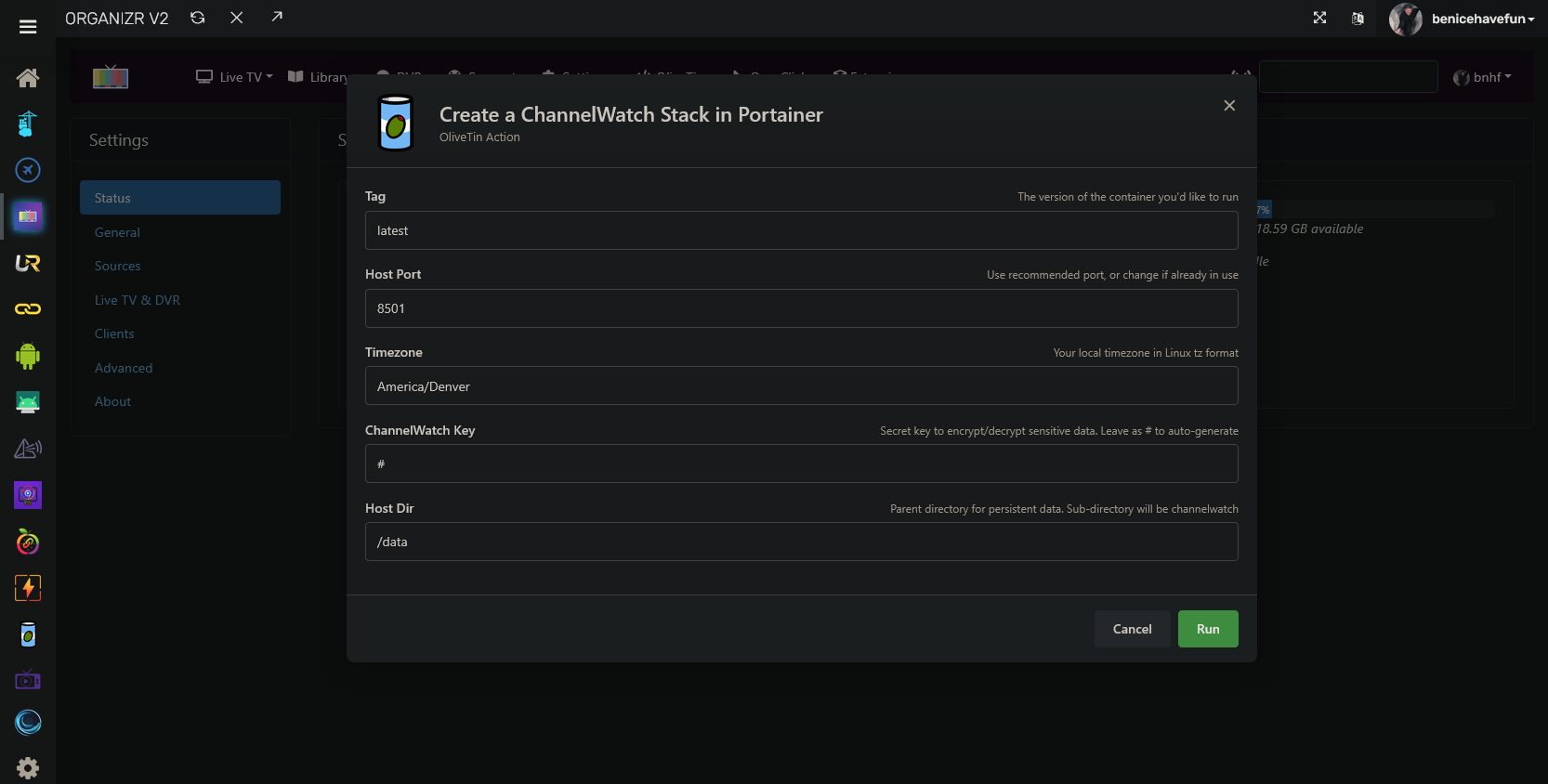
Also, I updated Project One-Click to generate a CHANNELWATCH_SECRET_STORAGE_KEY if one is not provided. This is available from both the classic OliveTin Dashboard and Project WebUI+:

Hopefully this method will still work with the change you have planned for your next release. As it stands, the user can either provide their current key, or let one be generated using openssl rand -base64 48

@bnhf Thanks for updating Project One Click. That will work well for v0.9.17.

I’m working on v0.9.18 as we speak. Hopefully it will be ready within a few hours if I have enough time to finish testing everything properly.

Fresh v0.9.18 installs will not need CHANNELWATCH_SECRET_STORAGE_KEY. ChannelWatch will create and manage its own key inside /config. Existing v0.9.17 installs can keep the generated key for the first v0.9.18 startup so their saved credentials migrate safely.

Thanks again!

Cheers,
CoderLuii
CoderLuii

1 Like

FYI, I didn't use project one-click to install this. I just copied the compose YAML and set up the stack in Portainer. I don't know what difference that makes, but thought you should have that information.

It appears that this means I am responsible to creating a secret key. Just use OpenSSL to create a random key and set it in the environment var?

I looked at the container log first. I now see the message on the site. It's nice and clear.

After setting up the secret key in the YAML and environment vars and deploying that, It now looks more like I expect it to. The "degraded" warning box did come up for a minute or so, but then went away. The alert tests I have done instantly showed up as expected.

yea, im about to tap out of this project. its too complicated just to see who is streaming what. it never monitors and now you have to add a secret key? it gets more tedious as updates roll in and hopefully this gets much easier to use.

@JefferMC Thanks for clarifying! This was not specific to Project One-Click. In v0.9.17, ChannelWatch was not automatically generating its credential-protection key, so monitoring remained blocked until one was added manually.

I’m glad monitoring and the alert tests are now working. Starting with v0.9.18, ChannelWatch will handle the key completely by itself inside /config. Users will not have to generate it, view it, copy it, add it to Portainer or Compose, or think about it at all.

Thanks again!

Cheers,
CoderLuii
CoderLuii

@AeroR1 I understand the frustration. You’re right, this became way more complicated than it should have been just to monitor who is watching what.

The storage key was supposed to be handled automatically, but v0.9.17 required users to create and add it themselves. Without the key, the interface could still load while monitoring stayed blocked, which made the problem even more confusing.

I’m fixing this in v0.9.18. ChannelWatch will create and manage the key automatically inside /config. You will not have to generate it, find it, copy it, add it anywhere, or even think about it.

I’m also improving the monitoring diagnostics so if something still does not connect, ChannelWatch will clearly explain what is wrong instead of just looking like it is not monitoring.

Cheers,
CoderLuii
CoderLuii

I thought I should throw this out here: I am less interested in knowing about every instance of a recording being made or viewed, and more interested in knowing of a recording that was scheduled isn't actually happening, or is having some sort of errors, or that the application itself is having issues or not responding. I don't see a lot of controls around these sort of alerts, and I've been wondering if they're just implied/automatic (of course you want to know that) because I'm turning off almost all the notifications I have control of.

As long as I'm giving feedback:

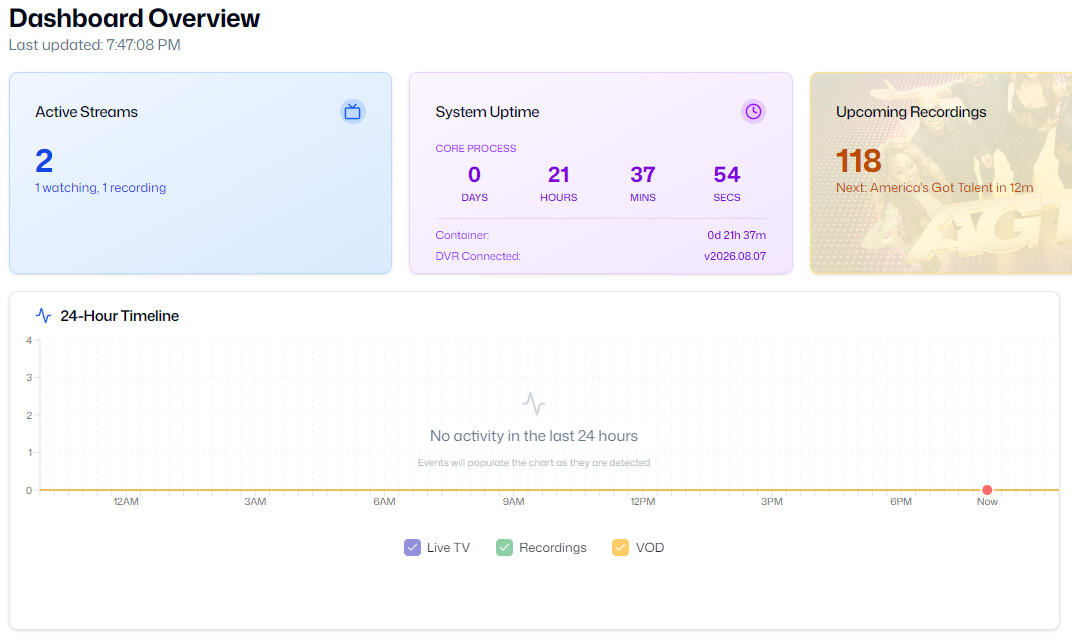
  1. I was a little surprised that System Uptime is that of the Channel Watch, not the Channels DVR systems. I suppose that given that you can monitor multiple DVRs that can have multiple uptimes this might make some sense, but I really don't think it's important enough for a tile.
  2. The "24-Hour Timeline" is showing no activity, which is clearly in error. I've been getting notices (and disabling them as they annoy me), but the DVR is definitely recording and playing back stuff.

ChannelWatch v0.9.18, v0.9.19, and v1.0.0

A few ChannelWatch releases landed close together, so here is one combined update.

v0.9.18

ChannelWatch now creates and manages its own credential encryption key inside persistent /config.

Normal installations no longer need CHANNELWATCH_SECRET_STORAGE_KEY. Saved DVR and notification credentials remain encrypted, but users do not need to generate, enter, copy, or preserve a separate deployment key.

This release also introduced the newer signed Update Center, automatic update policies, and improved support for LAN, .local, single label, and Tailscale DVR hostnames.

v0.9.19

This release fixes the empty Recent Activity and 24-Hour Timeline problem.

ChannelWatch was detecting events and preserving them in activity_history.json, but the dashboard could read an empty SQLite activity table instead. That made valid live TV, movie, episode, and recording activity appear missing.

SQLite is now the main activity store. Existing valid activity is migrated automatically, and Recent Activity, the timeline, per-DVR history, feeds, backups, clearing, retention, and DVR deletion now use the same storage rules.

No DVR credentials need to be entered again, and users should not edit the activity files manually.

v1.0.0

v1.0.0 is the first container-image milestone under the new release schedule.

This release aligns the application and container runtime, introduces launcher protocol 3, and fixes the Update Center status race that could temporarily replace version information with Unknown when two update checks overlapped.

Starting now:

  • Versions ending in .0, such as v1.0.0 and v1.1.0, require the matching container image.
  • Versions v1.0.1 through v1.0.9 will install through the signed in-app Update Center.
  • After v1.0.9, the next milestone will be v1.1.0.

Updating to v1.0.0

Pull and recreate the container using:

coderluii/channelwatch:1.0.0

Preserve the existing /config volume or directory. That contains the ChannelWatch settings, credentials, encryption key, database, activity history, and backups.

GitHub release:

Docker Hub:

https://hub.docker.com/r/coderluii/channelwatch/tags?name=1.0.0

The v1.0.0 image is available for both AMD64 and ARM64.

Cheers,
CoderLuii
CoderLuii

@JefferMC Thanks for the feedback. I agree that ChannelWatch needs a clearer separation between informational alerts and alerts that require attention.

Live TV and playback alerts should be easy to silence, while recording failures, disk warnings, an unreachable DVR, and ChannelWatch not responding should be easier to prioritize. The current controls are spread across Alerts, Notifications, and Routing, so I am adding clearer grouping and presets to the v1.0.1 list.

The empty timeline was a real storage bug. ChannelWatch detected the activity, but the dashboard sometimes read from an empty database instead. That was fixed in v0.9.19 and is included in v1.0.0.

You are also right about System Uptime. It currently means ChannelWatch uptime, not DVR uptime. I will make that clearer and see if I can redesign that area to display uptime for all configured DVRs as well.

Thanks again. This is useful feedback.

Cheers,
CoderLuii
CoderLuii

now were talking! everything is working! thanks.

if I can give a feature request, it would be cool if in recent activity, you can filter by channels client. I have so many clients that I would like to see what specific ones did. thanks.

@AeroR1 Glad to hear everything is working now!

That is a good request. Watch History already saves and displays the client name, so I am adding a dedicated client filter there and to Recent Activity. This will let you select a specific Channels client instead of searching manually.

I am also adding a new Help & Feedback option inside ChannelWatch. It will let users report a problem, request a feature or change, or ask a question. Submissions will be organized through GitHub so they are easier for me to track and follow up on.

I am working this into v1.0.1 now. Thanks for the suggestion!

Cheers,
CoderLuii
CoderLuii

I've upgraded to 1.0.0. Further feedback:

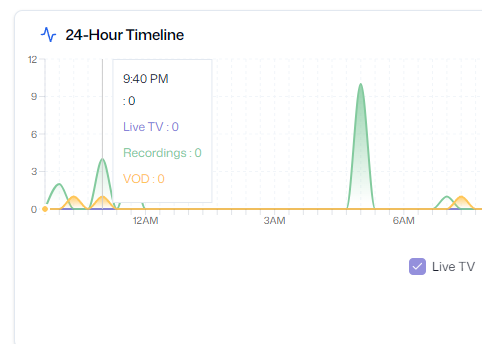
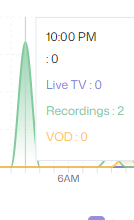
1) The graph now shows some traffic, but:
(a) the numbers in the chart are all zero (in the example, the graph indicates Recordings should be 4, not zero, and VOD looks like 1, not zero), and
(b) I'm not sure what the height/numbers represent? stream-hours of recording/viewing? Simultaneous streams at that particular point in time?
image

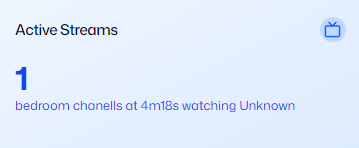
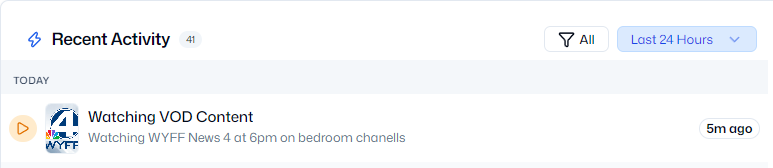
2) this shows unknown,
image
while this shows a program:


(yes, I'm sure it's the same thing)

**UPDATE: ** I think I answered 1b:
image
It's the number of events occurring in the interval ending at the time shown. There were a lot of "Recording events" shortly after 5:00 AM when the schedule update arrived and 10 instances of new programs got scheduled. Note that the Recordings shows 2 (not 10, not zero). But also note that the time doesn't match the grid for the cursor; there's something wrong with the logic for calculating what time should be shown in the popup box based on the cursor position.

@JefferMC Thanks for testing this and for including the screenshots. You found several real display issues.

The timeline is intended to show the number of activity events detected during each 20 minute interval. It is not measuring viewing duration or simultaneous streams. That needs to be explained more clearly in the interface.

The zero values, recording count mismatch, and tooltip time not matching the cursor are bugs. The Active Streams card showing Unknown while Recent Activity has the program information is also a bug. Those two views currently resolve the information differently, and they should agree.

I’m writing these corrections for v1.0.2. I’ll reproduce each issue, correct the timeline calculations and metadata handling.

Depending on your next test, I might ask for you to submit an issue via in-app reporting system in order to patch Active Streams / Recent Activity bug.

Thanks for documenting everything clearly.

Cheers,
CoderLuii
CoderLuii