
Morning folks,
I just posted on the kayo fir channels forum page but should let this forum know as well of my findings. For my setup, using the suppled github instructions of "bun main.js" completely made the kayo script just not work at all. As soon as I installed node.js after some chatgpt research, the CC4C app through the guthub repo now works flawlessly using "node main.js". Not sure if this is expected behavior, but for anyone have issues with cc4c on windows, try with node instead of bun. Happy new year all
What is the most recent version of Chrome that is working using the node approach for windows 11? I've followed some of the earlier thread instructions to avoid updates and am currently using Version 138.0.7204.184.
Mine is working fine with version 144.0.755.9.60.
wondering if others are still seeing this with the latest chrome on linux? I appear to be getting into this problem, though NBC.com is fine.
Cc4c was working for me last Monday, 1/12/2026, but not today. Today, Spectrum was displaying a message that i need to update to the latest version of Crome, etc, and would not play the stream. ChatGPT said that indeed they tightened controls yet again, and that is their generic error message when they dont detect Widevine among other transgressions. I noticed that i was running the version of Chrome thats bundled with Puppeteer, and it recommended running the latest stable version. It recommended removing the try/catch block that finds Chrome, and replace it with the hardcoded path to chrome-stable. This is for linux, so it would be different on different platforms. Tghis is an improvment in a way, because cc4c woudnt work at all with new versions of Chrome, but now it does. For now...
All - I wanted to share a little experiment I've been working on for a while called PrismCast. It's macOS-only (although it should work on other platforms...untested/unvalidated by me). It's inspired by the foundation that CC4C laid and I'm grateful to the Channels DVR team for the inspiration. Full release announcement here, but the TL;DR: native HLS with a web console to manage it all and a souped up version of CC4C, basically. And runs as a service. Enjoy!
2 Likes
Hello. I set my Channels up years ago. Aside from adding a few (very) simple Custom Channels, I haven't had a need to tinker with it much. Now that TVE seems to be threatened, I'd to see if I can get this going.
I have no idea what I'm doing & in need of some assistance. I'm running all this on a Windows 11 Pro i5 Nuc 8.
I'm starting in GitHub with the weatherscan setup. I downloaded & ran the cc4c.exe file. I set up the (weather scan) Custom Channel, and ran the "winget install" in cmd.
I added & can see the Weather Scan channel in my guide. But when tuning to it, I'm getting "Connection to tuner lost. Press play to try again" error message. Do I have to have a chrome tab opened to the weather scan url?
Sharing this idea:
Has anyone tried adding this retro Weather Channel feed to CC4C and had any luck getting it to un-mute? The Weather Channel - RetroCast Now
chrome updated on me again and i've lost my CC4C abilities. I had been running fine since July 2025 reinstalled.
trying to reinstall chrome 135 and I get some channels like Windy and Prime and NBC, but my YouTubeTV channels return errors of 99,999 and update your browsers. if I update chrome past 136 the webpage will not open at all. I think maybe the video capture extension gets disabled and fails to open.
I see plenty of new notes here of things changing since Aug 2025
Are there any clear simple instructions of how to get this setup again from new today using the 'node.js' method on Win 10/11?
side note: chrome continues to eventually want to update to latest version now even though I have disabled the services and task scheduler and renamed the update file.
I have reloaded everything from completely new download using the advanced node method. I get the chrome window to open but it sits at the "about" tab with an additional tab for the 'video capture' extension.
That's the normal "waiting" state. Another tab should open when you start watching a channel.
when I view a live channel, the 'about' tab opens instead of the live channel. I think this means the chrome version is 'too new' and I need a lower version, or I have a bad bitrate setting. I am on chrome v135
I'm running ESPN4CC which requires CC4C to be running and unfortunately Chrome updated itself to version 149 which killed CC4C. After spending a lot of time with my buddy Claude, we were able to get it up and running. Below are what we found and the fixes for it, get ready for a long message.
The root causes of 149 breaking CC4C were;
-
Chrome 149 broke CDP navigation to chrome-extension:// URLs — newer Chrome blocks Puppeteer from navigating directly to extension pages.
-
Puppeteer-stream's options.js used chrome.tabCapture.capture() which no longer works from extension pages in MV3/Chrome 116+
-
page.goto() was called after getStream() — the stream was being set up on a blank page before navigation.
-
Duplicate --allowlisted-extension-id — main.js was manually adding args that puppeteer-stream already adds internally, causing Chrome to receive a malformed duplicated extension ID.
-
Multiple page.close() calls — no guard against concurrent close events.
Fixes
-
Patched PuppeteerStream.js to swallow the ERR_BLOCKED_BY_CLIENT error on the options page navigation with .catch(() => {})
-
Rewrote extension/options.js to use chrome.tabCapture.getMediaStreamId() instead of chrome.tabCapture.capture()
-
Rewrote extension/background.js with a proper message listener for GET_STREAM_ID and keepalive alarm.
-
Added "alarms" to extension/manifest.json permissions.
-
Moved page.goto() to before getStream() in main.js.
-
Added page.bringToFront() before getStream() so the extension sees the correct active tab.
-
Added pageClosed guard to prevent multiple simultaneous page.close() calls
-
Removed --auto-accept-this-tab-capture and --allowlisted-extension-id from main.js args since puppeteer-stream adds these automatically
I can't attach the fixed files, but if you want to message me for them, I will send them.
1 Like
Dude, classic example of Claude over-engineering things. Chrome 149's update started disabling unpacked/command-line extensions unless the profile's "Developer Mode" is turned on, so it disabled puppeteer-stream's capture extension.
[edit: adding screenshot]
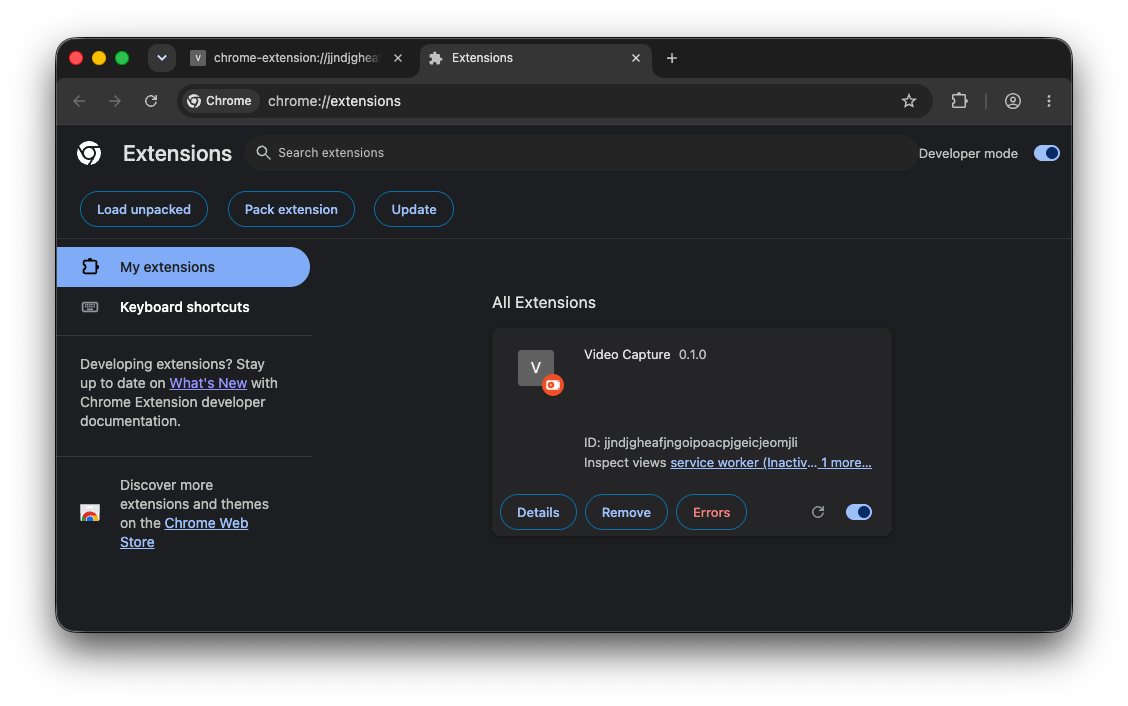
In the actual capture Chrome, goto chrome://extensions and toggle Developer Mode in the upper right.
Oh sure, now you tell me! 
Although I did enjoy learning a bit more about some coding for CC4C.
Tried that (when trying to run Prismcast, which Chrome seems to have disabled), and it didn't help. Prismcast tries mightily to start up, and I can see the extension, but then everything shuts right back down.
After I enter my credentials for Gotham Sports, I only see a never ending spinning circle in the Log In button:

havent used this in a while how well is cc4c working now? I had some cool scripts I was working on last year that I havent really messed with but they worked with the old version.