
Has anyone tried adding this retro Weather Channel feed to CC4C and had any luck getting it to un-mute? The Weather Channel - RetroCast Now
chrome updated on me again and i've lost my CC4C abilities. I had been running fine since July 2025 reinstalled.
trying to reinstall chrome 135 and I get some channels like Windy and Prime and NBC, but my YouTubeTV channels return errors of 99,999 and update your browsers. if I update chrome past 136 the webpage will not open at all. I think maybe the video capture extension gets disabled and fails to open.
I see plenty of new notes here of things changing since Aug 2025
Are there any clear simple instructions of how to get this setup again from new today using the 'node.js' method on Win 10/11?
side note: chrome continues to eventually want to update to latest version now even though I have disabled the services and task scheduler and renamed the update file.
I have reloaded everything from completely new download using the advanced node method. I get the chrome window to open but it sits at the "about" tab with an additional tab for the 'video capture' extension.
That's the normal "waiting" state. Another tab should open when you start watching a channel.
when I view a live channel, the 'about' tab opens instead of the live channel. I think this means the chrome version is 'too new' and I need a lower version, or I have a bad bitrate setting. I am on chrome v135
I'm running ESPN4CC which requires CC4C to be running and unfortunately Chrome updated itself to version 149 which killed CC4C. After spending a lot of time with my buddy Claude, we were able to get it up and running. Below are what we found and the fixes for it, get ready for a long message.
The root causes of 149 breaking CC4C were;
-
Chrome 149 broke CDP navigation to chrome-extension:// URLs — newer Chrome blocks Puppeteer from navigating directly to extension pages.
-
Puppeteer-stream's options.js used chrome.tabCapture.capture() which no longer works from extension pages in MV3/Chrome 116+
-
page.goto() was called after getStream() — the stream was being set up on a blank page before navigation.
-
Duplicate --allowlisted-extension-id — main.js was manually adding args that puppeteer-stream already adds internally, causing Chrome to receive a malformed duplicated extension ID.
-
Multiple page.close() calls — no guard against concurrent close events.
Fixes
-
Patched PuppeteerStream.js to swallow the ERR_BLOCKED_BY_CLIENT error on the options page navigation with .catch(() => {})
-
Rewrote extension/options.js to use chrome.tabCapture.getMediaStreamId() instead of chrome.tabCapture.capture()
-
Rewrote extension/background.js with a proper message listener for GET_STREAM_ID and keepalive alarm.
-
Added "alarms" to extension/manifest.json permissions.
-
Moved page.goto() to before getStream() in main.js.
-
Added page.bringToFront() before getStream() so the extension sees the correct active tab.
-
Added pageClosed guard to prevent multiple simultaneous page.close() calls
-
Removed --auto-accept-this-tab-capture and --allowlisted-extension-id from main.js args since puppeteer-stream adds these automatically
I can't attach the fixed files, but if you want to message me for them, I will send them.
1 Like
Dude, classic example of Claude over-engineering things. Chrome 149's update started disabling unpacked/command-line extensions unless the profile's "Developer Mode" is turned on, so it disabled puppeteer-stream's capture extension.
[edit: adding screenshot]
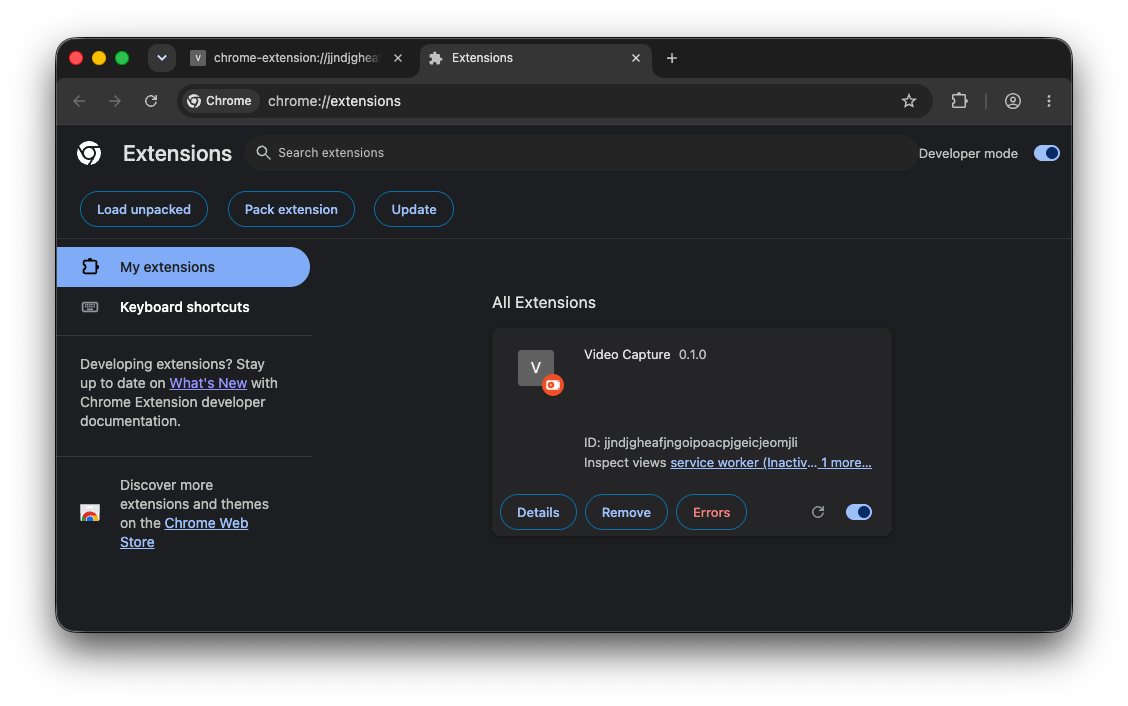
In the actual capture Chrome, goto chrome://extensions and toggle Developer Mode in the upper right.
Oh sure, now you tell me! 
Although I did enjoy learning a bit more about some coding for CC4C.
Tried that (when trying to run Prismcast, which Chrome seems to have disabled), and it didn't help. Prismcast tries mightily to start up, and I can see the extension, but then everything shuts right back down.
After I enter my credentials for Gotham Sports, I only see a never ending spinning circle in the Log In button:

havent used this in a while how well is cc4c working now? I had some cool scripts I was working on last year that I havent really messed with but they worked with the old version.