It's chilly out today. Perfect timing to warm things up and get a little fire going.
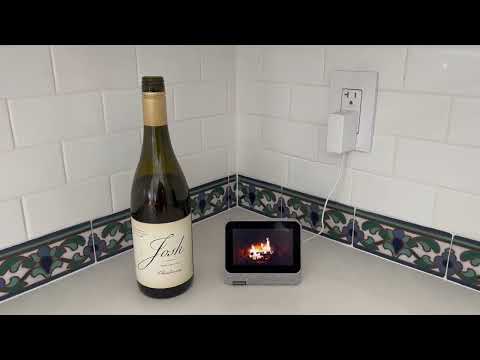

It's chilly out today. Perfect timing to warm things up and get a little fire going.
I edited the topic title to reflect the discovery I just made, that this device is a Bluetooth speaker too! I'm playing music from my iPhone to it now. I'd say audio quality is comparable to a Nest Mini. On screen shows the artist and track name.
For speaker output I was able to connect a UE Wonderboom speaker via Bluetooth but couldn’t get audio to actually play in that direction. Maybe someone else will have better luck than me.
Once you're all set up you won't want a future unexpected software update (if there ever is one) to potentially break things. So here's something else to consider:
In the Settings app > About AIV > tap "Build number" 7 times, in order to enable Developer Mode.
Then go to Settings > System > Advanced > Developer options > DISABLE "Automatic system updates."
I have Sonos speakers everywhere, so this is another interesting discovery. At least with Spotify, Pandora, YouTube Music and TuneIn Radio, I can issue Google Assistant voice requests for music, playing to a default speaker (or request a different one, on-the-fly.)
This functionality is part of the stock device, no unlock required. And it still works even when you're in a 3rd party launcher, and not the original Home screen. These settings are in the Google Home app in iOS or Android, and not on the Lenovo smart clock itself:
I wasn't able to do the same with Apple Music or SiriusXM though, I got an error when I tried, saying they weren't "currently supported." Voice requests did work for those, but were only able to play to the built-in speaker.
A little more on this topic, from the forum where all this great info originated from:
For all sorts of tech talk shows, I couldn't get any of the TWiT.tv players (like TWiT Pro or TWiT-stream) working on this device. I then remembered that TWiT also broadcasts live on Twitch, so I installed the Twitch APK, and lo and behold, it works great! I'm seeing lots of other Twitch content too now that's perfect for a device like this.
TWiT also livestreams on YouTube, and the "YouTube Vanced" app works well on this Lenovo. I'm logged into my YT account and have easy access to my subscriptions, playlists and watch history.
Also, for streaming any episode on the TWiT.tv network on-demand, from any of their channels, they publish via RSS, so the Pocket Casts app works great too. For audio as well as video podcasts. NPR Music's long-running "Tiny Desk Concert" series is excellent.
Amazon Prime Video, Amazon Music, NPR One and the PBS app work too! Some great content there for sure. I was NOT, however, successful with Hulu, Paramount+, or HBO Max. I added the working apps to my list above.
Thanks for sharing this. I’ve got one on the way. Not sure how I’ll use it exactly but it will be fun to play with. Even if it just replaces my Echo show it’ll be worth it since it barely functions as a clock or Alexa device.
I'm hoping the chromecast google home app may be a workaround here. Gulp.
Otherwise i need to find a friend with an android phone 
I've been deep in with Alexa since her inception, with Siri in 2nd place. I eventually got rid of my Shows because of how Amazon treats the Home Screen and was just using little screenless Echo devices like the Spot and Flex. With Sonos speakers everywhere all I really needed were mics for voice requests, anyway. So now some Echo Flexes around my house have been replaced by this Lenovo and I'm getting re-acquainted with Google Assistant. It's interesting to compare how it works and how it doesn't. For example, now I'm able to send voice requests to play content on my Sony Bravia (running Android TV.) But Google Assistant is definitely "chattier" when it comes to smarthome commands, following up with unnecessary confirmations a bit too frequently.
Every platform has their pros and cons. I didn’t expect this little Lenovo clock to change anything too drastically in my house but it does seem to have made an impact on the war between voice assistants…
Is there a way to spin up a Android of some kind on Windows to set it up? Because I don’t have access to an Android device only iOS devices.
I’m still mostly all in with Alexa for voice assistant stuff anyhow.I just despise the Show. Even for voice recognition, it’s worse than any of my other Alexa devices.
I’ll play with Google Assistant for sure though since this will be my first experience with it….well, in a long while anyhow. I
Hmmm, that’s an interesting idea. There is an emulator called BlueStacks that lets you run Android apps, and a similar subsystem is built into Windows 11: How to get started with Android apps on Windows 11 | Windows Central
If you can’t borrow or procure an actual Android device for this, is might be worth trying to run the Google Home app that way instead. I’ll be curious to hear if it works.
Doubtful. The Google home app relies on Bluetooth discovery to find the smart clock. I doubt the emulator passes through Bluetooth discovery. I would just get a dirt cheap android phone on ebay honestly.
Good call, I agree. Note that the "unlock" process involves logging in to your own Google account on that Android device, for syncing a single calendar event whose title is actually a link to a virtual keyboard APK to download. So even borrowing someone else's phone for this might feel uncomfortable. Maybe they have an old unused Android in the drawer instead? Fortunately there are plenty of avenues to find dirt cheap Android devices to purchase, if necessary.
I've now set up 3 of these Lenovos and am configuring 4th with and for a friend. Channels on a small screen on the kitchen counter is the #1 most appreciated use case. I'm still not sure why I find all of this so fun, but I do.
Not necessarily Channels specific:
I got mine and haven’t dug out my old Android to perform the hack but in the meantime it occurred to me that this might be able to perform double-duty as a Bluetooth speaker for my ATV in my office since I’m using a monitor with no built-in audio. It performs fine for this however, I’ve noticed an annoying quirk. If I leave Channels paused…it unpauses after some (probably ~15 minutes; haven’t timed it but like if I pause then take the dog out  ) time. I think it did the same with with Apple Music so don’t believe this to be specific to Channels.
I have other solutions with better audio quality etc in this room but I’ve not seen this behavior from anything else including various other Bluetooth devices including some that have media controls.
I’ll have to do some more testing and perhaps pair it to other devices to see if I can reproduce there but curious if anyone else has seen this.
On the bright side: if I pause something with the volume up then lay down on the futon in my office, I will get an automatic wake up.
I haven’t experienced that I also haven’t used it as a BT speaker for very long while, only just to test and have no desire to again, especially in the context you’re describing, since I already have much better Sonos speakers in every room, anyway. Personally speaking I think the only time I’d have incentive to use Bluetooth for a speaker would be when I’m traveling with a portable device. And these Lenovos are staying home. That does sound like a weird bug (?) though.
Oh yes, I was also able to "cast" audio from Spotify on my iPhone, over to the Lenovo too. I couldn't cast any video however.
Like I say I’ve got other sound options but if I’m sitting at my desk working with the news on, I don’t really need high quality audio and since the clock is probably going to be on my desk right in front of me it felt like a cool option particularly with the added benefit of being able to pause/play (like when the remote is hiding).
But separately - it can’t seem to stay connected to bt either so I’ve moved on from that experiment and will get down to the real fun this weekend hopefully
If you're watching a live stream (rather than a recording) this will happen because the playback buffer has filled up. The playback buffer is on the playback device, so its capacity is limited by the amount of storage on the playback device.
I use the new original streaming setting to keep the buffer on the server.


