
Looks like Thegrio waw added to FRNDLY TV
GRACENOTE ID: 116018
channel: thegrio
After working great for two years, my Frndly TV now shows zero channels in channelsdvr. Anybody else having this issue? Any suggestions to fix it?
1 Like
Working here
Did your FrndlyTV subscription expire
Check the container log
Restart the container
Check your ip in the frndly source?
Can friendly be used as a source using the pc client version?
I don’t see it in dropdown but pears that list can be updated?
As long as you have a Frndly account you can use the custom channels tool that is the OP of this thread. Instructions can be found at Frndly TV for Channels or in the first post here or dozens more times through this very long thread. I believe it can also be added through OliveTin for Channels: An Interface for Misc Channels DVR Scripts & Tricks.
Thank you!
Head's up. The Weather Channel on FRNDLY has been acting up today.
It plays fine through the TWC's own app, and YTTV. But, not on FRNDLY's app or website.
Changed my password today and now I can't seem to get the FrndlyTV docker working again. I stopped and deleted the container. Recreated with the right username and password but to no avail:
Error: Failed to get response from url: https://frndlytv-api.revlet.net/service/api/v1/tvguide/channels?skip_tabs=0
Did you create the container using Portainer?
Check the environment variables inside the container to make sure the username and password are correct inside the container.
In portainer, click on the container name and scroll down to  > ENV
> ENV
I did not use Portainer.
1 Like
If you have Portainer running on the same device you can still inspect the container
You can also exec into the container and run the command env
root@fc4ff90416f6:/usr/src/app# env
HOSTNAME=fc4ff90416f6
PYTHON_VERSION=3.8.19
IS_DOCKER=1
PWD=/usr/src/app
PYTHON_SETUPTOOLS_VERSION=57.5.0
TZ=America/Los_Angeles
HOME=/root
[email protected]
LANG=C.UTF-8
GPG_KEY=E3FF2839C048B25C084DEBE9B26995E310250568
PASSWORD=Monkey123!
TERM=xterm-256color
SHLVL=1
PYTHON_PIP_VERSION=23.0.1
PYTHON_GET_PIP_SHA256=dfe9fd5c28dc98b5ac17979a953ea550cec37ae1b47a5116007395bfacff2ab9
LC_ALL=C.UTF-8
PYTHON_GET_PIP_URL=https://github.com/pypa/get-pip/raw/dbf0c85f76fb6e1ab42aa672ffca6f0a675d9ee4/public/get-pip.py
PATH=/usr/local/bin:/usr/local/sbin:/usr/local/bin:/usr/sbin:/usr/bin:/sbin:/bin
_=/usr/bin/env
Or use the docker cli to inspect the container docker inspect | Docker Docs
# docker inspect --format '{{join .Config.Env "\n"}}' frndlytv-for-channels
PATH=/usr/local/bin:/usr/local/sbin:/usr/local/bin:/usr/sbin:/usr/bin:/sbin:/bin
LANG=C.UTF-8
GPG_KEY=E3FF2839C048B25C084DEBE9B26995E310250568
PYTHON_VERSION=3.8.19
PYTHON_PIP_VERSION=23.0.1
PYTHON_SETUPTOOLS_VERSION=57.5.0
PYTHON_GET_PIP_URL=https://github.com/pypa/get-pip/raw/dbf0c85f76fb6e1ab42aa672ffca6f0a675d9ee4/public/get-pip.py
PYTHON_GET_PIP_SHA256=dfe9fd5c28dc98b5ac17979a953ea550cec37ae1b47a5116007395bfacff2ab9
IS_DOCKER=1
TZ=America/Los_Angeles
[email protected]
PASSWORD=Monkey123!
Apparently the issue is special characters in the password.... I removed $ and ! and it worked.
1 Like
Notice recently that my Frndly channels (not all, ION plus for example) quit providing
CC, but I could still receive CC if I log in directly into the app. Using the Docker method with channels. Any advice, thanks.
Most likely using WebVTT subtitles which Channels DVR doesn't display.
Try playing the channel in VLC to check
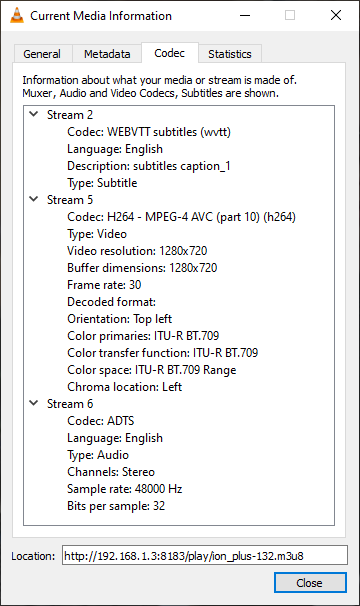
Thanks, I guess just have to watch within channels without the subtitles, I do get it with OTA just not as clean as FrndlyTV…
Why would the CCs disappear after years of being there? It is multiple Frndly TV stations where they just disappeared.
If they're delivered via Closed Captions imbedded in the video stream, Channels DVR will display them. If they're delivered via a WebVTT subtitle stream, Channels DVR does not support that and drops that stream (doesn't display WEBVTT subtitles).
To answer your question. Perhaps some were previously Closed Captions and are now WEBVTT subtitles?
If they're recordings you have it's easy enough to tell if they have closed captions. If they were aired with WEBVTT subtitles when recorded, Channels DVR would not have saved the WEBVTT subtitles stream in the recording (it drops the stream like it didn't exist).
also mpv doesn't support webvtt so probably no support is incoming
1 Like