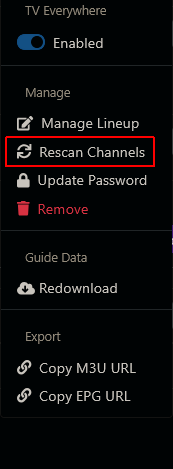
I just had Ziply Fiber installed using Xfinity Comcast cable and want to add YTTV

Not new - I'm just not seeing the responses I'm familiar with using Xfinity, Frndly, and Pluto. In fact, most of the time when I click on "Manage Lineup" or "Rescan Channels" for YTTV - nothing happens, like it was a dead link. I WAS able to get "Update Password" to prompt me for our "dog's" - you know, the non-2FA account - password.

The last two entries in my log are:
2025/06/13 19:05:32.737274 [TVE] Channel scan starting for 0 channels on YouTubeTV
2025/06/13 19:05:32.737274 [TVE] Channel scan finished after 0s: 0/0 channels available

Sounds like you have other issues going on. Are you still running CDVR on Win 10 Pro?
What do you see when you run CDVR troubleshooting Support > Troubleshooting

1 Like

No errors. The only one I saw earlier was the Remote Access I mentioned at the top.

I have some Xfinity TVE recordings scheduled for tonight and then when there's a gap I'll remove both TVE providers and add YTTV first to see how it behaves then. I'll report back then - probably sometime tomorrow because I've got some other things on my plate tonight.

Thanks for your help.

Best to rescan individual source channels that show errors.
Try TVE Troubleshooting tips step 10 before rescanning

I wouldn't remove and readd a source, except as a last resort TVE Troubleshooting tips step 14

I put them in order based on years of seeing what fixed TVE issues on this forum.

Good luck.

1 Like

What was frustrating was that I used to be able to do that all the time when some of the Discovery channels started disappearing while some stayed on. When Univision stopped working in Channels even though it was working fine on my browsers I was using that method numerous times a day. When I added YTTV I have seen no way of accessing the re-scan function for individual networks I was expecting to be carried by YTTV.

Edit: But now I just tried it again I'm being made a liar because I'm seeing that kind of interactive list I was used to seeing with Xfinity. Maybe it just needed hours to generate such a listing.

2nd edit: I came back give it another go and NO list appeared, so something is way more inconsistent than I've ever seen it.

What happens when you go to the DVR web admin UI and select
Settings > Sources > Youtube :gear: Manage > Rescan Channels

Channels Source Settings

It should look like this (except Youtube instead of Xfinity)


And to rescan an individual channel you click on the :gear: dropdown at the right side of the channel

I think the problem is that I've signed up for a 10-day free trial of YTTV and 4K Plus, and I'm also using a secondary non-2FA account as a family group member on Google, per the recommendations of ChatGPT.

When I look at the CDVR troubleshooting log, the vast majority of Channel scan failures were "Not Authorized: You are not authorized to view this content."; "access.denied.missingpackage:" (the latter looks like it's pertaining to the Discovery channels); or "not entitled: mvpd: Resource is not support by MVPD" in the case of FS1 and FS2. Meanwhile, I think the only channels that scanned in successfully were probably ones that just don't require any kind of authorization.

When I opened up a window of Chrome's incognito browser (so webites wouldn't get confused by all my Xfinity provider authorizations), I was able to get authorization on ABC.com and ESPN.com for YTTV, but on ESPN everything I tried to play said I was not authorized to view this content.

Do you mean you authenticated on those network live streaming websites and yet the ESPN website wouldn't play for you?

Are you using a smart DNS, ad-blocker/pi-hole or a VPN?

I guess this is why it's so difficult for people who have to answer call center calls - they have to start at ground zero. But I DO really appreciate you trying to do so.

I've been using ChannelsDVR for many years (nearly 40k recordings) and record almost exclusively from TVE, so I've had significant - almost daily - opportunity to become familiar with the Sources page.

What got me flustered was when I tried to add YTTV (that I just signed up for a free trial for yesterday) and did not have the expected experience.

Yes, I was able to play an On Demand show off of ABC, but when I tried to play a (On Demand) Replay from ESPN and ESPN2 (not ESPN+ because we have a Hulu subscription that includes ESPN+), it informed me that I wasn't authorized to view any of the programs I tried.

To clarify, I'm using our dog as a family member for a secondary non-2FA account, just like I use for Xfinity's TVE.

No to smart DNS, no to ad-blocker, no to VPN (except for when I connector my work PC).

OK, well playing on demand and live are two different things.
You said you were unable to access the rescan menu for youtube and that's why I asked what you see I just had Ziply Fiber installed but am still using Xfinity Comcast cable - #12 by chDVRuser and you never answered the question, so I figured you didn't know about it.

Hopefully someone using YTTV TVE or one of the developers can help you.

Yes, I answered, but that was above in post #11 that I had edited - likely while you were creating post #12.

One time when I clicked on Rescan Channels I saw the list just as I'm familiar to seeing it with Xfinity TVE. But that was only once as all the other times I tried to select Rescan Channels it was like hitting a dead link.

I created the family member account on Google per instructions I received from ChatGPT - circumventing the need to verify the account with a phone number by doing it an incognito tab. Perhaps that is causing an issue, but when I invited the dog to join the family group I was able to go into its gmail account and accept the invitation - so I just don't know what I should really expect.

One thing I'm not clear on is if I used the username or the email address when adding YTTV TVE. I THINK I used only the username. What does authenticating expect?

It expects you to click a yes it’s me link from a google browser you are logged into with that account. On another device

Did you first use a web browser and authenticate with NBC Live before scanning channels in CDVR.

I don't use YTTV, but I think the full email address, unlike Xfinity using username only.

Thanks for the tip to visit Watch the NBC Live Stream - NBC.com because I never did that. I think it will be best for me to remove my YTTV TVE in Channels, authorize my secondary Google account there, and then try adding YTTV TVE after that is successful.

Okay - getting authorized on nbc live appears to have been successful. Now when I'm adding the YTTV TVE source, I'm being asked for the username instead of the email, so I guess I'll stick with that.

Does YTTV TVE use the username (joe) or full email address ([email protected]) for authentication in Channels DVR. With Xfinity it's just the username joe (using [email protected] works with some channels, but not all).

Last time I did it I had to use my email and go to my phone to click the link acknowledging it was me. It took forever for TVE to start checking channels, but it finally did. The link was a pop-up on the screen, not an email btw.

1 Like